
Yoobure B0B93L5WPW
Yoobure End Table with Charging Station Instruction Manual
Brand: Yoobure | Model: B0B93L5WPW
1. Introduction
This manual provides detailed instructions for the assembly, operation, and maintenance of your Yoobure End Table with Charging Station. Please read this manual thoroughly before assembly and use to ensure safe and proper functionality. This end table is designed to offer convenient storage and charging capabilities for your living room, bedroom, or small spaces.
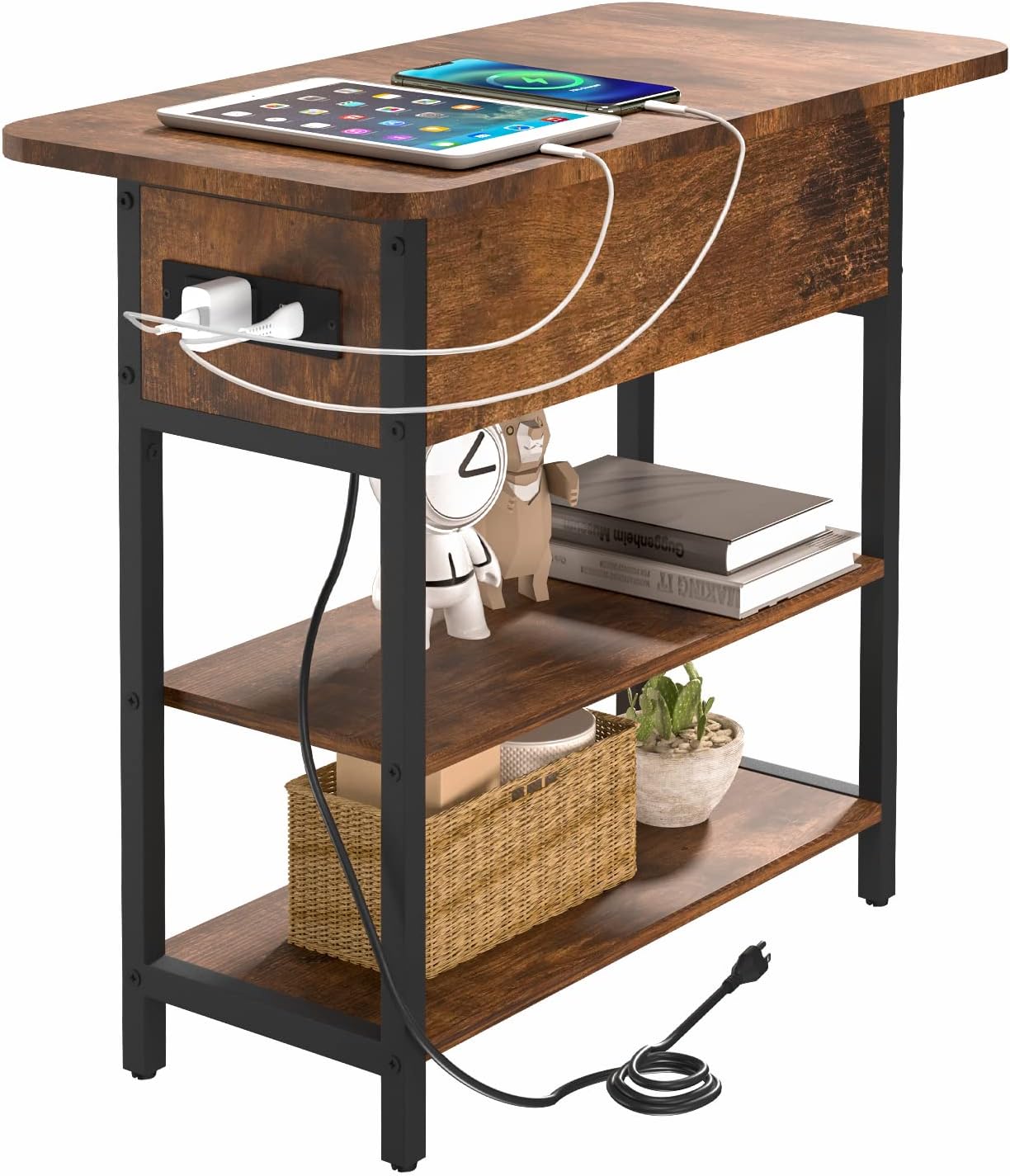
Image 1.1: Yoobure End Table with Charging Station, showcasing its design and integrated charging features.
2. Safety Information
- Electrical Safety: The integrated charging station is ETL certified. Ensure the power cord is not pinched or damaged during assembly or use.
- Outlet Placement: The AC outlets and USB ports are designed on the left vertical side of the table. This placement helps prevent electrical shock from spilled liquids.
- Injury Prevention: The table features round corners and smooth edges to minimize the risk of injury.
- Assembly Note: To maintain optimal storage space and ensure proper cable management, the outlets, the cable hole, and the fixed half of the flip top must be installed on the same side.
- Weight Capacity: Do not exceed the maximum weight capacity of 100 lbs for the tabletop and 20 lbs for each storage shelf.
3. Package Contents
Before beginning assembly, verify that all components listed below are present and undamaged. If any parts are missing or damaged, please contact customer support.
- Particle Board Panels (Tabletop, Shelves, Drawer components)
- Steel Frame Components
- Charging Station Unit (2 AC Outlets, 2 USB Ports, 6.5 ft Power Cord)
- Assembly Hardware (Screws, Bolts, Allen Wrench, etc.)
- Adjustable Foot Pads
- Instruction Manual

Image 3.1: Overview of all included parts and hardware for assembly.
4. Assembly Instructions
Assembly is designed to be straightforward. Follow the numbered steps and diagrams provided in the included instruction booklet. All necessary tools are provided.
- Prepare Workspace: Clear a spacious area and lay out all components. Identify each part using the labels in the instruction booklet.
- Assemble Frame: Attach the steel frame components together using the provided screws. Do not fully tighten screws until all parts are aligned.
- Install Shelves: Secure the particle board shelves to the frame.
- Install Charging Station: Carefully install the charging station unit into the designated slot on the side panel. Ensure the power cord is routed correctly.
- Attach Flip Top: Attach the flip top mechanism to the tabletop and the main structure. Remember to align the outlets, cable hole, and fixed half of the top on the same side for proper functionality and storage.
- Final Tightening: Once all components are in place and aligned, securely tighten all screws.
- Attach Foot Pads: Screw in the adjustable foot pads to the bottom of the table legs. These can be adjusted to level the table on uneven surfaces.

Image 4.1: Detailed view of the charging station, flip hinge, round corner, and adjustable foot pad components.

Image 4.2: Diagram illustrating the dimensions and weight capacities of the end table.
For visual guidance, refer to the installation video available on the product page (if applicable).
5. Operating Instructions
5.1. Charging Station
The integrated charging station provides convenient power access for your devices.
- AC Outlets: Plug in devices requiring standard 120V/12A power.
- USB Ports: Connect your USB-powered devices (e.g., smartphones, tablets) to the 5V/2A USB ports for charging.
- Power Cord: The 6.5 ft power cord allows flexible placement of the table near a wall outlet.

Image 5.1: Close-up of the charging station, showing 2 AC outlets and 2 USB ports with specifications.
5.2. Storage Features
- Flip Top Compartment: The tabletop features a hinged section that can be flipped open to reveal a hidden storage compartment, ideal for small items like remotes, books, or personal belongings.
- 2-Tier Shelves: Two open storage shelves below the main compartment provide additional space for decorative items, books, or other essentials.

Image 5.2: The end table positioned next to a bed, demonstrating the flip-top storage compartment in use.
6. Maintenance
To ensure the longevity and appearance of your Yoobure End Table, follow these maintenance guidelines:
- Cleaning: Wipe surfaces with a soft, damp cloth. Avoid using abrasive cleaners or harsh chemicals, as these can damage the finish.
- Spills: Promptly wipe up any spills to prevent water damage to the particle board.
- Tighten Hardware: Periodically check and tighten all screws and bolts to maintain stability.
- Adjust Foot Pads: Re-adjust the foot pads as needed to keep the table level.
7. Troubleshooting
| Problem | Possible Cause | Solution |
|---|---|---|
| Table is wobbly/unstable. | Loose screws; uneven floor. | Ensure all assembly screws are tightened. Adjust the leveling foot pads on the bottom of the legs. |
| Charging station not working. | Power cord not plugged in; device not properly connected; power outage. | Verify the table's power cord is securely plugged into a functional wall outlet. Ensure devices are correctly connected to the USB ports or AC outlets. Check household circuit breaker. |
| Flip top does not close properly. | Obstruction in compartment; hinge misalignment. | Remove any items obstructing the closing mechanism. Check if hinges are properly aligned and secured. |
8. Specifications
- Overall Dimensions (L x W x H): 23.6" x 11.8" x 23.8"
- Item Weight: Approximately 17.7 lbs
- Tabletop Weight Capacity: 100 lbs
- Shelf Weight Capacity: 20 lbs per shelf
- Charging Station:
- 2 x AC Outlets: 120V / 12A
- 2 x USB Ports: 5V / 2A
- Power Cord Length: 6.5 ft
- Materials: Engineered Wood (Particle Board), Steel Frame
- Color: Berry Brown
- Certifications: ETL (for charging station)
9. Warranty and Support
Yoobure stands by the quality of its products. If you encounter any quality issues, assembly problems, or missing parts, please do not hesitate to contact Yoobure customer support. While specific warranty details are not provided in this manual, our team is available to assist you with any concerns.
For assistance, please refer to the contact information provided with your purchase or visit the official Yoobure website.
Ask a question about this manual
Ask about setup, troubleshooting, compatibility, parts, safety, or missing instructions. Manuals+ will review the question and use this page’s manual context to help answer it.