
Introduction
This manual provides detailed instructions for the safe and effective operation of your CLOC Non-Contact Infrared Thermometer SK-T008. This device is designed for accurate and hygienic temperature measurement of both body and object surfaces. Please read this manual thoroughly before use and retain it for future reference.
Safety Information
- Do not immerse the thermometer in water or other liquids.
- Keep the device away from direct sunlight, dust, and extreme temperatures.
- Avoid dropping the thermometer or subjecting it to strong impacts.
- Do not attempt to disassemble or repair the device yourself. Contact qualified service personnel.
- Ensure the measurement probe is clean before each use to maintain accuracy.
- This thermometer is intended for household use. Consult a medical professional for any health concerns.
- Keep out of reach of children.
Product Overview
The CLOC SK-T008 thermometer features a user-friendly design for quick and accurate readings.
Components

Figure 1: Front view of the thermometer in use, showing the infrared sensor aimed at a baby's forehead.

Figure 2: Side profile of the thermometer, highlighting its ergonomic grip and display.

Figure 3: Close-up of the thermometer's front, detailing the infrared sensor lens.
- 1. Infrared Sensor: For non-contact temperature measurement.
- 2. LCD Display: Shows temperature readings, mode, and other indicators.
- 3. Mode Button (M): Switches between Body and Object temperature modes.
- 4. Plus (+) Button: Used for navigating memory records or switching units.
- 5. Minus (-) Button: Used for navigating memory records.
- 6. Speaker Button: Toggles mute/unmute for audible alerts.
- 7. Backlight Button: Toggles the display backlight.
- 8. Measurement Trigger: Press to take a temperature reading.
- 9. Battery Compartment: Houses the DC9V battery.
LCD Display Indicators
- Temperature Reading: Displays the measured temperature.
- Unit Indicator: Shows ℃ (Celsius) or ℉ (Fahrenheit).
- Mode Indicator: Icon for Body mode (e.g., person symbol) or Object mode (e.g., house/object symbol).
- Memory Indicator: Shows when viewing stored readings.
- Battery Indicator: Shows remaining battery life.
- Mute/Unmute Indicator: Shows if sound is enabled or disabled.
- Backlight Indicator: Shows if backlight is active.
Setup
Battery Installation
- Locate the battery compartment cover on the handle of the thermometer.
- Slide or open the cover according to the indicator.
- Insert one DC9V battery, ensuring the correct polarity (+ and -) as marked inside the compartment.
- Close the battery compartment cover securely.
- The thermometer will power on automatically or can be powered on by pressing the measurement trigger.
Note: A DC9V battery is included with your purchase.
Operating Instructions
Taking a Temperature Measurement
- Ensure the thermometer is powered on.
- Select the desired mode (Body or Object) by pressing the M (Mode) button. The corresponding icon will appear on the display.
- For body temperature, aim the thermometer at the center of the forehead from a distance of approximately 1-5 cm (0.4-2 inches). Ensure there is no hair, sweat, or cosmetics obstructing the area.
- For object temperature, aim the thermometer at the surface of the object.
- Press the measurement trigger. The temperature reading will be displayed on the LCD within approximately 1 second.

Figure 4: The thermometer can be used for various temperature measurements including body temperature for infants and adults, and object temperatures for milk, pets, food, and water.
Switching Between Celsius (℃) and Fahrenheit (℉)
To switch the temperature unit, simultaneously press and hold the M (Mode) button and the + (Plus) button for a few seconds until the unit changes on the display.
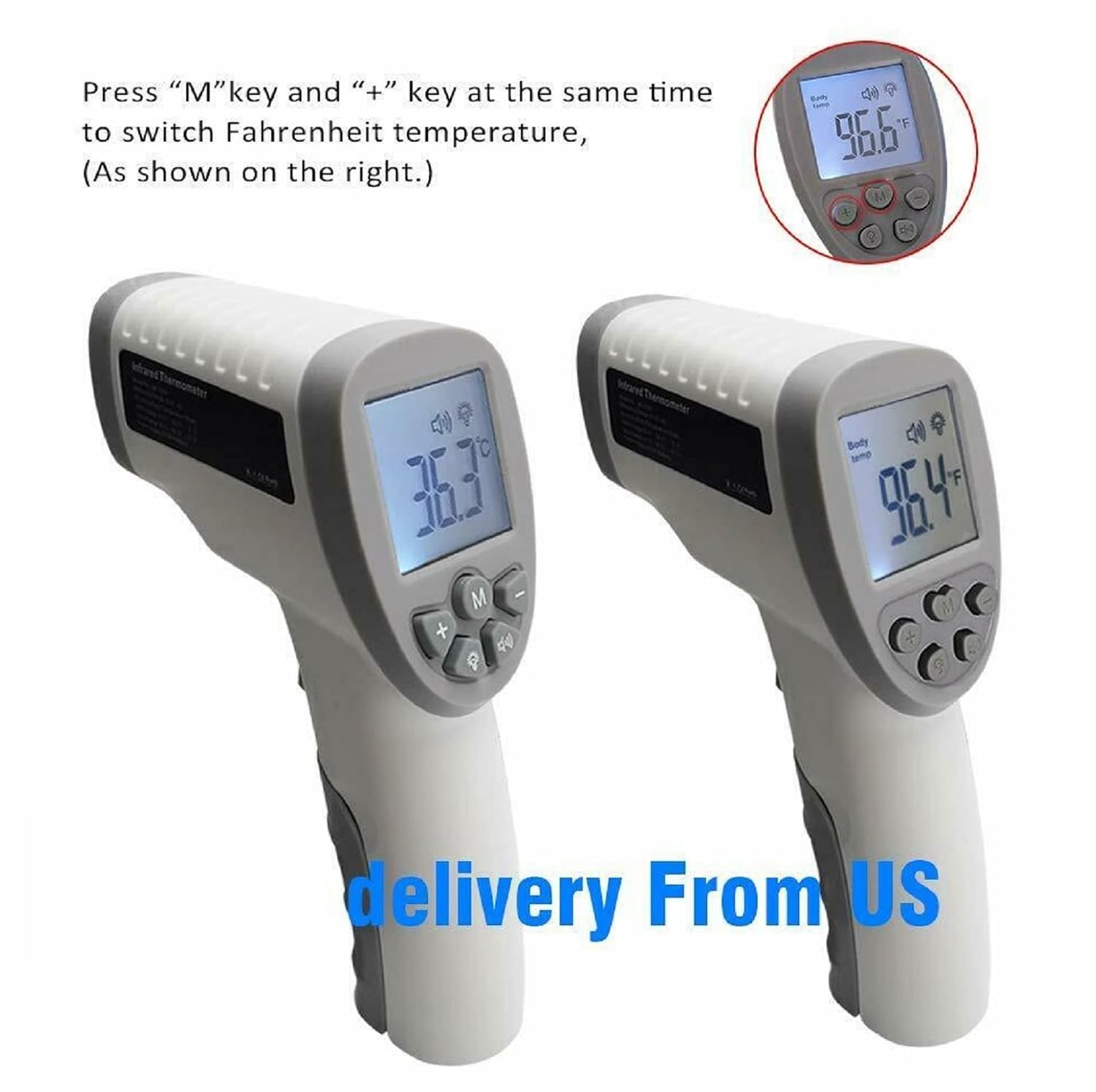
Figure 5: Visual representation of the display showing temperature in Celsius (left) and Fahrenheit (right), demonstrating the unit conversion feature.
Mute/Unmute Mode and Backlight
Press the Speaker button to toggle the audible alerts on or off. When muted, a mute icon will appear on the display. Press the Backlight button to turn the display backlight on or off, which is useful for readings in low-light conditions.

Figure 6: The thermometer features an LCD backlight for visibility in dark conditions and a mute mode for silent operation, ideal for not disturbing sleeping individuals.
Memory Function
The thermometer can store up to 32 previous temperature readings. To access the memory, press the + or - buttons when the device is idle. Each press will cycle through the stored readings. The memory number will be displayed alongside the temperature.
Maintenance and Care
- Cleaning: Wipe the thermometer body with a soft, dry cloth. For the sensor lens, use a cotton swab lightly moistened with alcohol. Do not use abrasive cleaners or immerse the device in water.
- Storage: Store the thermometer in a cool, dry place, away from direct sunlight and extreme temperatures.
- Battery Replacement: When the low battery indicator appears on the display, replace the DC9V battery promptly to ensure accurate readings. Dispose of used batteries responsibly.
Troubleshooting
| Problem | Possible Cause | Solution |
|---|---|---|
| No display or weak display | Low battery or incorrect battery installation. | Replace the battery with a new DC9V battery, ensuring correct polarity. |
| Inaccurate readings | Sensor lens is dirty; incorrect measurement distance; environmental factors (e.g., drafts); recent change in ambient temperature. | Clean the sensor lens; ensure proper measurement distance (1-5 cm); allow the thermometer to acclimate to room temperature for 15-20 minutes before use; avoid measuring in drafts. |
| "Lo" or "Hi" displayed | Temperature is outside the measuring range. | Ensure the temperature being measured is within the specified range (Body: 32.0℃~42.9℃). |
| Thermometer does not respond to button presses | Device frozen or malfunction. | Remove and reinsert the battery to reset the device. If the problem persists, contact customer support. |
Specifications
| Model Number | CLOC Thermometer SK-T008 |
| Measuring Range (Body Mode) | 32.0℃ ~ 42.9℃ (89.6℉ ~ 109.2℉) |
| Accuracy (Body Mode) |
|
| Power Supply | DC9V Battery (included) |
| Display Type | LCD with Backlight |
| Connectivity Technology | Infrared |
| Special Feature | Non-Contact |
| Memory Storage | 32 readings |
| Dimensions | 7.28 x 4.49 x 2.01 inches |
| Weight | 4 ounces |
| Material | Plastic |
| Color | White & Gray |
Warranty and Support
For any questions, technical support, or warranty inquiries regarding your CLOC Non-Contact Infrared Thermometer SK-T008, please contact the manufacturer or the retailer from whom you purchased the product. Please have your model number (SK-T008) and purchase date available when contacting support.
While specific warranty details are not provided in this manual, standard consumer rights apply. Keep your purchase receipt as proof of purchase.