
1. Introduction
Thank you for choosing the NEEWER 72mm 2-in-1 Variable ND2-ND32 & CPL Filter. This product combines the functionality of a Variable Neutral Density (ND) filter and a Circular Polarizer (CPL) filter into a single unit, designed to enhance your photographic and videographic capabilities. This manual provides essential information for the proper setup, operation, maintenance, and troubleshooting of your filter.

Image: The NEEWER 72mm 2-in-1 Variable ND2-ND32 & CPL Filter.
2. Product Features
- 2-in-1 Variable ND & CPL Functionality: Combines a variable neutral density filter (ND2-ND32, 1-5 stops of light reduction) with a circular polarizer filter, allowing simultaneous control over light and reflections.
- No Dark Cross Shadow Technology: Utilizes self-locking technology to prevent dark cross shadows and vignetting, especially when used with wide-angle lenses.
- High-Definition Optical Glass: Constructed with premium HD optical glass and 30 layers of nano coatings on both sides, achieving less than 0.1% reflectivity to minimize flare and ghosting.
- Durable & Protective Coatings: Features water-repellent, oil-resistant, dust-resistant, and scratch-resistant properties for enhanced durability and easier cleaning.
- Aircraft-Grade Aluminum Alloy Frame: CNC machined aluminum alloy frame with a non-slip texture for easy installation and removal. Ultra-slim design.
- Precise Control: Laser-etched marks on the frame allow for precise adjustment of light reduction from ND2 to ND32.

Image: Visual representation of the 2-in-1 ND and CPL filter functionality.
3. What's in the Box
- 1 x NEEWER 72mm 2-in-1 Variable ND & CPL Filter
- 1 x Protective Case
- 1 x Cleaning Cloth
4. Setup
4.1 Identifying Your Lens Thread Size
Before attaching the filter, confirm your camera lens thread size. This is typically marked on the front or side of your lens barrel, often preceded by a "Ф" (diameter) symbol. This filter is compatible with lenses that have a 72mm thread size.
4.2 Attaching the Filter
- Gently align the filter's threads with the threads on the front of your lens.
- Rotate the filter clockwise until it is securely attached. Avoid overtightening.
Note on Lens Cap/Hood: Due to the ultra-slim design and a front diameter larger than the back diameter (designed to prevent vignetting), a 77mm lens cap or hood is required for this 72mm filter.
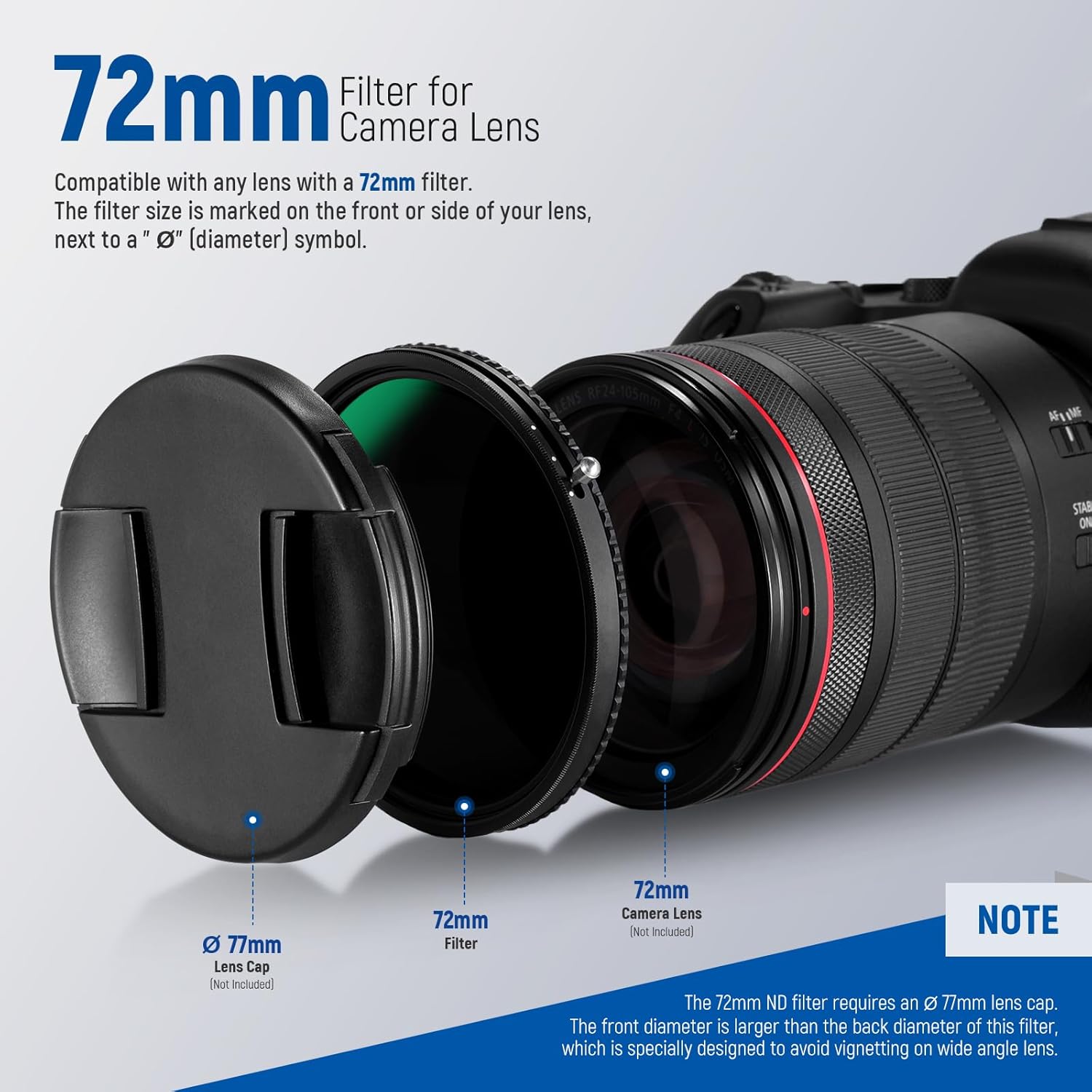
Image: Illustration of filter attachment and lens cap size.
5. Operating Instructions
5.1 Adjusting the Variable ND Effect
The filter allows for 1 to 5 stops of light reduction (ND2 to ND32). To adjust the ND effect, rotate the outer ring of the filter. The laser-etched marks on the frame indicate the current ND stop. This allows for greater control over exposure, enabling wider apertures and slower shutter speeds in bright conditions.

Image: Visual guide to ND filter stops.
5.2 Adjusting the CPL Effect
After setting your desired ND level, rotate the serrated frame of the filter to adjust the CPL (Circular Polarizer) effect. This will reduce reflections and glare from non-metallic surfaces such as water or glass, and can also enhance color saturation and contrast in skies.

Image: Demonstrating CPL adjustment and its effect on reflections.
5.3 Combined Operation
The 2-in-1 design allows you to achieve both ND and CPL effects simultaneously. First, adjust the ND filter for light reduction, then rotate the frame to fine-tune the CPL polarizing effect. This integrated approach simplifies your workflow and reduces the need for multiple filters.
5.4 Instructional Videos
Video: An official NEEWER video demonstrating the features and usage of the 2-in-1 Variable ND Filter. This video shows how to adjust the filter and its effects on exposure.
Video: An official NEEWER video showcasing the 2-in-1 Variable ND Filter, including its application with a smartphone rig to demonstrate its versatility and effect on reflections.
6. Maintenance
6.1 Cleaning the Filter
The filter features multi-layer nano coatings that make it water-repellent, oil-resistant, and scratch-resistant. To clean the filter:
- Use the provided cleaning cloth or a soft, lint-free microfiber cloth.
- For stubborn smudges or fingerprints, use a small amount of lens cleaning solution applied to the cloth, not directly to the filter.
- Wipe gently in a circular motion from the center outwards.
Avoid using abrasive materials or harsh chemicals, as these can damage the coatings.
6.2 Storage
When not in use, store the filter in its protective case to prevent dust accumulation and accidental damage.

Image: Details of the multi-coated optical glass and its protective features.
7. Troubleshooting
7.1 Dark Cross Shadow or Vignetting
This filter is designed with self-locking technology to minimize dark cross shadows and vignetting, which can be a common issue with variable ND filters, especially on wide-angle lenses. If you observe any unusual dark patterns or darkening at the corners of your images, ensure the filter is correctly mounted and that the ND adjustment is within the recommended range (ND2-ND32). Extreme angles or very wide lenses combined with maximum ND settings can sometimes still exhibit minor effects, but the filter's design significantly reduces this.

Image: Comparison of images with and without dark cross shadow, highlighting the filter's technology.
7.2 Difficulty Rotating Filter Rings
The filter features a non-slip texture on its aluminum alloy frame for easy grip. If you experience difficulty rotating the rings, ensure your hands are clean and dry. Avoid forcing the rotation, as this could damage the mechanism. If the filter is new, the mechanism may require a few uses to loosen slightly.
8. Specifications
| Specification | Detail |
|---|---|
| Brand | NEEWER |
| Model Number | 10101187 |
| Material | Optical Glass, Aluminum Alloy |
| Photo Filter Thread Size | 72 Millimeters |
| Coating Description | Nano Coating (30 layers) |
| Photo Filter Effect Type | Variable Neutral Density (ND2-ND32), Circular Polarizer (CPL) |
| Water Resistance Level | Waterproof |
| Photo Filter Factor | 32x (ND32) |
| Compatible Devices | Cameras and lenses with 72mm thread size |
| Item Weight | 3.42 Ounces |
9. Warranty & Support
9.1 Manufacturer's Warranty
This NEEWER product is covered by a 1-Year Manufacturer's Warranty from the date of purchase. This warranty covers defects in materials and workmanship under normal use. It does not cover damage caused by misuse, accident, unauthorized modification, or improper storage.
9.2 Customer Support
For technical assistance, warranty claims, or any questions regarding your NEEWER 2-in-1 Variable ND & CPL Filter, please contact NEEWER customer support through their official website or the retailer where the product was purchased. Please have your product model number and proof of purchase ready when contacting support.