
Introduction
Thank you for purchasing the ByDiffer H20SR-6AC-3B-3.4A Power Strip. This device is designed to provide convenient power distribution and charging for multiple electronic devices. It features 6 AC outlets and 3 USB ports, a 2-meter retractable extension cord, and a 180° swivel plug for flexible placement. Please read this manual carefully before use to ensure safe and optimal operation.
Product Features
- Multiple Outlets: Equipped with 6 AC outlets and 3 USB charging ports, allowing up to 9 devices to be powered or charged simultaneously.
- High Power Output: USB ports provide a total output of 3.4A, and AC outlets support a maximum total power consumption of 1400W, suitable for various household and office electronics.
- Retractable 2m Cord: Features a 2-meter extension cord that can be neatly wound around the unit for compact storage and portability, ideal for travel or business trips.
- 180° Swivel Plug: The power plug can swivel 180 degrees, making it easy to plug into wall outlets in narrow spaces and preventing interference with other plugs.
- Enhanced Safety: Built with heat-resistant urea resin double-coated cord to prevent electric shock and fire from wire breakage. PSE certified for safety and reliability.
Safety Instructions
To prevent electric shock, fire, or injury, always follow these basic safety precautions:
- Do not exceed the maximum total power rating of 1400W.
- Do not use in wet environments or near water.
- Keep out of reach of children.
- Do not disassemble or modify the power strip.
- Ensure the plug is fully inserted into the wall outlet.
- Avoid placing heavy objects on the power cord.
- Unplug the power strip from the wall outlet when not in use for extended periods.
- Regularly inspect the power cord and plug for any damage.
Setup
- Unpack: Carefully remove the power strip from its packaging.
- Unwind the Cord: Gently unroll the 2-meter extension cord to the desired length.
- Plug In: Insert the 180° swivel plug into a standard 100V AC wall outlet. Ensure it is securely connected.
- Position: Place the power strip on a stable, dry surface, away from heat sources or flammable materials.
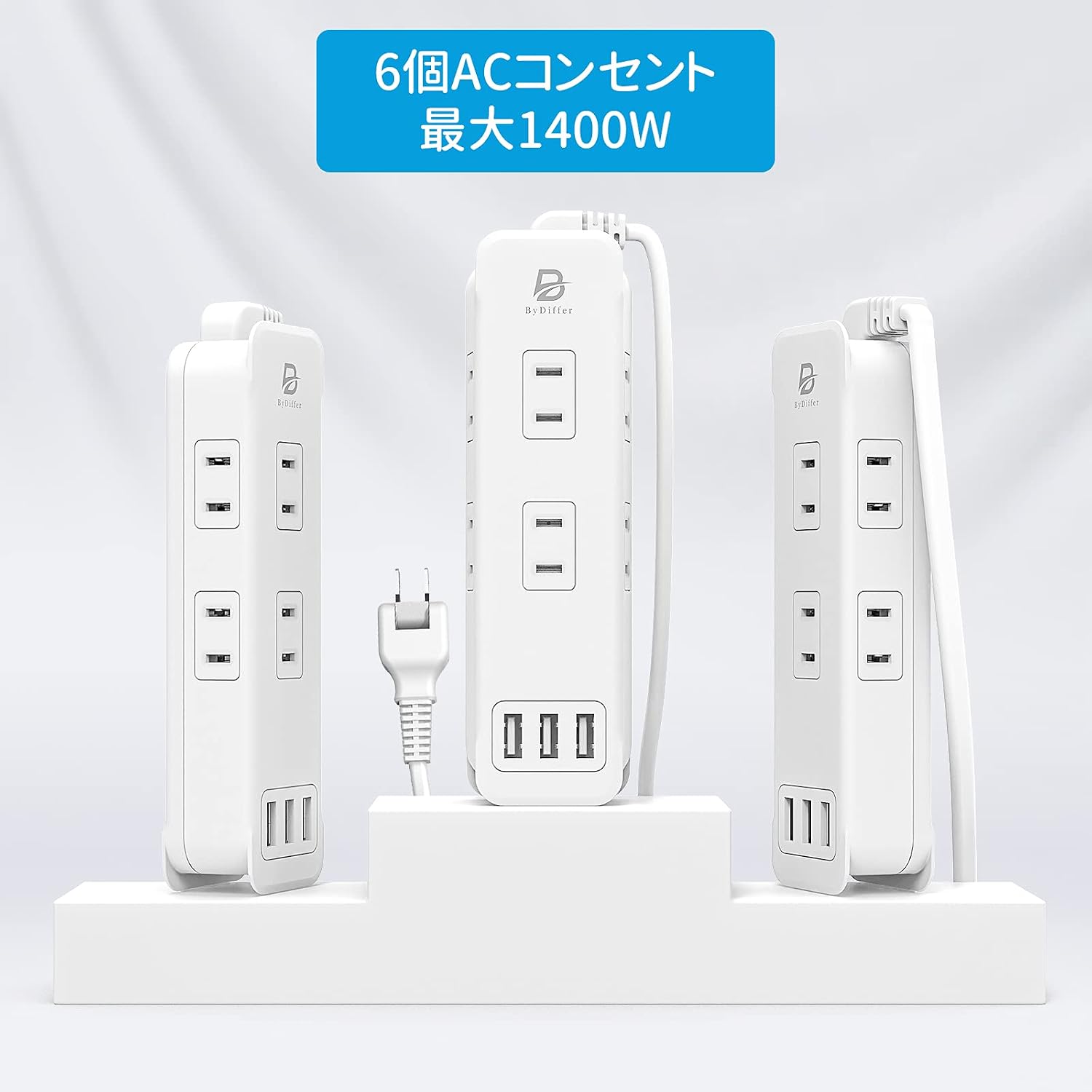
Image: The ByDiffer power strip, showcasing its 6 AC outlets and 3 USB ports, with a 2-meter retractable cord. The 180° swivel plug is also visible.
Operating Instructions
- Connecting AC Devices: Plug your AC-powered devices into any of the 6 AC outlets. Ensure the total power consumption does not exceed 1400W.
- Connecting USB Devices: Connect your USB-powered devices (smartphones, tablets, etc.) to any of the 3 USB ports using appropriate USB cables. The total USB output is 3.4A.
- Charging Multiple Devices: The power strip allows simultaneous charging of up to 9 devices (6 AC + 3 USB).

Image: The ByDiffer power strip in use, charging a laptop, tablet, and wireless earbuds, demonstrating its multi-device compatibility.
Video: This video demonstrates the key features of the ByDiffer power strip, including its multiple outlets, USB ports, 180-degree swivel plug, and compact design for easy storage and travel.
Maintenance
- Cleaning: Disconnect the power strip from the wall outlet before cleaning. Use a dry, soft cloth to wipe the surface. Do not use liquid cleaners.
- Storage: When not in use, wind the extension cord neatly around the unit for compact storage. Store in a cool, dry place.
- Dust Prevention: The plug features an insulation cap to prevent dust intrusion, which helps reduce the risk of fire. Ensure this cap is intact.

Image: Close-up view of the ByDiffer power strip's 180-degree swivel plug for easy wiring in tight spaces and the insulation cap for dust prevention.
Troubleshooting
| Problem | Possible Cause | Solution |
|---|---|---|
| No power to devices. | Power strip not plugged in, wall outlet not working, or overload protection activated. | Ensure the power strip is securely plugged into a working wall outlet. Reduce the number of connected devices if overloaded. |
| USB ports not charging. | Faulty USB cable, device not compatible, or total USB current exceeded. | Try a different USB cable. Ensure your device is compatible. Check if the total USB current draw exceeds 3.4A. |
| Plug is difficult to insert/remove. | New product, or safety mechanism for secure connection. | This is normal for some outlets to ensure a firm connection. Use both hands to insert or remove the plug carefully. |
Specifications
| Feature | Detail |
|---|---|
| Brand | BYDIFFER |
| Model Number | H20SR-6AC-3B-3.4A |
| Color | White 2m |
| Total AC Outlets | 6 |
| Total USB Ports | 3 |
| Voltage | 100 Volts |
| Max AC Output | 1400W |
| Total USB Output | 3.4A |
| Product Dimensions (L x W) | 16 cm x 4.7 cm |
| Item Weight | 310 grams |
| Plug Type | Type B (Japanese standard) |
| Certifications | PSE Certified |
Warranty and Support
This ByDiffer power strip comes with a 1-year warranty from the date of purchase. Please retain your proof of purchase for warranty claims.
For technical support or warranty inquiries, please contact ByDiffer customer service through the retailer where you purchased the product or visit the official ByDiffer store on Amazon: ByDiffer Amazon Store.