
INTERGREAT H2W1
INTERGREAT 2 Drawer Lateral File Cabinet User Manual
Model: H2W1
1. Introduction
Thank you for choosing the INTERGREAT 2 Drawer Lateral File Cabinet. This manual provides essential information for the safe assembly, operation, and maintenance of your new filing cabinet. Please read these instructions thoroughly before beginning assembly or use to ensure proper function and longevity of the product.

Image 1.1: The INTERGREAT 2 Drawer Lateral File Cabinet, showcasing its design and storage capacity. The top surface can accommodate office equipment like a printer.
2. Safety Information
Please observe the following safety precautions to prevent injury or damage to the product:
- Always follow the assembly instructions provided.
- Ensure the cabinet is securely wall-mounted if using the provided hardware.
- Do not overload drawers beyond the stated weight capacity (110 lbs per drawer, 220 lbs total).
- Be cautious of pinch points when opening and closing drawers.
- Keep the area around the cabinet clear to prevent tripping hazards.
- The anti-tilt interlocking system allows only one drawer to be opened at a time to prevent tipping. Do not attempt to force multiple drawers open simultaneously.

Image 2.1: Anti-tipping file storage cabinet mechanism. This safety feature ensures stability by allowing only one drawer to be opened at a time.
3. Parts List
Before assembly, verify that all components are present and undamaged. If any parts are missing or damaged, please contact customer support.
- Cabinet Frame Components (Top, Bottom, Sides, Back)
- Drawer Components (Drawer fronts, sides, bottoms)
- Full-extension Ball Bearing Glides (for drawers)
- Locking Mechanism with 2 Keys
- Adjustable Hanging Rods (for file organization)
- "G" Shape Handles
- Protective Base Pads (4 units)
- Assembly Hardware (screws, bolts, etc.)
Note: A standard flat blade screwdriver and a rubber mallet (optional, for seating parts) may be required for assembly.
4. Assembly Instructions
Assembly is required for this product. It is recommended to have two people for easier assembly. Follow the steps carefully.
- Unpack Components: Carefully remove all parts from the packaging. Lay them out on a clean, soft surface to prevent scratches.
- Assemble Cabinet Frame: Connect the side panels to the top and bottom panels using the provided hardware. Ensure all tabs are securely bent and clipped into place.
- Install Drawer Glides: Attach the full-extension ball bearing glides to the inside of the cabinet frame and to the drawer sides. Ensure they are aligned correctly for smooth operation.
- Assemble Drawers: Construct the two drawers by attaching the front, back, and side panels. Insert the drawer bottoms.
- Attach Handles: Secure the "G" shape handles to the front of each drawer.
- Insert Drawers: Carefully slide the assembled drawers onto the glides within the cabinet frame.
- Install Locking Mechanism: Integrate the locking mechanism into the designated slot on the cabinet. Test the lock with the provided keys.
- Attach Protective Base Pads: Place the four protective base pads on the bottom corners of the cabinet to prevent floor scratching.
- Install Hanging Rods: Insert the adjustable hanging rods into the designated slots within the drawers. These can be adjusted to accommodate A4, Letter, or Legal size files.
Tip: Some users have found watching an assembly video helpful due to the detailed nature of the instructions. Ensure all connections are firm before use.

Image 4.1: Key features for assembly and function, including ball bearing glides for smooth drawer operation, the ergonomic 'G' shape handle, the integrated lock with two keys, and protective base pads.
5. Operating Instructions
5.1 Opening and Closing Drawers
The drawers are equipped with full-extension ball bearing glides for smooth operation. Pull the "G" shape handle to open a drawer. Push the drawer firmly until it clicks into place to close it completely.
5.2 Using the Locking System
The cabinet features a single lock that secures both drawers simultaneously. Insert one of the provided keys into the lock located on the top drawer. Turn the key to lock or unlock the drawers. Remove the key after locking to prevent loss.
Anti-tilt Interlocking System: For safety, only one drawer can be opened at a time. If one drawer is open, the other drawer will remain locked. To open the other drawer, close the currently open drawer first. If you need to open both drawers simultaneously (not recommended for stability), you would need to pull them together, bypassing the safety mechanism, which is not advised.
5.3 Adjusting Hanging Rods for File Sizes
The adjustable hanging rods allow for flexible storage of various file sizes. You can configure them to hold A4, Letter, or Legal size files either front-to-back or side-to-side.
- F4 Size: Length 13", Width 8.26"
- Legal Size: Length 14", Width 8.5"
- Letter Size: Length 11", Width 8.5"
- A4 Size: Length 11.69", Width 8.26"
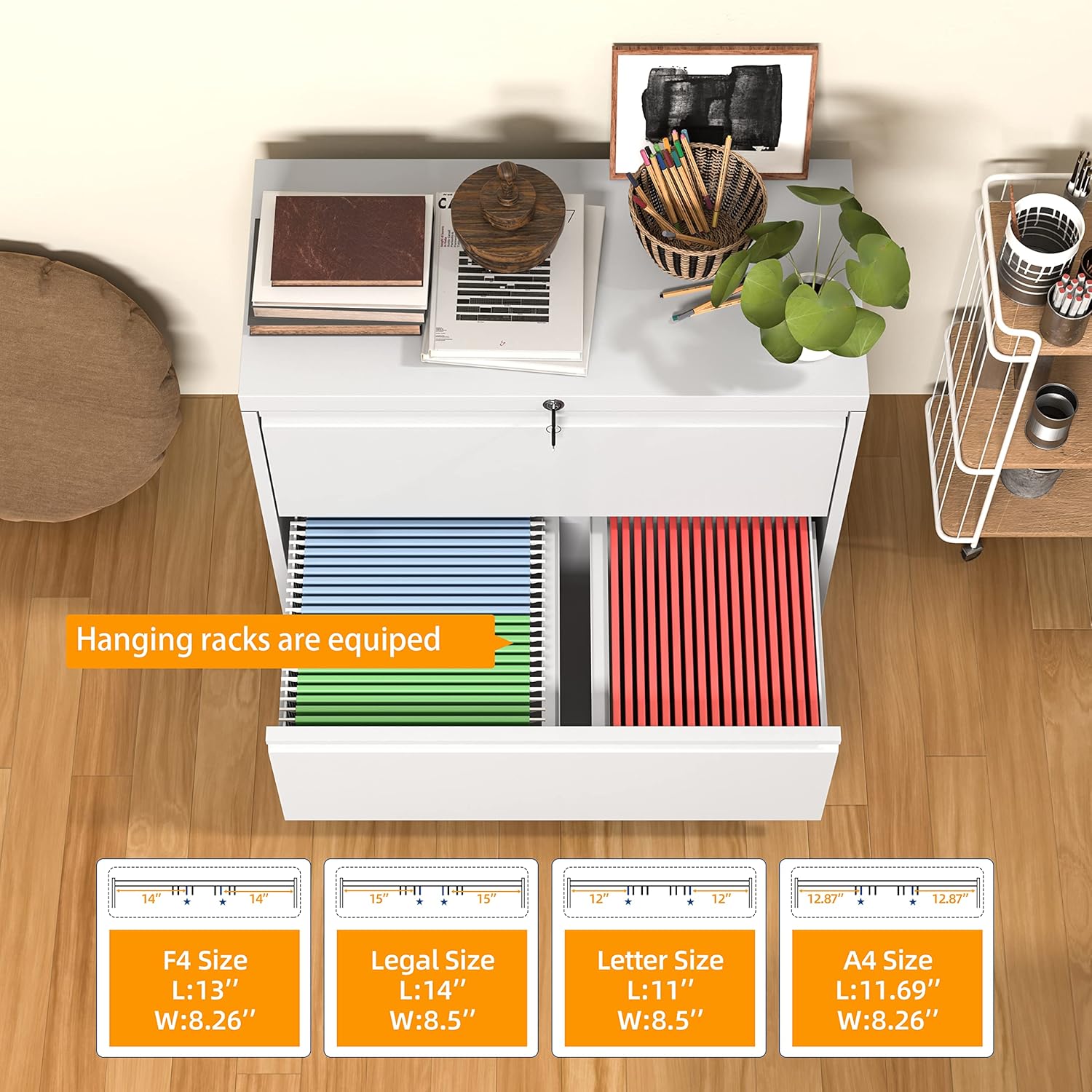
Image 5.1: Internal configuration for hanging files, illustrating how the adjustable rods accommodate different document sizes such as F4, Legal, Letter, and A4.
6. Maintenance
Regular maintenance will help preserve the appearance and functionality of your filing cabinet.
- Cleaning: Wipe surfaces with a soft, damp cloth. Avoid abrasive cleaners or harsh chemicals, as they may damage the powder-coated finish.
- Drawer Glides: Periodically check the ball bearing glides for smooth operation. If they become stiff, a small amount of silicone-based lubricant can be applied.
- Hardware: Occasionally check all screws and bolts to ensure they are tight. Retighten if necessary.
- Protective Pads: Ensure the protective base pads are intact to prevent floor scratching. Replace if worn.
7. Troubleshooting
| Problem | Possible Cause | Solution |
|---|---|---|
| Drawers do not open/close smoothly. |
|
|
| Cabinet feels unstable or wobbly. |
|
|
| Locking mechanism not working. |
|
|
8. Specifications
| Brand | INTERGREAT |
| Model Name | 28"W-2 Drawers |
| Item Model Number | H2W1 |
| Color | White |
| Product Dimensions (D x W x H) | 16"D x 28"W x 28.5"H |
| Material Type | Metal (Cold-rolled steel) |
| Finish Type | Powder Coated |
| Number of Drawers | 2 |
| Weight Limit (per drawer) | 110 lbs |
| Total Weight Limit | 220 lbs |
| Item Weight | 80 Pounds |
| Lock Type | Key (1 lock, 2 keys) |
| Assembly Required | Yes |
| Included Components | Hanging bar, locking Keys |

Image 8.1: Product dimensions for the INTERGREAT 2 Drawer Lateral File Cabinet.
9. Warranty and Support
INTERGREAT products are manufactured to high-quality standards. For warranty information, technical support, or to order replacement parts, please contact INTERGREAT customer service through the retailer where the product was purchased or visit the official INTERGREAT website.
Please retain your purchase receipt as proof of purchase for any warranty claims.
Ask a question about this manual
Ask about setup, troubleshooting, compatibility, parts, safety, or missing instructions. Manuals+ will review the question and use this page’s manual context to help answer it.