
1. Product Overview
The ULANZI Zero Y Professional Camera Tripod is a lightweight and versatile carbon fiber tripod designed for photographers and videographers. Its compact design and robust construction make it ideal for travel and various shooting environments. This manual provides essential information for setting up, operating, and maintaining your tripod.
Key Features:
- Sandblasting process full carbon fiber construction for lightweight durability.
- Ultra-fast reconfiguration into low mode for unique perspectives.
- Quick switch to inverted mode, perfect for macro or product photography.
- Adjustable height from 15.3cm to 156cm to suit various shooting needs.
- Comes with a portable carrying bag for easy transport.
- Features a 360° ballhead with quick release 1/4" screw for versatile camera mounting.


2. Setup
2.1 Unfolding the Tripod
- Gently unfold the tripod legs until they are fully extended.
- Adjust the leg angles by pressing the leg angle adjusters located at the top of each leg. There are multiple locking positions for different terrains and stability requirements.
2.2 Adjusting Leg Sections
The tripod features quick-release flip-locks for rapid leg extension and retraction.
- Flip open the quick-release buckles on each leg section.
- Extend or retract the leg sections to the desired height.
- Securely close the quick-release buckles to lock the leg sections in place.

2.3 Attaching Your Camera
- Ensure the quick release plate is securely attached to your camera's 1/4" screw mount.
- Open the quick release clamp on the ball head.
- Slide the camera with the attached plate into the clamp until it clicks securely into place.
- Tighten the clamp knob to prevent any movement.
2.4 Leveling the Tripod
Use the integrated bubble level on the ball head to ensure your camera is perfectly level for accurate shots.

2.5 Setup Video Guide
Video 1: This video demonstrates the quick setup and key features of the ULANZI Zero F38 Professional Camera Tripod, including leg adjustments and quick release mechanisms. While showcasing a variant model, the core functionalities are similar to the Zero Y.
Video 2: This video illustrates the quick assembly, leveling, multi-angle shooting, and lever lock leg design of the ULANZI TT09 VideoGo Carbon Fiber Travel Video Tripod. It also highlights the removable center column and interchangeable foot spikes, providing useful operational insights.
3. Operating Modes
3.1 Ball Head Operation
The 360° ball head allows for precise camera positioning and smooth panoramic shots.
- Loosen the main locking knob on the ball head to adjust the camera angle.
- Loosen the panoramic base knob for 360° horizontal rotation.
- Tighten the respective knobs once the desired position is achieved.

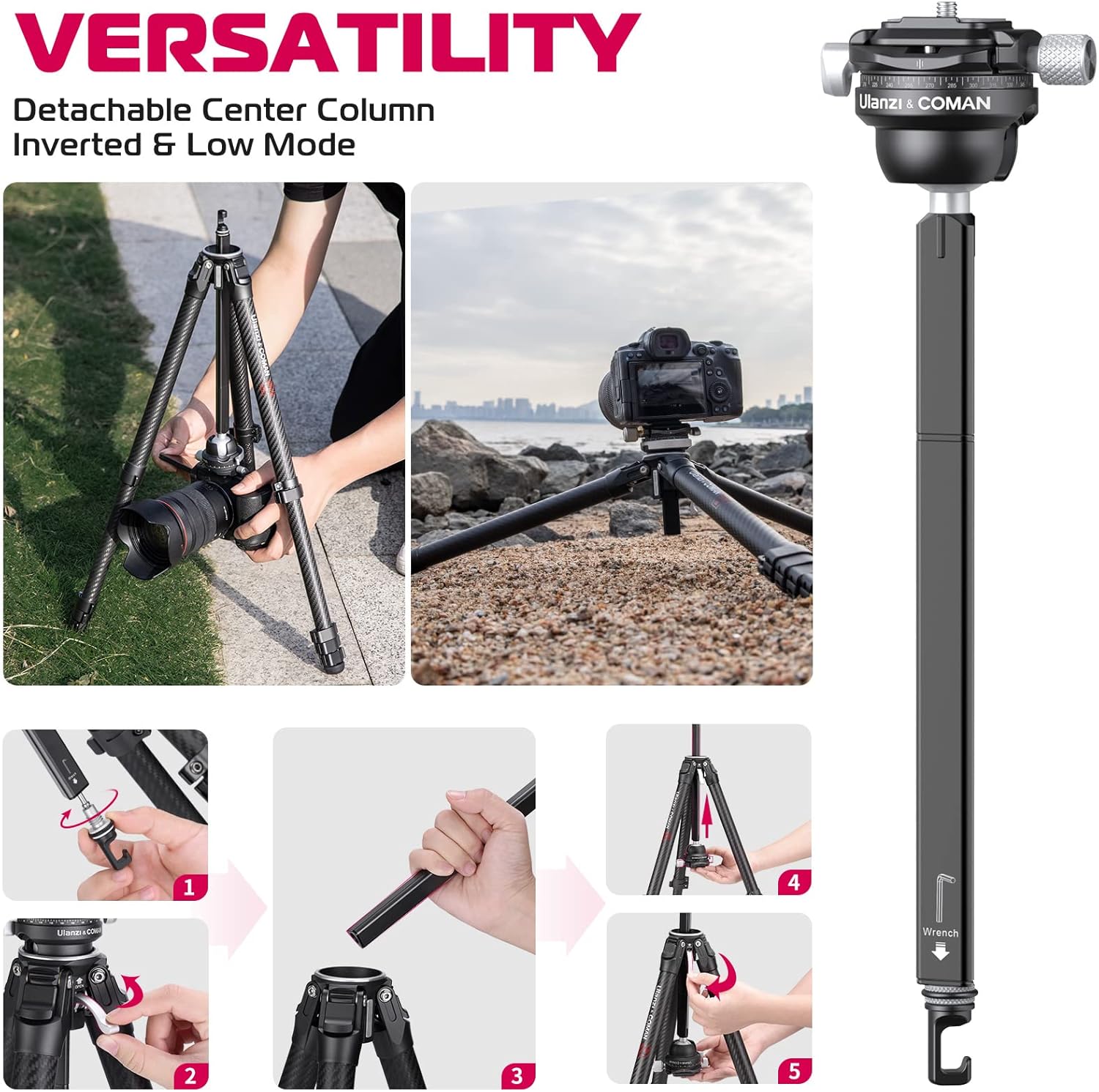
3.2 Low Mode and Inverted Mode
For macro photography or extremely low-angle shots, the center column can be inverted or removed.
- To remove the center column: Unscrew the hook at the bottom of the center column, then fully extend the column and pull it out from the tripod base.
- To invert the center column: Reinsert the column upside down into the tripod base.
- Securely tighten the locking mechanism.
4. Maintenance
4.1 Cleaning and Storage
- Regularly clean the tripod legs and ball head with a soft, dry cloth. For stubborn dirt, use a slightly damp cloth and mild soap, then dry thoroughly.
- Avoid using harsh chemicals or abrasive materials that could damage the carbon fiber or metal finishes.
- Store the tripod in its provided carrying bag in a cool, dry place away from direct sunlight and extreme temperatures.
4.2 Checking and Tightening
- Periodically check all screws and locking mechanisms for tightness. Use the included Allen keys if any adjustments are needed.
- Ensure leg angle adjusters and quick-release buckles operate smoothly.
4.3 Foot Spikes
The tripod comes with replaceable foot spikes for enhanced stability on various surfaces.

5. Troubleshooting
5.1 Legs Not Extending/Retracting Smoothly
- Issue: Leg sections feel stiff or get stuck.
- Solution: Check for dirt or debris inside the leg sections. Clean thoroughly. Ensure quick-release buckles are fully open before extending/retracting and fully closed to lock.
5.2 Ball Head Movement Issues
- Issue: Ball head is too loose or too stiff.
- Solution: Adjust the main locking knob and panoramic base knob to achieve the desired tension. If persistent, check for any foreign objects obstructing movement.
5.3 Tripod Stability Concerns
- Issue: Tripod feels unstable, especially at maximum height.
- Solution: Ensure all leg sections are fully extended and locked. Verify leg angles are set appropriately for the terrain. Hang a counterweight (e.g., your camera bag) from the hook at the bottom of the center column for added stability.
6. Specifications
| Feature | Specification |
|---|---|
| Brand | ULANZI |
| Model | Zero Y |
| Material | Carbon Fibre |
| Item Weight | 1.1 KG (2.2 lbs) |
| Weight Limit | 18 Kilograms (39.6 lbs) |
| Folded Length | 42.3 cm (16.6 inches) |
| Minimum Height | 15.3 Centimeters |
| Maximum Height | 156 Centimeters (61.7 inches) |
| Number of Leg Sections | 5 |
| Tripod Head Type | Ball Heads |
| Compatible Devices | Camera, Projector |

7. Warranty and Support
For warranty information, technical support, or any product-related inquiries, please refer to the official ULANZI website or contact their customer service directly. Keep your purchase receipt as proof of purchase for warranty claims.


