Product Overview
The WESTERSTRAND QUARTZ CLOCK 23cm H-FACE is a wall clock from the renowned Swedish clock brand, Westerstrand. Known for its simple yet highly visible dial design, which has remained largely unchanged since the 1960s, this clock is widely used in public institutions such as railways, hospitals, and schools. Its unique design, featuring a protruding back cover, creates a three-dimensional effect, making it a globally cherished timepiece.

Image: Front view of the WESTERSTRAND QUARTZ CLOCK 23cm H-FACE. This image displays the clean, minimalist white dial with black hour markers and hands, and a red second hand. The brand logo is visible at the top center.
Package Contents
Please ensure all items are present upon opening the package:
- WESTERSTRAND QUARTZ CLOCK (H-FACE model)
- Instruction Manual (this document)
Note: One AA battery is required for operation and is not included in the package. It must be purchased separately.
Setup
Battery Installation
Locate the battery compartment on the back of the clock. Insert one AA battery, ensuring the polarity (+/-) matches the indicators inside the compartment.

Image: Detailed view of the clock's rear, showing the quartz movement and the battery compartment with an AA battery inserted. This illustrates the correct orientation for battery placement.
Setting the Time
After installing the battery, use the time-setting knob located on the clock mechanism at the back to adjust the hands to the correct time. Rotate the knob until the hour and minute hands display the desired time.
Wall Mounting
The clock is designed for wall mounting. On the back of the clock, there is a keyhole-shaped hanging slot. Securely fasten a screw (not included) into your wall, ensuring it is strong enough to support the clock's weight (approx. 700g). Hang the clock onto the screw using the designated slot.
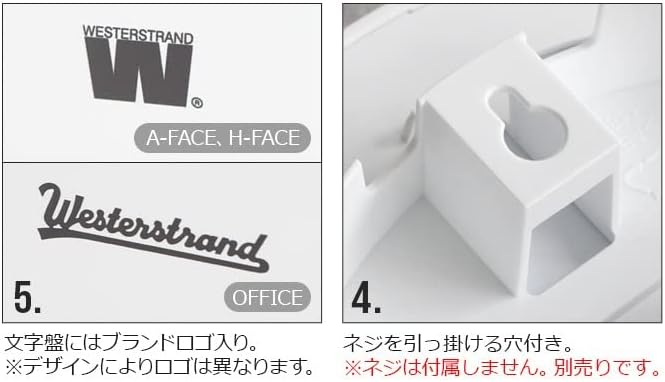
Image: Close-up of the clock's back, highlighting the keyhole-shaped slot for wall mounting. This shows where a screw should be inserted to hang the clock.
Operating Instructions
Once the battery is installed and the time is set, the clock will begin to operate. The second hand moves in a step motion, producing a distinct ticking sound.
Image: Close-up of the clock face, showing the red second hand in motion. This illustrates the step-second movement characteristic of the clock.
Maintenance
- Cleaning: Wipe the clock's surface and glass with a soft, dry cloth. Avoid using abrasive cleaners or solvents, as they may damage the finish.
- Battery Replacement: Replace the AA battery approximately once a year, or when the clock starts to lose time or the second hand stops moving.
- Placement: Avoid placing the clock in direct sunlight or in areas with extreme temperature fluctuations, as this may affect its accuracy and lifespan.
Troubleshooting
| Problem | Possible Cause | Solution |
|---|---|---|
| Clock is not running | Battery is dead or incorrectly installed. | Check battery polarity. Replace with a new AA battery. |
| Clock is losing or gaining time | Weak battery or environmental factors. | Replace battery. Ensure clock is not in extreme temperatures. |
| Second hand is not moving smoothly | This clock features a step second hand, which moves in distinct increments. This is normal operation. | No action required. This is a characteristic of the step second hand. |
Specifications
| Brand | WESTERSTRAND |
| Model | H-FACE |
| Dimensions | Approx. Diameter 23 cm x Depth 5.5 cm |
| Weight | Approx. 700 g |
| Materials | ABS Plastic, Glass |
| Power Source | 1 x AA Battery (not included) |
| Second Hand Type | Step Second Hand |
| Mounting Type | Wall Mount |
| Country of Origin | Sweden |
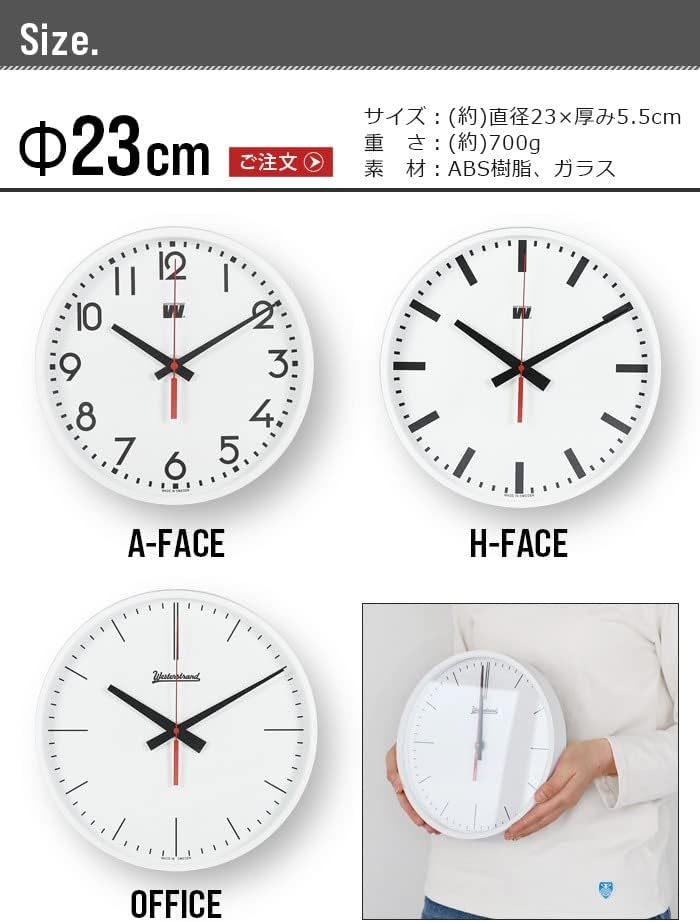
Image: This image displays the dimensions of the clock (diameter 23cm, depth 5.5cm) and illustrates three different dial designs: A-FACE, H-FACE, and OFFICE. The H-FACE model is highlighted.
Important Notes & Warranty
Please be aware of the following:
- Due to the manufacturing process, slight printing smudges or minor dirt may be present on the dial. These are not considered defects.
- As an imported product, the packaging and the clock body itself may have minor scratches or dirt. Your understanding is appreciated.
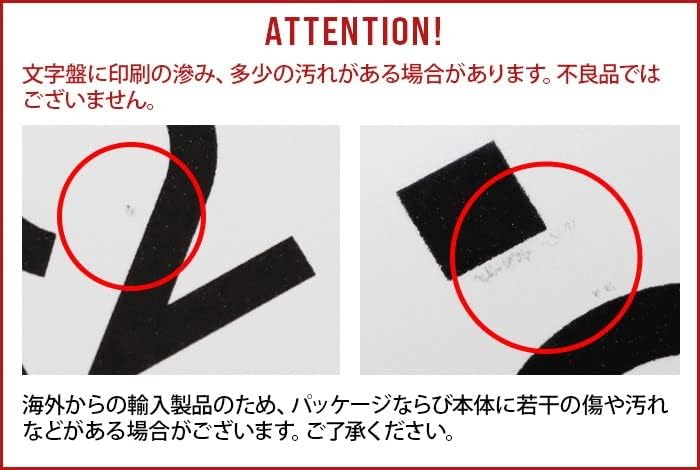
Image: Two close-up images highlighting minor imperfections such as small smudges or marks on the clock's dial. These are examples of the slight variations that may occur due to the manufacturing and import process.
Warranty Information
This product comes with a 6-month warranty from the date of purchase. Please retain your proof of purchase for warranty claims. The warranty covers manufacturing defects but does not cover damage caused by misuse, accidents, or normal wear and tear.


