
1. Introduction
Thank you for choosing the TOMSOO MG-04 10X Magnifying Glass with Light and Clamp. This product is designed to provide enhanced visibility and illumination for detailed tasks such as crafts, reading, painting, hobbies, and close work. It features a 10X real glass magnifier, 5 color modes, stepless dimming, and a flexible gooseneck, offering versatile use with both a stable base and a secure clamp.
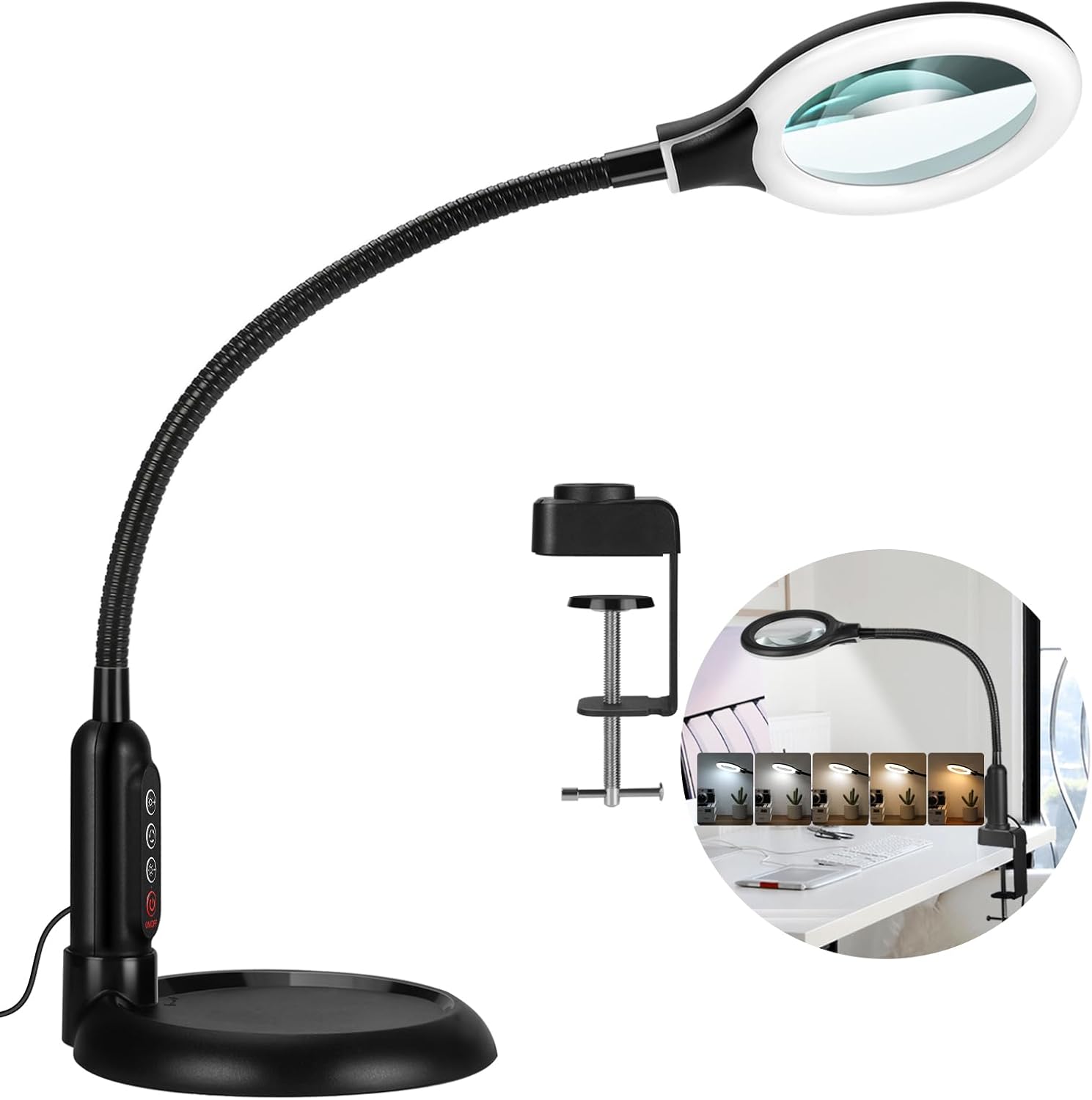
Figure 1: TOMSOO MG-04 Magnifying Lamp with both base and clamp options.
2. Safety Instructions
- Ensure the power adapter is compatible with your local voltage before plugging in.
- Do not expose the magnifying lamp to water or excessive moisture.
- Avoid looking directly into the LED light source for extended periods to prevent eye strain.
- Keep the magnifying glass away from direct sunlight to prevent fire hazards, as it can concentrate sunlight.
- Do not attempt to disassemble or repair the unit yourself. Contact customer support for assistance.
- Keep out of reach of children.
3. Package Contents
Verify that all items are present in your package:
- 1x 10X Magnifying Lamp with Flexible Gooseneck and Control Buttons
- 1x Stable Desktop Base
- 1x Adjustable Clamp
- 1x USB Power Adapter
4. Product Overview
Familiarize yourself with the components of your TOMSOO MG-04 magnifying lamp.

Figure 2: Detailed view of control buttons, flexible gooseneck, and power connection.
- 10X Real Glass Magnifier: Provides clear, distortion-free magnification.
- LED Light Ring: Uniform illumination with 5 color modes and stepless dimming.
- Flexible Gooseneck: Allows for precise positioning of the magnifier and light.
- Control Buttons: Located on the gooseneck for easy access to power, brightness adjustment (+/-), and color mode selection.
- Desktop Base: A weighted base for stable freestanding use.
- Adjustable Clamp: For secure attachment to various surfaces up to 2.5 inches thick, featuring protective pads.
5. Setup
The TOMSOO MG-04 offers two setup options: desktop base or clamp mount.
5.1. Desktop Base Installation
- Insert the bottom end of the gooseneck into the central hole of the desktop base.
- Rotate the gooseneck clockwise until it is securely tightened into the base. Ensure it is firm and stable.

Figure 3: Illustration of securing the gooseneck into the desktop base.
5.2. Clamp Mount Installation
- Unscrew the clamp to open its jaws.
- Position the clamp onto a stable surface (e.g., desk edge, workbench) up to 2.5 inches thick.
- Tighten the clamp screw until it is firmly secured to the surface. The clamp includes protective pads to prevent damage to your furniture.
- Insert the bottom end of the gooseneck into the hole on the clamp and rotate clockwise to secure.

Figure 4: Details of the upgraded clamp design, showing protective pads and maximum opening.

Figure 5: The magnifying lamp configured with both the heavy base and the strong clamp for various table types.
5.3. Power Connection
Connect the USB cable from the magnifying lamp to the provided USB power adapter, then plug the adapter into a standard wall outlet.
6. Operating Instructions
The control buttons are conveniently located on the gooseneck for easy access.
- Power On/Off: Press the ON/OFF button to turn the lamp on or off.
- Adjusting Brightness: Use the Brightness '+' and Brightness '-' buttons to increase or decrease the light intensity. The lamp features stepless dimming for precise control.
- Changing Color Modes: Press the 5 Color Mode button to cycle through the five available color temperature settings (e.g., cool white, natural white, warm white).
- Positioning: Adjust the flexible gooseneck to position the magnifying glass and light at the desired angle and height for your task.

Figure 6: Visual representation of the 5 color modes and stepless dimming functionality.
7. Maintenance
- Cleaning the Lens: Use a soft, lint-free cloth specifically designed for optics to clean the magnifying glass. Avoid abrasive cleaners or paper towels, which can scratch the lens.
- Cleaning the Body: Wipe the lamp body and gooseneck with a soft, damp cloth. Do not use harsh chemicals.
- Storage: When not in use, store the lamp in a clean, dry place.
8. Troubleshooting
If you encounter any issues, refer to the following common problems and solutions:
| Problem | Possible Cause | Solution |
|---|---|---|
| Lamp does not turn on. | No power, loose connection, faulty adapter. | Check power outlet, ensure USB cable is securely connected, try a different USB adapter if available. |
| Light flickers or is dim. | Insufficient power, faulty connection. | Ensure power adapter meets specifications, check all connections. |
| Magnification is blurry or distorted. | Dirty lens, incorrect focal distance. | Clean the lens with a suitable cloth. Adjust the gooseneck to find the optimal focal distance for your task. |
| Lamp is unstable. | Base not tightened, clamp not secured, uneven surface. | Ensure the gooseneck is fully tightened into the base or clamp. Verify the clamp is securely fastened to a stable surface. Place the base on a flat, level surface. |
If the problem persists after attempting these solutions, please contact TOMSOO customer support.
9. Specifications
| Brand | TOMSOO |
| Model Number | MG-04 |
| Magnification Strength | 10X |
| Lens Material | Glass |
| Luminous Flux | 1500 Lumen |
| Number of Lights | 1 (LED Ring) |
| Special Features | 5 Color Modes, Stepless Dimmable, Flexible Gooseneck, 2-in-1 (Base/Clamp) |
| Product Dimensions | 11.88"L x 10.15"W (approximate, varies with gooseneck position) |
| Item Weight | 3.74 pounds (1.7 Kilograms) |
| Power Source | Corded Electric (USB) |
10. Warranty Information
For detailed warranty information, please refer to the documentation included with your purchase or visit the official TOMSOO website. Keep your proof of purchase for any warranty claims.
11. Customer Support
If you have any questions, require technical assistance, or need to report an issue, please contact TOMSOO customer support through the following channels:
- Website: Visit the official TOMSOO store on Amazon: TOMSOO Store
- Email: Refer to your product packaging or the TOMSOO store page for direct contact information.