
1. Introduction
Thank you for choosing the BAICIWE Rechargeable Fabric Shaver. This device is designed to efficiently remove lint, pills, and fuzz from various fabrics, restoring their appearance. Please read this manual thoroughly before use to ensure safe and optimal operation.
2. Important Safety Instructions
- Keep the device out of reach of children.
- Ensure the mesh cover is securely fastened before operation. The device features a safety protection switch that automatically powers off if the mesh cover is loose, preventing damage to fabric or injury.
- Do not use the device on wet fabrics.
- Avoid pressing too hard on delicate fabrics to prevent damage.
- Do not disassemble the device beyond routine cleaning and blade replacement.
- Use only the provided charging cable or a compatible Type-C cable.
- Store the device in a dry place when not in use.
3. Package Contents
Verify that all items are present in the package:
- BAICIWE Rechargeable Fabric Shaver Unit
- USB Type-C Charging Cable
- Cleaning Brush
- 2 x Replaceable 6-Leaf Blades
- Wall-Mounted Storage Box

Image: The fabric shaver unit, USB-C cable, cleaning brush, two replacement blades, and wall-mounted storage box.
4. Product Overview
The BAICIWE Fabric Shaver features a sleek design and powerful performance for effective fabric care.
- LED Digital Display: Shows current battery level and speed gear.
- 3 Speed Settings: Adjustable speeds (I/II/III) up to 9000rpm for different fabric types.
- 6-Leaf Stainless Steel Blades: Designed for efficient and quick lint removal.
- Large Mesh Cover: Features three sizes of holes to effectively capture various sizes of lint and pills.
- Large Capacity Lint Bin: Collects removed lint, reducing the frequency of emptying.
- Rechargeable Battery: Built-in 2000mAh lithium-ion battery with Type-C fast charging.
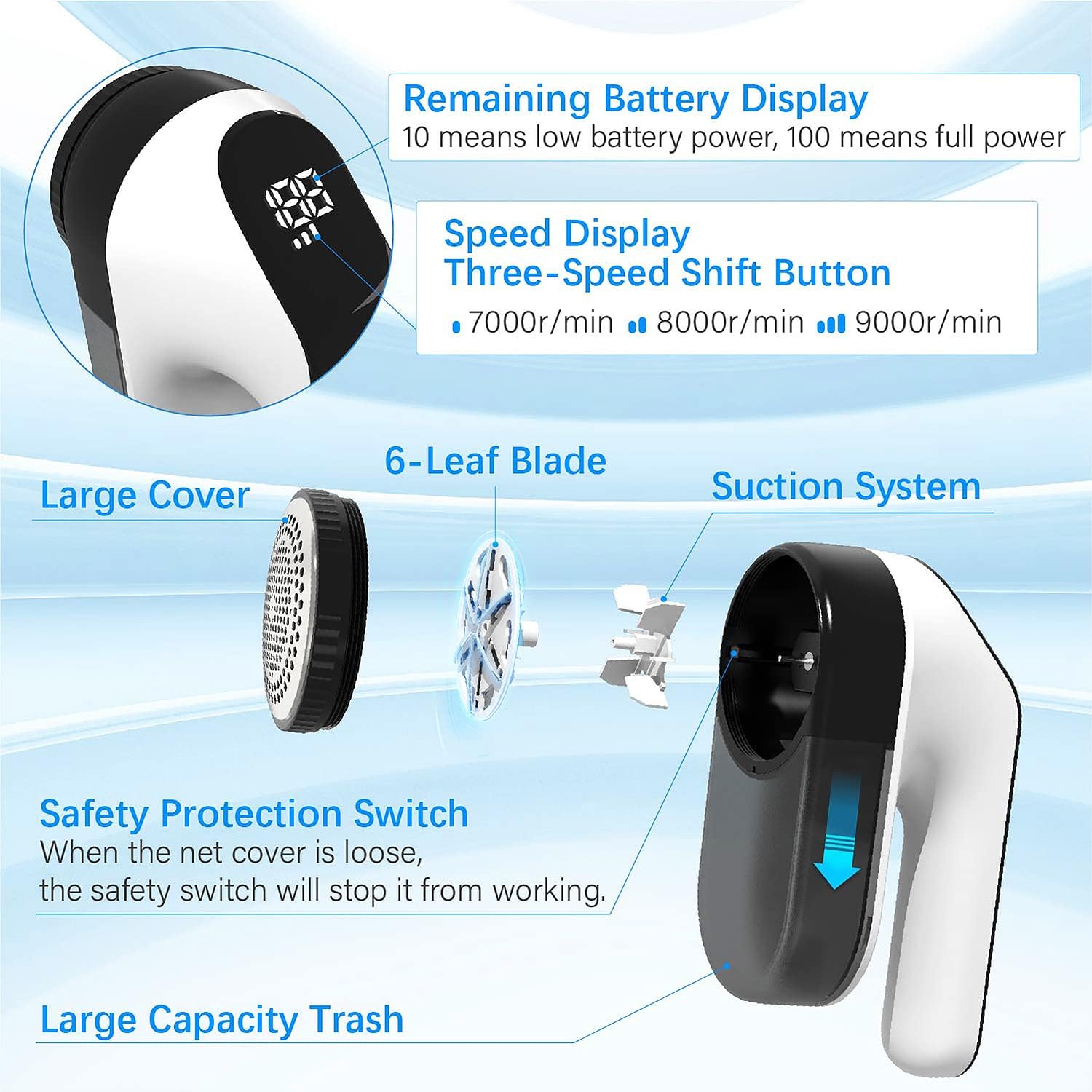
Image: Detailed view of the fabric shaver's internal components and digital display features.

Image: Visual summary of the fabric shaver's advanced features.
5. Setup
5.1 Charging the Device
- Connect the USB Type-C charging cable to the charging port on the device.
- Plug the other end of the USB cable into a compatible power source (e.g., computer, power bank, wall charger).
- The LED digital display will show the battery percentage. A full charge (100%) typically takes about 2 hours.
- The device can be used for 2-4 hours on a full charge.

Image: The fabric shaver charging via a USB-C connection.
5.2 Installing the Wall-Mounted Storage Box
- Wipe the desired wall surface clean and ensure it is dry.
- Remove the protective film from the adhesive pad on the back of the storage box.
- Stick the storage box firmly onto the wall, pressing to remove any air bubbles.
- Allow the adhesive to set for a few hours before placing the shaver in the box.

Image: The fabric shaver stored in its wall-mounted holder.

Image: Step-by-step instructions for mounting the storage box.
6. Operating Instructions
6.1 Power On/Off and Speed Adjustment
- Press the power button once to turn on the device at Speed I (7000rpm). The LED display will show the current speed and battery level.
- Press the power button again to switch to Speed II (8000rpm).
- Press the power button a third time to activate Speed III (9000rpm).
- Press the power button a fourth time to turn off the device.

Image: Guide to selecting the appropriate speed setting for various fabric types.
6.2 Using the Fabric Shaver
- Lay the garment or fabric flat on a hard, smooth surface. Ensure there are no wrinkles or folds that could be caught by the blades.
- Select the appropriate speed setting based on the fabric type. Use lower speeds for delicate materials and higher speeds for more durable fabrics or stubborn pills.
- Gently glide the shaver head over the affected area in circular motions or short, even strokes. Avoid pressing down too hard.
- Observe the lint bin to see the collected pills and lint.
- The shaver is suitable for various fabrics including sweaters, woolen coats, couches, cushions, blankets, socks, and plush toys.

Image: Demonstration of the shaver's effectiveness with a before-and-after view.

Image: Examples of fabrics and items suitable for use with the shaver.
6.3 Official Product Video
Video: An official product video from BAICIWE demonstrating the fabric shaver's features and usage.
7. Maintenance
7.1 Emptying the Lint Bin
- Ensure the device is turned off.
- Gently slide off the transparent lint bin located at the bottom of the shaver.
- Empty the collected lint and fuzz into a trash receptacle.
- Slide the lint bin back onto the device until it clicks securely into place.
7.2 Cleaning the Blades and Mesh Cover
- Ensure the device is turned off.
- Carefully unscrew the mesh cover by turning it counter-clockwise.
- Use the provided cleaning brush to remove any lint or debris from the blades and the inside of the mesh cover.
- Wipe the exterior of the device with a soft, dry cloth.
- Replace the mesh cover by screwing it clockwise until it is securely fastened.
7.3 Replacing the Blades
- Ensure the device is turned off and the mesh cover is removed.
- Carefully lift the old blade assembly from the device.
- Place a new 6-leaf blade assembly onto the motor shaft, ensuring it sits correctly.
- Reattach the mesh cover and lint bin.
8. Troubleshooting
| Problem | Possible Cause | Solution |
|---|---|---|
| Device does not turn on. | Low battery; Loose mesh cover. | Charge the device; Ensure mesh cover is securely fastened. |
| Poor lint removal performance. | Dull blades; Full lint bin; Clogged mesh cover. | Replace blades; Empty lint bin; Clean mesh cover and blades. |
| Unusual noise during operation. | Lint or debris caught in blades; Loose components. | Turn off and clean blades/mesh; Ensure all parts are securely assembled. |
| Device stops unexpectedly. | Low battery; Safety switch activated (loose mesh cover). | Charge the device; Securely fasten the mesh cover. |
9. Specifications
| Feature | Detail |
|---|---|
| Brand | BAICIWE |
| Model Number | 58806 |
| Material | Plastic, Acrylonitrile Butadiene Styrene |
| Color | Black and White |
| Product Dimensions | 7.09"D x 2.99"W x 4.06"H |
| Item Weight | 12.3 ounces |
| Operation Mode | Automatic |
| Battery Type | 1 Lithium Polymer battery (included) |
| Battery Capacity | 2000mAh |
| Charging Interface | USB Type-C |
| Charging Time | Approx. 2 hours |
| Working Time | Approx. 2-4 hours |
| Blades | 6-Leaf Stainless Steel |
| UPC | 766484845208 |
| ASIN | B0B8RXXX5C |
| Date First Available | August 5, 2022 |
10. Warranty and Support
Specific warranty information and direct customer support contact details were not provided in the product data. Please refer to the product packaging or the retailer's website for the most up-to-date warranty terms and customer service options.