
1. Introduction
Thank you for choosing the Zivases HBC Battery Charger D-74564. This manual provides essential information for the safe and efficient operation of your charger, compatible with BA223030 2.1Ah batteries. Please read these instructions carefully before use and retain them for future reference. This charger is designed for DC 12V-24V input and is suitable for models QA108600 and QD108300.
2. Safety Instructions
Always observe the following safety precautions to prevent injury or damage to the product.
- Read all instructions: Before using the charger, read all instructions and cautionary markings on the charger, the battery, and the product using the battery.
- Indoor use only: Do not expose the charger to rain or wet conditions.
- Proper ventilation: Ensure adequate ventilation during charging. Do not cover the charger.
- Avoid short circuits: Do not short-circuit the charger terminals.
- Use correct voltage: Only connect the charger to a DC 12V-24V power source as specified.
- Battery compatibility: Use this charger only with BA223030 2.1Ah batteries. Attempting to charge other battery types may cause personal injury and damage.
- Damaged charger: Do not operate the charger if it has received a sharp blow, been dropped, or otherwise damaged.
- Children: Keep the charger out of reach of children.
- Disassembly: Do not disassemble the charger. Incorrect reassembly may result in a risk of electric shock or fire.
3. Package Contents
Verify that all items listed below are present in your package:
- 1 x Zivases HBC Battery Charger D-74564 (Models QA108600 / QD108300)
- Note: Battery is not included and must be purchased separately.
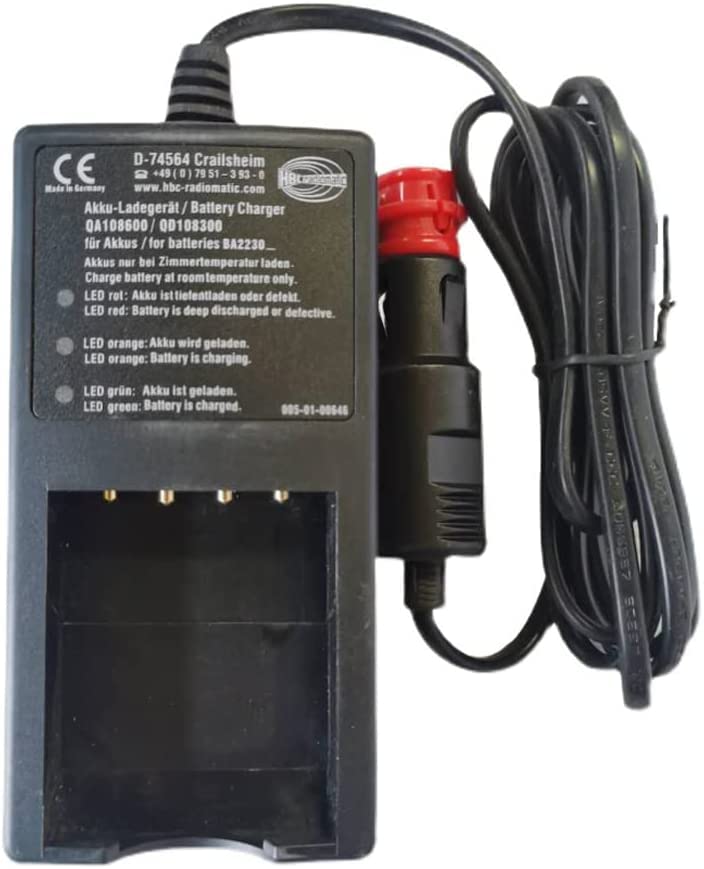
Image 1: Zivases HBC Battery Charger D-74564. This image shows the front view of the battery charger, highlighting its compact design and connection ports.
4. Setup
Follow these steps to set up your battery charger:
- Choose a suitable location: Place the charger on a flat, stable surface in a well-ventilated area, away from direct sunlight, heat sources, and moisture.
- Connect to power: Connect the charger's input cable to a compatible DC 12V-24V power source. Ensure the connection is secure.
- Prepare the battery: Ensure the BA223030 battery is clean and free from any debris or damage before inserting it into the charger.
5. Operating Instructions
To charge your BA223030 battery:
- Insert battery: Carefully slide the BA223030 battery into the charging slot of the Zivases charger. Ensure it clicks into place securely.
- Monitor charging indicator: The charger will typically have an indicator light to show the charging status.
- Red light (or similar): Indicates the battery is currently charging.
- Green light (or similar): Indicates the battery is fully charged.
- Remove battery: Once the battery is fully charged (indicated by the green light), carefully remove it from the charger.
- Disconnect power: Disconnect the charger from the power source when not in use.
Note: Charging times may vary depending on the battery's charge level and condition.
6. Maintenance
Proper maintenance ensures the longevity and optimal performance of your charger.
- Cleaning: Disconnect the charger from the power source before cleaning. Use a soft, dry cloth to wipe the exterior of the charger. Do not use abrasive cleaners or solvents.
- Storage: Store the charger in a cool, dry place when not in use. Avoid extreme temperatures and humidity.
- Inspection: Periodically inspect the charger and its cables for any signs of damage. If any damage is found, discontinue use and contact support.
7. Troubleshooting
If you encounter issues with your charger, refer to the following common problems and solutions:
| Problem | Possible Cause | Solution |
|---|---|---|
| Charger indicator light does not turn on. | No power supply or loose connection. | Ensure the charger is securely connected to a working DC 12V-24V power source. Check the power source itself. |
| Battery not charging. | Battery not properly inserted, battery is faulty, or charger is faulty. | Re-insert the battery firmly. Test with another compatible battery if available. If the issue persists, the charger or battery may be faulty. |
| Charger gets unusually hot. | Poor ventilation or internal fault. | Ensure the charger is in a well-ventilated area. Discontinue use immediately if overheating is severe and contact support. |
If the problem persists after trying these solutions, please contact customer support.
8. Specifications
| Feature | Detail |
|---|---|
| Brand | Zivases |
| Model Numbers | QA108600, QD108300 |
| Compatible Battery | BA223030 2.1Ah |
| Input Voltage | DC 12V - 24V |
| Current Rating | 2.1 Amps |
| Specification Met | CE, FCC |
9. Warranty and Support
Zivases products are manufactured to high-quality standards. For information regarding warranty coverage, please refer to the warranty card included with your purchase or visit the official Zivases website.
For technical support, troubleshooting assistance, or to inquire about replacement parts, please contact Zivases customer service. Contact details can typically be found on the product packaging or the official Zivases website.
Note: No official product videos were available for inclusion in this manual.