
ANPABO HC-301
ANPABO 24V 4X4 Ride-On Car Truck User Manual
Model: HC-301
1. Introduction
This manual provides essential information for the safe assembly, operation, and maintenance of your ANPABO 24V 4X4 Ride-On Car Truck, Model HC-301. Please read all instructions carefully before use to ensure proper function and safety.

Image 1.1: The ANPABO 24V 4X4 Ride-On Car Truck.
2. Safety Guidelines
WARNING: Adult assembly required. Adult supervision is always necessary. Keep children away from moving parts during assembly.
- Age and Weight Limits: Suitable for children aged 36 months to 8 years. Maximum weight capacity is 110 lbs (50 kg). Accommodates one child up to 4.5 ft tall or two smaller toddlers up to 3.4 ft tall.
- Seat Belt Use: Always ensure the adjustable 4-point seat belt is securely fastened before operation.
- Operating Environment: Use on flat, dry surfaces. Avoid slopes, uneven terrain, public roads, swimming pools, or other water bodies.
- Remote Control Safety: The parental remote control can override manual operation and features an emergency brake ('P' button) for immediate stopping.
- Battery Safety: Only use the provided charger. Do not short-circuit the battery terminals.
- Certifications: This product is certified by ASTM F963 CPSIA, ensuring it meets safety standards for children's products.

Image 2.1: Lockable doors enhance safety during operation.

Image 2.2: The 19-inch seat includes a secure 4-point seat belt.
3. Assembly Instructions
Before starting, ensure all parts listed in the 'Package Contents' are present.
3.1 Package Contents
- 1 x ANPABO 24V Ride-on car (Vehicle body, Steering Wheel, 2 Pair Drive Motors, 4 x Wheels and Wheel Covers, 1 x Front Windshield, 1 x Guide Frame, 2 x Guide Frame Base, 1 x Trunk Floor, 1 x Rear Axle)
- 1 x Charger
- 1 Pair of Keys
- 1 x Remote Control
- Screw Pack
3.2 Step-by-Step Assembly
- Wheel Installation: Attach the four wheels to the axles, securing them with the provided fasteners and wheel covers. Ensure they rotate freely.
- Steering Wheel Attachment: Connect the steering wheel to the steering column. Ensure all electrical connections are secure before fastening the steering wheel in place.
- Windshield and Frame: Install the front windshield and the guide frame components onto the vehicle body.
- Battery Connection: Locate the battery compartment (often under the hood or seat). Connect the battery terminals as instructed.
- Trunk Floor: Place the trunk floor in the rear storage area.
- Final Checks: Verify all screws are tightened and all parts are securely attached.
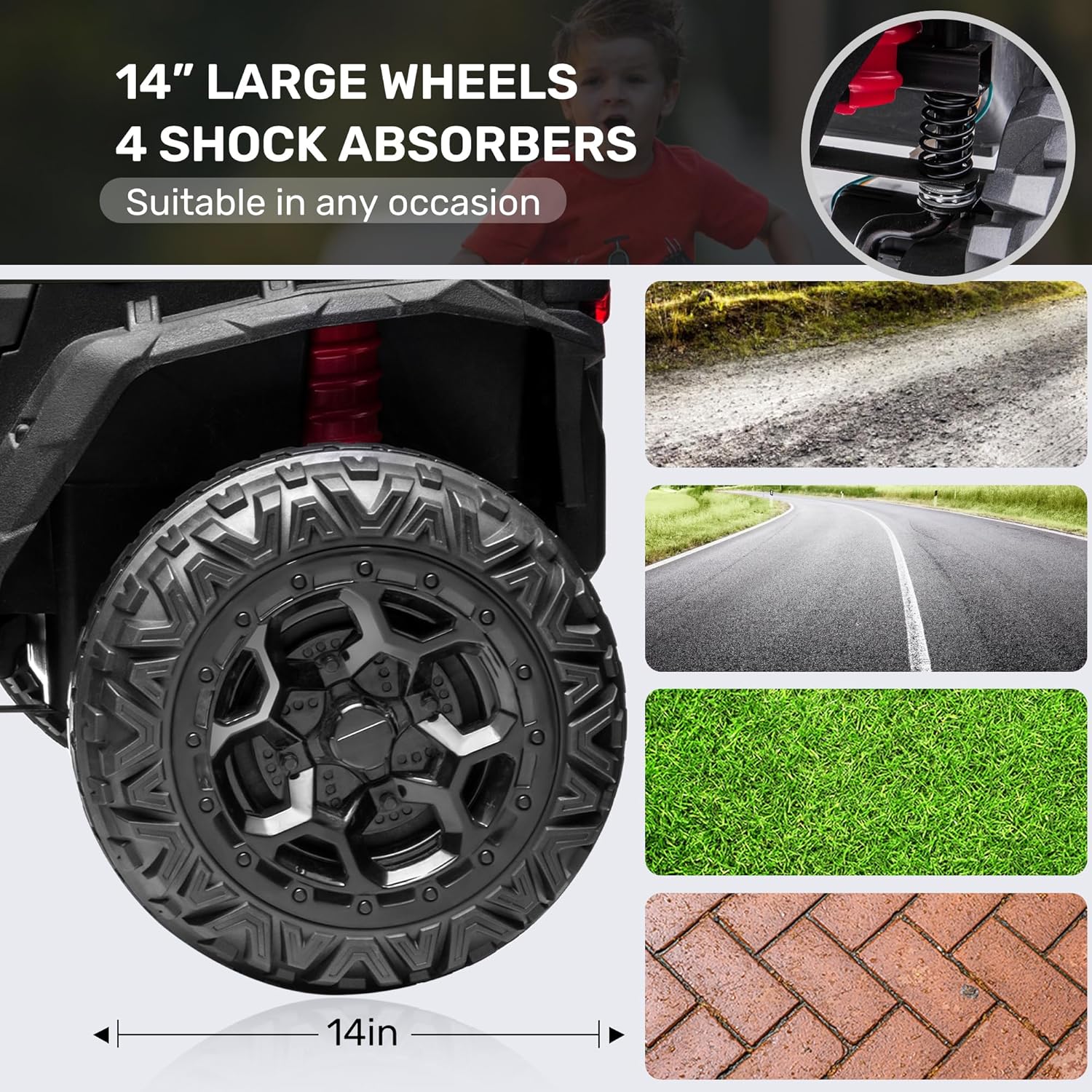
Image 3.1: Illustration of the 14-inch wheels and shock absorbers.

Image 3.2: Front storage compartment, often housing the battery.

Image 3.3: Rear storage compartment for carrying items.
4. Battery Charging & Care
4.1 Initial Charging
Before first use, charge the battery for a full 8-12 hours. Do not overcharge for more than 18 hours to prevent battery damage.
4.2 Regular Charging
Recharge the battery after each use for approximately 8-12 hours. The charger indicator light will typically change color when charging is complete.
4.3 Battery Care
- Always use the original ANPABO 24V charger.
- Do not allow the battery to completely drain before recharging.
- If storing the vehicle for an extended period, charge the battery fully every 3 months to maintain its lifespan.
- Store the battery in a cool, dry place.
5. Operating Instructions
5.1 Starting the Vehicle
Insert the key into the ignition and turn it to the 'ON' position. The vehicle features a Soft Start system for gradual acceleration, preventing sudden jolts.
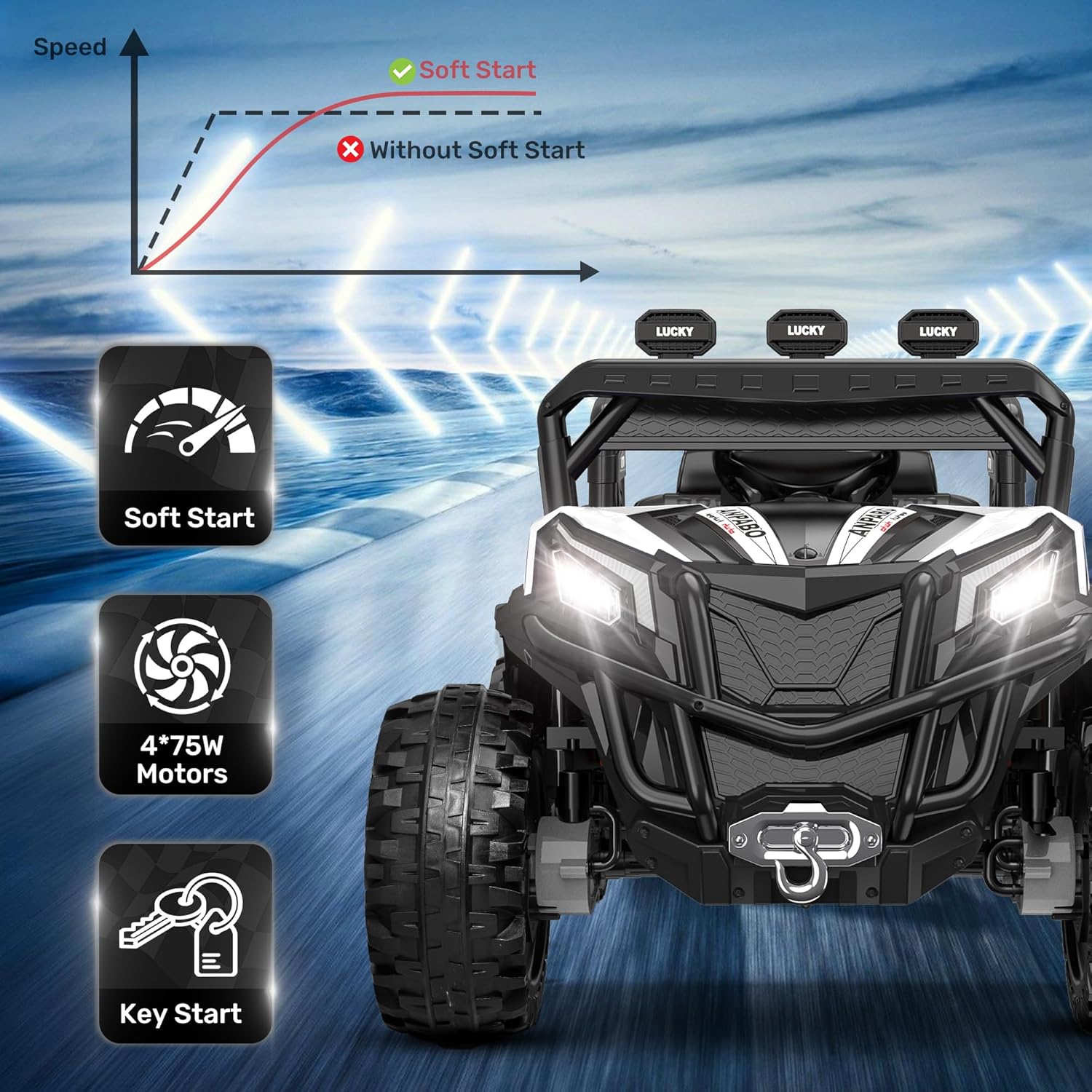
Image 5.1: Key start and soft start mechanism.
5.2 Driving Modes
The vehicle offers both manual and remote control driving options.
- Manual Mode: The child operates the vehicle using the foot pedal for acceleration and the steering wheel for direction. A speed switch (High/Low) is available on the dashboard.
- Remote Control Mode: Parents can control the vehicle's direction and speed (3 variable speeds: 2.1-4.5 Mph) using the included remote control. The remote also features an emergency 'P' button to stop the vehicle instantly.

Image 5.2: Parental remote control functions.
5.3 2WD/4WD Switching
The vehicle is equipped with a switch to toggle between 2-wheel drive (2WD) and 4-wheel drive (4WD) modes. 4WD provides enhanced power for overcoming obstacles and rough terrain, while 2WD conserves battery for longer play on flat surfaces.

Image 5.3: 2WD/4WD switch location and function.
5.4 Multimedia System
The dashboard features a music player with USB and Bluetooth connectivity. Children can enjoy pre-installed music or play their favorite songs from a connected device. Volume adjustment and a low battery reminder are also integrated.

Image 5.4: Multifunction dashboard layout.

Image 5.5: Detailed view of the music player interface.
5.5 Lights and Horn
The vehicle is equipped with LED lights and a functional horn for a realistic driving experience. These can be activated via switches on the dashboard.
6. Maintenance & Storage
6.1 Cleaning
Wipe the vehicle with a soft, damp cloth. Do not use abrasive cleaners or solvents. Avoid spraying water directly onto electrical components.
6.2 General Inspection
Regularly check for loose screws, damaged wires, or worn parts. Pay attention to the steering rods, as they can vibrate loose over time. Replace any damaged components immediately.
6.3 Storage
Store the vehicle in a dry, covered area away from direct sunlight and moisture. If storing for extended periods, ensure the battery is fully charged and recharged every three months.
7. Troubleshooting
| Problem | Possible Cause | Solution |
|---|---|---|
| Vehicle does not start/power on. | Battery is low or disconnected; power switch is off; fuse blown. | Charge the battery; check battery connections; ensure power switch is on; check and replace fuse if necessary. |
| Remote control not working. | Remote batteries are dead; remote not paired; interference. | Replace remote batteries; re-pair the remote control (refer to remote instructions); move to an area with less interference. |
| Vehicle moves slowly or lacks power. | Low battery; overloaded vehicle; motor issue; 2WD mode on rough terrain. | Recharge battery; reduce load; switch to 4WD mode if on rough terrain; contact support if motor issue suspected. |
| Steering is loose or unresponsive. | Loose steering rod connections; damaged steering mechanism. | Inspect and tighten screws on steering rods; contact support for replacement parts if damaged. |
| Music player not functioning. | Incorrect mode selected; USB device not recognized; Bluetooth not paired. | Ensure correct input mode (USB/Bluetooth); check USB device format; re-pair Bluetooth device. |
8. Product Specifications
| Feature | Detail |
|---|---|
| Model Number | HC-301 |
| Product Dimensions | 45 x 31 x 31 inches (L x W x H) |
| Item Weight | 59.5 pounds |
| Battery | 24V Rechargeable (included) |
| Motors | 4 x 75W Motors |
| Speed (Remote Control) | 3 variable speeds (2.1-4.5 Mph) |
| Recommended Age | 36 months - 8 years |
| Max. Capacity | 110 lbs |
| Wheel Size | 14 inches |
| Features | 4WD/2WD Switchable, 4 Shock Absorbers, Soft Start, Music Player (USB/Bluetooth), LED Lights, Key Start, Remote Control, 4-point Seat Belt |

Image 8.1: Key dimensions and capacity information.
9. Warranty & Customer Support
9.1 Warranty Information
ANPABO products typically come with a manufacturer's warranty covering defects in materials and workmanship. Please refer to your purchase documentation or contact ANPABO customer service for specific warranty terms and duration.
9.2 Customer Support
For any questions, concerns, or assistance with your ANPABO 24V 4X4 Ride-On Car Truck, please contact ANPABO customer service. You can usually find contact information on the ANPABO official website or through the retailer where you purchased the product.
Online Resources:
- Visit the official ANPABO Store on Amazon: ANPABO Store