1. Introduction
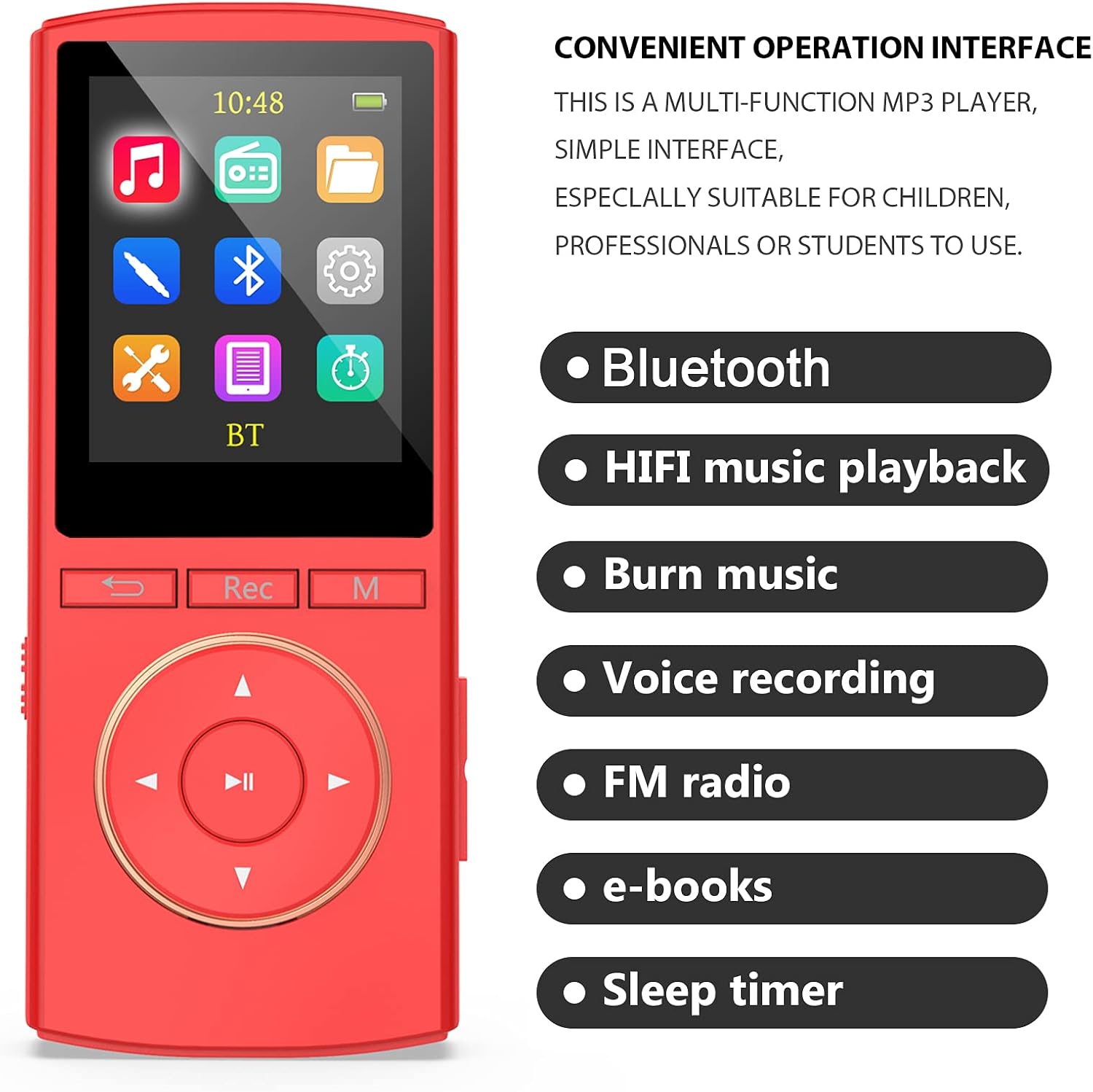
Thank you for choosing the MUSRUN Q8 MP3 Player. This manual provides detailed instructions for setting up, operating, and maintaining your device. The MUSRUN Q8 is a versatile MP3 player featuring Bluetooth 5.0 connectivity, HiFi lossless sound quality, FM radio, a voice recorder, line-in recording capabilities, and a sleep timer function. Please read this manual carefully to ensure proper use and to maximize your enjoyment of the product.
2. Product Overview
2.1 What's in the Box
- MUSRUN Q8 MP3 Player
- AUX cable
- USB cable
- Wired earphones
- User manual

2.2 Device Layout and Controls

- M Button: Menu/Mode selection.
- Record Key: Initiates voice recording.
- Return Key: Navigates back to the previous screen or menu.
- UP Key: Navigates up in menus or increases selection.
- Play/Pause Key: Plays or pauses media playback.
- Left Key: Navigates left in menus or skips backward.
- Down Key: Navigates down in menus or decreases selection.
- Right Key: Navigates right in menus or skips forward.
- Vol +: Increases volume.
- Vol -: Decreases volume.
- ON/OFF Switch: Power switch for the device.
- TF Card Slot: Slot for inserting a Micro SD (TF) card.
- Reset Button: Small pinhole button to reset the device.
- Line In Port: 3.5mm audio input for recording from external sources.
- Headset Port: 3.5mm audio output for wired earphones.
- USB Port: Micro USB port for charging and data transfer.
3. Setup
3.1 Initial Charging
Before first use, fully charge the MP3 player. Connect the provided USB cable to the device's USB port and the other end to a computer's USB port or a standard 5V, 0.5-1A USB wall adapter (not included). The battery indicator on the screen will show charging status. A full charge typically takes approximately 3 hours.
3.2 Transferring Music Files
- Connect the MP3 player to your computer using the provided USB cable.
- The player will appear as a removable disk drive on your computer.
- Open the device's storage and locate the 'Music' folder.
- Drag and drop your desired audio files (e.g., MP3, WMA, FLAC, APE) into the 'Music' folder.
- Once files are transferred, safely eject the device from your computer before disconnecting the USB cable.
3.3 Micro SD Card Installation (Optional)
To expand storage, insert a Micro SD (TF) card into the TF Card slot (12). Ensure the card is inserted correctly until it clicks into place. The device supports Micro SD cards for additional music storage.
4. Operating Instructions
4.1 Power On/Off
- To power on, slide the ON/OFF switch (11) to the 'ON' position.
- To power off, slide the ON/OFF switch (11) to the 'OFF' position.
4.2 Basic Navigation
Use the UP (4), DOWN (7), LEFT (6), and RIGHT (8) keys to navigate through menus and selections. The Play/Pause key (5) typically acts as a confirmation button, while the Return key (3) takes you back to the previous screen.
4.3 Music Playback
- From the main menu, select the 'Music' icon.
- Browse your music library by artist, album, genre, or all songs.
- Use the UP/DOWN keys to select a song and the Play/Pause key (5) to start playback.
- During playback, use the LEFT/RIGHT keys to skip tracks.
- Adjust volume using the Vol + (9) and Vol - (10) buttons on the side.

4.4 Bluetooth Connectivity
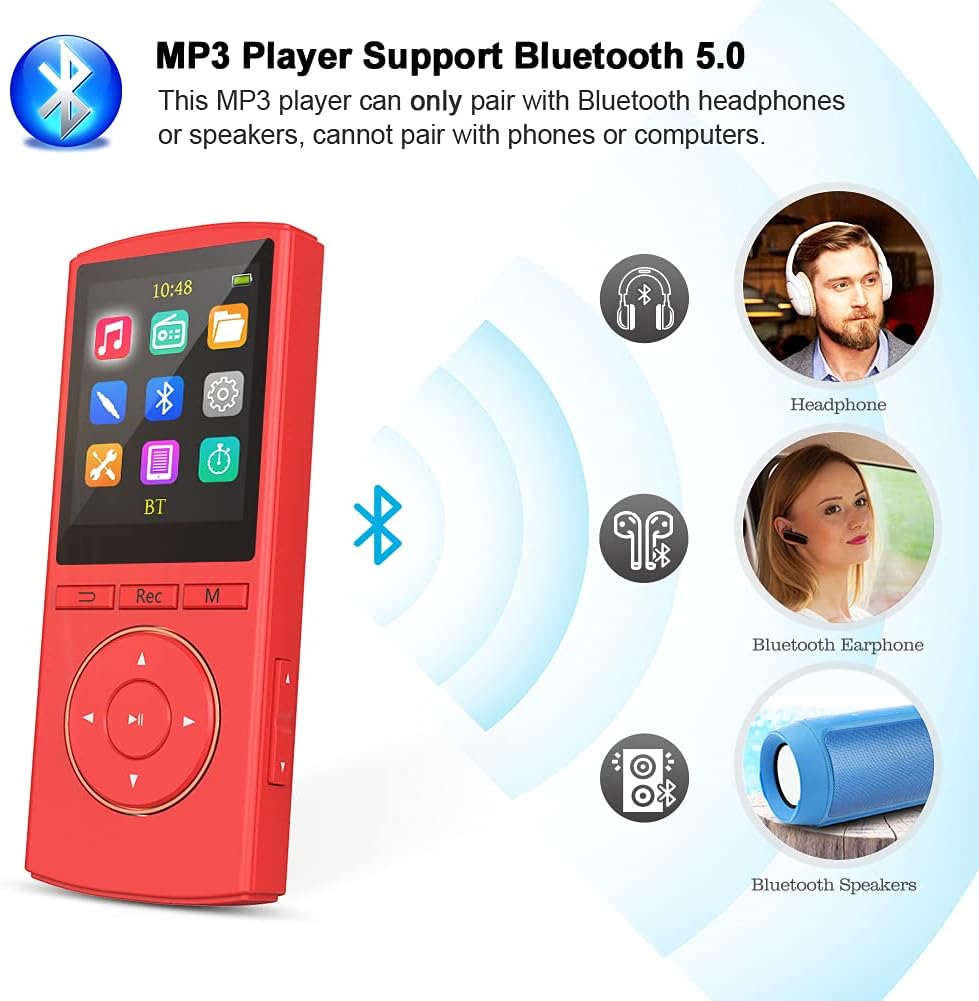
The MUSRUN Q8 supports Bluetooth 5.0 for wireless audio output.
- Ensure your Bluetooth headphones or speaker are in pairing mode.
- On the MP3 player, navigate to the 'Bluetooth' menu from the main screen.
- Select 'Search Device' to find available Bluetooth devices.
- Choose your device from the list and confirm pairing.
- Once connected, audio will play through your Bluetooth device.
Note: This MP3 player can only pair with Bluetooth headphones or speakers. It cannot pair with mobile phones or computers.
4.5 FM Radio
To use the FM radio function, you must connect wired earphones to the Headset Port (15), as they act as the antenna.
- Connect wired earphones.
- From the main menu, select the 'FM Radio' icon.
- Use the navigation keys to scan for stations or manually tune to a frequency.
- You can save your favorite stations for quick access.

4.6 Voice Recorder
The device features a one-click voice recording function.
- Press the Record Key (2) lightly to start recording quickly.
- Press the Record Key (2) again to stop and save the recording.
- Recorded files can be accessed through the 'Recordings' or 'Voice' menu.
4.7 Line-in Recording (Burn Music)
You can record audio directly from external devices using the Line In port (14).
- Connect an external audio source (e.g., phone, PC) to the MP3 player's Line In port (14) using the provided 3.5mm AUX cable.
- Navigate to the 'Line-in Record' function in the menu.
- Start playback on your external device and initiate recording on the MP3 player. The device will record the audio in lossless quality.
4.8 Sleep Timer
The sleep timer allows the device to automatically power off after a set period.
- Access the 'Sleep Timer' option, usually found in the 'Settings' or 'Tools' menu.
- Set the desired duration after which the player should turn off.
- Note: The sleep timer may need to be reset each time the device is used if you wish to use it consistently.
4.9 E-books
The MUSRUN Q8 supports e-book reading. Transfer compatible text files to the device's 'E-book' folder. Access them via the 'E-book' icon on the main menu.
5. Charging and Battery
The MUSRUN Q8 MP3 Player is equipped with a built-in Lithium Polymer battery.
- Charging: Use the provided USB cable to connect to a computer or a 5V, 0.5-1A USB power adapter.
- Charging Time: Approximately 3 hours for a full charge.
- Battery Life: Up to 60 hours of playtime on a full charge, depending on usage (e.g., volume, Bluetooth use).

6. Maintenance
- Cleaning: Use a soft, dry cloth to clean the device. Avoid liquid cleaners or abrasive materials.
- Storage: Store the player in a cool, dry place away from direct sunlight and extreme temperatures.
- Battery Care: To prolong battery life, avoid fully discharging the battery frequently. Charge the device regularly, even if not in use for extended periods.
- Water Exposure: This device is not waterproof. Avoid exposure to water or high humidity.
7. Troubleshooting
- Device won't turn on: Ensure the ON/OFF switch is in the 'ON' position. Connect the player to a charger to check if the battery is depleted. If unresponsive, try pressing the Reset Button (13) with a thin object like a paperclip.
- Device won't charge: Verify the USB cable is securely connected to both the player and the power source. Try a different USB cable or power adapter. Ensure the power source is providing 5V.
- Bluetooth pairing issues: Make sure your Bluetooth headphones/speaker are in pairing mode and within range. Ensure the MP3 player's Bluetooth is enabled. Remember, the player cannot pair with phones or computers.
- Poor sound quality: Check the volume level on both the player and connected headphones/speakers. Ensure headphones are fully plugged in. If using Bluetooth, try re-pairing the device. For wired connections, try different earphones.
- Music files not appearing: Ensure files are transferred to the correct 'Music' folder on the device. Check if the file formats are supported. If using a Micro SD card, ensure it is properly inserted and recognized.
- Buttons unresponsive: Try resetting the device using the Reset Button (13). If the issue persists, ensure the device is not frozen due to low battery.
8. Specifications
| Feature | Detail |
|---|---|
| Product Dimensions | 1.54 x 0.43 x 3.62 inches |
| Item Weight | 4.2 ounces |
| Item Model Number | Q8 |
| Batteries | 1 Lithium Polymer battery (included) |
| Connectivity Technology | Bluetooth 5.0 |
| Memory Storage Capacity | 64 GB (internal) + Micro SD support |
| Color | White |
| Compatible Devices | Headphones, Earphones, Bluetooth Speakers |
| Media Type | Micro SD |
| Display Technology | No display (referring to advanced touch display, has a basic screen) |
| Special Features | FM Radio, FM record, Line in Record, Voice Recorder, Sleep Timer |
9. Warranty and Support
For warranty information, technical support, or any questions not covered in this manual, please contact the seller or manufacturer directly through your purchase platform. Keep your proof of purchase for warranty claims.