
1. Introduction
This manual provides essential information for the safe and effective operation of your MAGPIE M-30+ Compact Laser Measurement Tool. Please read this manual thoroughly before using the device and retain it for future reference.
The MAGPIE M-30+ is a compact and precise laser distance meter designed for quick and accurate measurements in various applications. It features multiple measurement modes, data storage, and a rechargeable battery.
2. Safety Information
WARNING: Laser Radiation
This device emits a Class 2 laser. Do not stare into the laser beam. Do not direct the laser beam at people or animals. Avoid direct eye exposure. Laser power output is less than 1mW.
- Do not attempt to modify or disassemble the device.
- Keep the device out of reach of children.
- Use the device only for its intended purpose as described in this manual.
- Avoid using the device in explosive environments or near flammable materials.
- Protect the device from extreme temperatures, moisture, and strong vibrations.
- Ensure the measurement surface is suitable for laser reflection to obtain accurate readings.
3. Package Contents
Verify that all items are present in the package:
- MAGPIE M-30+ Laser Measuring Device (Natural Beige)
- User Manual (this document)
- Portable Bag
- Strap
- USB 5 Pin Charger Cable

4. Device Overview and Controls
Familiarize yourself with the components and buttons of your M-30+ device.
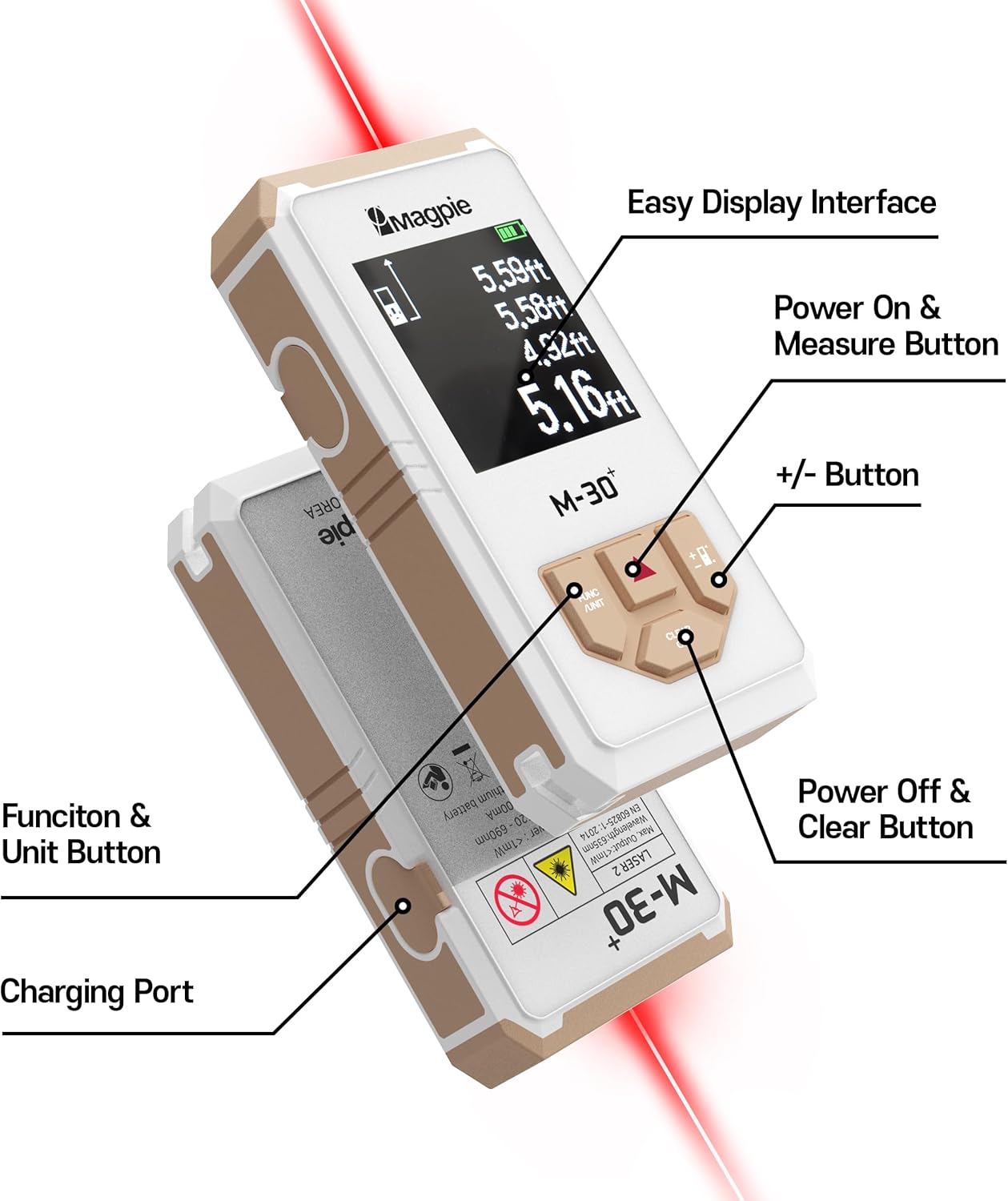
- Easy Display Interface: Shows measurement data, battery status, and mode indicators.
- Power On & Measure Button: Press once to turn on the device or activate the laser for measurement. Press again to take a measurement.
- +/- Button: Used for addition/subtraction functions and navigating menus.
- Function & Unit Button: Press to cycle through measurement modes (distance, area, volume, Pythagorean, continuous) and to change measurement units (m/in/ft/ft+in).
- Power Off & Clear Button: Press and hold to turn off the device. Press once to clear the current measurement or exit a mode.
- Charging Port: Micro USB port for charging the internal battery.
5. Setup
5.1 Charging the Battery
The M-30+ is equipped with a rechargeable Lithium Polymer battery. Before first use, fully charge the device.
- Connect the provided USB 5 Pin Charger Cable to the charging port on the side of the device.
- Connect the other end of the USB cable to a standard USB power adapter (not included) or a computer USB port.
- The battery indicator on the display will show charging status. A full charge typically takes less than an hour and provides power for up to 900 measurements.

5.2 Powering On/Off
- To Power On: Press the Power On & Measure button once. The display will light up.
- To Power Off: Press and hold the Power Off & Clear button for a few seconds until the display turns off. The device will also automatically power off after a period of inactivity to conserve battery.
6. Operating Instructions
6.1 Basic Measurement
- Power on the device.
- Point the laser at the target surface.
- Press the Power On & Measure button once to activate the laser.
- Press the Power On & Measure button again to take a measurement. The result will be displayed on the screen.

6.2 Measurement Reference Point
The M-30+ can measure from either the front or the rear of the device. An icon on the display indicates the current reference point. This is crucial for accurate measurements.

Refer to the on-screen icon to confirm the active reference point before taking a measurement. The default reference point is typically the rear of the device.
6.3 Unit Selection
To change the measurement units (meters, inches, feet, feet+inches):
- Press the Function & Unit button repeatedly until the desired unit is displayed.

6.4 Measurement Modes
The M-30+ offers several measurement modes. Press the Function & Unit button to cycle through them. The active mode will be indicated on the display.

6.4.1 Continuous Measurement (Tracking)
In this mode, the device continuously measures and displays the distance as you move it, showing the maximum, minimum, and current distance. This is useful for finding specific distances or scanning an area.
- Select continuous measurement mode.
- Point the laser at the target. The display will update in real-time.
- Press the Power On & Measure button to stop continuous measurement and hold the last reading.
6.4.2 Area Measurement
To calculate the area of a rectangular space:
- Select area measurement mode.
- Take the first measurement (e.g., length).
- Take the second measurement (e.g., width).
- The device will automatically calculate and display the area.
6.4.3 Volume Measurement
To calculate the volume of a rectangular space:
- Select volume measurement mode.
- Take the first measurement (e.g., length).
- Take the second measurement (e.g., width).
- Take the third measurement (e.g., height).
- The device will automatically calculate and display the volume.
6.4.4 Pythagorean Measurement (Indirect Height)
This mode allows for indirect measurement of height using the Pythagorean theorem. It requires two or three measurements depending on the specific Pythagorean mode (single or double).
- Select the desired Pythagorean mode (e.g., single indirect height).
- Follow the on-screen prompts to take the required measurements (e.g., hypotenuse and base for single indirect height).
- The device will calculate and display the indirect height.
Note: For accurate indirect measurements, ensure the device is held level and stable, and the measurement points form a right angle.
6.4.5 Addition and Subtraction
The M-30+ can add or subtract measurements.
- Take the first measurement.
- Press the +/- button to enter addition or subtraction mode.
- Take the second measurement.
- The device will display the calculated sum or difference.
6.5 Data Storage
The device can store up to 50 measurement entries automatically. The last three measurements are typically visible on the main screen.

To review stored data, use the +/- buttons to scroll through the memory. Press the Power Off & Clear button to exit data review mode.
7. Maintenance
- Cleaning: Use a soft, damp cloth to clean the device. Do not use abrasive cleaners or solvents.
- Storage: Store the device in its portable bag in a cool, dry place when not in use.
- Battery: Recharge the battery regularly, even if the device is not used frequently, to maintain battery health.
- Protection: The M-30+ is water-resistant and dust-proof (IP54 rated), but it should not be submerged in water. Avoid dropping the device or subjecting it to harsh impacts.
8. Troubleshooting
| Problem | Possible Cause | Solution |
|---|---|---|
| Device does not power on. | Low or depleted battery. | Charge the device using the provided USB cable. |
| Inaccurate measurements. | Incorrect reference point selected; unstable surface; laser obstructed; highly reflective or transparent target. | Verify the reference point setting. Ensure the device is stable. Clear any obstructions. Use a non-reflective target card if measuring on difficult surfaces. |
| Laser beam not visible. | Device not powered on; laser not activated; bright ambient light. | Ensure the device is on and the laser is activated. Use in lower light conditions if visibility is an issue. |
| Display is blank or frozen. | Software error or temporary malfunction. | Press and hold the Power Off & Clear button to force a restart. If the issue persists, contact customer support. |
9. Specifications
| Feature | Detail |
|---|---|
| Model | M-30+ (MPM30PS-CR) |
| Measuring Range | Up to 98 ft (30 m) |
| Accuracy | ±1/16 inch (±3 mm) |
| Laser Class | Class 2, <1mW |
| Measurement Units | m / in / ft / ft+in |
| Measurement Functions | Distance, Area, Volume, Continuous, Pythagorean (single/double), Addition/Subtraction |
| Data Storage | Up to 50 entries |
| Battery Type | Rechargeable Lithium Polymer |
| Measurements per Charge | Approx. 900 |
| Charging Port | Micro USB (5 Pin) |
| Water Resistance | IP54 (Dust-proof, Water-resistant) |
| Dimensions | 1.54 x 0.67 x 3.03 inches (39 x 17 x 77 mm) |
| Weight | 5 ounces (142 grams) |
| Operating Temperature | 0°C to 40°C (32°F to 104°F) |


10. Warranty and Support
10.1 Warranty Information
The MAGPIE M-30+ comes with a 1-Year Global Warranty from the date of purchase. This warranty covers defects in materials and workmanship under normal use. It does not cover damage caused by misuse, accidents, unauthorized modifications, or improper maintenance.
Please retain your proof of purchase for warranty claims.
10.2 Customer Support
For technical assistance, warranty claims, or any questions regarding your MAGPIE M-30+ device, please contact MAGPIE customer support through the retailer where you purchased the product or visit the official MAGPIE website.
Online Resources:
- MAGPIE Store on Amazon
- Refer to the packaging or included documentation for additional contact information.