
1. Introduction
This manual provides comprehensive instructions for the MONSIATUG replacement remote control, designed for use with Dyson HP02 and HP03 Pure Hot + Cool air purifier, heater, and fan models. This remote control offers full functionality without the need for programming. Simply insert the required battery, and it is ready for use.
2. Compatibility
This replacement remote control is compatible with the following Dyson models:
- Dyson HP02 Pure Hot + Cool Air Purifier Heater Fan
- Dyson HP03 Pure Hot + Cool Air Purifier Heater Fan
The color of the remote control does not affect its functionality. If your device is a Dyson HP02 or HP03, this remote will operate it correctly.
3. Setup
3.1 Battery Installation
The remote control requires one CR2032 battery (not included). Follow these steps to install the battery:
- Locate the battery compartment on the back of the remote control.
- Gently slide open the battery cover.
- Insert one CR2032 battery, ensuring the positive (+) side faces upwards.
- Close the battery cover securely until it clicks into place.

Figure 1: Battery compartment of the MONSIATUG replacement remote control, illustrating where to insert the CR2032 battery.
No programming or pairing is required. Once the battery is installed, the remote control is ready for immediate use.
4. Operating Instructions
4.1 Remote Control Functions
The remote control features various buttons to manage your Dyson HP02/HP03 device. Refer to the diagram below for button identification and their respective functions:
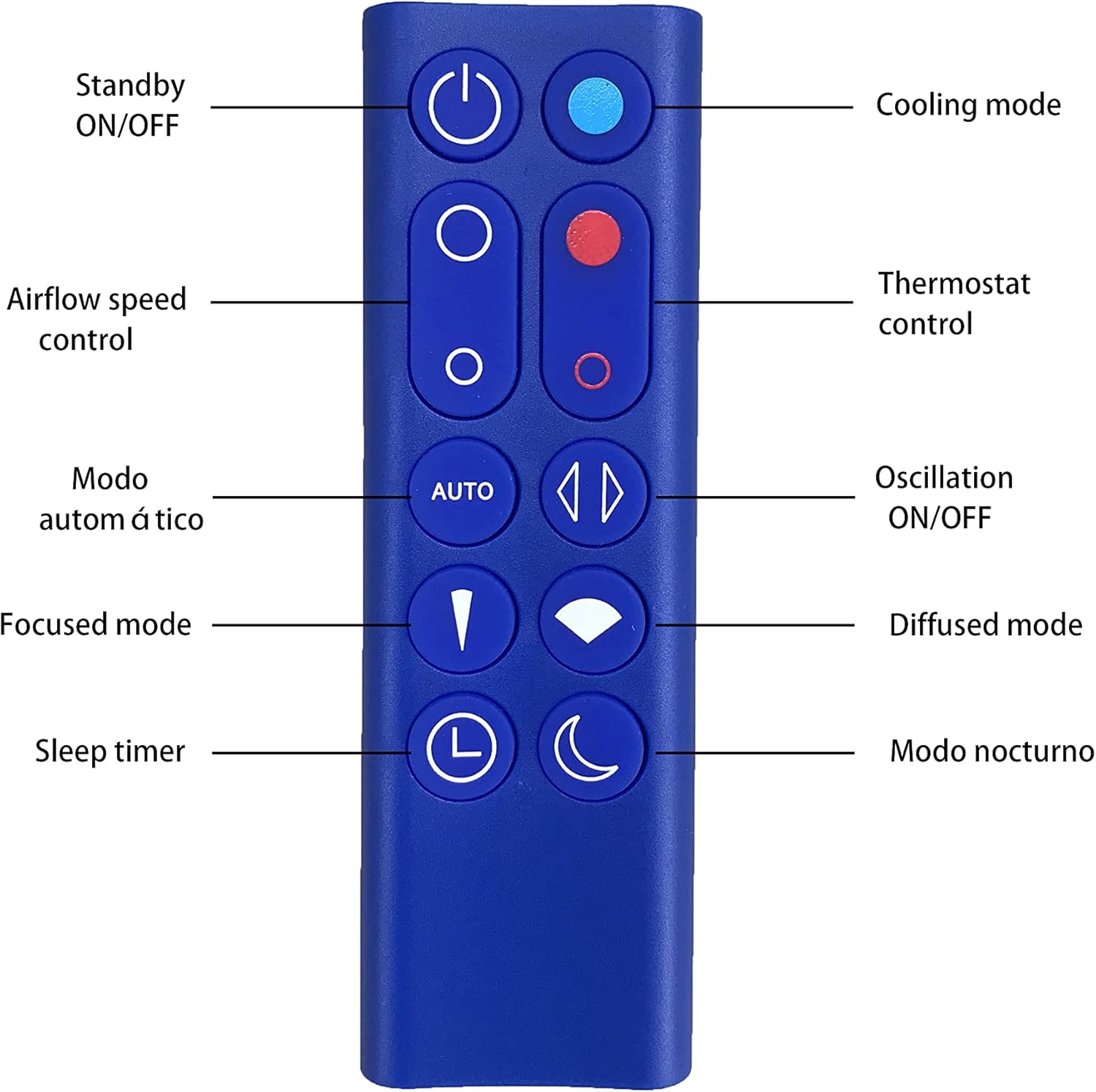
Figure 2: MONSIATUG replacement remote control with labeled buttons indicating their functions.
- Standby ON/OFF (Power Button): Press to turn the device on or off.
- Cooling Mode (Blue Button): Activates or adjusts the cooling function.
- Airflow Speed Control (Two Circular Buttons): Adjusts the fan speed. The upper button increases speed, the lower decreases it.
- Thermostat Control (Red Button & Red Ring Button): Adjusts the heating temperature. The red button increases temperature, the red ring button decreases it.
- AUTO Mode (AUTO Button): Engages the automatic mode, where the device adjusts settings based on ambient conditions.
- Oscillation ON/OFF (Arrow Buttons): Activates or deactivates the oscillation feature, allowing the device to rotate.
- Focused Mode (Inverted Triangle Button): Directs airflow in a concentrated stream.
- Diffused Mode (Fan Icon Button): Spreads airflow over a wider area.
- Sleep Timer (Clock Icon Button): Sets a timer for the device to automatically turn off.
- Night Mode (Crescent Moon Icon Button): Activates night mode for quieter operation and dimmed display.
5. Maintenance
5.1 Cleaning
To maintain optimal performance and appearance, clean the remote control periodically:
- Wipe the surface with a soft, dry cloth.
- Avoid using abrasive cleaners, solvents, or harsh chemicals, as these can damage the remote's finish or internal components.
5.2 Battery Replacement
Replace the CR2032 battery when the remote control's responsiveness decreases or it stops functioning. Refer to section 3.1 for battery installation instructions.
6. Troubleshooting
If you experience issues with your remote control, consider the following:
- Remote not responding: Ensure the battery is correctly installed and not depleted. Replace the CR2032 battery if necessary.
- Intermittent functionality: Check for any obstructions between the remote control and the Dyson device. Ensure you are within the effective operating range.
- Buttons not working: Press buttons firmly. If specific buttons are unresponsive, try replacing the battery.
If problems persist after following these steps, please refer to the customer support section.
7. Specifications
| Brand | MONSIATUG |
| Compatible Models | Dyson HP02, HP03 Pure Hot + Cool Air Purifier Heater Fan |
| Connectivity | Infrared |
| Power Supply | 1 x CR2032 Battery (not included) |
| Dimensions | 12.4 x 10.79 x 1.7 cm |
| Weight | 18 g |
| Color | Blue |
8. Warranty Information
Specific warranty details for this MONSIATUG replacement remote control are not provided in the product information. Please refer to your purchase documentation or contact the seller directly for warranty terms and conditions.
9. Customer Support
For further assistance, technical support, or inquiries regarding your MONSIATUG replacement remote control, please contact the seller through the platform where the purchase was made. Provide your order number and a detailed description of the issue for prompt support.