1. Introduction
This manual provides essential information for the safe and effective operation of your TCFUNDY 1500W Fog Machine with RGB 8 LED Lights. Please read these instructions thoroughly before initial use and retain them for future reference. This device is designed to produce atmospheric fog effects for various events such as parties, stage performances, and special occasions.
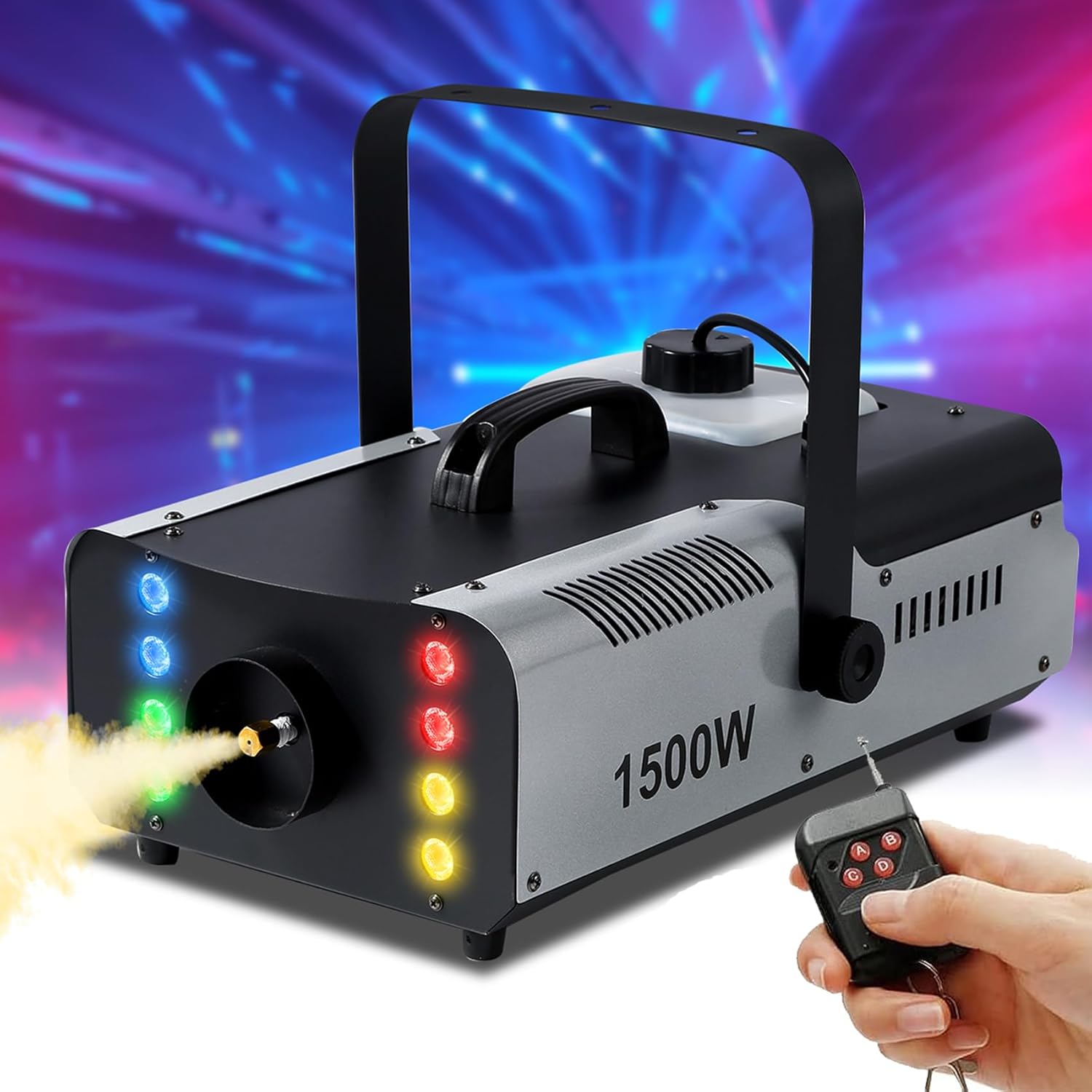
Image 1.1: TCFUNDY 1500W Fog Machine with RGB LED lights and wireless remote control.
2. Safety Information
Adherence to the following safety guidelines is crucial to prevent injury or damage to the device:
- Always use professional, water-based fog fluid. Do not use flammable liquids or other unauthorized substances.
- Ensure the fog machine is placed on a stable, level surface.
- Keep the device away from heat sources, open flames, and water.
- Do not block the ventilation openings.
- Allow the machine to cool down completely before handling or storing.
- Disconnect the power cord before cleaning, maintenance, or when not in use.
- Operate the machine in a well-ventilated area.
- Do not operate the machine if the fluid tank is empty. Turn off the machine before the liquid is completely used up to ensure safety and prevent damage to the heating element.
- Keep out of reach of children.
3. Package Contents
Verify that all items are present upon unpacking:
- TCFUNDY 1500W Fog Machine
- Wired Remote Control
- Wireless Remote Control (Keychain style)
- Power Cord
- User Manual (this document)
4. Product Overview
The TCFUNDY 1500W Fog Machine features a robust design with integrated RGB LED lights for enhanced visual effects. Key components include:
- Fog Nozzle: Point of fog emission.
- RGB LED Lights: Eight lights surrounding the nozzle, providing automatic color changes with fog output.
- Fluid Tank: Transparent tank with a 2L capacity for fog fluid.
- Carrying Handle: For portability and secure placement.
- Control Panel (Rear): Includes power switch, power input, wired remote input, and fuse holder.

Image 4.1: Detailed views of the TCFUNDY 1500W Fog Machine, showing various angles and components.

Image 4.2: Rear view of the TCFUNDY 1500W Fog Machine, showing the power switch, input/output ports, fuse, and fluid level indicator.
5. Setup Instructions
Follow these steps for initial setup:
- Fill Fluid Tank: Pour professional fog fluid (not included) into the tank. Ensure the fluid level is visible through the transparent tank. Securely screw the tank cover back on.
- Connect Power and Remote: Connect the power cord to the machine and a suitable power outlet (AC110V 60Hz). Connect the wired remote control sensor cord to the designated input on the machine's rear panel.
- Power On and Warm-up: Press the power switch to the "ON" position. The machine will begin its warm-up cycle, which typically takes 3-5 minutes. During this time, the machine is heating the fluid to the optimal temperature for fog production.
- Ready for Use: Once the warm-up is complete, the machine is ready to produce fog.

Image 5.1: Visual guide for filling the fluid tank, connecting power and remote, powering on, and initiating fog emission.
6. Operating Instructions
The fog machine can be controlled via the wired remote or the wireless remote.
6.1. Fog Emission
- Wired Remote Control: Press and hold the button on the wired remote to emit fog. Release the button to pause fog emission.
- Wireless Remote Control: Press any button (A, B, C, or D) on the keychain wireless remote to emit fog. Release the button to pause.
The machine will produce a continuous stream of fog as long as the button is held, provided it has completed its warm-up cycle and has sufficient fluid.

Image 6.1: The fog machine can be operated using either the wired remote or the wireless remote control.
6.2. RGB LED Lights
The 8 RGB LED lights automatically illuminate and change color during fog emission, creating a combined visual effect. The color sequence is pre-programmed and changes automatically.

Image 6.2: The fog machine's automatic RGB LED lights illuminate and change color during operation.

Image 6.3: Examples of the automatic color changes produced by the 8 LED lights combined with fog output.
7. Maintenance
Regular maintenance ensures optimal performance and longevity of your fog machine.
- Cleaning: Periodically clean the exterior of the machine with a soft, dry cloth. Do not use abrasive cleaners or solvents.
- Fluid Tank: If the machine will not be used for an extended period, empty the fluid tank and run a small amount of distilled water through the system to prevent residue buildup.
- Storage: Store the machine in a cool, dry place, away from direct sunlight and extreme temperatures.
- Fuse Replacement: If the machine does not power on, check the fuse located on the rear panel. Replace with a fuse of the same type and rating if necessary.
8. Troubleshooting
Refer to the table below for common issues and their solutions:
| Problem | Possible Cause | Solution |
|---|---|---|
| No fog output |
|
|
| No power |
|
|
| LED lights not working |
|
|
9. Specifications
| Feature | Specification |
|---|---|
| Voltage | AC110V 60Hz |
| Power | 1500W |
| Output | 18000 CFM (c.f./min) |
| Output Distance | 6m / 19.5ft |
| Tank Capacity | 2L |
| LED Lights | 8 RGB LEDs (Automatic Color Change) |
| Control Modes | Wired Remote, Wireless Remote |
| Material | Aluminum, Iron |

Image 9.1: The TCFUNDY 1500W Fog Machine is capable of producing a large volume of fog, up to 18000 CFM.
10. Warranty and Support
For warranty information or technical support, please refer to the product packaging or contact TCFUNDY customer service directly. Keep your purchase receipt as proof of purchase.