1. Introduction
This instruction manual provides essential information for the safe and effective use of your Marcree Biometric Rifle Gun Safe. Please read this manual thoroughly before installation and operation to ensure proper functionality and security. Keep this manual for future reference.

Image: Front view of the Marcree Biometric Rifle Gun Safe in a home setting.
2. Package Contents
Verify that all items listed below are included in your package:
- Marcree Biometric Rifle Gun Safe (Model 1H-F)
- Emergency Battery Box (x1)
- Emergency Key (x2)
- Interior Cabinet Key (x2)
- Expansion Screws (x5)
- Instruction Manual (x1)
- Magnetic LED Light (x1)
3. Setup
3.1 Initial Opening
For the first opening or in case of emergency, use the provided emergency keys:
- Locate the emergency keyhole on the safe's keypad panel.
- Insert an emergency key and turn it to unlock.
- Turn the handle to open the safe door.
3.2 Battery Installation
The safe requires 4*AA batteries for the electronic lock system:
- Open the safe door using the emergency key.
- Locate the battery compartment on the inside of the door.
- Insert 4*AA batteries, ensuring correct polarity.
- Close the battery compartment cover.
3.3 Mounting Instructions
For enhanced security, it is recommended to mount the safe to a wall or floor. The safe features pre-drilled holes for this purpose.

Image: Illustration of wall and floor mounting points and included expansion screws.
- Choose a suitable location for mounting.
- Mark the positions for drilling using the pre-drilled holes on the back (3 holes) or bottom (2 holes) of the safe as a template.
- Drill pilot holes into the wall or floor.
- Align the safe with the drilled holes and secure it using the provided expansion screws.
4. Operating Instructions
This section details how to operate your safe's locking mechanisms and features.
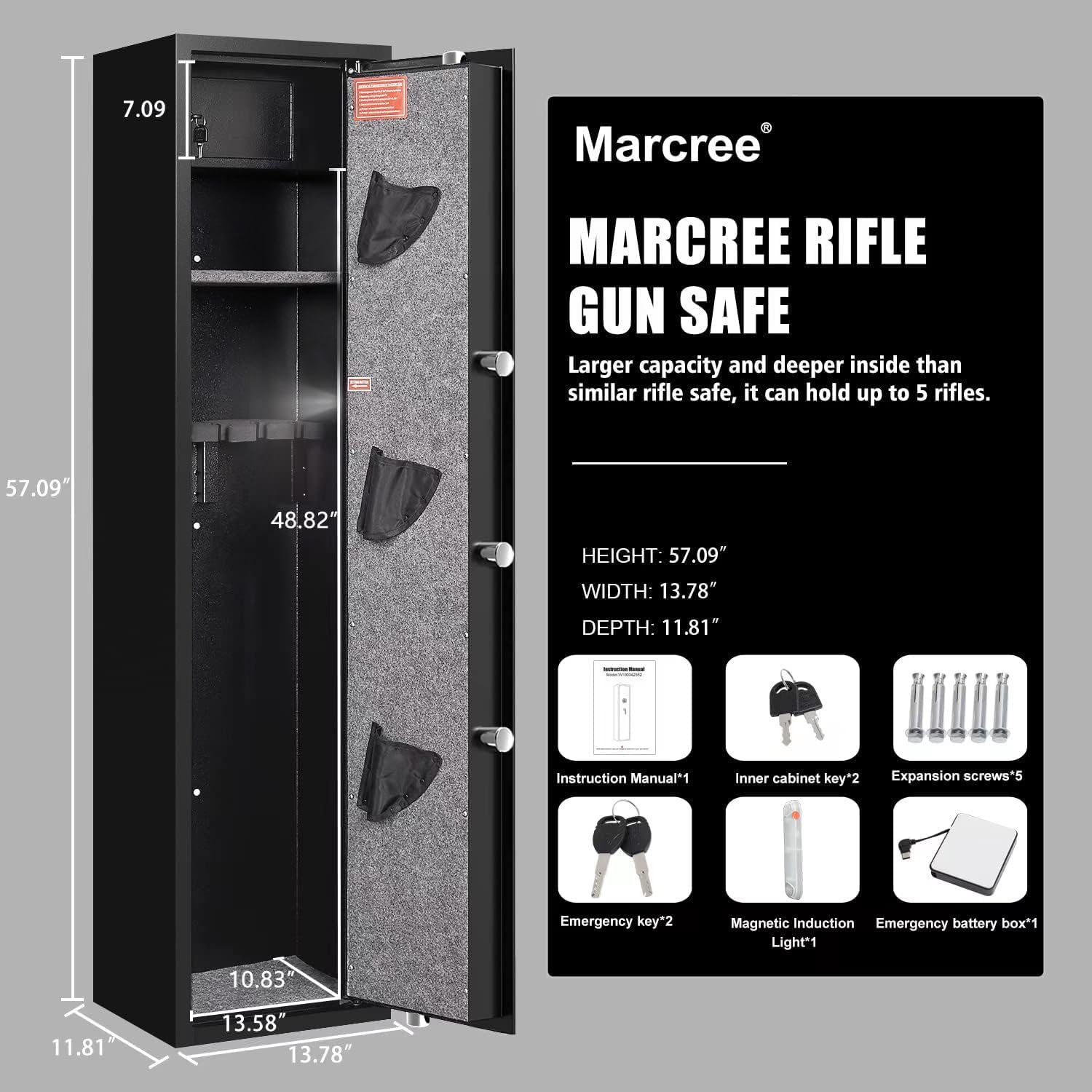
Image: Visual guide to the four methods of opening the safe.

Image: Detailed view of the biometric keypad for access.
4.1 Code Setting
- With the safe door open, press the red 'Setting Button' located on the inside edge of the door.
- On the keypad, enter your desired new code (3-8 digits).
- Press '#' to confirm.
- Re-enter the new code and press '#' again to finalize.
4.2 Fingerprint Setting
The safe can store up to 20 fingerprints for quick access.
- With the safe door open, press the red 'Setting Button' located on the inside edge of the door.
- Place your finger on the fingerprint scanner. The system will prompt you to lift and place your finger five times.
- Ensure each scan is successful before proceeding to the next.
- After five successful scans, your fingerprint is registered.
4.3 Silent Mode
To operate the safe without audible feedback:
- To activate Silent Mode: Press and hold the '*' button on the keypad for approximately three seconds until a confirmation signal is heard (or light changes).
- To deactivate Silent Mode: Repeat the process by pressing and holding the '*' button for approximately three seconds.
4.4 Emergency Access
In case of battery failure or forgotten code/fingerprint:
- Emergency Key: Follow the steps in Section 3.1.
- Emergency Battery Box: Connect the emergency battery box to the external power port on the keypad. Enter your code or use a registered fingerprint to open the safe.
4.5 Alarm System
The safe is equipped with a dual alarm system for enhanced security.

Image: Visual representation of the safe's alarm system.
- Password Error Alarm: If an incorrect fingerprint or code is entered five times consecutively, the alarm will sound for 60 seconds.
- Vibration Alarm: If the safe is subjected to violent movement or impact, a vibration alarm will be triggered, sounding for 60 seconds.
- To stop the alarm: Enter the correct fingerprint or code.
For a visual demonstration of the safe's features and operation, please refer to the official product video below:
Video: Official Marcree Biometric Fingerprint Rifle Gun Safe demonstration, covering setup and features.
5. Features and Product Details
Your Marcree Biometric Rifle Gun Safe is designed with multiple features for secure storage and ease of use.

Image: Overview of the safe's key security features.

Image: Visual representation of the safe's robust, anti-pry and anti-drilling construction.
- Quick Access: Semiconductor fingerprint identification system allows for 0.1-second unlock.
- Capacity: Designed to hold up to 5 rifles, with a maximum length of 48.8 inches.
- Interior Protection: Features a soft foam barrel holder and carpeted floor to protect firearms from scratches.
- Inner Safe Box: A separate lockable compartment for storing valuables or smaller items. Access with interior cabinet keys.
- Removable Shelf: A removable storage rack allows for flexible interior configuration. If your rifle is less than 43.3 inches long, the shelf can be installed.
- Pistol Bags: Three pistol bags are included for organized storage of handguns.
- Magnetic LED Light: A magnetic LED light can be placed anywhere inside the safe for improved visibility in low-light conditions.
- Robust Construction: Made from alloy steel with a 60mm thick door and 5*20mm solid anti-pry bolts, ensuring a 100% steel structure.

Image: Interior view highlighting the inner safe box, removable shelf, gun rack, pistol bags, LED light, and locking bolts.
6. Maintenance
Regular maintenance ensures the longevity and reliable operation of your safe.
- Cleaning: Wipe the exterior and interior surfaces with a soft, dry cloth. Avoid abrasive cleaners or solvents.
- Battery Replacement: Replace the 4*AA batteries annually or when the low battery indicator appears to ensure continuous electronic functionality.
- Lock Mechanism: Do not lubricate the lock mechanism. If the lock becomes stiff, contact customer support.
- Emergency Keys: Store emergency keys in a secure location outside the safe.
7. Troubleshooting
If you encounter any issues with your safe, refer to the following common problems and solutions:
| Problem | Possible Cause | Solution |
|---|---|---|
| Safe does not open with code/fingerprint. | Low batteries, incorrect code/fingerprint, system error. | Replace batteries, re-enter code/fingerprint, use emergency key or battery box. Reset the system if necessary (see Section 4.6). |
| Alarm sounds unexpectedly. | Incorrect input attempts, physical impact/vibration. | Enter correct code/fingerprint to disarm. Ensure safe is stable and not subject to accidental impacts. |
| Shelf is not level. | Improper seating of the shelf. | Ensure the removable shelf is correctly seated on all support tabs. Adjust if necessary. |
4.6 Resetting the System
If you need to clear all stored codes and fingerprints and return the safe to factory settings:
- Open the safe door.
- Press and hold the red 'Setting Button' on the inside edge of the door for 2-3 seconds.
- The system will indicate a successful reset. You can then set new codes and fingerprints.
8. Specifications
Detailed specifications for the Marcree Biometric Rifle Gun Safe (Model 1H-F):
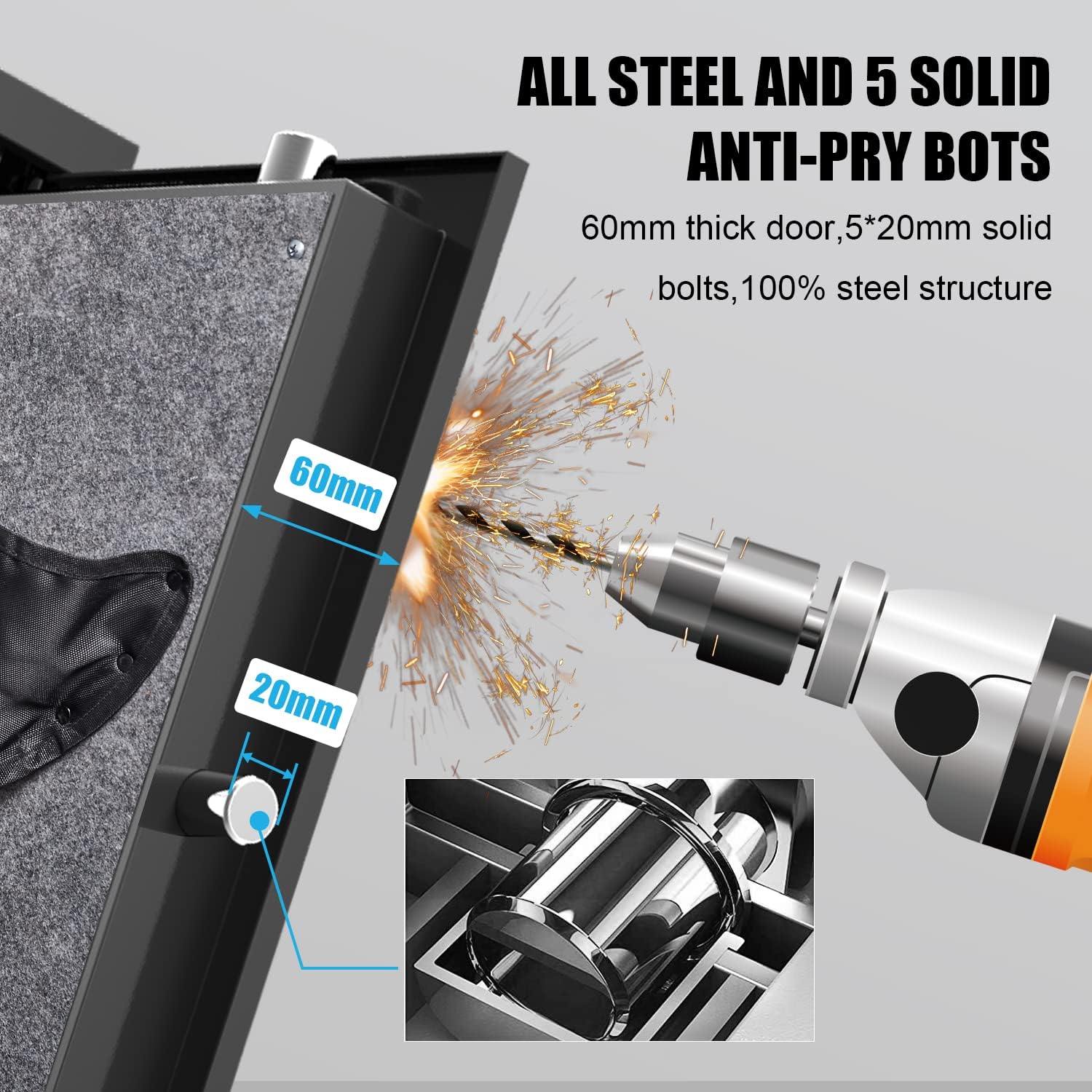
Image: External dimensions of the safe.
| Feature | Detail |
|---|---|
| Brand | Marcree |
| Model Number | 1H-F |
| Product Dimensions | 11.81"D x 13.78"W x 57.09"H |
| Lock Type | Key, Biometric |
| Capacity | 5 load (up to 48.8 inches long rifles) |
| Material | Alloy Steel |
| Special Features | Alarm System, Anti-Theft, Biometric Fingerprint, Scratch Resistant, Sensor Light |
| Mounting Type | Floor Mount, Wall Mount |
| Alarm | Audible |
| Water Resistance Level | Not Water Resistant |
9. Warranty and Support
Marcree is committed to providing high-quality products and excellent customer service.
- Customer Service: Our experienced customer service team is available 24/7 to assist you. Please feel free to contact us with any questions or concerns.
- Lifetime Key Matching Service: In the event that your emergency keys are lost, Marcree provides a lifetime key matching service. Contact customer support for assistance.