
LEOFOTO VD-03
LEOFOTO VD-03 Monopod Tilt Base/Stand/Ground Pod Instruction Manual
Model: VD-03 | Brand: LEOFOTO
Introduction
Thank you for choosing the LEOFOTO VD-03 Monopod Tilt Base. This versatile accessory is designed to provide stable support for your camera equipment, functioning as a monopod base, ground pod, or mini tripod. This manual provides essential information for the proper setup, operation, and maintenance of your VD-03 to ensure optimal performance and longevity.
Product Features
The LEOFOTO VD-03 combines a monopod support, ball head, and quick release system into a compact and robust unit. Its innovative design offers exceptional flexibility for various shooting scenarios.

Figure 1: LEOFOTO VD-03 Monopod Tilt Base with its integrated quick release plate and ball head, ready for attachment to a monopod or camera.
Integrated Ball Head and Quick Release System
The VD-03 features a built-in ball head for smooth adjustments and a secure quick release system for fast attachment and detachment of your gear.

Figure 2: Detailed view of the Press Style Quick Release System. The square dovetail plate securely drops into the clamp, and the safety lock can be turned clockwise for added protection.

Figure 3: Close-up of the quick release mechanism, showing the 'LOCK' and 'UNLOCK' indicators for secure operation.
Versatile Ground Pod Functionality
The VD-03 can be used as a super-ground tripod, providing a stable low-angle platform for various photographic and videographic needs.

Figure 4: The VD-03 configured as a super-ground tripod, demonstrating its capability to support a video fluid head for stable low-angle shots.

Figure 5: The VD-03 providing stable support for a video head, showcasing its robust design.
Adjustable Leg Angles
The monopod support features three adjustable leg angles, allowing for optimal positioning and stability on various terrains. The rubber mats on the feet ensure excellent grip.

Figure 6: Illustration of the three distinct leg angles (narrow, medium, wide) that can be set for the VD-03, providing versatility for different stability requirements.

Figure 7: The VD-03 with one leg partially extended, demonstrating the mechanism for adjusting leg angles.

Figure 8: The VD-03 with all three legs fully extended, showcasing its stable base for ground-level use.
Excellent Flexibility and Portability
The VD-03 is designed for excellent flexibility, offering a convenient and diverse shooting experience. Its compact folded size makes it highly portable.

Figure 9: A visual representation of the VD-03's flexibility, showing its ability to adapt to various angles and positions for diverse shooting needs.
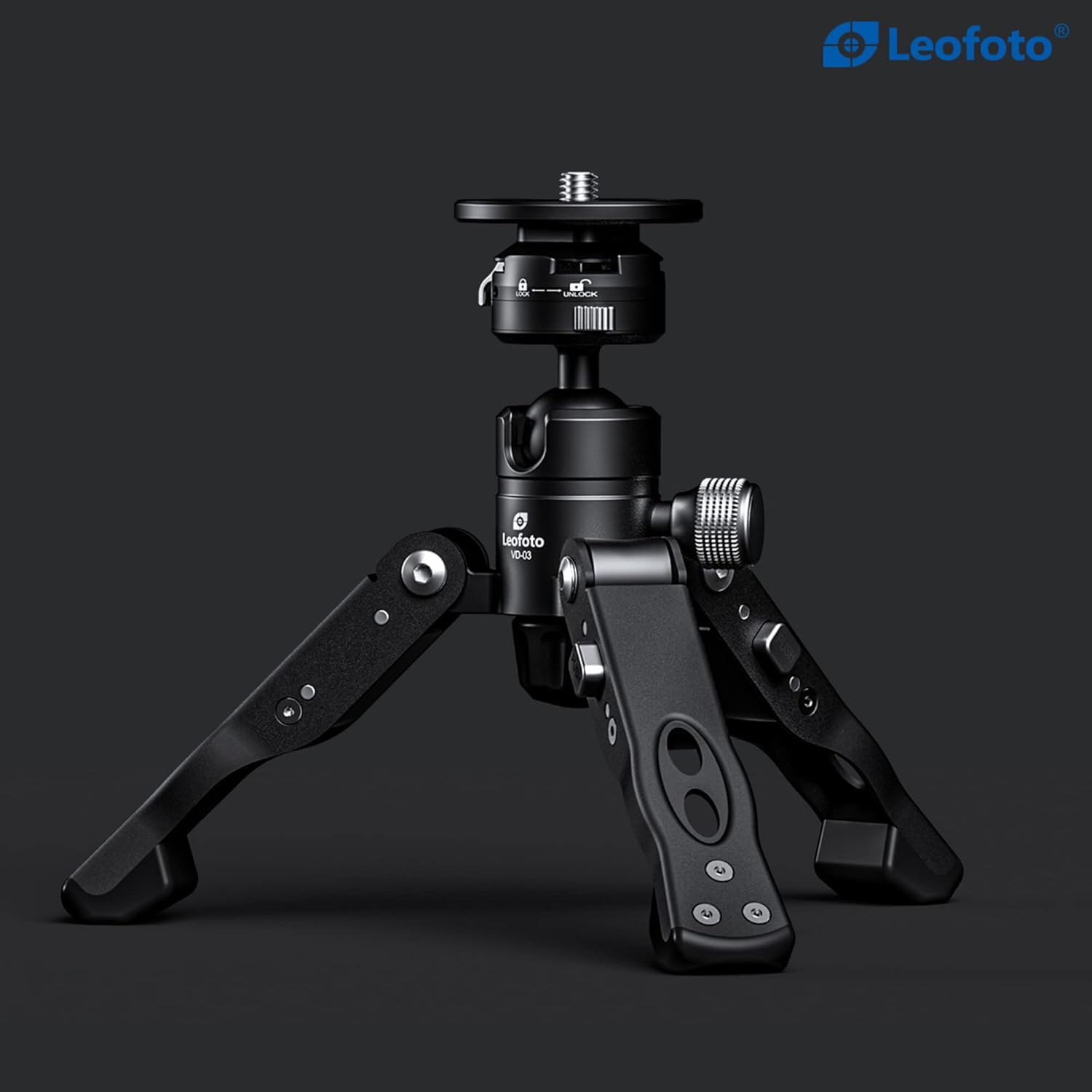
Figure 10: The VD-03 in its compact, folded configuration, highlighting its portability.
Assembly and Setup
- Unfolding the Legs: Gently pull each of the three legs outwards from the central body until they click into one of the three available angle positions. Choose the angle that best suits your stability requirements.
- Attaching a Monopod: The VD-03 is primarily designed as a monopod base. Screw your monopod's 3/8" or 1/4" mounting screw (adapter may be needed for 1/4") into the threaded hole on the top plate of the VD-03. Ensure it is securely tightened.
- Attaching a Camera/Ball Head (Directly): If using as a mini tripod/ground pod, you can attach a camera or a separate ball head directly to the top plate using the appropriate screw thread.
- Using the Quick Release System:
- To attach a quick release plate (e.g., Arca-Swiss compatible), ensure the clamp lever is in the 'UNLOCK' position.
- Slide the quick release plate into the clamp.
- Push the clamp lever to the 'LOCK' position to secure the plate. For extra security, turn the safety lock knob clockwise.
- To remove, reverse the process: turn the safety lock counter-clockwise, then move the clamp lever to 'UNLOCK' and slide out the plate.
Operating Instructions
- Adjusting Leg Angles: To change the leg angle, press the angle button located at the hinge of each leg and reposition the leg to the desired angle. Ensure all three legs are set to the same angle for maximum stability.
- Using the Ball Head: The VD-03 features a ball head for precise positioning.
- To adjust the angle of your attached equipment, loosen the ball head lock knob (the silver knurled knob).
- Position your equipment as desired.
- Tighten the ball head lock knob firmly to secure the position.
- Stability: Always ensure the VD-03 is placed on a stable, level surface. For uneven terrain, adjust leg angles as needed to maintain balance. The rubber feet provide enhanced grip.
- Weight Capacity: Do not exceed the maximum weight recommendation of 20 pounds to prevent damage to the unit or your equipment.
Care and Maintenance
- Cleaning: Wipe the VD-03 with a soft, dry cloth after each use. For stubborn dirt, use a slightly damp cloth and then dry thoroughly. Avoid abrasive cleaners or solvents.
- Storage: Store the VD-03 in a cool, dry place, away from direct sunlight and extreme temperatures. Ensure it is clean and dry before storage.
- Inspection: Periodically check all screws and moving parts for tightness and smooth operation. Do not attempt to disassemble the ball head or quick release mechanism beyond normal user adjustments.
Troubleshooting
| Problem | Possible Cause | Solution |
|---|---|---|
| Legs do not lock into position. | Angle button not fully depressed or mechanism obstructed. | Ensure the angle button is fully pressed while adjusting. Check for debris in the hinge mechanism. |
| Quick release plate is loose. | Clamp lever not fully locked or safety knob not tightened. | Ensure the clamp lever is pushed completely to the 'LOCK' position and the safety lock knob is tightened clockwise. Verify the plate is correctly seated. |
| Ball head does not hold position. | Ball head lock knob is loose or equipment exceeds weight capacity. | Tighten the ball head lock knob firmly. Ensure the attached equipment does not exceed the 20-pound maximum weight recommendation. |
Technical Specifications
| Specification | Value |
|---|---|
| Model Number | VD-03 (TFS-US) |
| Brand | LEOFOTO |
| Compatible Devices | Camera |
| Color | Black |
| Item Weight | 8.8 ounces (0.55 Pounds) |
| Maximum Weight Recommendation | 20 Pounds |
| Folded Size | 6.1 inches |
| Package Dimensions | 13.86 x 5.39 x 4.29 inches |
| Date First Available | June 22, 2022 |
| Manufacturer | Leofoto |
Warranty and Support
LEOFOTO products are manufactured to high-quality standards. For any warranty inquiries, technical support, or service needs, please contact LEOFOTO customer service through their official website or the retailer from whom you purchased the product. Please retain your proof of purchase for warranty validation.
Visit the official LEOFOTO store for more information: LEOFOTO Store
Related Documents - VD-03
 |
Dometic ColdMachine Refrigeration Cooling Unit Installation and Operating Manual Comprehensive installation and operating manual for Dometic ColdMachine refrigeration cooling units, covering models 50, 54, 55, 84, 85, 86, 94, 95, 96, CS-NC15, and various VD series units. Includes safety instructions, technical specifications, installation guides, and troubleshooting. |
 |
VIKYLIN VD Series POE IP Camera Quick Start Guide A quick start guide for VIKYLIN VD Series POE IP Cameras, covering system requirements, network setup, software configuration using ConfigTool, DMSS, and SmartPSS Lite, and access methods via web browser and NVR. |
 |
Varmilo Mechanical Keyboard User Manual and Guide This comprehensive guide provides detailed instructions for Varmilo mechanical keyboards, covering setup, features, Bluetooth and wired connectivity, maintenance, and warranty information. |
 |
Animal Service VD Series Veterinary Disposable Flexible Endoscope Technical specifications and features of the Animal Service VD Series veterinary disposable flexible endoscopes, including compatibility with D-1211 processors and clinical applications. |
 |
CMS Electracom Viva Duo Non-QI2 AU Configurations: Technical Guide Explore the configuration options for the CMS Electracom Viva Duo Non-QI2 AU, a modular desk power and charging solution. Details clamp types, USB AC modules, and color variations. |
 |
Busch SIMPLEX VD Vacuum Systems: Operating Instructions Comprehensive operating instructions for Busch SIMPLEX VD vacuum systems (VD 0025 G, VD 0063 G, VD 0100 G), covering safety, installation, operation, maintenance, and troubleshooting for industrial applications. |
Ask a question about this manual
Ask about setup, troubleshooting, compatibility, parts, safety, or missing instructions. Manuals+ will review the question and use this page’s manual context to help answer it.