
1. Introduction
Thank you for choosing the usmile F1 Ultrasonic Electric Toothbrush. This manual provides essential information for the safe and effective use of your new toothbrush. Please read it thoroughly before first use and keep it for future reference.
2. Product Overview & Key Features
The usmile F1 is designed to provide a superior cleaning experience with advanced ultrasonic technology and smart features.
- 8 Brushing Modes: Choose from 4 on-device modes and 4 additional modes via the smartphone app for a personalized brushing experience.
- Stepless Intensity Adjustment: Fine-tune brushing intensity through the dedicated smartphone application.
- Reminder Function: Set brushing times between 2 to 6 minutes and receive notifications for changing brushing areas.
- Two Brush Head Types: Includes Whitening Pro and Deep Clean brush heads for varied dental needs.
- High-Frequency Vibrations: Delivers 38,000 vibrations per minute for effective plaque removal.
- Long Battery Life: Up to 365 days of use on a single charge (based on 2 uses/day, 2 minutes/use, weak intensity).
- DuPont Diamond-Cut Bristles: High-quality bristles designed for gentle yet thorough cleaning.
- UV Sterilization Travel Case: A convenient travel case with built-in UV sterilization to keep your brush head hygienic.
- Smartphone App Connectivity: Connects to a smartphone app for customized settings, brushing history tracking, and personalized advice.

Image: Overview of 8 brushing modes and stepless intensity adjustment.

Image: Illustration of the 38,000 vibrations per minute and a user smiling, highlighting the whitening effect.

Image: Battery icon indicating 365 days of battery life on a single charge.

Image: Detailed view of the DuPont diamond-cut bristles on the brush head.
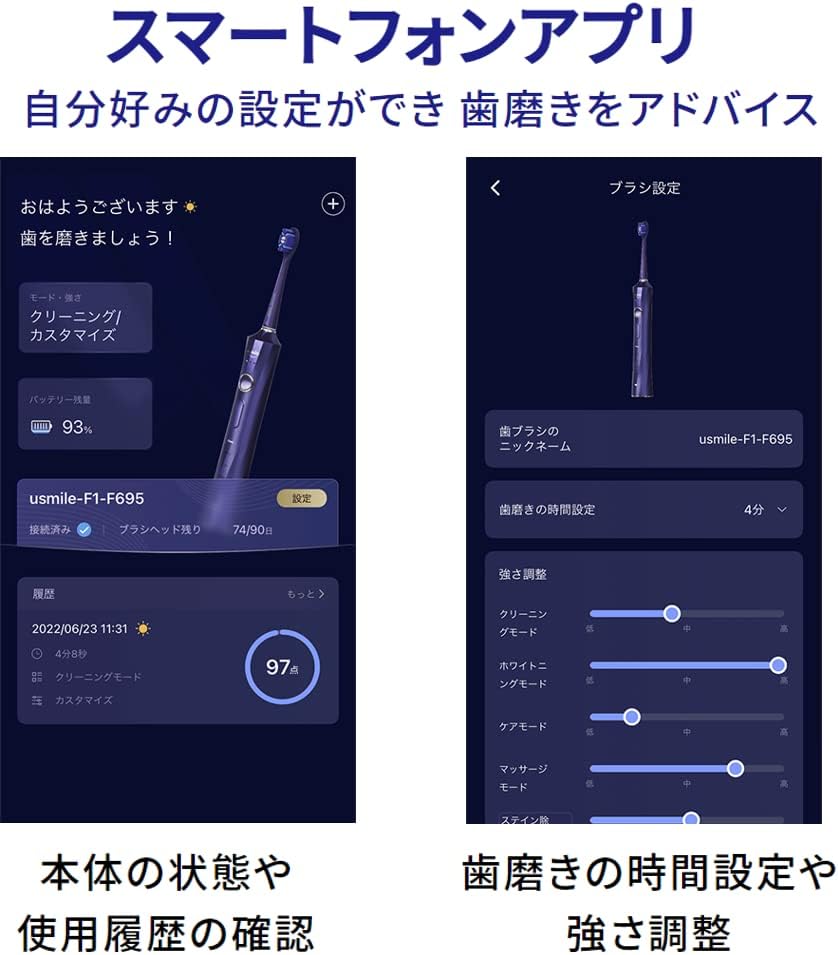
Image: The usmile F1 toothbrush next to its UV sterilization travel case.

Image: Screenshots of the usmile smartphone app, displaying brush settings, usage history, brushing support, and reports.
3. Setup
3.1 Unboxing and Initial Inspection
Carefully remove all components from the packaging. Ensure the package contains the toothbrush handle, two brush heads (Whitening Pro and Deep Clean), a UV sterilization travel case, and a USB Type-C charging cable. Inspect all items for any visible damage.
Image: All components included with the usmile F1 electric toothbrush.
3.2 Initial Charging
- Connect the USB Type-C charging cable to the charging port at the bottom of the toothbrush handle.
- Plug the other end of the cable into a compatible USB power adapter (not included) or a USB port.
- The indicator light on the handle will illuminate to show charging status. Allow the toothbrush to charge fully before first use. A full charge typically takes several hours.
3.3 Attaching the Brush Head
- Align the brush head with the metal shaft on the toothbrush handle.
- Push the brush head down firmly until it clicks into place. Ensure it is securely attached.
4. Operating Instructions
4.1 Power On/Off
Press the power button on the handle to turn the toothbrush on. Press it again to turn it off.
4.2 Changing Brushing Modes
While the toothbrush is on, press the mode button (usually below the power button) to cycle through the available modes. The indicator lights on the handle will show the selected mode. For additional modes and fine-tuning, use the smartphone app.
4.3 Adjusting Intensity (via App)
For stepless intensity adjustment, download and connect to the usmile smartphone application. Within the app, you can precisely control the brushing intensity for each mode.
4.4 Brushing Technique
- Wet the brush head and apply a small amount of toothpaste.
- Place the brush head against your teeth at a slight angle towards the gum line.
- Turn on the toothbrush. Gently move the brush head across your teeth, allowing the ultrasonic vibrations to clean each surface. Do not scrub aggressively.
- The built-in timer and quadrant reminder will guide you through the recommended brushing duration for each section of your mouth.
- After brushing, rinse your mouth and the brush head thoroughly.
4.5 Smartphone App Usage
- Download the usmile app from your device's app store.
- Follow the in-app instructions to pair your usmile F1 toothbrush via Bluetooth.
- Use the app to customize brushing modes, adjust intensity, view brushing history, and receive personalized oral care reports and advice.
5. Maintenance
5.1 Cleaning the Toothbrush
- After each use, rinse the brush head and bristles thoroughly under running water.
- Wipe the toothbrush handle with a damp cloth. Do not immerse the handle in water for extended periods.
- Ensure the charging port cover is securely closed to prevent water ingress.
5.2 Replacing Brush Heads
It is recommended to replace brush heads every three months, or sooner if the bristles become frayed or worn. To replace:
- Pull the old brush head straight off the handle.
- Align the new brush head with the metal shaft and push it down until it clicks into place.

Image: Two types of usmile F1 replacement brush heads.
5.3 Charging
Recharge the toothbrush when the battery indicator shows low power. Use the provided USB Type-C cable. The long battery life minimizes the frequency of charging.
5.4 UV Sterilization Travel Case
The travel case includes a UV sterilization function to keep your brush head clean. Place the brush head into the designated slot in the case. Close the case to activate the UV light, which helps to eliminate bacteria.
6. Troubleshooting
6.1 Toothbrush Not Turning On or Charging
- Ensure the toothbrush is fully charged. Connect it to a power source and check if the charging indicator light is active.
- Verify that the charging cable and adapter are working correctly. Try a different cable or adapter if available.
6.2 Weak or No Vibration
- Check the battery level. A low battery can result in weaker vibrations.
- Ensure the brush head is securely attached. A loose brush head can affect vibration transfer.
- If using the app, verify that the intensity setting is not set to the lowest level.
6.3 App Connectivity Issues
- Ensure Bluetooth is enabled on your smartphone and the toothbrush is within range.
- Restart both your smartphone and the toothbrush.
- If issues persist, try reinstalling the usmile app.
7. Specifications
| Brand | usmile |
| Model | F1 |
| Color | Black |
| Power Source | Rechargeable Battery (Lithium Ion) |
| Drive Method | Vibration (Ultrasonic) |
| Bristle Material | DuPont |
| Included Components | Travel Case, Replacement Brush Heads |
| Package Dimensions | 25.4 x 20.8 x 5 cm |
| Package Weight | 0.72 kg |
8. Warranty and Support
For warranty information, technical support, or any inquiries regarding your usmile F1 Electric Toothbrush, please refer to the official usmile website or contact usmile customer service directly. Keep your purchase receipt as proof of purchase for warranty claims.


