
Product Overview
The KANBIT KB-2207 is a compact, battery-operated digital alarm clock designed for travel and desk use. It features a large LCD display showing time, date, day of the week, and temperature. Its portable design includes a flexible cover that protects the screen and doubles as a stand.

Image: Front view of the KANBIT KB-2207 Digital Travel Alarm Clock, displaying the time, day, date, and temperature clearly on its large LCD screen.

Image: Visual representation of the clock's key functions: Time, Alarm, Snooze, Date, and Temperature display.
Setup
1. Battery Installation
The clock requires one CR2025 button battery, which is included, along with an extra battery for replacement. To install or replace the battery:
- Locate the battery compartment on the back of the clock.
- Open the battery compartment cover.
- Insert the CR2025 battery with the positive (+) side facing up.
- Close the battery compartment cover securely.
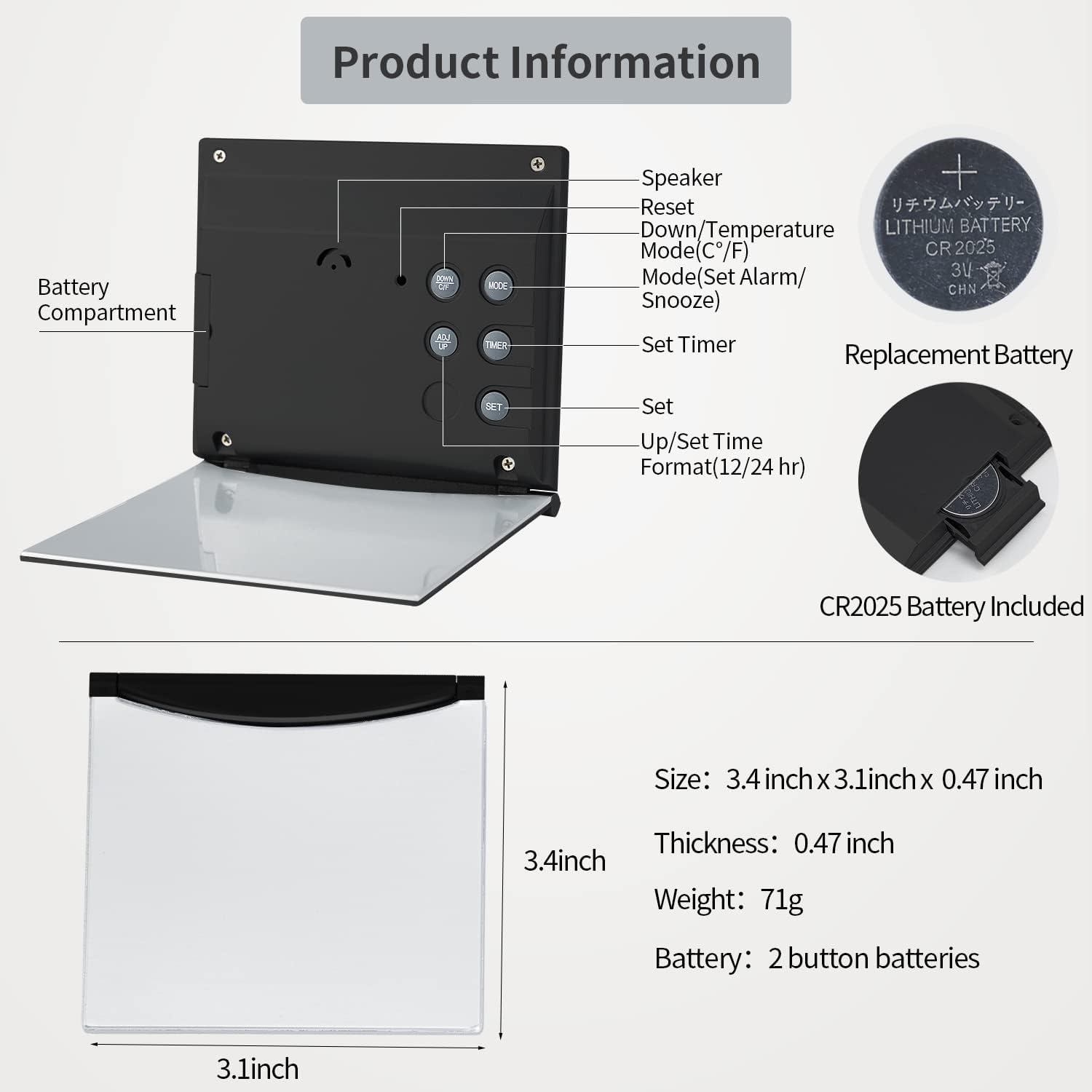
Image: Rear view of the clock, highlighting the battery compartment and the five control buttons.
2. Initial Time and Date Setting
After battery installation, the clock will power on. Follow these steps to set the correct time and date:
- Press the MODE button to cycle through Time, Alarm, and Timer modes. Stop when the time display is active.
- Press and hold the SET button until the hour digit flashes.
- Use the UP or DOWN buttons to adjust the hour. Pay attention to AM/PM indicators if in 12-hour format.
- Press SET again to move to minutes, then use UP or DOWN to adjust.
- Continue pressing SET to cycle through Year, Month, and Date settings, adjusting each with UP or DOWN. Ensure the correct year is set for accurate day of the week display.
- Press SET one last time to exit setting mode.
Operating Instructions
1. Display Modes
The clock displays time, date, day of the week, and temperature. You can switch between 12-hour and 24-hour time formats by pressing the UP/SET button while in time display mode (not setting mode).
2. Setting the Alarm
- Press the MODE button until the alarm time is displayed (usually indicated by an alarm icon).
- Press and hold the SET button until the alarm hour flashes.
- Use the UP or DOWN buttons to set the desired alarm hour.
- Press SET again to move to alarm minutes, then adjust with UP or DOWN.
- Press SET to confirm.
- To activate/deactivate the alarm, press the UP button while in alarm display mode. An alarm icon will appear/disappear on the screen.

Image: The clock positioned on a bedside table, illustrating its use as an alarm clock.
3. Alarm Sound Selection
The clock offers 8 different alarm melodies. While in alarm setting mode (after setting the alarm time), press the DOWN button to cycle through the available alarm sounds.
4. Snooze Function
When the alarm sounds, press the MODE button (often labeled 'SNZ' or 'Snooze') to activate the snooze function. The alarm will temporarily stop and sound again after a few minutes.
5. Timer Function
The clock includes a countdown timer:
- Press the MODE button until 'TIMER' or a timer icon is displayed.
- Press and hold the SET TIMER button until the timer digits flash.
- Use the UP or DOWN buttons to set the desired countdown time (hours, minutes, seconds).
- Press SET TIMER to start the countdown.
- To pause/resume, press SET TIMER. To reset, press the RESET button.

Image: The clock demonstrating its timer function for both study and kitchen use.
6. Temperature Display
The clock displays temperature in either Celsius or Fahrenheit. To switch between units, press the DOWN/TEMP button while in time display mode.
Maintenance
1. Battery Replacement
When the display dims or functions become erratic, it's time to replace the battery. Refer to the 'Battery Installation' section under Setup for instructions. Always use a CR2025 battery.
2. Cleaning
To clean the clock, gently wipe the surface with a soft, dry cloth. Avoid using abrasive cleaners or solvents, which can damage the display or casing.
3. Flexible Cover Care
The flexible cover protects the screen from scratches. Ensure it is properly closed when transporting the clock. When used as a stand, position it firmly on a flat surface.

Image: Illustration of the clock's flexible cover, demonstrating how it folds to act as a stable display stand.
Troubleshooting
- Clock not working or display is blank: Check battery installation. Ensure the CR2025 battery is correctly inserted with the positive side up. Replace with a new battery if necessary.
- Incorrect time or date: Re-enter the time and date settings as described in the 'Initial Time and Date Setting' section. Ensure the correct year is set.
- Alarm is too quiet or not sounding: The alarm is designed to be gentle. Ensure the alarm is activated (alarm icon visible). If the sound is still insufficient, consider the clock's intended use as a gentle wake-up device.
- Temperature reading is inaccurate or frozen: The clock is designed for indoor use and may not function optimally in extreme temperatures, particularly freezing conditions. If exposed to freezing temperatures, remove and reinsert the battery to reset.
Specifications
| Brand | KANBIT |
| Model Number | KB-2207 |
| Display Type | Digital LCD |
| Dimensions | 3.1" W x 3.4" H (0.47" Thickness) |
| Weight | 2.12 ounces |
| Power Source | 1 x CR2025 Battery (included, plus 1 extra) |
| Material | Plastic |
| Special Features | Alarm, Silent Clock, Temperature Display, Date, Day of Week, 12/24H Format, Timer |

Image: Dimensional diagram of the clock, indicating its width and height for reference.

Image: The clock's compact size is demonstrated by showing it held in a hand and fitting into a small bag, emphasizing its portability.
Warranty and Support
Warranty Information
This KANBIT product comes with a one-year limited warranty from the date of purchase. This warranty covers manufacturing defects under normal use.
Customer Support
For any questions, concerns, or warranty claims, please contact KANBIT customer support through the Amazon buyer center. We aim to respond promptly to assist you.