1. Introduction
This manual provides essential information for the installation, operation, and maintenance of your SAMSUNG Auto Rotating TV Wall Mount. This mount is designed to enhance your viewing experience by allowing your compatible television to rotate between horizontal (landscape) and vertical (portrait) orientations.
The Auto Rotating Wall Mount is compatible with 55-inch and 65-inch televisions from the 2022 series, including The Frame (LS03B), QN95B, QN900B, QN800B, and QN700B models. It supports VESA 400x300 mounting patterns.
Key features include:
- Flexible Viewing: Enjoy content in either vertical or horizontal orientation.
- Enhanced Mobile Mirroring: Utilize the full screen when mirroring mobile content from compatible Samsung devices (Android 10 or higher).
2. Safety Information
Please read all safety instructions before installation and use to prevent injury or damage to your product. Keep this manual for future reference.
- Professional Installation Recommended: Due to the complexity and weight of televisions, professional installation is highly recommended to ensure proper and secure mounting.
- Wall Structure: Ensure the wall structure can support the combined weight of the mount and your television. Consult a qualified professional if unsure.
- Cable Management: Properly route all cables to prevent pinching, binding, or damage during rotation. Ensure cables have sufficient slack.
- Obstruction-Free Zone: Maintain a clear area around the television to allow for unobstructed rotation. Avoid placing objects or furniture that could interfere with the movement.
- Power Disconnection: Always disconnect power to the television and mount before performing any maintenance or adjustments.
3. Package Contents
The SAMSUNG Auto Rotating TV Wall Mount package typically includes the main rotating mechanism, wall bracket, TV attachment bracket, power adapter, and various screws and mounting hardware. Please verify all components are present against the packing list provided in your product box before beginning installation.

Figure 3.1: Overview of the SAMSUNG Auto Rotating TV Wall Mount components. This image displays the main circular rotating plate and the rectangular wall bracket, illustrating the primary parts included in the package.

Figure 3.2: Angled view of the rotating mechanism. This image provides a detailed perspective of the mount's rotating components, showing its structural design.
4. Setup and Installation
Installation of the Auto Rotating TV Wall Mount requires careful attention to detail. For comprehensive, step-by-step instructions, please refer to the dedicated installation guide included with your product or consult official Samsung installation videos available online. Professional installation is strongly recommended.
4.1 Key Installation Considerations
- Wall Type: Ensure the mount is installed on a suitable wall type (e.g., wood studs, concrete) using appropriate anchors and fasteners.
- Leveling: Accurate leveling is crucial for proper rotation and aesthetic alignment.
- Cable Routing: When routing cables, ensure they are not too tight or prone to binding during the rotation process. Leave sufficient slack to accommodate movement.
- Clearance: Verify that there are no protrusions or uneven areas on the wall that could interfere with the mount's rotation.

Figure 4.1: Rear view of a television with the mount installed. This image shows how the circular mount plate attaches to the back of the TV.

Figure 4.2: Side profile of a mounted television. This image demonstrates the minimal distance between the TV and the wall when installed with the rotating mount.
5. Operating Instructions
5.1 Rotating the Television
The Auto Rotating Wall Mount allows you to switch your television's orientation between landscape and portrait modes. This function is typically controlled via your Samsung TV's remote control.
- Standard Operation: Locate the dedicated rotate button on your Samsung remote control (often depicted with a circular arrow icon). Pressing this button will initiate the rotation.
- For 2024 Samsung Frame TVs: If you experience issues with rotation on newer models, a workaround has been identified:
- To enable the feature, hold down the top left settings button on your remote for approximately 5-10 seconds.
- Once enabled, you can rotate the mount by long-pressing the Home button on your remote.

Figure 5.1: Remote control with auto-rotate function. This image shows a Samsung remote with the rotate button clearly marked, demonstrating its use for switching TV orientation.
5.2 Mobile Mirroring
The mount facilitates an optimized mobile mirroring experience, allowing your mobile content to fill the entire TV screen without black bars when rotated to match your phone's orientation.
- Compatibility: Mobile mirroring with full-screen optimization is supported only on Samsung mobile devices running Android version 10 or higher.
- Process: Initiate screen mirroring from your compatible Samsung mobile device to your television. The TV will automatically adjust its orientation to match your phone's display, providing a seamless full-screen view.
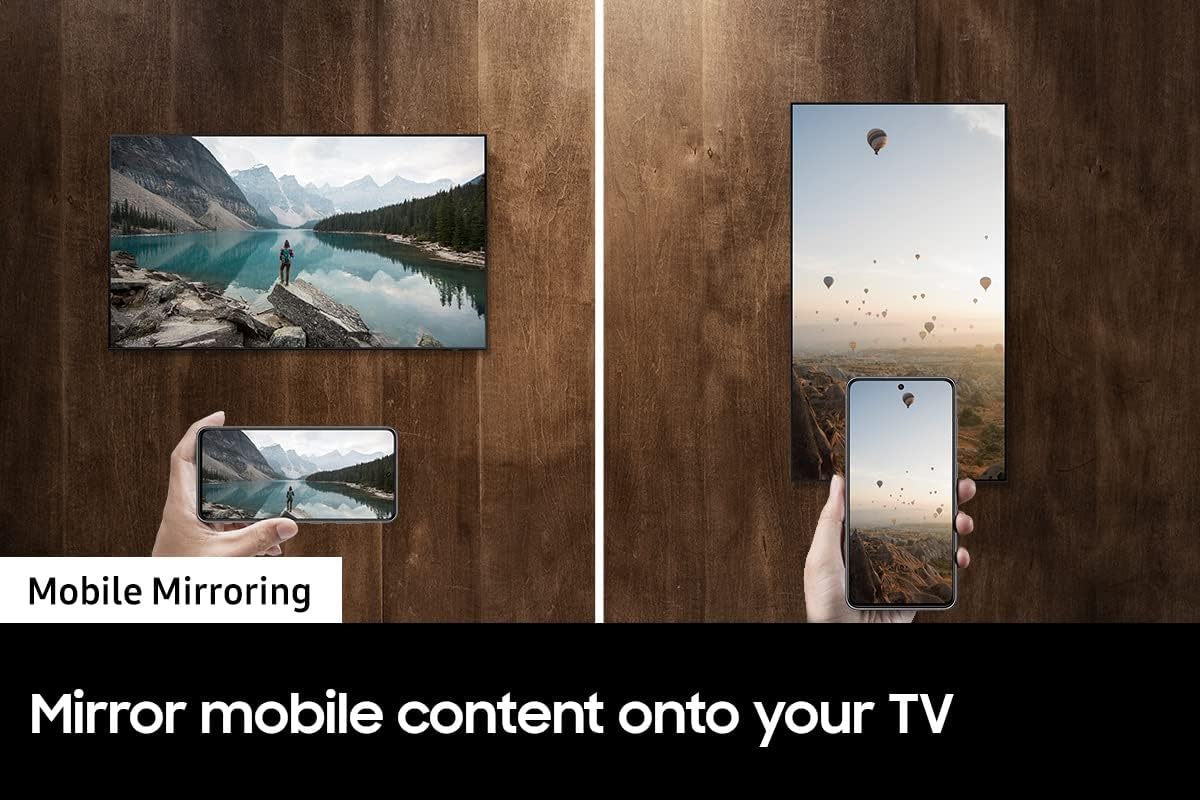
Figure 5.2: Mobile mirroring in action. This image illustrates how a smartphone's display is mirrored onto the TV, adapting to both portrait and landscape orientations.
6. Compatibility
The SAMSUNG Auto Rotating TV Wall Mount (Model VG-ARAB43WMTZA) is specifically designed for use with the following Samsung TV models from the 2022 series:
- The Frame: LS03B (QN65LS03BAFXZA)
- QN95B Series: QN55QN95BAFXZA, QN65QN95BAFXZA
- QN900B Series: QN65QN900BFXZA
- QN800B Series: QN65QN800BFXZA
- QN700B Series: QN55QN700BFXZA, QN65QN700BFXZA
Please verify your TV model number to ensure compatibility before installation. While the mount is physically compatible with some newer models like the 2024 Frame TVs, the automatic rotation functionality may require specific software updates or alternative activation methods as described in the Operating Instructions section.
7. Maintenance
Regular maintenance helps ensure the longevity and proper functioning of your Auto Rotating TV Wall Mount.
- Cleaning: Gently wipe the mount's surfaces with a soft, dry cloth. Avoid abrasive cleaners or solvents.
- Cable Inspection: Periodically check all cables connected to the TV and mount for any signs of wear, fraying, or improper routing that could impede rotation.
- Fastener Check: Occasionally inspect all mounting screws and fasteners to ensure they remain tight and secure. Do not overtighten.
- Obstruction Check: Ensure the area around the TV remains clear of any objects that could obstruct the rotation mechanism.
8. Troubleshooting
If you encounter issues with your Auto Rotating TV Wall Mount, refer to the following common problems and solutions:
| Problem | Possible Cause / Solution |
|---|---|
| TV does not rotate automatically. |
|
| Rotation is noisy or rough. |
|
| Cables become tangled or damaged during rotation. |
|
| Mobile mirroring does not fill the screen. |
|
9. Specifications
| Feature | Specification |
|---|---|
| Brand | SAMSUNG |
| Model Number | VG-ARAB43WMTZA |
| Compatible TV Sizes | 55” & 65” Televisions |
| VESA Compatibility | 400x300 |
| Mounting Type | Wall Mount |
| Movement Type | Rotate |
| Material | Metal |
| Color | Black |
| Product Dimensions | 0.96 x 20.16 x 18.03 inches |
| Item Weight | 14.74 pounds |
| UPC | 887276644653 |
10. Warranty and Support
For warranty information and technical support, please refer to the warranty card included with your product or visit the official SAMSUNG support website. You can typically find detailed support resources, FAQs, and contact information for customer service there.
Keep your proof of purchase for warranty claims.


