
1. Product Overview
The COSTWAY Home Dehumidifier is designed to efficiently remove excess moisture from your indoor environment, creating a healthier and more comfortable living space. This model can remove up to 50 liters of moisture per day and is suitable for areas up to 60 square meters. It features multiple operating modes, two fan speeds, and can be controlled via a touch panel or a Wi-Fi enabled smartphone application. Key features include a 24-hour timer, overflow protection, and options for both manual and continuous drainage.

Figure 1: Front view of the COSTWAY Home Dehumidifier, showcasing its compact and modern design.
Practical Details

Figure 2: This image highlights practical design elements including integrated portable handles for easy movement, smooth-rolling wheels for mobility, a clear visible water level indicator on the tank, and a dedicated storage area for the power cord.
2. Important Safety Instructions
Please read all instructions carefully before using this appliance and retain them for future reference. Failure to follow these instructions may result in electric shock, fire, or serious injury.
- Ensure the power supply voltage matches the rating label on the dehumidifier.
- Do not operate the dehumidifier with a damaged cord or plug. If the cord is damaged, it must be replaced by the manufacturer or a qualified service agent.
- Always place the unit on a stable, level surface to prevent tipping and water spillage.
- Keep the appliance at least 20 cm away from walls or other objects to ensure proper airflow.
- Do not insert fingers or foreign objects into the air inlet or outlet.
- Unplug the dehumidifier before cleaning, moving, or performing any maintenance.
- This appliance is not intended for use by persons (including children) with reduced physical, sensory, or mental capabilities, or lack of experience and knowledge, unless they have been given supervision or instruction concerning use of the appliance by a person responsible for their safety.
- Do not use the appliance in areas where flammable liquids or gases are stored.
3. Package Contents
Upon unpacking, please ensure all items listed below are present and undamaged:
- 1 x COSTWAY Home Dehumidifier
- 1 x 100 cm Drain Hose
- 1 x Instruction Manual
4. Setup
4.1 Unpacking
Carefully remove the dehumidifier from its packaging. Retain all packaging materials for future storage or transport.
4.2 Placement
Place the dehumidifier on a firm, level surface in the area where dehumidification is desired. Ensure there is at least 20 cm of clear space around the air inlet and outlet for optimal performance. Avoid placing the unit near heat sources or in direct sunlight.

Figure 3: The dehumidifier can be effectively placed in various rooms such as living rooms, bedrooms, bathrooms, and basements to manage humidity.
4.3 Power Connection
Plug the power cord into a grounded electrical outlet. The unit is now ready for operation.
5. Operating Instructions
5.1 Control Panel Overview

Figure 4: A close-up of the intuitive touch control panel featuring an LED display. Labels indicate functions such as 24-hour timer, fan speed (high/low), 'Water Full' indicator, humidity level adjustment, 4 modes (saving, fan, automatic dehumidification, continuous drying), and power on/off.
5.2 Power On/Off
Press the POWER button to turn the dehumidifier on or off.
5.3 Setting Humidity Level
In Automatic Dehumidification mode, press the ADD or MINUS buttons to set your desired humidity level between 30% and 80%.
5.4 Operating Modes
Press the MODE button to cycle through the available modes:
- Automatic Dehumidification: The unit will automatically turn on or off based on the difference between the ambient humidity and your set humidity level.
- Continuous Drying: Operates continuously regardless of ambient humidity, ideal for drying clothes.
- Sleep Mode: Indicators turn off or dim automatically to ensure a comfortable and undisturbed sleeping environment. The maximum noise level is less than 46 dB.
- Fan Mode: The fan operates at selected speed, and the display shows the ambient temperature.
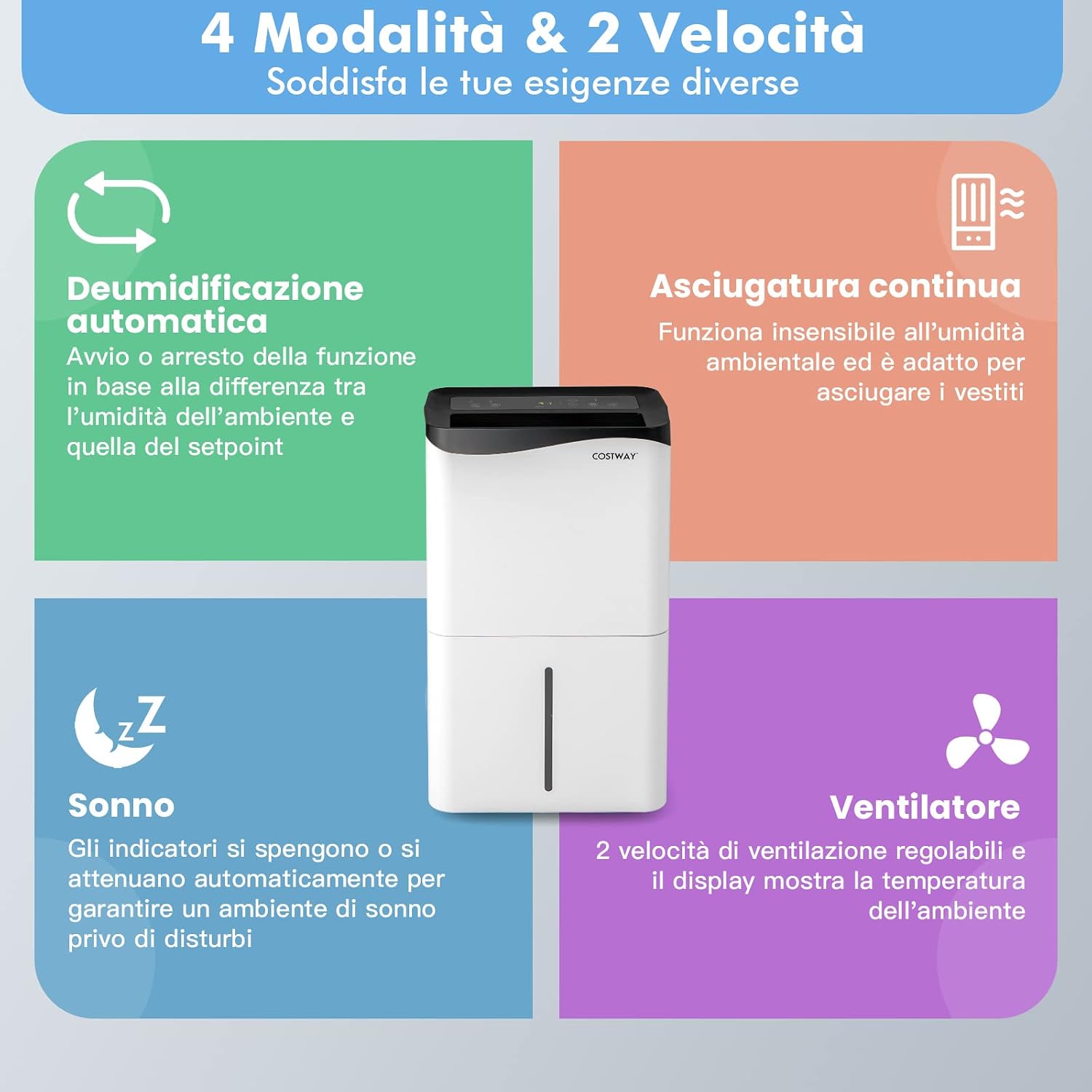
Figure 5: A visual guide detailing the four operating modes: Automatic Dehumidification, Continuous Drying, Sleep Mode, and Fan Mode, along with the two available fan speeds. Each mode is described with its function.

Figure 6: An image depicting the dehumidifier in a bedroom setting, emphasizing its quiet operation (below 46 dB) suitable for peaceful sleep. It compares its noise level to a library, office, and street.
5.5 Fan Speed
Press the SPEED button to switch between high and low fan speeds.
5.6 Timer Function
Press the TIMER button to set the 24-hour timer for automatic power-on or power-off.
5.7 Wi-Fi Control
The dehumidifier can be controlled remotely using the 'Smart Life' app, available for Android and iOS devices. Follow the app's instructions for pairing and remote operation.

Figure 7: A user interacting with the 'Smart Life' app on a smartphone to control the dehumidifier, highlighting the Wi-Fi connectivity and ease of remote operation.
6. Water Drainage
The dehumidifier offers two drainage options: manual and continuous.
6.1 Manual Drainage
When the 5-liter water tank is full, the unit will automatically shut off and emit an audible alert. Carefully remove the water tank from the unit and empty the collected water. Reinsert the tank firmly until it clicks into place.
6.2 Continuous Drainage
For continuous operation without needing to empty the tank, attach the included 100 cm drain hose to the continuous drainage port on the back of the unit. Ensure the hose is directed downwards to a suitable drain or container, allowing gravity to facilitate water flow.
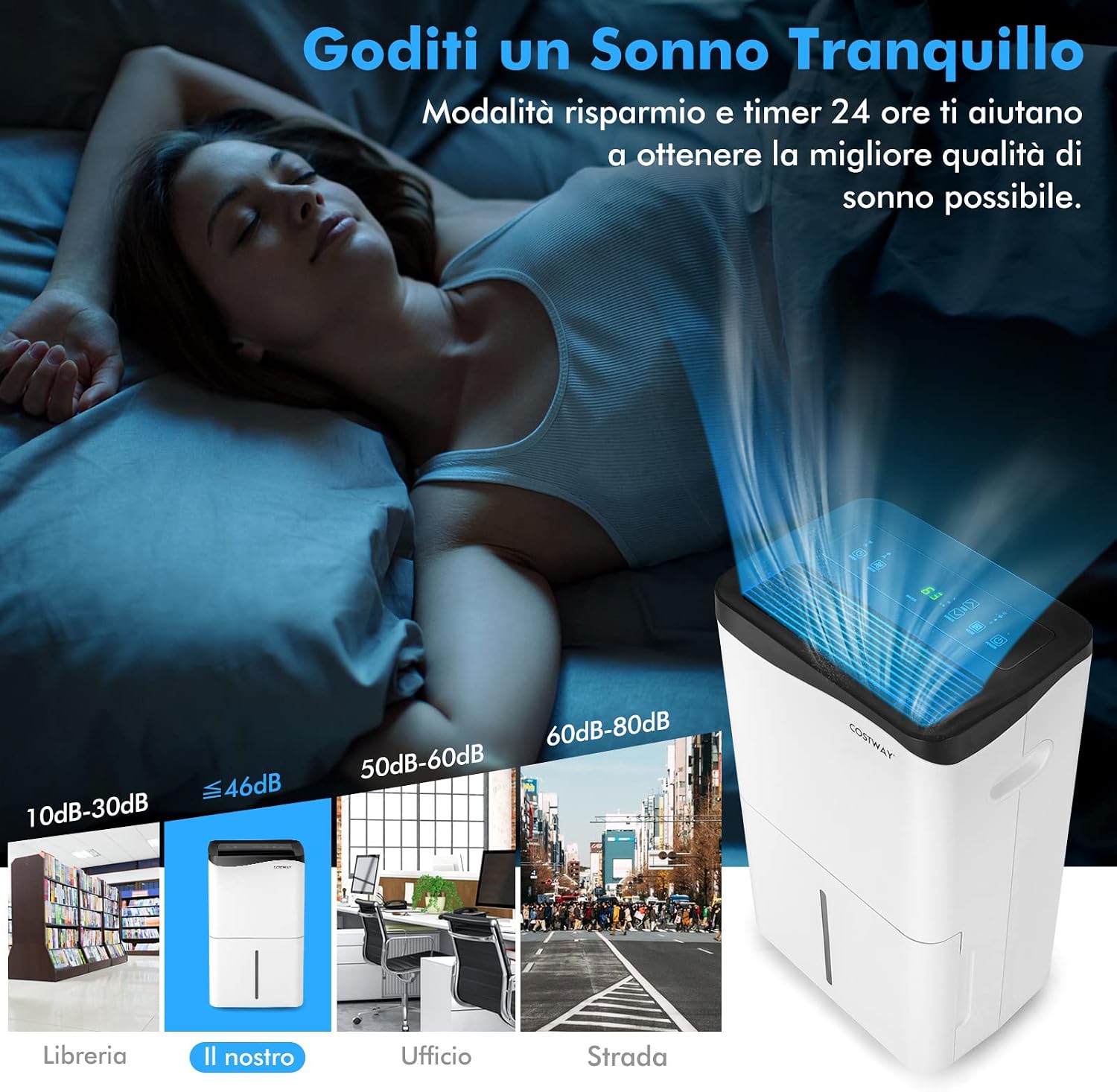
Figure 8: This image illustrates both manual and continuous drainage options. Manual drainage shows the removable 5L water tank being emptied, with an overflow protection feature. Continuous drainage shows the connection point for the included 100cm drain hose.
7. Maintenance
Regular maintenance ensures optimal performance and extends the lifespan of your dehumidifier.
7.1 Cleaning the Air Filter
The high-density air filter is removable and washable. It is recommended to clean the filter regularly (e.g., every two weeks or as needed) to prevent dust buildup and maintain air quality. To clean, remove the filter, wash it with mild detergent and water, rinse thoroughly, and allow it to air dry completely before reinserting. You may also use a vacuum cleaner to remove dust from the surface.

Figure 9: This image demonstrates the removable and washable high-density air filter, showing how it can be easily detached for regular cleaning to maintain a healthy and comfortable indoor environment.
7.2 Cleaning the Exterior
Wipe the exterior of the unit with a soft, damp cloth. Do not use abrasive cleaners or solvents.
7.3 Storage
If storing the dehumidifier for an extended period, ensure the water tank is empty and clean, and the filter is clean and dry. Store the unit in a cool, dry place, preferably in its original packaging.
8. Troubleshooting
If you encounter issues with your dehumidifier, please refer to the following common problems and solutions:
| Problem | Possible Cause | Solution |
|---|---|---|
| Dehumidifier does not turn on. | No power supply; power cord not plugged in; water tank full or not properly inserted. | Check power connection; empty and reinsert water tank correctly. |
| Unit is running but not collecting water. | Ambient humidity is too low; temperature is too low; air filter is clogged. | Ensure ambient humidity is above 30%; ensure room temperature is above 5°C; clean the air filter. |
| Unit is noisy. | Unit not on a level surface; fan obstruction. | Place on a level surface; check for obstructions in the fan area. |
| Wi-Fi connection issues. | Incorrect Wi-Fi password; router too far; app not updated. | Verify Wi-Fi password; move unit closer to router; update 'Smart Life' app. |
If the problem persists after attempting these solutions, please contact customer support.
9. Specifications
| Feature | Detail |
|---|---|
| Brand | COSTWAY |
| Model Name | 50 L/24H 60 sqm |
| Dehumidification Capacity | 50 Liters per day |
| Coverage Area | 60 square meters |
| Water Tank Volume | 5 Liters |
| Product Dimensions (DxWxH) | 25.5P x 37l x 62H cm |
| Number of Speeds | 2 |
| Operating Modes | Automatic, Continuous Drying, Sleep, Fan |
| Special Features | LED power indicator, Touch Panel, Wi-Fi Control, 24H Timer, Overflow Protection |
| Color | White |
| Item Weight | 19 Kilograms |
| Components Included | 1 x Dehumidifier, 1 x Drain Hose |
| Country of Origin | China |
10. Warranty Information
This product comes with a manufacturer's warranty. Please refer to the warranty card included in your product packaging or visit the official COSTWAY website for detailed warranty terms and conditions. Keep your purchase receipt as proof of purchase for any warranty claims.
11. Customer Support
For technical assistance, troubleshooting beyond this manual, or spare parts, please contact COSTWAY customer support. Contact information can typically be found on the product packaging, the official COSTWAY website, or your purchase platform.