
1. Introduction
Welcome to the instruction manual for your Reidubo 24 Port Gigabit PoE Switch, Model P4826D-K. This document provides essential information for the proper installation, operation, and maintenance of your device. Please read this manual thoroughly before using the switch to ensure optimal performance and safety.
2. Product Overview
The Reidubo 24 Port Gigabit PoE Switch is an unmanaged network switch designed to provide power and data connectivity for various network devices. It features 24 Gigabit PoE+ ports and 2 Gigabit uplink ports, offering a total power budget of 400W.
2.1 Key Features
- Full Gigabit PoE Switch with 400W Power Output: Equipped with 24 10/100/1000 Mbps Base-TX RJ45 PoE+ ports and 2 Gigabit uplink ports, capable of transmitting both data and power simultaneously. The total PoE power output is 400W, with a maximum of 30W per port.
- Built-in Power Supply & 4KV Lightning Protection: Features an integrated 400W power supply, eliminating the need for an external power adapter. The 4KV lightning protection design enhances product stability in adverse weather conditions.
- Unmanaged Plug and Play Operation: Automatically detects connected devices and requires no software installation or configuration. Simply connect the power cord and network cables.
- Intelligent PD Detection & QoS Function: Automatically identifies if a connected device requires power. For non-PoE devices, power to the port is automatically turned off to prevent damage. Quality of Service (QoS) prioritizes important data transmission on ports 1-2 when the switch is operating at full capacity.
- VLAN Mode for Network Segmentation: Offers a VLAN mode where PoE ports are isolated from each other but can communicate with the uplink ports. This improves local network data transmission performance and enhances security for applications like surveillance systems.
- Fanless Silent Operation: Designed without a fan for quiet operation, making it suitable for noise-sensitive environments.
- Durable Metal Casing: Constructed with a robust alloy steel case for enhanced durability and efficient heat dissipation.
- Multiple Installation Options: Supports both desktop placement and 19-inch rackmount installation.
2.2 Front Panel Layout
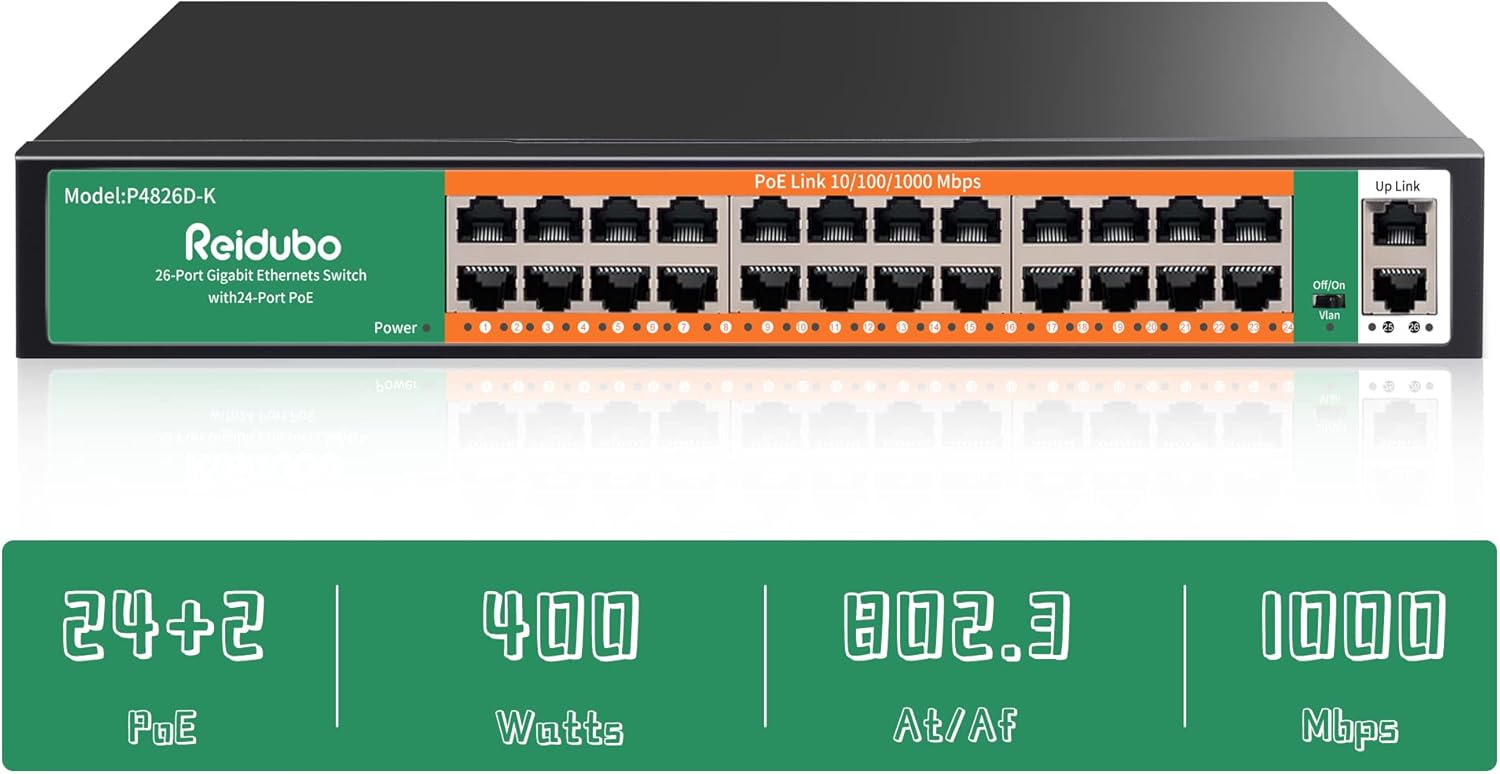
The front panel of the Reidubo 24 Port Gigabit PoE Switch features 24 PoE+ Gigabit Ethernet ports, 2 Gigabit uplink ports, a power indicator LED, and a VLAN mode switch. Each port has corresponding LED indicators for link/activity status.
2.3 Rear Panel Layout

The rear panel of the switch includes the AC power input connector (AC/IN 100-240V) for connecting the power cord.
3. Setup and Installation
3.1 Package Contents
Verify that your package contains the following items:
- Reidubo 24 Port Gigabit PoE Switch (Model P4826D-K)
- AC Power Cord
- Rackmount Ears (2)
- Mounting Screws
- User Manual
3.2 Physical Installation
Desktop Installation
Place the switch on a flat, stable surface. Ensure adequate ventilation around the device to prevent overheating.
Rackmount Installation
For 19-inch rack installation, attach the included rackmount ears to the sides of the switch using the provided screws. Then, secure the switch into a standard 19-inch server rack.

This image illustrates the process of installing the Reidubo PoE switch into a standard 19-inch server rack using the provided rackmount kit.
3.3 Connecting the Switch

The diagram above demonstrates the plug-and-play connection process for various devices with the Reidubo PoE switch.
- Power Connection: Connect the AC power cord to the power input on the rear panel of the switch and then to a power outlet.
- PoE Device Connection: Connect your Power over Ethernet (PoE) compatible devices, such as IP cameras, wireless access points (APs), or IP phones, to any of the 24 PoE+ ports (ports 1-24). The switch will automatically detect and provide power to these devices.
- Non-PoE Device Connection: Connect non-PoE devices, such as computers or standard network printers, to the uplink ports or any PoE port (the switch will not supply power to non-PoE devices).
- Network Uplink: Connect the 2 Gigabit uplink ports to your router, NVR (Network Video Recorder), or another network switch to integrate the PoE switch into your existing network infrastructure.
4. Operating Instructions
4.1 Powering On
Once the power cord is connected, the switch will automatically power on. The 'Power' LED indicator on the front panel will illuminate, indicating that the device is operational.
4.2 LED Indicators
The front panel LEDs provide status information:
- Power LED: Indicates the power status of the switch.
- Link/Act LEDs (per port): Indicates a network link when lit and data activity when blinking.
4.3 VLAN Mode Operation

The Reidubo PoE switch features a physical switch on the front panel to enable or disable VLAN mode. In standard mode (VLAN off), all PoE ports can communicate freely with each other. In VLAN mode (VLAN on), the PoE ports are isolated from each other, meaning devices connected to different PoE ports cannot directly communicate. However, all PoE ports can still communicate with the uplink ports. This feature is particularly useful for security applications, such as isolating IP cameras to prevent unauthorized access or reduce broadcast storms, while still allowing them to send data to a central NVR connected to an uplink port.
4.4 Intelligent PD Detection and QoS
The switch incorporates Intelligent PD (Powered Device) Detection, which automatically senses if a connected device requires Power over Ethernet. If a non-PoE device is connected, the switch will not supply power to that port, protecting the device from potential damage. Additionally, the Quality of Service (QoS) function prioritizes data traffic on ports 1-2, ensuring critical data (e.g., from high-priority cameras) receives preferential bandwidth during high network load.
5. Maintenance
The Reidubo 24 Port Gigabit PoE Switch is designed for reliable, fanless operation, minimizing maintenance requirements. To ensure longevity and optimal performance:
- Keep the switch in a well-ventilated area to facilitate natural heat dissipation.
- Regularly inspect the ports and cables for any physical damage or loose connections.
- Clean the exterior of the switch with a soft, dry cloth as needed. Avoid using liquid cleaners or solvents.
- Ensure the power supply is stable and within the specified voltage range.
6. Troubleshooting
If you encounter issues with your Reidubo PoE Switch, please refer to the following basic troubleshooting steps:
- No Power: Check if the power cord is securely connected to both the switch and the power outlet. Verify that the power outlet is functional.
- No Link/Activity on Port: Ensure the Ethernet cable is properly connected to both the switch port and the connected device. Check if the connected device is powered on and functioning correctly. Try a different Ethernet cable or port.
- PoE Device Not Receiving Power: Confirm that the connected device is PoE compatible (802.3af/at standard). Check the cable length; excessive cable length can lead to power loss. Ensure the total power consumption of all connected PoE devices does not exceed the switch's 400W power budget.
- Network Connectivity Issues: If devices cannot communicate, check the VLAN mode switch. If VLAN mode is enabled, devices on different PoE ports cannot communicate directly but should still reach devices connected to uplink ports. Ensure your router or NVR is properly connected to an uplink port.
- Intermittent Operation: If the switch stops working randomly, try power cycling the device (unplug and replug the power cord). Ensure the operating environment is within the specified temperature range.
7. Technical Specifications
| Feature | Specification |
|---|---|
| Brand | Reidubo |
| Model Number | P4826D-K |
| Number of Ports | 24 (PoE+) + 2 (Uplink) |
| Interface Type | PoE, RJ45 |
| Data Transfer Rate | 28 Gigabits Per Second (Switching Capacity) |
| PoE Standard | 802.3af/at |
| Total PoE Power | 400W |
| Max Power Per Port | 30W |
| Product Dimensions | 12.24 x 7.17 x 1.77 inches |
| Item Weight | 5.04 pounds |
| Case Material | Alloy Steel |
| Upper Temperature Rating | 40 Degrees Celsius |
| UPC | 755426770005 |
8. Warranty and Support
Every Reidubo switch undergoes rigorous testing for reliability, quality, and performance. We provide a one-year warranty for all products and offer lifetime technical support. For assistance, please contact our customer service team.