
Introduction
This manual provides instructions for the Brawu GX-IR03 Infrared Remote Control, designed for use with compatible gym timer clocks. Please read this manual thoroughly before operating the device to ensure proper function and longevity.
Package Contents
- 1 x Brawu GX-IR03 Remote Control
- Note: AAA batteries are not included and must be purchased separately.
Setup
1. Battery Installation
The GX-IR03 remote control requires two (2) AAA batteries for operation. Follow these steps to install the batteries:
- Locate the battery compartment cover on the back of the remote control.
- Press down on the tab and slide the cover off.
- Insert two AAA batteries, ensuring the positive (+) and negative (-) terminals align correctly with the markings inside the compartment.
- Slide the battery compartment cover back into place until it clicks securely.

Image: Rear view of the GX-IR03 remote control with the battery compartment visible.
2. Compatibility Check
Before use, verify that your gym timer clock is compatible with the Brawu GX-IR03 remote control. The model number of this remote is GX-IR03. Please ensure your original remote or timer specifications indicate compatibility with this model.
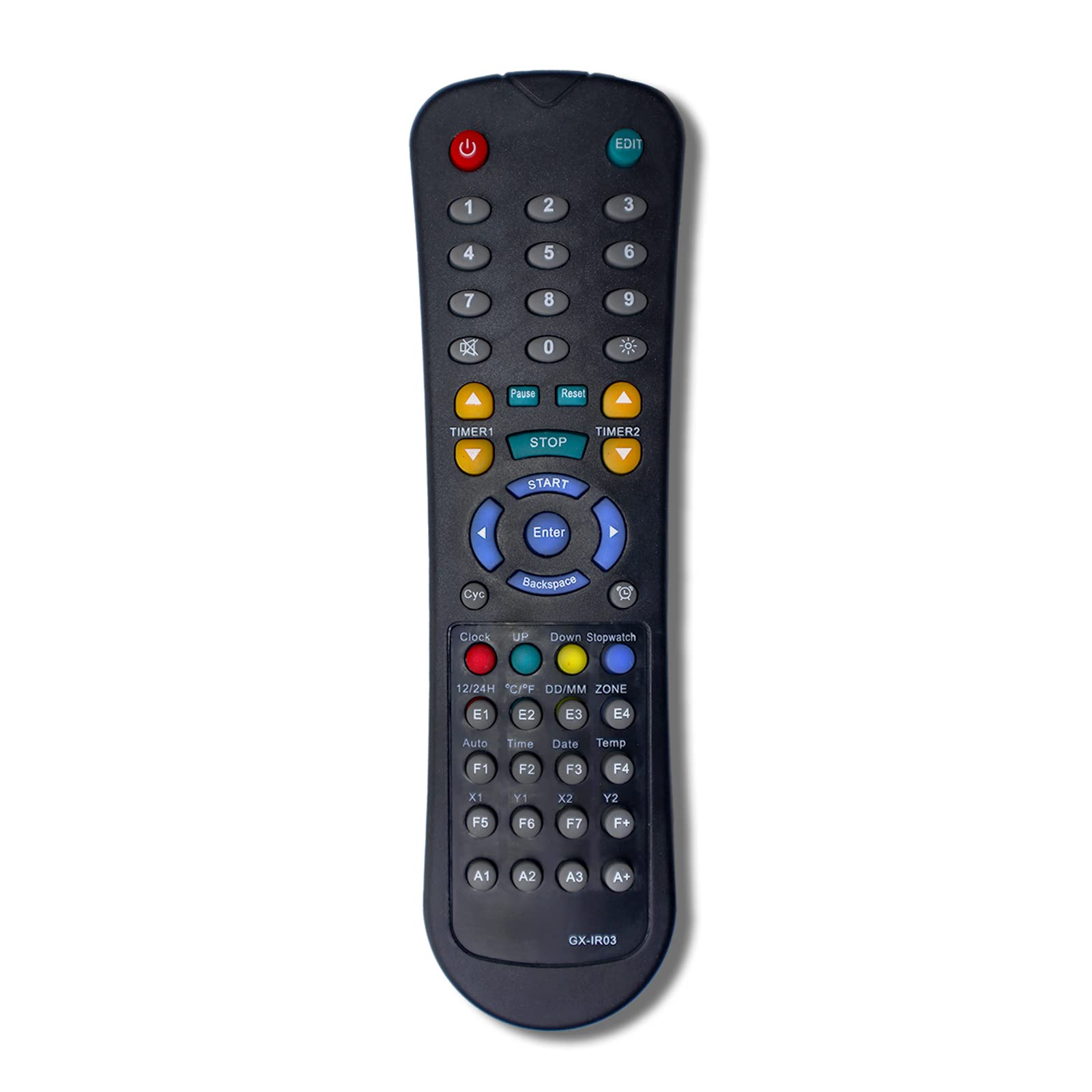
Image: Front view of the GX-IR03 remote control, highlighting the model number "GX-IR03" for verification.
Operating Instructions
The Brawu GX-IR03 remote control operates using infrared technology, providing stable and easy control over your compatible gym timer clock. Ensure a clear line of sight between the remote and the timer's infrared receiver.

Image: Full front view of the GX-IR03 remote control, displaying its button layout.
Button Functions Overview
The remote features 14 buttons designed for various functions on your gym timer. Specific functions may vary slightly depending on your timer model. Refer to your gym timer's manual for detailed button assignments.
- Power Button (⏻): Turns the timer on or off.
- Numeric Keypad (0-9): Used for entering time values or program numbers.
- EDIT Button: Enters or exits editing mode for timer settings.
- TIMER1 / TIMER2: Selects between different timer modes or presets.
- START / STOP / RESET / PAUSE: Controls the timer's operation (start, stop, reset, pause).
- Directional Arrows (UP, DOWN, LEFT, RIGHT) & ENTER: Navigates menus and confirms selections.
- BACKSPACE: Deletes the last entered digit or returns to the previous menu.
- Cyc (Cycle): Initiates or controls cycle functions.
- Clock / 12/24H: Displays current time or switches between 12-hour and 24-hour formats.
- UP / DOWN / Stopwatch: Adjusts values up/down or activates stopwatch mode.
- ZONE / DD/MM: Sets time zones or displays date in day/month format.
- E1-E4 / F1-F7 / A1-A3 / A+: Programmable function buttons, often used for quick access to preset timers or specific features.
Note: For detailed instructions on specific timer functions, please consult the user manual of your gym timer clock.
Maintenance
Cleaning
To clean the remote control, use a soft, dry cloth. Do not use liquid cleaners, abrasive pads, or chemical solvents, as these may damage the surface or internal components.
Battery Replacement
Replace batteries when the remote's range decreases or buttons become unresponsive. Always replace both AAA batteries at the same time with new ones. Dispose of used batteries according to local regulations.
Troubleshooting
- Remote not responding to timer:
- Ensure batteries are correctly installed and not depleted. Replace if necessary.
- Check for any obstructions between the remote and the timer's infrared receiver.
- Verify that the remote control's model number (GX-IR03) matches the compatibility requirements of your gym timer.
- Ensure you are within the maximum operating range (up to 10 meters).
- Buttons are hard to push or unresponsive:
- This may indicate low battery power. Replace batteries.
- Ensure the remote is clean and free of debris around the buttons.
Specifications
| Brand | Brawu |
| Model Name | GX-IR03 |
| Model Number | GX-IR03 (Mfr Part Number: WS-IR03) |
| Connectivity Technology | Infrared |
| Compatible Devices | Gym Timer Clock |
| Controller Type | Button Control |
| Button Quantity | 14 |
| Maximum Range | 10 Meters |
| Power Source | 2 x AAA Batteries (not included) |
| Color | Black |
| Special Feature | Ergonomic |
| UPC | 605182940269 |
| ASIN | B0B7N1TF34 |
Warranty Information
Specific warranty details for the Brawu GX-IR03 Remote Control are not provided in this manual. For information regarding warranty coverage, terms, and conditions, please refer to the product packaging or contact the seller directly.
Support
If you have any questions, encounter issues, or require further assistance with your Brawu GX-IR03 Remote Control, please contact the seller or manufacturer directly through your purchase platform. They can provide specific guidance and support for your product.