
1. Introduction
The GLUROO RGB LED Flood Light (Model GL-FL01) is designed to provide versatile and colorful illumination for both outdoor and indoor environments. This product features multiple color options and dynamic lighting modes, controllable via a remote. Its IP65 waterproof rating ensures durability and reliable performance in various weather conditions. This manual provides essential information for the safe and effective use of your GLUROO RGB LED Flood Light system.
2. Package Contents
Please verify that all items listed below are included in your package:
- 4 x GLUROO RGB LED Flood Lights
- 1 x Remote Control (with battery included)
- 1 x Power Adapter with Integrated Driver
- 1 x 12-meter Connection Cable
- 4 x Ground Stakes
- 8 x Screws
- 8 x Expansion Tubes
- 1 x User Manual
3. Safety Information
Read all safety instructions before installation and use. Failure to follow these instructions may result in electric shock, fire, or other hazards.
- Electrical Safety: Ensure the power supply matches the product's requirements (AC100-240V). Always disconnect power before installing, cleaning, or performing maintenance.
- Installation: Install the lights in a stable location. Ensure all connections are secure and properly sealed, especially for outdoor use.
- Water Resistance: The product has an IP65 rating, meaning it is protected against dust ingress and low-pressure water jets. It is suitable for outdoor use but must not be submerged in water.
- Heat: The flood lights generate heat during operation. Ensure adequate ventilation and do not cover the lights. The design includes heat dissipation fins to manage temperature.
- Children and Pets: Keep the product and its components out of reach of children and pets.
- Damage: Do not operate the product if any part is damaged. Contact customer support for assistance.
4. Setup
Follow these steps to set up your GLUROO RGB LED Flood Light system:
4.1. Installation Methods
The flood lights offer flexible installation options:
- Ground Mounting: Attach the ground stakes to the lights and firmly insert them into soft ground (e.g., garden, lawn).
- Wall Mounting: Use the provided screws and expansion tubes to secure the lights to a wall.
- Ceiling Mounting: Secure the lights to a ceiling using the provided screws and expansion tubes.
Each light features a 180° flexible adjustment bracket, allowing you to direct the light beam as needed.

Image: The GLUROO RGB LED Flood Light can be adjusted 180 degrees and installed as a wall light, lawn light, or ceiling light.

Image: Examples of indoor and outdoor applications, illustrating ceiling, wall, and ground mounting options.
4.2. Connecting the Lights
The four flood lights are designed to be connected in series. Each light connects to the main cable, with approximately 3 meters of separation between each light. The total length of the connection cable is 12 meters, plus additional cable for the power adapter.
- Connect each flood light to the main connection cable by aligning the connectors and twisting them securely until they are watertight.
- Connect the power adapter to the main connection cable.
- Plug the power adapter into a standard AC100-240V electrical outlet.

Image: A diagram illustrating the series connection of the four flood lights, showing 3-meter spacing between each light and overall dimensions of a single light unit.
5. Operating Instructions
The GLUROO RGB LED Flood Light system is controlled using the included remote control.
5.1. Remote Control Functions
The remote control allows you to manage various aspects of the lighting:
- ON/OFF: Press the 'ON' button to turn the lights on, and 'OFF' to turn them off.
- Color Selection: Choose from 8 distinct colors (Red, Green, Blue, Orange, Yellow, Pink, Purple, Warm White) using the dedicated color buttons.
- Brightness Adjustment: Use the brightness up/down buttons to adjust the light intensity across 10 levels.
- Lighting Modes: Select from 14 dynamic lighting modes, including 'BREATH', 'FLASH', 'FADE', 'RAINBOW', 'RANDOM', 'AUTO', 'WINK', 'RUN', and 'CHASER'.
- Speed Control: Adjust the speed of dynamic modes using the 'SPEED+' and 'SPEED-' buttons.
- Timer Function: Set the lights to automatically turn off after 2, 4, 6, or 8 hours using the '2H', '4H', '6H', '8H' buttons.
- Memory Function: The system retains the last selected settings (color, mode, brightness) when turned off and on again.
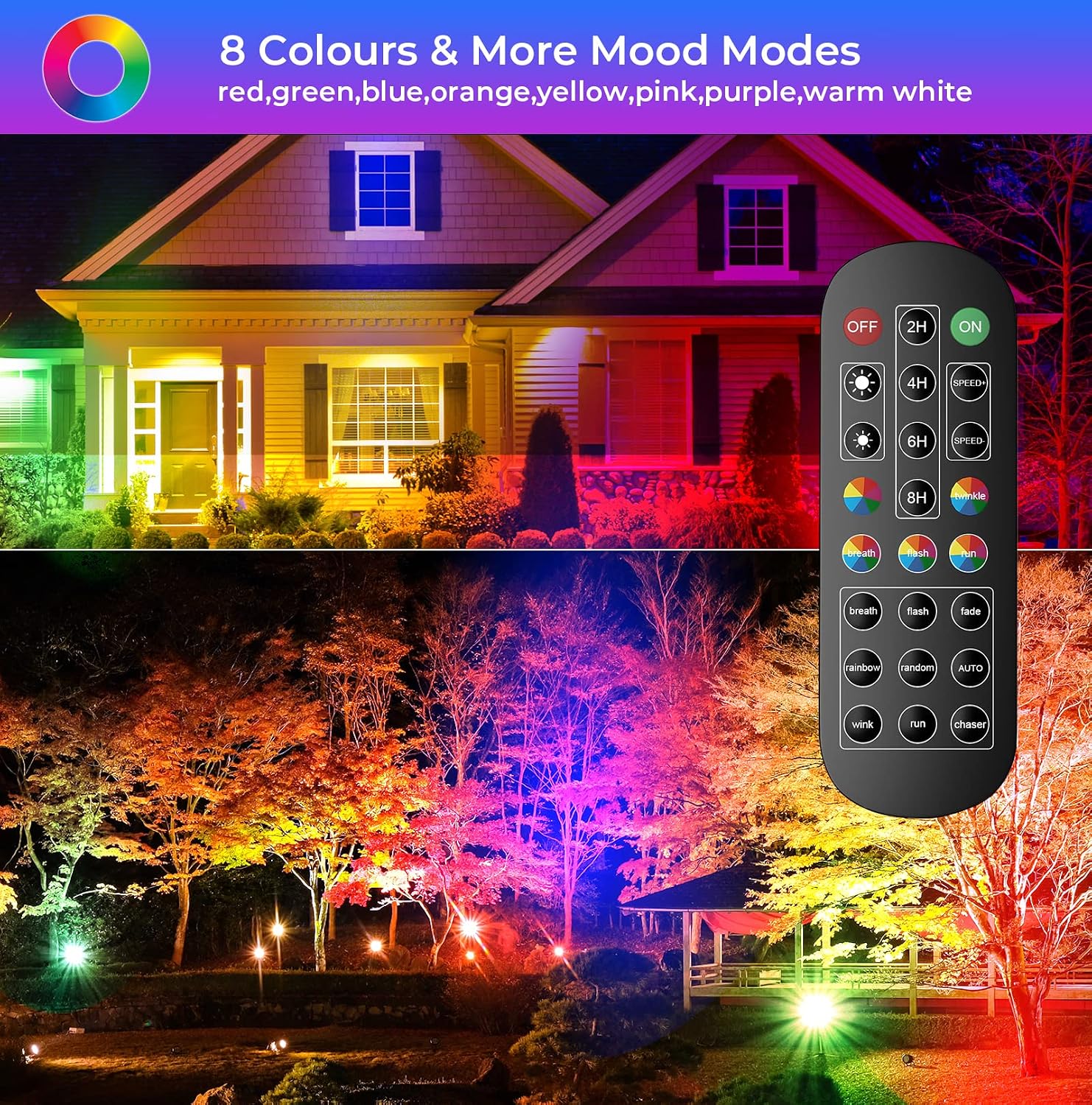
Image: The remote control displaying buttons for power, timer, brightness, color selection, and various mood modes. The lights are shown illuminating a house and garden in multiple colors.

Image: The remote control with brightness adjustment buttons, demonstrating the effect of different brightness levels on illuminated outdoor scenes.

Image: An illustration of the timing function, showing the light set to turn off automatically at 22:00, highlighting the convenience of scheduled operation.
5.2. Remote Control Range
The remote control has an effective sensing distance of approximately 10-12 meters.

Image: A visual representation of the remote control's effective sensing distance, indicating a range of 10-12 meters from the lights.
6. Maintenance
Regular maintenance ensures optimal performance and longevity of your flood lights.
- Cleaning: Periodically clean the surface of the lights with a soft, damp cloth. Do not use abrasive cleaners or solvents. Ensure the lights are off and unplugged before cleaning.
- Inspection: Regularly inspect the cables and connections for any signs of wear, damage, or loose fittings. Ensure all waterproof seals are intact.
- Storage: If storing the lights for an extended period, disconnect them from power, clean them, and store them in a dry, cool place.
7. Troubleshooting
If you encounter issues with your GLUROO RGB LED Flood Light, refer to the following common problems and solutions:
| Problem | Possible Cause | Solution |
|---|---|---|
| Lights do not turn on. | No power supply; Loose connection; Remote control battery depleted; Remote control out of range. | Check if the power adapter is plugged in and the outlet is functional. Ensure all cable connections are secure. Replace the remote control battery. Move closer to the lights (within 10-12m). |
| Remote control is unresponsive. | Remote control battery depleted; Remote control out of range; Obstruction between remote and lights. | Replace the remote control battery. Move closer to the lights (within 10-12m). Remove any obstructions. |
| Lights flicker or display incorrect colors. | Loose cable connection; Faulty light unit. | Check and secure all cable connections. If the problem persists, contact customer support. |
8. Specifications
Detailed technical specifications for the GLUROO RGB LED Flood Light (Model GL-FL01):
| Feature | Specification |
|---|---|
| Brand | GLUROO |
| Model Number | GL-FL01 |
| Dimensions (each light) | 13 x 2.8 x 24.5 cm |
| Total Weight | 1.85 kg |
| Power (Total) | 32W (4 x 8W LED lights) |
| Input Voltage | AC100-240V |
| Output Voltage | 24V/2A |
| Waterproof Rating | IP65 |
| Material | Metal (Chassis), Aluminum (Shade), Tempered Glass (Front) |
| Number of Lights | 4 |
| Colors | 8 RGB Colors (Red, Green, Blue, Orange, Yellow, Pink, Purple, Warm White) |
| Lighting Modes | 14 |
| Connection Cable Length | 12 meters (main cable) |
| Light Source Type | LED |
| Remote Control Battery | CR2025-2032 (included) |
| Energy Efficiency Class | E |

Image: The energy label for the GLUROO LED Flood Light, indicating an energy efficiency class of E. For more details, refer to the EPREL database.
9. Warranty and Support
GLUROO provides a warranty for this product to ensure customer satisfaction.
- Warranty Period: This product is covered by a 3-year warranty from the date of purchase.
- Customer Support: For technical assistance, warranty claims, or any questions regarding your GLUROO RGB LED Flood Light, please refer to the contact information provided on the product packaging or the official GLUROO website.