
Introduction
This manual provides comprehensive instructions for the Generic GE-OSR935 remote control, designed as an alternative replacement for the Osim UShape Machine Model OS935. Please read this manual carefully before use to ensure proper operation and longevity of your device.
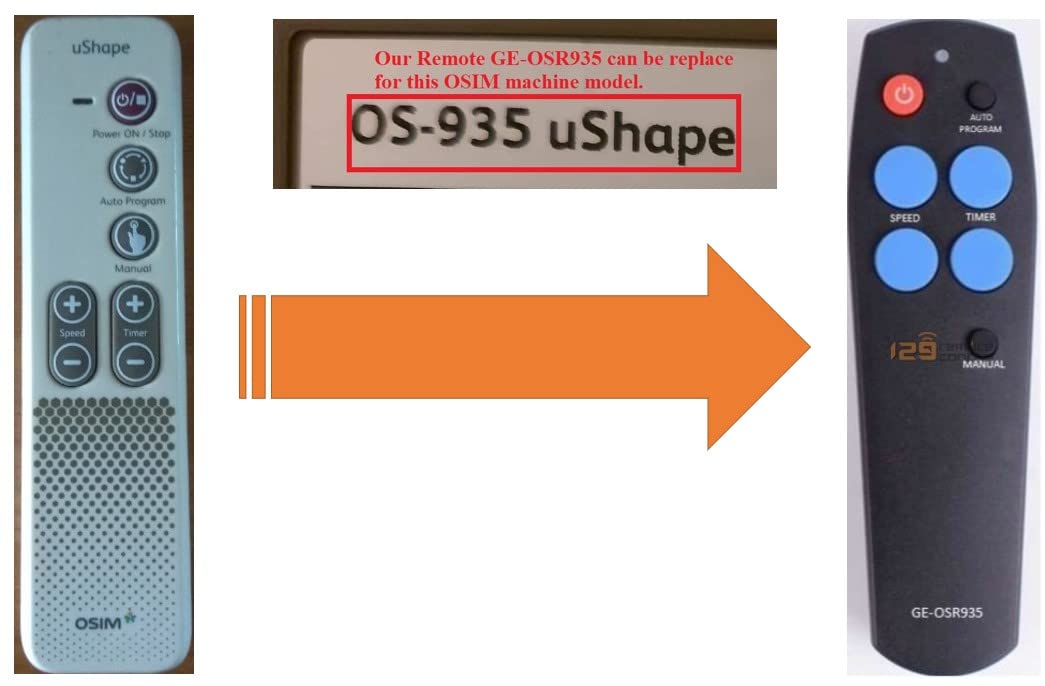
Image: The Generic GE-OSR935 remote control, a direct replacement for the Osim UShape OS935 machine.
Setup
1. Battery Installation
The remote control requires two (2) AAA batteries for operation.
- Locate the battery compartment cover on the back of the remote control.
- Slide the cover downwards or press the latch to open it.
- Insert two AAA batteries, ensuring the positive (+) and negative (-) terminals align correctly with the markings inside the compartment.
- Replace the battery compartment cover until it clicks securely into place.
2. Initial Use
This remote control is designed for direct use and is plug-and-play. No programming or pairing is required. Simply install the batteries, and it is ready to operate your Osim UShape Machine Model OS935.
Operating Instructions
The GE-OSR935 remote control functions identically to the original Osim UShape OS935 remote. Point the remote control directly at the Osim UShape machine's infrared receiver for optimal performance.
Button Functions:
- Power Button: Turns the Osim UShape machine ON or OFF.
- Mode Selection Buttons: Cycles through various massage modes or programs. Refer to your Osim UShape machine's manual for specific mode details.
- Intensity Adjustment Buttons: Increases or decreases the intensity of the massage.
- Timer Button: Adjusts the operating duration of the machine.
- (Note: Specific button labels and functions may vary slightly based on the original Osim UShape OS935 model. Consult your machine's original manual for detailed function descriptions.)
Maintenance
- Cleaning: Wipe the remote control with a soft, dry cloth. Do not use liquid cleaners, abrasive pads, or chemical solvents, as these may damage the surface or internal components.
- Battery Replacement: Replace batteries when the remote control's range decreases or it becomes unresponsive. Always replace both batteries simultaneously with new AAA batteries. Do not mix old and new batteries, or different types of batteries.
- Storage: Store the remote control in a cool, dry place away from direct sunlight and extreme temperatures. If storing for an extended period, remove the batteries to prevent leakage.
Troubleshooting
| Problem | Possible Cause | Solution |
|---|---|---|
| Remote control not responding. | Dead or incorrectly installed batteries. | Check battery orientation. Replace with new AAA batteries. |
| Reduced operating range. | Weak batteries. Obstruction between remote and machine. | Replace batteries. Ensure a clear line of sight to the Osim UShape machine's IR receiver. |
| Specific functions not working. | Machine-specific issue or remote malfunction. | Test with original remote (if available). Ensure the Osim UShape machine is powered on and functioning correctly. |
Specifications
- Model Number: GE-OSR935
- Compatibility: Osim UShape Machine Model OS935
- Connectivity Technology: Infrared (IR)
- Controller Type: Button Control
- Special Feature: Ergonomic design
- Power Source: 2 x AAA batteries (not included)
- Manufacturer: Singapore
Warranty Information
This product comes with a 1-month warranty from the date of purchase. This warranty covers manufacturing defects under normal use. It does not cover damage caused by misuse, accidents, unauthorized modifications, or improper battery installation.
For warranty claims, please retain your proof of purchase and contact the seller or manufacturer directly.
Support
For further assistance or inquiries regarding the GE-OSR935 remote control, please refer to the seller's contact information provided at the time of purchase. You may also consult the original Osim UShape Machine Model OS935 user manual for machine-specific operations.