
1. Safety Information
Please read all safety instructions carefully before assembling and using the Pegasi 800 Indoor Table Tennis Table. Failure to follow these instructions may result in injury or damage to the product.
- Indoor Use Only: This table is designed for indoor use. While it can be used outdoors in good weather, it is not resistant to humidity or adverse weather conditions. Prolonged exposure to moisture will damage the table.
- Assembly: Assembly requires two adults. Follow the provided assembly manual carefully. Ensure all bolts and fasteners are securely tightened before use.
- Stability: Ensure the table is placed on a flat, stable surface. Use the adjustable feet to level the table if the surface is uneven.
- Folding/Unfolding: Exercise caution when folding and unfolding the table. Keep hands and fingers clear of moving parts to prevent pinching. Ensure the safety locking mechanisms are engaged when the table is in playing position, self-play position, or fully folded for storage.
- Children: Supervise children during assembly and use. Do not allow children to climb on or hang from the table.
- Moving the Table: Use the wheels to move the table. Engage the wheel brakes when the table is in its desired position to prevent accidental movement.
- Weight Limit: The table is designed for playing table tennis. Do not place heavy objects on the table or use it as a workbench.
2. Product Overview
The Pegasi 800 Indoor Table Tennis Table is designed for recreational sports at home, suitable for all ages. It features a sporty look and robust construction for optimal playing enjoyment.
2.1 Key Features
- 15mm MDF Playfield: Provides high-quality playing characteristics.
- 30mm Edge Frame: Enhances stability and prevents warping of the playing surface, with rubber corner protectors.
- Sturdy Steel Chassis: Features 25mm diameter tubes for durability.
- 125mm Wheels with Brakes: Large wheels for easy mobility, with brakes to secure the table in place.
- Adjustable Feet: Allows for leveling the table on uneven surfaces.
- Foldable Design: Easy to fold for compact storage.
- Self-Play Mode: One half of the table can be folded up for solo practice.
- Integrated Storage: Side panels offer space for storing bats and balls (accessories sold separately).
- ITTF Approved Dimensions: Official competition dimensions for authentic play.
- Includes Net: Comes with a table tennis net.
2.2 Product Components
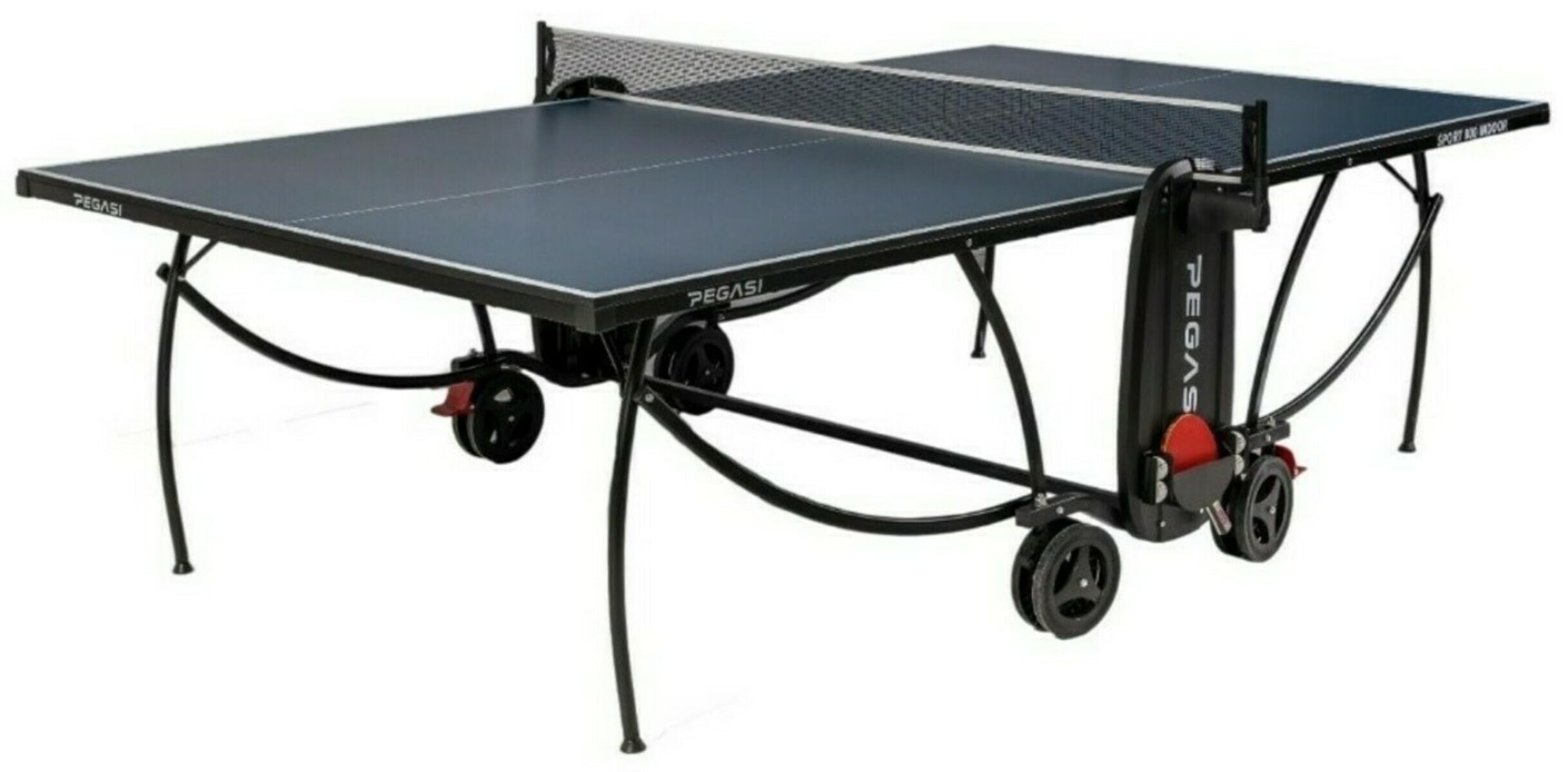
Figure 2.1: The Pegasi 800 Indoor Table Tennis Table in its full playing configuration.
The table consists of two playing halves, a steel frame with wheels and adjustable feet, and a net set. The design allows for easy folding and unfolding, as well as a self-play mode.
3. Setup
The Pegasi 800 Table Tennis Table is delivered unassembled. Follow the detailed assembly manual included in the packaging. The following steps outline the general process for setting up the table for play after initial assembly.
3.1 Unfolding the Table
- Ensure the table is on a flat surface and the wheel brakes are engaged.
- Carefully unlock the safety mechanisms that hold the table halves in the folded position.
- With assistance, gently lower each table half until it is horizontal and fully extended. Ensure the support legs are properly locked into place.
- Verify that both table halves are level and securely connected. Use the adjustable feet on the legs to fine-tune the height and levelness.

Figure 3.1: The Pegasi 800 table in its full playing position, ready for use.
3.2 Attaching the Net
The table comes with a net. Attach the net posts to the designated clamps on the center of the table, ensuring the net is taut and at the correct height (15.25 cm or 6 inches).
4. Operating Instructions
4.1 Playing Mode
Once assembled and unfolded, the table is ready for standard two-player table tennis. Ensure the net is properly installed and the table is level.

Figure 4.1: The Pegasi 800 table set up in a room, ready for a game.
4.2 Self-Play Mode (Solo Training)
For individual practice, the table can be set up in self-play mode:
- Ensure the table is in the full playing position with wheel brakes engaged.
- Unlock the safety mechanism for one half of the table.
- Carefully lift and fold one half of the table vertically, ensuring it locks securely into the upright position.
- The remaining horizontal half can now be used for solo practice, hitting the ball against the vertical half.

Figure 4.2: The table configured for self-play mode, with one half folded vertically for solo practice.
4.3 Folding for Storage
To store the table compactly:
- Remove the net.
- Unlock the safety mechanism for one table half and fold it vertically. Secure the lock.
- Repeat for the second table half, folding it vertically and securing its lock. The two halves will be parallel.
- Ensure all safety locks are engaged to prevent accidental unfolding.
- Engage the wheel brakes once the table is in its storage location.

Figure 4.3: The table fully folded for compact storage.

Figure 4.4: Detail of the safety lock system used for folding and unfolding the table.
4.4 Using the Wheel Brakes
The table is equipped with large wheels for easy movement. Each wheel has a brake lever. To engage the brake, push the lever down. To release, lift the lever up. Always engage the brakes when the table is in its desired playing or storage position to prevent unintended movement.

Figure 4.5: Close-up view of a wheel with the brake mechanism. Engage the brake to secure the table.
5. Maintenance
Regular maintenance will ensure the longevity and optimal performance of your Pegasi 800 Table Tennis Table.
- Cleaning the Playfield: Wipe the playing surface with a soft, damp cloth to remove dust and dirt. Avoid abrasive cleaners or excessive moisture, as this can damage the MDF surface.
- Frame and Legs: Clean the steel frame and legs with a damp cloth. Dry thoroughly to prevent rust.
- Storage: Store the table in a dry, indoor environment when not in use. Avoid extreme temperatures and humidity.
- Check Fasteners: Periodically check all bolts, screws, and locking mechanisms to ensure they are tight and functioning correctly. Tighten any loose fasteners.
- Wheel Maintenance: Keep the wheels clean and free of debris to ensure smooth movement.
6. Troubleshooting
This section addresses common issues you might encounter with your table tennis table.
- Table is uneven:
Solution: Use the adjustable feet located at the bottom of the table legs. Rotate them clockwise or counter-clockwise to raise or lower each corner until the playing surface is level.
- Table does not fold/unfold smoothly:
Solution: Check that all safety locking mechanisms are fully disengaged before attempting to fold or unfold. Ensure there are no obstructions (e.g., debris, accessories) in the folding path. Apply a small amount of silicone spray to moving parts if necessary, avoiding the playing surface.
- Wheels are difficult to move:
Solution: Ensure the wheel brakes are disengaged. Check for any debris (hair, dust) caught in the wheel axles and clean them if necessary.
- Net is not taut:
Solution: Re-adjust the net posts and tensioning system. Ensure the clamps are securely fastened to the table.
7. Specifications
| Feature | Detail |
|---|---|
| Model Number | PEG-T800IN-BLUE |
| Brand | Pegasi |
| Type | Indoor Table Tennis Table |
| Playfield Material | 15mm MDF (Engineered Wood) |
| Edge Frame | 30mm with rubber corner protectors |
| Frame Material | Steel (25mm diameter tubes) |
| Wheel Diameter | 125mm |
| Brakes | Yes, on wheels |
| Adjustable Feet | Yes |
| Playing Dimensions (L x W x H) | 274 cm x 152.5 cm x 76 cm (ITTF Official) |
| Product Weight | 78 Kilograms |
| Assembly Required | Yes |
| Number of Players | 2 (or 1 for self-play) |
| Color | Blue |
8. Warranty & Support
8.1 Manufacturer's Warranty
The Pegasi 800 Indoor Table Tennis Table comes with a 2-year manufacturer's warranty. This warranty covers defects in materials and workmanship under normal use. It does not cover damage resulting from misuse, accidents, unauthorized modifications, or failure to follow the instructions in this manual.
Please retain your proof of purchase for warranty claims.
8.2 Customer Support
For any questions, technical assistance, or warranty claims, please contact Pegasi customer support through your retailer or the official Pegasi website. Have your model number (PEG-T800IN-BLUE) and proof of purchase ready when contacting support.