
Introduction
Thank you for choosing the HM08 Smart Watch. This manual provides detailed instructions on how to set up, operate, and maintain your device. Please read this manual thoroughly before using the watch to ensure proper functionality and a safe user experience.
Product Overview
Key Features
- Health Monitoring: Heart rate, blood pressure, blood oxygen, sleep quality, and physiological cycle tracking for women.
- Professional Sports Modes: 7 indoor and outdoor sports modes to track activity data, including calorie consumption.
- Smart Notifications: Receive calls and messages from your synchronized mobile phone.
- Long Battery Life: Up to 7 days of active use and 10 days standby time with magnetic charging.
- High-Resolution Display: 1.47-inch TFT strip screen with 172*320 resolution.
- Durable Design: Aluminum alloy case, 2.5D mineral glass mirror, IP68 waterproof rating.
- Intuitive Control: Full-color touch screen and a rotary button for menu navigation, dial switching, and music volume control.
Components
The HM08 Smart Watch features a rectangular display, a rotary button on the side, and sensors on the back for health monitoring.

Figure 1: HM08 Smart Watch (Pink Steel Belt). This image shows the watch face displaying steps, calories, and distance, along with icons for heart rate, music, and weather.
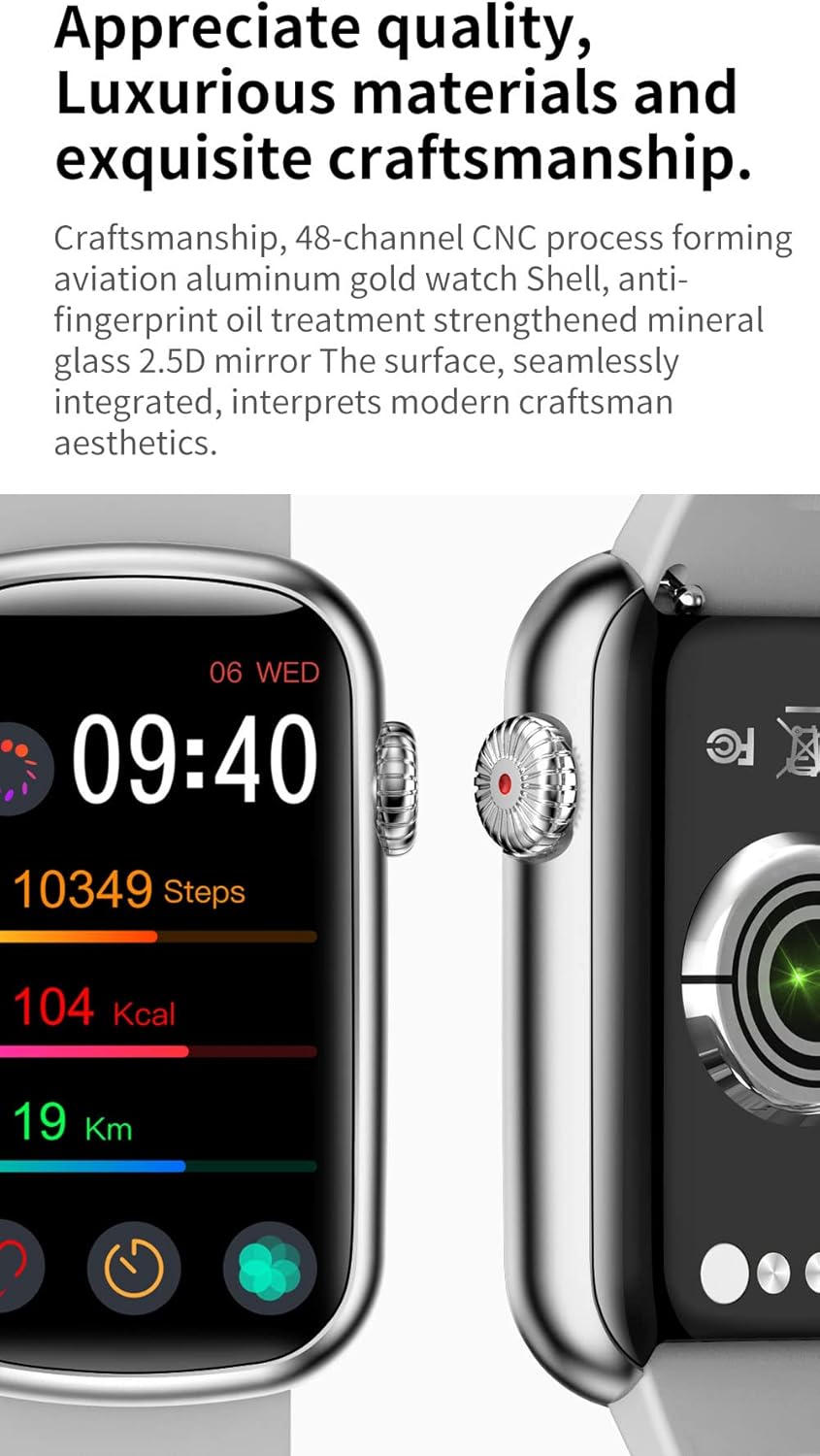
Figure 2: Watch craftsmanship and rotary button. This image highlights the detailed construction of the watch casing and the textured rotary button on the side.
Setup
1. Charging the Watch
Before first use, fully charge your HM08 Smart Watch. Use the provided magnetic charging cable. Align the magnetic pins of the charger with the charging contacts on the back of the watch. The watch display will indicate charging status. A full charge typically takes approximately 2 hours.
2. App Installation
To unlock the full functionality of your HM08 Smart Watch, you need to install the companion application on your smartphone. The watch is compatible with Android 5.0 and above, and iOS 10 and above. Search for the official app in your device's app store (Google Play Store for Android, Apple App Store for iOS) or scan the QR code provided in the watch's quick start guide (if available).
3. Pairing with Your Smartphone
- Ensure Bluetooth is enabled on your smartphone.
- Open the installed companion app on your smartphone.
- Follow the on-screen instructions within the app to search for and connect to your HM08 Smart Watch. The watch uses Bluetooth 4.0/BLE5.0 for connection.
- Confirm the pairing request on both your watch and smartphone if prompted.
- Once successfully paired, the watch will synchronize data and notifications with your phone.
Operating Instructions
Basic Navigation
- Touch Screen: Swipe left, right, up, or down to navigate through menus and screens. Tap to select options.
- Rotary Button: Rotate the button to zoom in/out of the menu, switch watch faces, or control music volume. Press the button to return to the previous screen or wake the display.
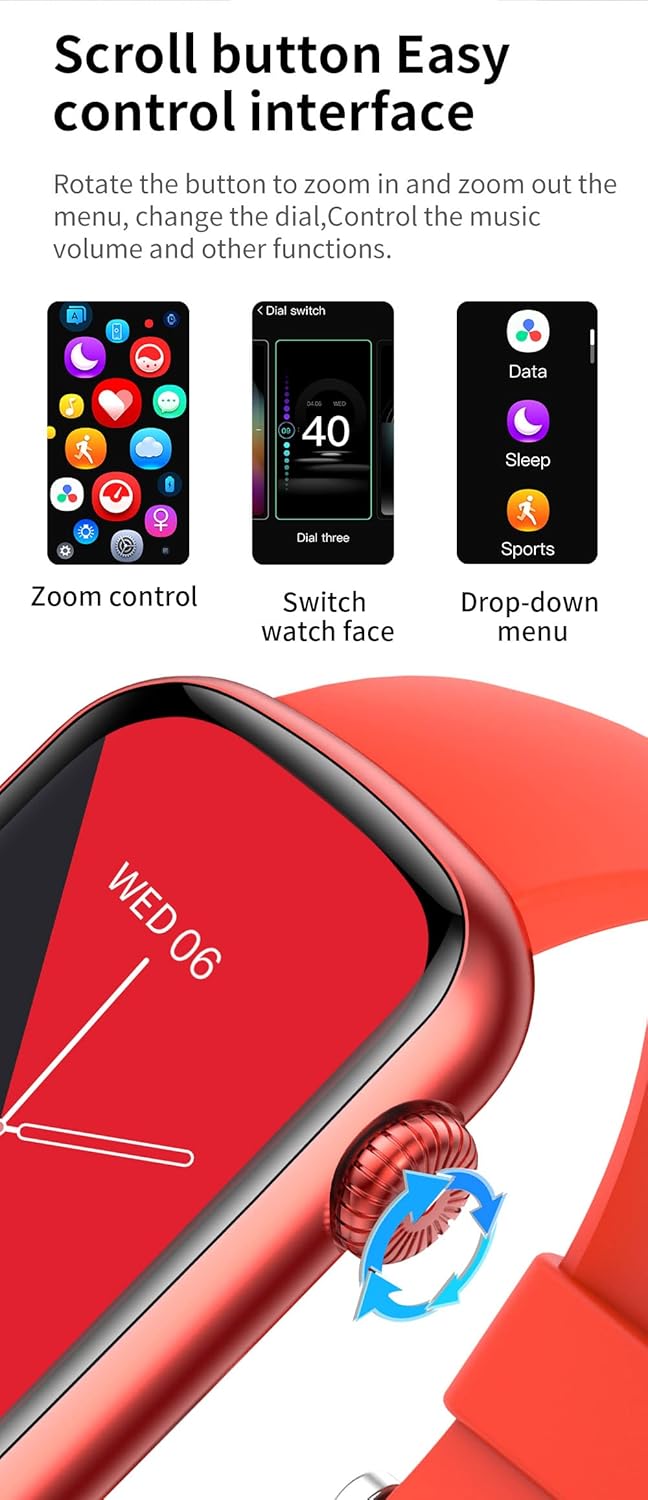
Figure 3: Rotary button controls. This image illustrates the three main functions of the rotary button: zoom control for apps, switching watch faces, and accessing the drop-down menu for quick settings.
Health Monitoring
The HM08 Smart Watch can monitor various health indicators. Access these features through the watch menu or the companion app.
- Heart Rate: Real-time monitoring throughout the day.
- Blood Pressure: Provides real-time monitoring of blood pressure changes.
- Blood Oxygen (SpO2): Measures blood oxygen saturation.
- Sleep Quality: Analyzes your sleep patterns to help develop good sleep habits.
- Women's Health: Supports physiological period records and ovulation records.
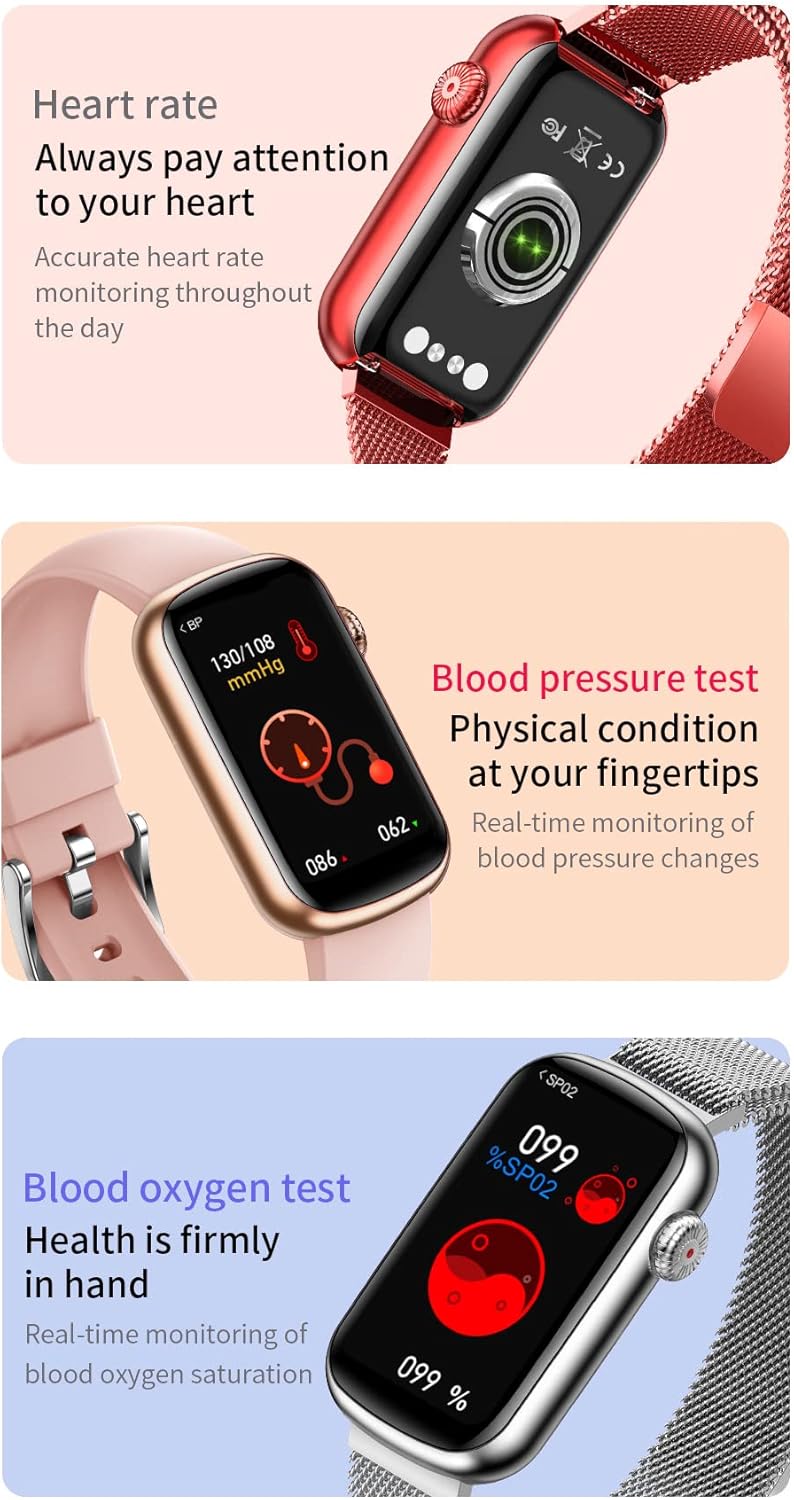
Figure 4: Health monitoring features. This image shows the watch displaying screens for heart rate, blood pressure, and blood oxygen levels, indicating its health tracking capabilities.
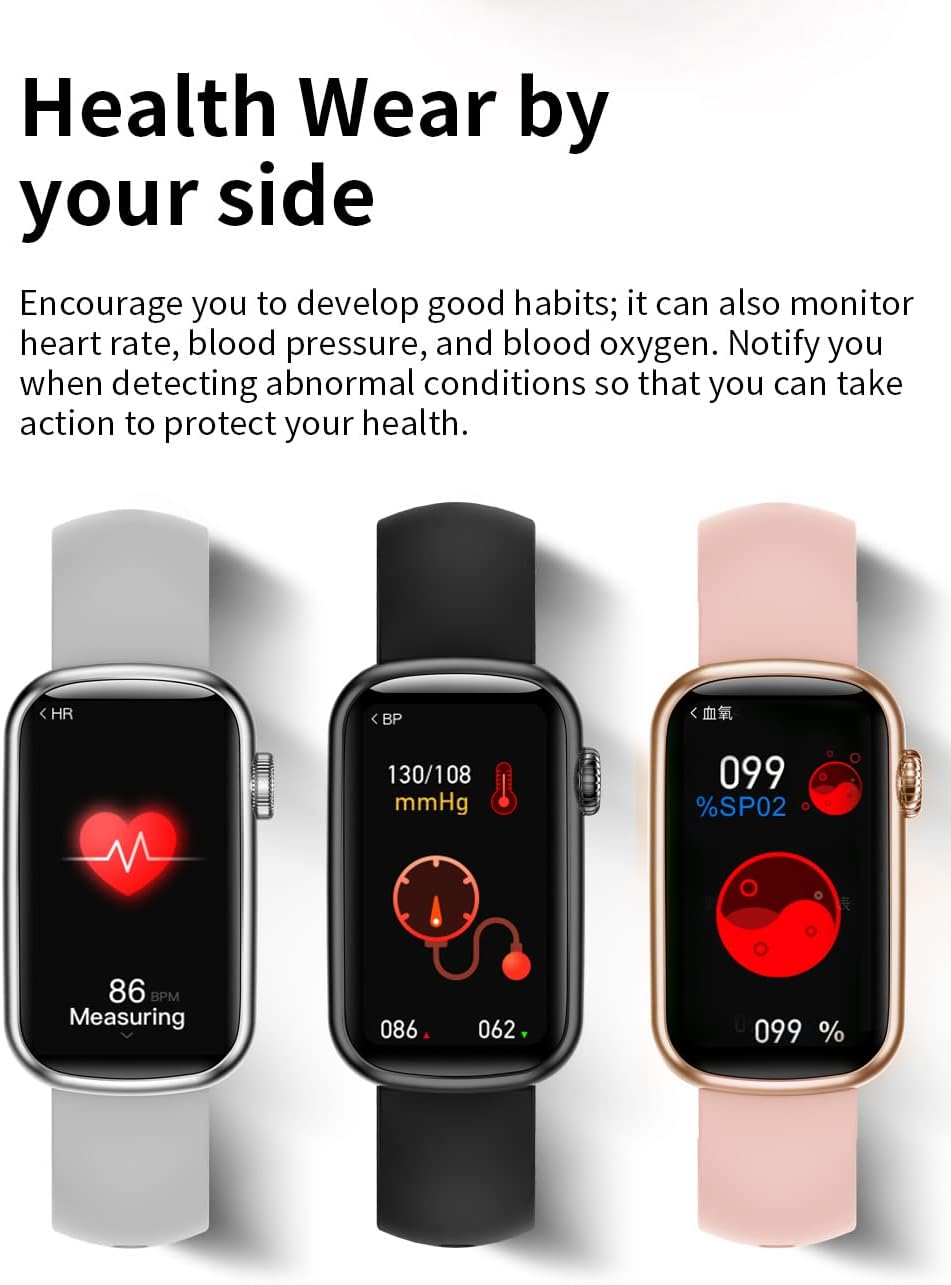
Figure 5: Comprehensive health tracking. This image displays three watches, each showing a different health metric: heart rate, blood pressure, and blood oxygen, emphasizing the watch's ability to monitor multiple vital signs.
Sports Modes
The HM08 Smart Watch offers 7 professional sports modes, categorized into indoor and outdoor activities.
- Indoor Activities: Elliptical machine, Basketball, Yoga.
- Outdoor Sports: Walk, Run, Cycling, Mountaineering.
Before starting an exercise, you can set your sports goals. The watch will record your exercise data, analyze calorie consumption, and provide a simple interface to track your progress.

Figure 6: Multiple sports modes. This image shows the watch interface with icons representing different sports activities, categorized into indoor and outdoor options.
Smart Notifications and Other Functions
- Call Reminders: When connected to your mobile phone, incoming calls will be displayed on the watch.
- Message Notifications: Receive various messages from synchronized mobile applications.
- Music Playback Control: Control music playing on your phone directly from the watch.
- Weather Forecast: View current weather information.
- Remote Camera Control: Use the watch to remotely trigger your phone's camera.
- Time Alarm Clock: Set alarms directly on your watch.
- Stopwatch & Countdown: Utilize built-in timing functions.
- Find Phone: Locate your paired smartphone.

Figure 7: Call reminder feature. This image shows the watch screen displaying an incoming call notification with the caller's name, indicating its ability to alert users to calls.

Figure 8: Music control during exercise. This image shows the watch displaying music playback controls, indicating that users can manage their music while tracking exercise data.
Maintenance
Cleaning
Regularly clean your HM08 Smart Watch to ensure optimal performance and hygiene.
- Wipe the screen and watch body with a soft, lint-free cloth.
- For stubborn smudges, slightly dampen the cloth with water. Avoid using harsh chemicals or abrasive materials.
- Ensure the charging contacts on the back of the watch are clean and dry before charging.
Water Resistance (IP68)
The HM08 Smart Watch has an IP68 waterproof rating, meaning it is resistant to dust and can withstand immersion in water up to 1.5 meters for up to 30 minutes. While it is suitable for daily use and activities like hand washing or light rain, it is not recommended for swimming, diving, or high-pressure water activities. Avoid exposing the watch to hot water or steam.
Troubleshooting
If you encounter issues with your HM08 Smart Watch, refer to the following common problems and solutions:
| Problem | Possible Solution |
|---|---|
| Watch does not turn on or charge. |
|
| Cannot pair with smartphone. |
|
| Notifications are not received. |
|
| Inaccurate health data. |
|
Specifications
| Feature | Detail |
|---|---|
| Product Name | HM08 Smart Watch |
| Model Number | HM08HM |
| Screen | 1.47 inch TFT strip screen |
| Resolution | 172*320 |
| System Compatibility | Android 5.0 and above, iOS 10 and above |
| Bluetooth Version | BLE5.0 (supports Bluetooth 4.0) |
| Chip | 8762DK |
| PPG Chip | 3300 |
| Battery Capacity | 140mAh |
| Standby Time | 8-10 days |
| Battery Life (Typical Use) | 5-7 days |
| Charging Method | Magnetic charging |
| Waterproof Level | IP68 |
| Material | Aluminum alloy + plastic |
| Sensor | Three-axis gravity sensor |
| Watch Size | 44.2mm x 26.2mm x 10.5mm |
| Band Width | 16mm |
| Supported Languages | Simplified Chinese / Traditional / English / German / Russian / Spanish / Portuguese / French / Japanese / Arabic / Italian / Korean / Polish |
Warranty and Support
For warranty information and customer support, please refer to the documentation included with your purchase or contact the retailer/manufacturer directly. Keep your purchase receipt as proof of purchase.