
Introduction
Thank you for choosing the Golon 978S-BT Solar Powered Bluetooth Radio Receiver. This manual provides essential information for the safe and efficient operation of your device. Please read it thoroughly before use and retain it for future reference.
Safety Information
- Do not expose the device to extreme temperatures, direct sunlight for prolonged periods (beyond charging), or high humidity.
- Keep the device away from water and other liquids.
- Do not attempt to disassemble or modify the radio. This may void the warranty and cause damage.
- Use only approved charging methods.
- Keep out of reach of children.
Product Overview
The Golon 978S-BT is a versatile radio receiver featuring solar power, Bluetooth connectivity, and a USB/TF music player. It offers a compact design with a user-friendly interface, delivering clear audio output with high-fidelity bass sound.
Key Features:
- Compact design and user-friendly interface.
- Delivers clear audio output.
- Very clear sound.
- Easy to use and connect.
- High-fidelity bass sound.
- Solar powered for extended use.
- Bluetooth connectivity for wireless audio streaming.
- USB and TF card slots for local music playback.
- FM radio tuner.
Component Identification:
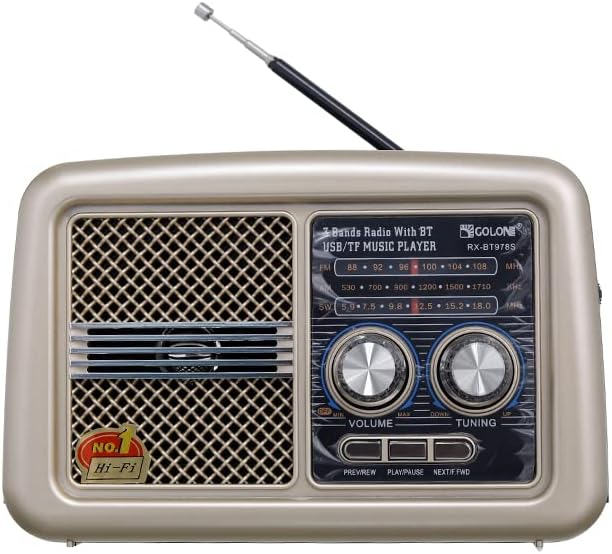


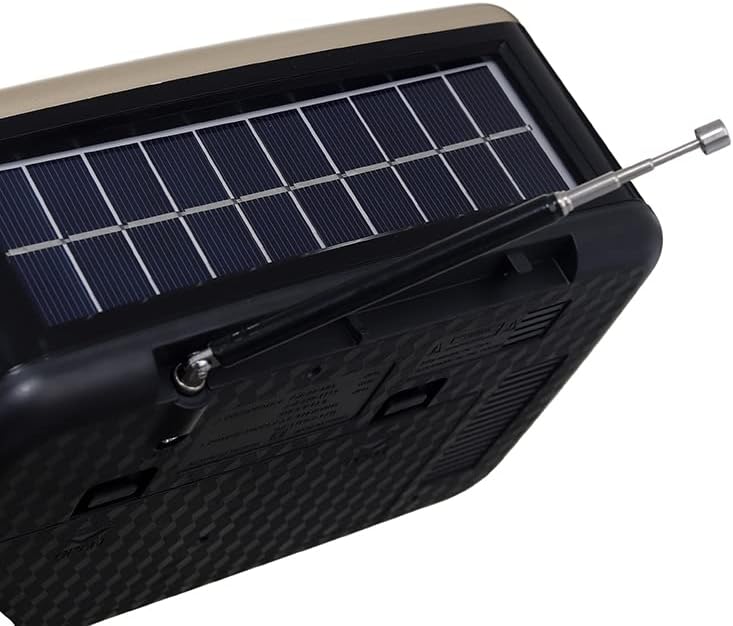
Setup
- Initial Charge: Before first use, it is recommended to fully charge the radio. Connect the radio to a power source using a compatible USB cable (not always included) or place it in direct sunlight for several hours to utilize the solar charging feature.
- Antenna: For optimal FM radio reception, extend the telescopic antenna fully.
- Power On: Locate the power switch, usually on the side or back of the unit, and slide it to the 'ON' position.
Operating Instructions
1. FM Radio Operation:
- Ensure the radio is powered on.
- Extend the antenna for better reception.
- Rotate the Tuning knob to scan for available FM stations. The LCD display will show the frequency.
- Adjust the Volume knob to your desired listening level.
2. Bluetooth Mode:
- Switch the mode selector (if available) to Bluetooth mode, or the radio may automatically enter Bluetooth pairing mode when powered on.
- On your mobile device, enable Bluetooth and search for available devices.
- Select "Golon 978S-BT" (or similar name) from the list to pair.
- Once paired, you can stream audio from your device to the radio.
- Use the playback control buttons (PREVIEW, PLAY/PAUSE, NEXT/FWD) on the radio or your connected device to control music.
3. USB/TF Card Playback:
- Insert a USB flash drive or TF (microSD) card containing MP3 audio files into the respective slot.
- The radio should automatically detect the storage device and begin playing music. If not, switch the mode selector to USB/TF mode.
- Use the playback control buttons (PREVIEW, PLAY/PAUSE, NEXT/FWD) to navigate tracks.
4. Solar Charging:
- Place the radio with its solar panel facing direct sunlight.
- Ensure the solar panel is clean and unobstructed for efficient charging.
- Charging time will vary depending on sunlight intensity.
Maintenance
- Cleaning: Use a soft, dry cloth to clean the radio's exterior. Do not use abrasive cleaners or solvents.
- Solar Panel: Regularly wipe the solar panel to remove dust and dirt, ensuring maximum charging efficiency.
- Storage: When not in use for extended periods, store the radio in a cool, dry place. It is advisable to partially charge the battery every few months to maintain its lifespan.
Troubleshooting
| Problem | Possible Cause | Solution |
|---|---|---|
| No power | Battery is depleted. | Charge the radio via solar panel or USB. |
| Poor FM reception | Antenna not extended or weak signal. | Extend the antenna fully. Try repositioning the radio. |
| Bluetooth not connecting | Radio not in pairing mode or device too far. | Ensure radio is in Bluetooth mode. Move device closer. Re-pair if necessary. |
| USB/TF card not playing | Incorrect file format or card not inserted correctly. | Ensure files are MP3 format. Reinsert the card. Check if the radio is in USB/TF mode. |
Specifications
| Brand Name: | Golon |
| Model Number: | 978S-BT (Part Number: 6221237238057) |
| Color: | Brown |
| Connectivity Technology: | Bluetooth |
| Tuner Technology: | FM Waves |
| Power Source: | Solar Powered |
| Included Components: | Radio |
| Item Weight: | 400 grams |
| Frequency (Max): | 108 MHz (FM) |
| Display Type: | LCD |
| Hardware Interface: | Bluetooth |
Warranty and Support
This product is indicated to have No Warranty. For any operational issues or technical inquiries not covered in this manual, please refer to the retailer where the product was purchased or visit the manufacturer's official website for potential support resources.