
USAMS US-NX10
USAMS NX10 True Wireless Noise Cancelling Earbuds
Instruction Manual
1. Introduction
Thank you for choosing the USAMS NX10 True Wireless Noise Cancelling Earbuds. These earbuds are designed to provide a superior audio experience with advanced features such as active noise cancellation, sensitive touch controls, and a long-lasting battery. This manual will guide you through the setup, operation, and maintenance of your new earbuds.

Image: USAMS NX10 Earbuds available in white, black, and pink, showcasing their sleek design and compact charging cases.

Image: Visual representation of key features including ENC, quick charging, Bluetooth 5.2, low-latency gaming, extended battery life, and sensitive touch controls.
2. Package Contents
Please check the package for the following items:
- USAMS NX10 True Wireless Earbuds (Left and Right)
- Charging Case
- USB Charging Cable
- User Manual

Image: The retail packaging for the USAMS NX10 earbuds, illustrating the product and its key features on the box.
3. Product Overview
Familiarize yourself with the components of your USAMS NX10 earbuds and charging case.
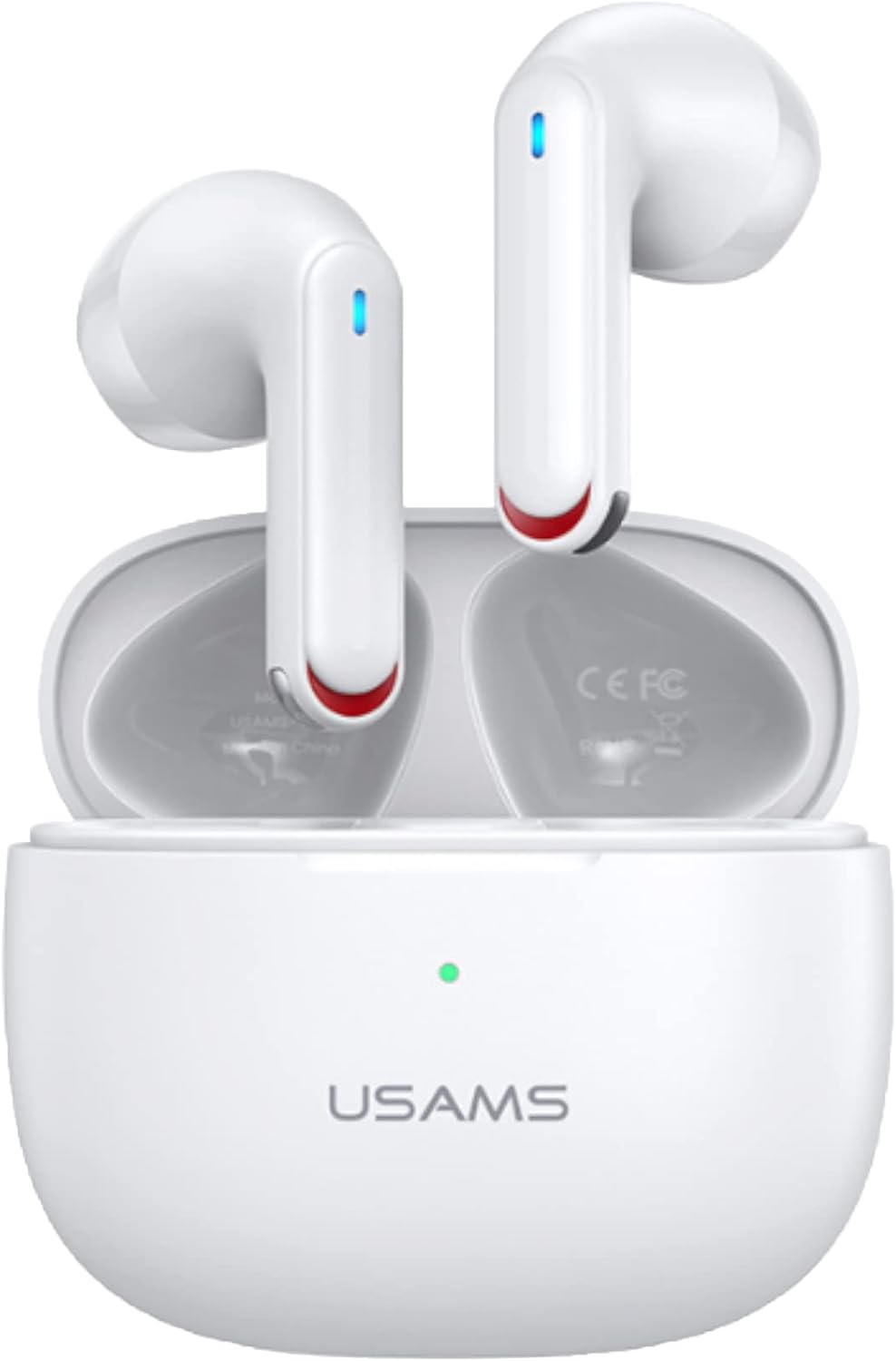
Image: The USAMS NX10 earbuds resting in their charging case, with indicator lights visible on the earbuds and case.

Image: An illustrative diagram detailing the internal structure and acoustic components of an earbud, highlighting its multi-layered design.
4. Charging the Earbuds and Case
Ensure your earbuds and charging case are fully charged before first use.
Charging the Case:
Connect the USB charging cable to the charging port on the case and to a power source. The indicator light on the case will show charging status.
Charging the Earbuds:
Place the earbuds into the charging case. They will automatically begin charging. The indicator lights on the earbuds will show charging status.
A full charge provides approximately 5 hours of listening time. The charging case provides an additional 4.5 charges, extending total battery life to about 28 hours. A quick 10-minute charge can provide up to 2 hours of listening time.

Image: Battery life indicators for the USAMS NX10, showing 5 hours per charge, 4.5 additional charges from the case, and a total of 28 hours of battery life.
5. Pairing and Connection
The earbuds are designed for easy pairing with your device.
- Initial Pairing: Open the lid of the charging case. The earbuds will automatically power on and enter pairing mode.
- On your device (smartphone, tablet, etc.), enable Bluetooth and search for available devices.
- Select "USAMS NX10" from the list of devices to connect.
- Once connected, you will hear a confirmation prompt, and the indicator lights on the earbuds will change.
Automatic Reconnection:
After initial pairing, the earbuds will automatically reconnect to the last paired device when you open the charging case lid, provided Bluetooth is enabled on your device.

Image: Instructions illustrating how opening the charging case lid initiates auto power-on, pairing, and reconnection, while closing the lid triggers auto power-off.
6. Touch Controls
The USAMS NX10 earbuds feature sensitive touch controls for easy management of music, calls, and other functions.
| Action | Control |
|---|---|
| Play/Pause Music | Tap once on either earbud |
| Next Song | Double tap on either earbud |
| Previous Song | Double tap on either earbud |
| Answer/End Call | Double tap on either earbud |
| Reject Call | Long press L or R earbud for 1 second |
| Activate Voice Assistant (Siri, Google Assistant) | Long press L earbud for 2 seconds |
| Toggle Low-Latency Game Mode On/Off | Long press R earbud for 2 seconds |

Image: A visual guide to the touch-sensitive controls on the earbuds, detailing single tap, double tap, and long press functions for various operations.
7. Noise Cancellation (ENC) and Gaming Mode
Environmental Noise Cancellation (ENC):
The USAMS NX10 earbuds feature ENC technology, which helps to reduce ambient noise during calls, ensuring clearer conversations. This function is automatically active during calls.

Image: An illustration demonstrating the noise suppression capabilities of the earbuds, indicating 90% noise suppression and 30dB noise reduction depth.
Low-Latency Gaming Mode:
For an optimized gaming experience, activate the low-latency gaming mode. This mode reduces audio delay, providing better synchronization between audio and video.
- To turn on/off: Long press the Right earbud for 2 seconds.
- The latency in this mode is approximately 60ms.
8. Maintenance and Care
To ensure the longevity and optimal performance of your earbuds, follow these care instructions:
- Keep the earbuds and charging case clean and dry.
- Wipe with a soft, dry cloth. Do not use abrasive cleaners or solvents.
- Avoid extreme temperatures and direct sunlight.
- Store in the charging case when not in use to protect them and keep them charged.
- Do not attempt to disassemble the product.
9. Troubleshooting
If you encounter any issues with your USAMS NX10 earbuds, try the following solutions:
| Problem | Solution |
|---|---|
| Earbuds not pairing | Ensure earbuds are charged. Place them back in the case, close the lid, then open it again to re-enter pairing mode. Check your device's Bluetooth settings and try reconnecting. |
| Only one earbud working | Ensure both earbuds are charged. Place both earbuds back in the case, close the lid, wait a few seconds, then open it again. This often re-syncs them. |
| No sound | Check the volume on your device and on the earbuds. Ensure the earbuds are properly connected to your device. |
| Charging issue | Ensure the charging cable is securely connected. Try a different charging cable or power adapter. Clean the charging contacts on the earbuds and inside the case. |
| Touch controls not responding | Ensure your fingers are clean and dry. Try restarting the earbuds by placing them in the case and taking them out again. |
10. Specifications
| Feature | Detail |
|---|---|
| Model Number | US-NX10 |
| Connectivity Technology | Wireless (Bluetooth 5.2) |
| Ear Placement | In Ear |
| Control Type | Touch Control |
| Special Feature | Noise Cancellation (ENC) |
| Battery Life (Earbuds) | Approx. 5 hours per charge |
| Total Battery Life (with Case) | Approx. 28 hours |
| Quick Charge | 10 mins charge for 2 hours listening |
| Item Weight | 4.9 ounces |
| Manufacturer | USAMS |

Image: An abstract visual representing the advanced chipset technology integrated into the earbuds, highlighting its role in performance.
11. Safety Information
Please read and follow these safety guidelines to prevent injury or damage:
- Do not use the earbuds at excessively high volumes for prolonged periods to prevent hearing damage.
- Do not use the earbuds in situations where inability to hear ambient sounds could be dangerous (e.g., driving, cycling, walking in traffic).
- Keep out of reach of children and pets.
- Avoid dropping, hitting, or subjecting the product to strong impacts.
- Do not expose to water, moisture, or extreme temperatures.
- Dispose of the product and batteries responsibly according to local regulations.
12. Warranty and Support
For warranty information and customer support, please refer to the documentation included with your purchase or contact the retailer where you purchased the product. You may also visit the official USAMS website for further assistance.
Manufacturer: USAMS
Model: US-NX10