
HomSof B0B79TY6Q5
HomSof Armless Chaise Lounge with Massage Function
Model: B0B79TY6Q5
1. Introduction
Thank you for choosing the HomSof Armless Chaise Lounge with Massage Function. This manual provides essential information for the safe assembly, operation, and maintenance of your new chaise lounge. Please read it thoroughly before use and retain it for future reference.

Image 1.1: The HomSof Armless Chaise Lounge in Light Grey, featuring its modern design and side pocket.
Important Safety Information
WARNING: Do not exceed the maximum weight capacity of 300 lbs (136 kg). Always follow assembly instructions carefully to avoid injury. Ensure all components are securely fastened before use. Keep children and pets away from the assembly area. Do not stand on the chaise lounge.
2. Package Contents
Please verify that all components are present before beginning assembly. If any parts are missing or damaged, contact customer support.
- Chaise Lounge Body (x1)
- Metal Legs (x4)
- Assembly Hardware (screws, washers, Allen wrench)
- Massage Remote Control (x1)
- Power Adapter (x1)
3. Assembly Instructions
Assembly of the HomSof Chaise Lounge is designed to be straightforward and typically takes less than 10 minutes. Follow these steps:
- Unpack Components: Carefully remove all items from the packaging and lay them out on a clean, soft surface to prevent scratches.
- Attach Legs: Locate the four metal legs and the corresponding screw holes on the underside of the chaise lounge. Align each leg with its designated mounting point and secure it using the provided screws and Allen wrench. Ensure all legs are tightened firmly.

Image 3.1: Detail of a metal leg, illustrating the attachment point.
- Connect Power: Locate the power input port on the side or underside of the chaise lounge. Connect the power adapter cable to this port.
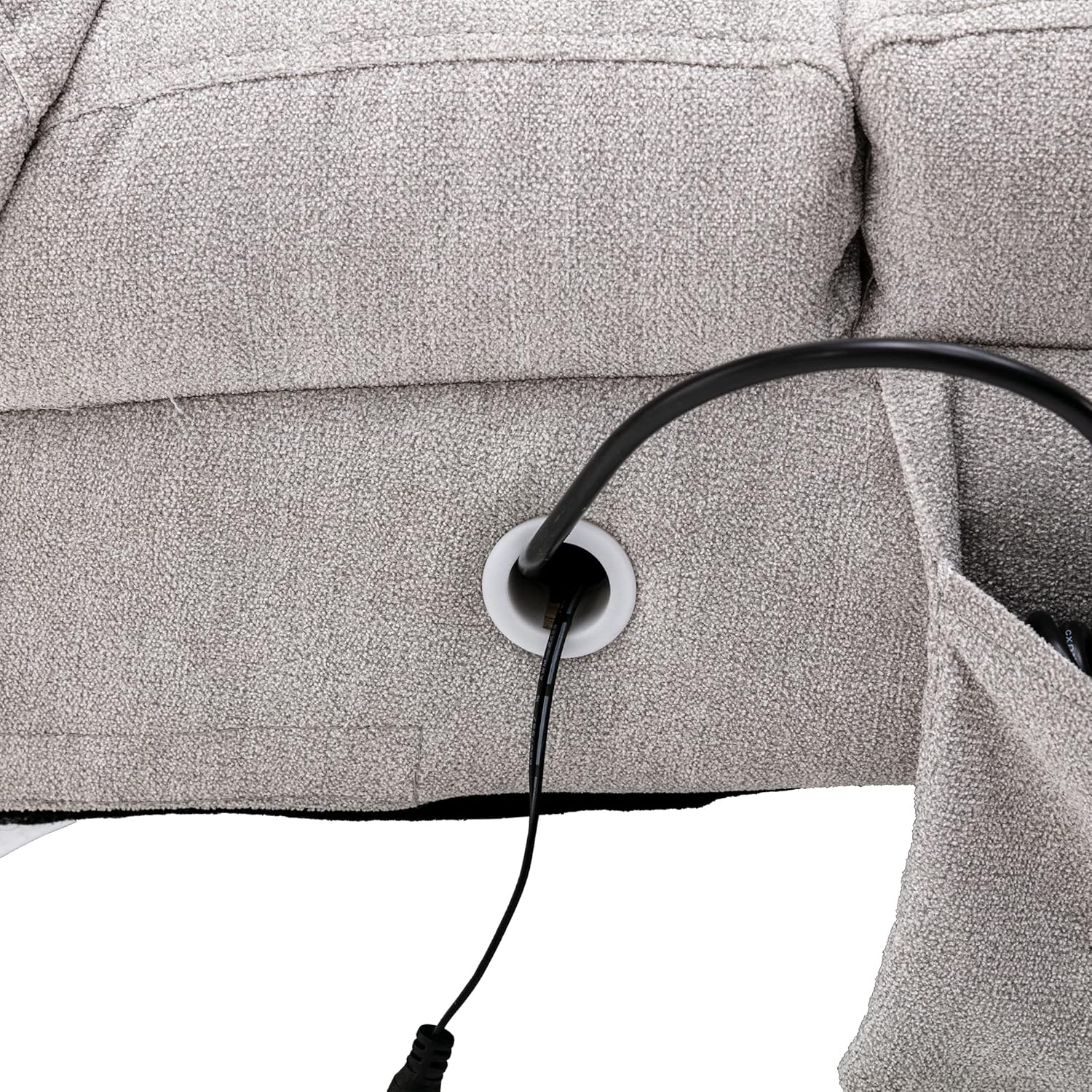
Image 3.2: The power cable connected to the chaise lounge's input port.
- Position Chaise Lounge: Place the assembled chaise lounge in your desired location. Ensure it is on a stable, level surface.
4. Operating Instructions
The HomSof Chaise Lounge features a 5-mode vibrating massage system controlled by a wired remote. The remote can be conveniently stored in the side pocket of the chaise lounge.

Image 4.1: The massage remote control placed in the integrated side pocket.
Using the Massage Remote Control

Image 4.2: Diagram illustrating the functions of the massage remote control.
- Power Button: Press the POWER button (usually red) to turn the massage function on or off.
- Intensity: Use the INTENSITY buttons (HIGH/LOW) to adjust the strength of the vibration.
- Mode: Press the MODE button to cycle through the 5 available massage modes:
- Pulse: A rhythmic, intermittent vibration.
- Press: A steady, continuous vibration.
- Wave: A gentle, undulating vibration pattern.
- Auto: Cycles automatically through different massage modes.
- Normal: A standard, consistent vibration.
- Body Zones: Select specific areas for massage using the dedicated buttons for BACK, LUMBAR, THIGH, and LEG. You can activate multiple zones simultaneously.
Plug the power adapter into a standard electrical outlet to provide power to the massage system.
5. Care and Maintenance
To ensure the longevity and appearance of your HomSof Chaise Lounge, follow these care instructions:
- Cleaning: Wipe clean with a damp cloth. For spills, blot immediately with a clean, dry cloth. Avoid harsh chemicals or abrasive cleaners, as these may damage the fabric or finish.
- Dusting: Regularly dust the chaise lounge with a soft, dry cloth.
- Avoid Direct Sunlight: Prolonged exposure to direct sunlight can cause fabric fading.
- Weight Capacity: Adhere strictly to the 300 lbs (136 kg) weight limit to prevent structural damage.
6. Troubleshooting
If you encounter issues with your chaise lounge, refer to the following common problems and solutions:
- Massage Function Not Working:
- Ensure the power adapter is securely plugged into both the chaise lounge and a working electrical outlet.
- Check if the power button on the remote control is pressed.
- Verify there are no visible damages to the power cord or remote control.
- Chaise Lounge Feels Unstable:
- Re-tighten all leg attachment screws.
- Ensure the chaise lounge is placed on a flat, even surface.
- Unusual Noises During Massage:
- Minor vibration noise is normal. If the noise is excessive or unusual, discontinue use and contact customer support.
If these solutions do not resolve the issue, please contact HomSof customer support.
7. Product Specifications
Detailed specifications for the HomSof Armless Chaise Lounge:

Image 7.1: Dimensional diagram of the chaise lounge.
| Feature | Specification |
|---|---|
| Brand | HomSof |
| Model Number | B0B79TY6Q5 |
| Color | Light Grey |
| Product Dimensions (D x W x H) | 58.27" x 21.65" x 34.25" (148 cm x 55 cm x 87 cm) |
| Seat Depth | 37.40" (95 cm) |
| Back Height | 27.56" (70 cm) |
| Seat Width | 21.65" (55 cm) |
| Seat Height | 17.72" (45 cm) |
| Upholstery Material | Poly fabric |
| Seat Fill Material | Foam |
| Frame Material | Solid Wood + Plywood |
| Leg Material | Metal (Chromeplate) |
| Maximum Weight Capacity | 300 lbs (136 kg) |
| Massage System | 5-mode vibrating massage (Pulse, Press, Wave, Auto, Normal) |
| Item Weight | 38.8 lbs (17.6 kg) |
| Recommended Use | Relaxing |
| Indoor/Outdoor Usage | Indoor |
8. Warranty and Customer Support
For information regarding warranty coverage or to obtain customer support, please refer to the documentation included with your purchase or visit the official HomSof website. If you have any questions or require assistance with your product, do not hesitate to contact our support team.
Contact Information: Please refer to your purchase receipt or the HomSof official website for the most current customer service contact details.
Ask a question about this manual
Ask about setup, troubleshooting, compatibility, parts, safety, or missing instructions. Manuals+ will review the question and use this page’s manual context to help answer it.