
1. Introduction
The FoxAlien WM-3020 is a versatile 3-axis CNC router machine designed for precision carving and engraving on various materials, including wood, metal (aluminum, copper, brass), and acrylic. Equipped with industrial-grade components such as HG-15 linear bearings and 12mm ball screws, this machine offers enhanced stability, accuracy, and reduced noise during operation. Its Grbl-based control board provides flexibility for customization and broad software compatibility. This manual provides essential information for the safe and effective use of your WM-3020 CNC router.
2. Safety Instructions
Read all safety warnings and instructions before operating the machine. Failure to follow these instructions may result in electric shock, fire, or serious injury.
- Eye Protection: Always wear safety glasses or goggles to protect your eyes from flying debris.
- Work Area: Keep your work area clean, well-lit, and free from clutter. Ensure adequate ventilation to dissipate dust and fumes.
- Emergency Stop: Familiarize yourself with the location and operation of the emergency stop button. Ensure it is easily accessible.
- Material Securing: Always securely clamp your workpiece to the spoilboard to prevent movement during carving.
- Tooling: Use appropriate and sharp cutting tools for the material being processed. Ensure tools are correctly installed and tightened in the collet.
- Electrical Safety: Ensure the machine is properly grounded. Do not operate in wet conditions. Disconnect power before performing maintenance or adjustments.
- Supervision: Never leave the machine unattended while it is operating.
- Loose Clothing/Hair: Avoid wearing loose clothing, jewelry, or having long hair untied, as these can get caught in moving parts.
3. Package Contents
Upon unpacking, verify that all components listed below are present. If any items are missing or damaged, please contact FoxAlien customer support.

Image: All components included in the FoxAlien WM-3020 package.
- WM-3020 CNC Machine (pre-assembled main parts)
- 300W Spindle Motor
- Control Box
- Power Adapter
- USB Cable
- Collets and Wrenches
- Cutting Bits (for trial run)
- Workpiece Clamps
- User Manual
- Other necessary accessories for assembly and operation
4. Assembly and Setup
The FoxAlien WM-3020 is designed for quick assembly, with main parts pre-assembled. The full assembly typically takes 30-45 minutes.

Image: Step-by-step assembly guide for the WM-3020.
- Install Gantry to Base: Securely attach the gantry assembly to the machine's base. Ensure all fasteners are tightened.
- Install Spindle: Mount the 300W spindle motor into its designated clamp on the Z-axis. Ensure it is firmly secured.
- Install Drag Chain: Attach the drag chain to manage cables and prevent entanglement during machine movement.
- Connect Controller: Connect the control box to the CNC machine using the provided cables. Ensure all connections are secure.
For detailed visual instructions, refer to the included user manual or official FoxAlien assembly videos.
5. Key Features
- Outstanding Precision and Accuracy: The WM-3020 features HG-15 linear bearings and 12mm ball screws on all three axes (X, Y, Z). These industrial-grade components contribute to faster, quieter, and more stable carving with high precision.
- Multiple Spindle Options: The machine comes with a 300W spindle suitable for engraving and cutting wood, acrylic, carbon fiber, aluminum, and brass. The Z-axis is compatible with 65mm and 69mm spindle clamps, allowing for the use of trimmer routers (e.g., DWP611, RT0701C), engraving modules, or a 1.5kW spindle (sold separately).
- Aluminum Spoilboard with Scale: A one-piece aluminum spoilboard enhances flatness and strength. Integrated scale markings facilitate convenient measurement and positioning of workpieces. It is compatible with most standard hold-down clamps.
- Grbl Open-source Based: The control board utilizes a 32-bit chip and is based on Grbl firmware. This open-source platform allows for flexible configuration, including setting homing origins to any corner.
- All-Aluminum Industrial Structure: The machine is constructed entirely from aluminum, providing a sturdy and stable platform for carving operations.

Image: Detailed view of the X, Y, and Z axes with linear rails and ball screws.

Image: Various spindle options compatible with the WM-3020.

Image: Aluminum spoilboard with integrated scale and clamping options.
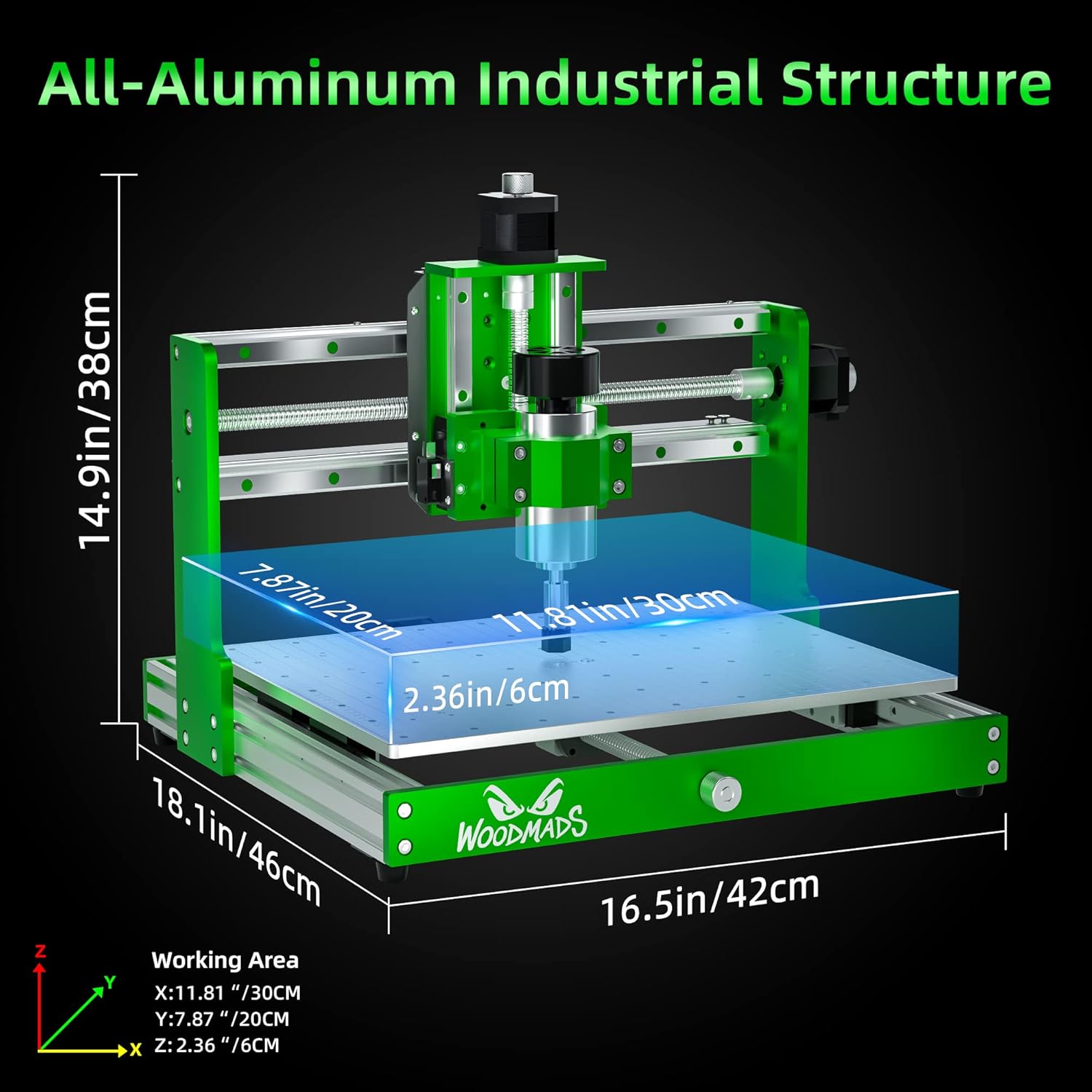
Image: WM-3020 machine dimensions and all-aluminum structure.
6. Operation
Operating the FoxAlien WM-3020 involves a series of steps from design to execution. This section provides a general overview.
6.1 Workflow Overview
- Design: Create your design using CAD/CAM software (e.g., Fusion 360, VCarve, Easel).
- Generate G-code: Use your CAM software to generate G-code, which is the set of instructions for the CNC machine.
- Connect Machine: Connect the WM-3020 to your computer via USB or use an offline controller (if available).
- Load Material: Securely clamp your workpiece onto the aluminum spoilboard.
- Set Z-Probe/Zero: Use a Z-probe or manually set the Z-axis zero point to the surface of your material. Set X and Y zero points as required by your design.
- Load G-code: Load the generated G-code into your CNC control software (e.g., UGS, Candle).
- Start Job: Initiate the carving process. Monitor the machine closely during operation.
6.2 Compatible Materials
The WM-3020 is capable of working with a variety of materials:
- Wood (hardwood, softwood, plywood, MDF)
- Plastics (Acrylic, ABS, PVC)
- Soft Metals (Aluminum, Copper, Brass)
- Carbon Fiber
Always use appropriate cutting parameters (feed rate, spindle speed, depth of cut) and tooling for the specific material to achieve optimal results and prevent damage to the machine or workpiece.
7. Maintenance
Regular maintenance ensures the longevity and optimal performance of your FoxAlien WM-3020 CNC router.
- Cleaning: After each use, clean the machine thoroughly to remove dust, chips, and debris. Pay special attention to the linear rails, ball screws, and spindle area. Use compressed air or a soft brush.
- Lubrication: Periodically lubricate the linear bearings and ball screws with appropriate grease or oil as recommended by the manufacturer to ensure smooth movement and prevent wear.
- Check Connections: Regularly inspect all electrical connections, cables, and fasteners to ensure they are secure and free from damage.
- Tool Inspection: Inspect cutting bits for wear or damage before each use. Replace dull or broken bits to maintain cut quality and prevent machine strain.
- Spindle Care: Keep the spindle clean and ensure proper airflow if it is air-cooled.
8. Troubleshooting
This section addresses common issues you might encounter with your WM-3020 CNC router.
8.1 Machine Not Moving or Responding
- Power: Ensure the machine and control box are powered on and all cables are securely connected.
- Emergency Stop: Check if the emergency stop button is engaged. Release it if necessary.
- Software Connection: Verify that your CNC control software is correctly connected to the machine (correct COM port selected, baud rate matches).
- Grbl Status: Check the status in your control software. If it shows an alarm, reset the machine and clear the alarm.
8.2 Poor Carving Quality
- Tooling: Ensure the cutting bit is sharp, clean, and appropriate for the material. Check for runout.
- Workpiece Clamping: Verify that the material is securely clamped and not vibrating during the cut.
- Cutting Parameters: Adjust feed rate, spindle speed, and depth of cut. Parameters too aggressive can lead to poor quality or tool breakage.
- Machine Calibration: Ensure the machine's axes are properly calibrated and free from backlash.
8.3 Spindle Not Rotating
- Power: Check the spindle's power connection.
- Control Software: Ensure the spindle is commanded to turn on in your G-code or control software.
- Manual Check: If applicable, test the spindle manually to rule out a motor issue.
9. Specifications
Detailed technical specifications for the FoxAlien WM-3020 CNC Router Machine.
| Specification | Value |
|---|---|
| Brand | FoxAlien |
| Model Number | WM-3020 |
| Material | Aluminium |
| Power Source | AC/DC |
| Voltage | 220 Volts |
| Horsepower | 0.39 Horsepower |
| Amperage | 1.36 Amps |
| Product Dimensions (W x H) | 22W x 29H centimetres |
| Base Type | Fixed |
| Spindle | 300W |
| Linear Bearings | HG-15 |
| Ball Screws | 12mm |
| Control Board | 32-bit, Grbl-based |
10. Official Product Video
Watch this video for a dynamic overview of the FoxAlien WM-3020 CNC Router Machine, showcasing its all-aluminum structure, linear rails, ball screws, and ease of assembly.
Video: FoxAlien WM-3020 CNC Router Machine features and assembly overview.
11. Warranty and Support
The FoxAlien WM-3020 CNC Router Machine comes with a 1-year manufacturer warranty. For warranty claims, technical support, or any inquiries regarding your product, please contact FoxAlien customer service through their official website or the retailer where the product was purchased.
Always refer to the official FoxAlien website for the most up-to-date support information, drivers, and software.