
Introduction
This manual provides instructions for the installation, use, and maintenance of your Zoeirc Clear Case for the Huawei Y9 Prime 2019 (model STK-L21). This protective case is designed to safeguard your device from daily wear and tear while maintaining its original aesthetic.
Product Features
- Material: Constructed from Thermoplastic Polyurethane (TPU) for flexibility and durability.
- Design: Ultra-clear, transparent case with a decorative butterfly pattern.
- Protection: Shock-absorbing frame protects against drops, scratches, and dings.
- Accessibility: Precise cutouts for speakers, screen, camera, and ports ensure full functionality without case removal.
- Camera & Screen Protection: Features a raised lip around the camera and screen to prevent direct contact with surfaces.
- Lightweight: Adds minimal bulk to your device.
Package Contents
- 1 x Zoeirc Clear Case for Huawei Y9 Prime 2019 (Butterfly Design)
Setup and Installation
- Prepare Your Device: Ensure your Huawei Y9 Prime 2019 is clean and free of dust or debris.
- Align the Case: Hold the case with the camera cutout aligned with your phone's camera.
- Insert Phone: Gently push your phone into the case, starting with one side, then carefully working around the edges until the phone is fully seated within the case. Ensure all corners are securely covered.
- Check Fit: Verify that all buttons (power, volume) and ports (charging, headphone jack) are accessible and function correctly.

Image: The Huawei Y9 Prime 2019 phone with the clear butterfly case fully installed, showcasing the transparent material and design.
Operation
Once installed, the Zoeirc Clear Case allows full access to all phone functions. The precise cutouts ensure that the camera, charging port, headphone jack, and speakers are unobstructed. The case's design also ensures that the power and volume buttons remain responsive and easy to press.
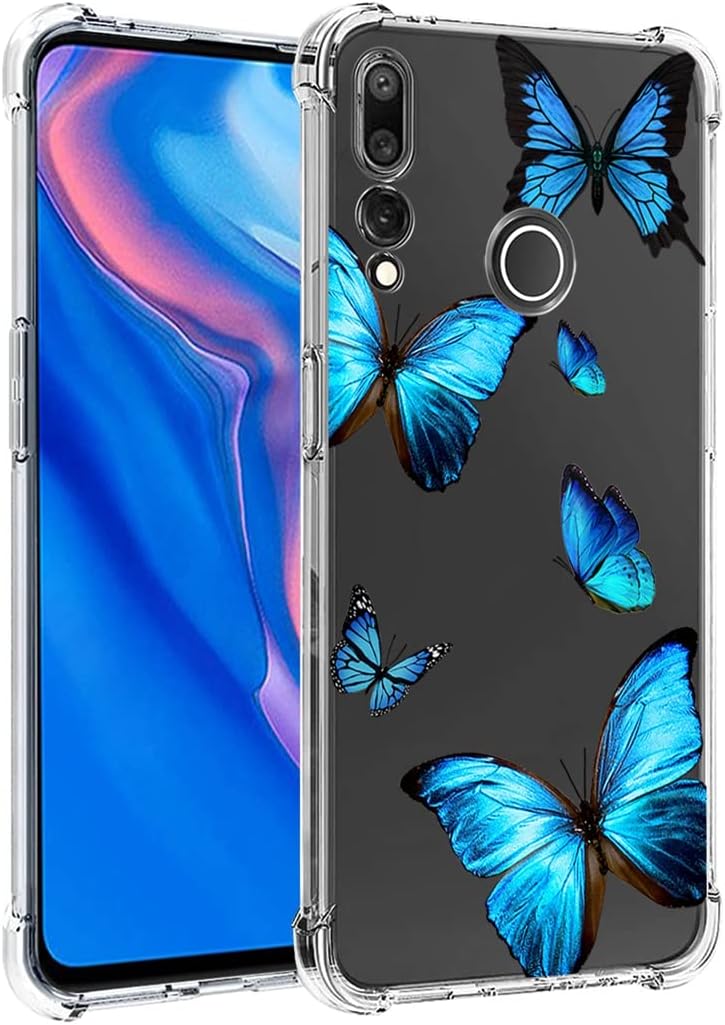
Image: A side view of the case highlighting the precise button covers and overall slim profile.
Maintenance and Care
- Cleaning: To clean the case, remove it from your phone. Use a soft, damp cloth with mild soap and water. Avoid harsh chemicals or abrasive cleaners, as these can damage the material or print.
- Drying: Allow the case to air dry completely before reattaching it to your phone.
- Storage: When not in use, store the case in a cool, dry place away from direct sunlight to prevent discoloration or material degradation.
Troubleshooting
| Issue | Possible Cause | Solution |
|---|---|---|
| Case does not fit properly. | Incorrect phone model or improper installation. | Ensure your phone is a Huawei Y9 Prime 2019 (STK-L21). Re-install the case, ensuring all corners are seated correctly. |
| Buttons are stiff or unresponsive. | Case not fully aligned or debris under buttons. | Remove the case, clean the phone and case buttons, then re-install carefully. |
| Case appears discolored or yellowing. | Natural aging of TPU material, exposure to UV light or certain chemicals. | This is a common characteristic of clear TPU over time. Regular cleaning and avoiding prolonged direct sunlight can help slow the process. |
Specifications
| Feature | Detail |
|---|---|
| Brand | Zoeirc |
| Compatible Phone Model | Huawei Y9 Prime 2019 (STK-L21) |
| Material | Thermoplastic Polyurethane (TPU) |
| Color/Design | Clear with Butterfly pattern |
| Form Factor | Bumper |
| Item Weight | 1.13 ounces (approx. 32 grams) |
| Special Features | Lightweight, Shock-Absorbent, Scratch Protection |
Warranty and Support
For information regarding warranty coverage or customer support, please refer to the retailer's return policy or contact Zoeirc directly through their official channels. Keep your purchase receipt as proof of purchase.