1. Product Overview
The Generic Portable Evaporative Air Cooler (Model BL-198DLR) is a versatile 3-in-1 device designed to provide cooling, humidification, and air circulation. It utilizes water evaporation and a honeycomb cooling pad to transform hot, dry air into cool, humid air, effectively lowering room temperature. This unit is equipped with features such as a 12L water tank, a 12-hour timer, remote control, and three-speed settings, making it suitable for various indoor environments.

Image: The Evaporative Air Cooler in white, showing cool air flowing and two ice packs next to it.
2. Safety Instructions
Please read all safety instructions carefully before operating the appliance and retain this manual for future reference. Failure to follow these instructions may result in electric shock, fire, or serious injury.
- Always ensure the power supply matches the voltage specified on the rating label (120V, 60Hz).
- Do not immerse the appliance, cord, or plug in water or other liquids.
- Unplug the cooler from the power outlet before filling or emptying the water tank, cleaning, or performing any maintenance.
- Do not operate the appliance with a damaged cord or plug, or after the appliance malfunctions or has been damaged in any manner.
- Keep the appliance out of reach of children and pets.
- Place the cooler on a stable, level surface to prevent tipping.
- Do not block air inlets or outlets. Ensure adequate space around the unit for proper airflow.
- Do not use the appliance outdoors or in wet environments like bathrooms.
- Only use clean tap water in the water tank. Do not add any chemicals or additives other than the provided ice crystals.
- Avoid direct sunlight exposure to the unit for prolonged periods.
3. Package Contents
Upon unpacking, please verify that all items listed below are present and in good condition:
- 1 x Portable Evaporative Air Cooler (Model BL-198DLR)
- 1 x Remote Control
- 1 x User Manual (this document)
- 2 x Ice Crystal Boxes
4. Product Features
The Evaporative Air Cooler BL-198DLR offers a range of features for enhanced comfort:
- 3-in-1 Functionality: Operates as an air cooler, humidifier, and fan.
- Honeycomb Cooling Pad: Efficiently cools air through water evaporation.
- 12L Large Capacity Water Tank: Reduces the frequency of refills, providing extended cooling.
- 12-Hour Timer: Allows for scheduled operation and automatic shut-off.
- Remote Control: Convenient operation from a distance.
- LED Display: Clear indication of settings and status.
- 3 Wind Speeds: Low, Medium, and High settings for customized airflow.
- 3 Wind Modes: Normal, Natural, and Sleep modes for varied comfort.
- Oscillation Function: Automatic left and right swing for wider air distribution.
- Negative Ion Purification: Helps to purify the air.
- Low Noise Operation: Designed for quiet performance, especially in sleep mode.
- Caster Wheels: Four durable wheels for easy portability.
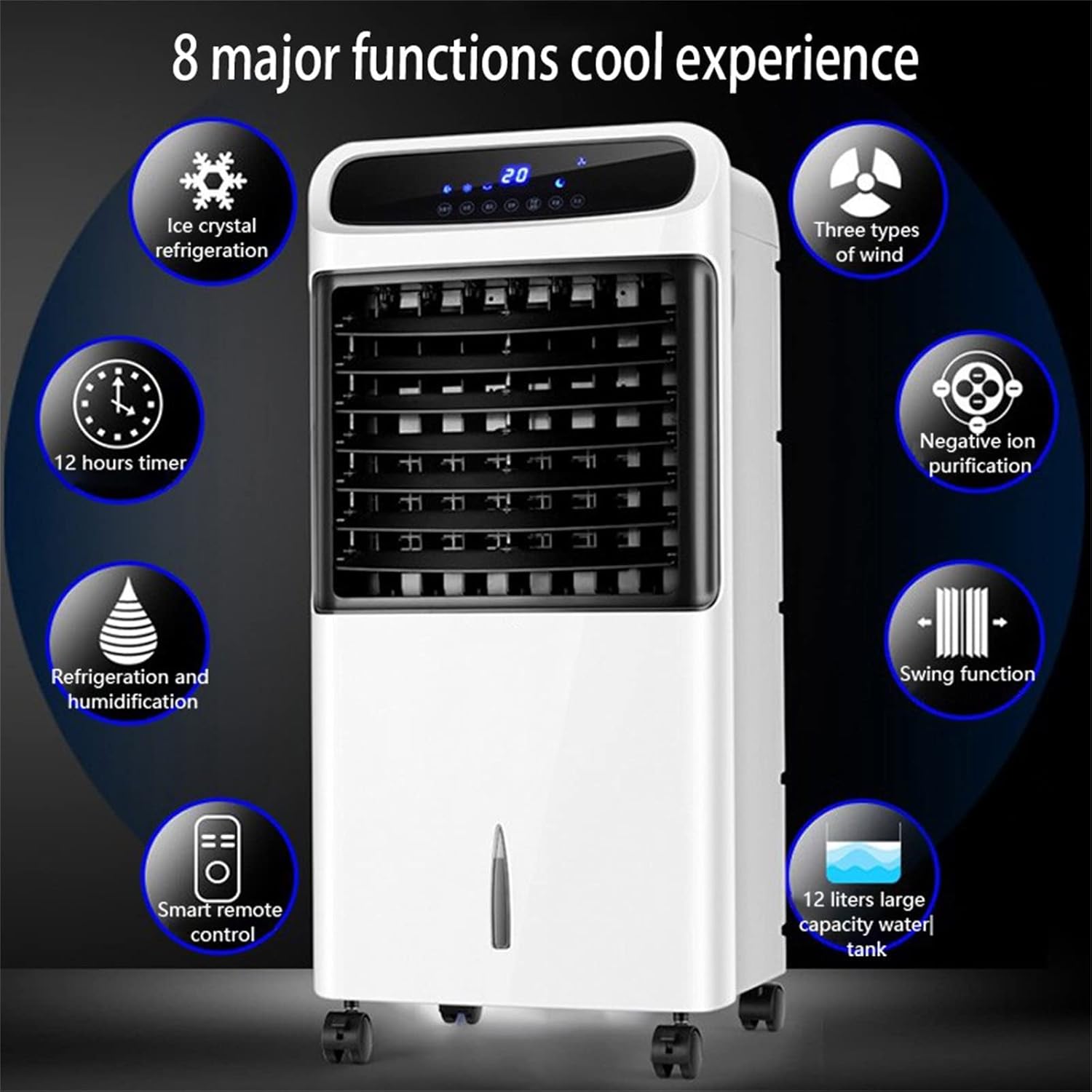
Image: Visual representation of the cooler's 8 major functions, including ice crystal refrigeration, three types of wind, negative ion purification, swing function, 12 liters large capacity water tank, smart remote control, refrigeration and humidification, and 12 hours timer.
5. Setup
5.1 Unpacking and Placement
- Carefully remove the air cooler and all accessories from the packaging.
- Place the unit on a firm, level surface. Ensure there is at least 20 cm (8 inches) of clear space around the unit for proper airflow.
- The unit comes with pre-installed caster wheels for easy movement.

Image: Front and side views of the air cooler with dimensions indicated: 15 inches (width), 14 inches (depth), and 32 inches (height).
5.2 Filling the Water Tank and Using Ice Crystal Boxes
- Ensure the unit is unplugged from the power outlet.
- Locate the water tank at the bottom of the unit. It is designed to be removable for easy filling and cleaning.
- Pull out the water tank gently.
- Fill the water tank with clean tap water. Do not exceed the "MAX" fill line. The tank has a 12L capacity.
- For enhanced cooling, place the two provided ice crystal boxes in a freezer for several hours until they are completely frozen.
- Once frozen, place the ice crystal boxes into the water tank.
- Carefully slide the water tank back into the unit until it is securely in place.
- Plug the power cord into a standard 120V, 60Hz electrical outlet.

Image: Side view of the air cooler highlighting the 12L water tank, its large capacity, removable design, and convenience for adding water and cleaning.

Image: A hand pouring water into the cooler's water tank, illustrating the ease of refilling the 12L capacity tank for lasting cooling.
6. Operating Instructions
The air cooler can be operated using the control panel on top of the unit or the included remote control.
6.1 Control Panel and Remote Control Overview

Image: The air cooler with its remote control, illustrating the 12-hour timer function and ease of remote operation.

Image: The evaporative air cooler shown next to its remote control, highlighting the convenience of remote operation.
The control panel and remote control share similar functions:
- ON/OFF Button: Powers the unit on or off.
- SPEED Button: Cycles through Low, Medium, and High fan speeds.
- MODE Button: Selects between Normal, Natural, and Sleep wind modes.
- TIMER Button: Sets the auto-off timer from 1 to 12 hours.
- SWING Button: Activates or deactivates the automatic horizontal oscillation.
- COOL/HUMIDIFY Button: Activates or deactivates the cooling/humidifying function (water pump).
- ION Button: Activates or deactivates the negative ion purification function.
6.2 Basic Operation
- Power On: Press the "ON/OFF" button to turn on the unit. It will start in Normal mode at a default speed.
- Adjust Fan Speed: Press the "SPEED" button repeatedly to cycle through Low, Medium, and High speeds.
- Select Wind Mode: Press the "MODE" button to choose between Normal, Natural, and Sleep modes.
- Normal: Constant airflow at the selected speed.
- Natural: Simulates natural breeze by varying fan speed.
- Sleep: Gradually reduces fan speed for quiet operation during sleep.
- Activate Cooling/Humidifying: Press the "COOL/HUMIDIFY" button to turn on the water pump and activate the evaporative cooling function. Ensure the water tank is filled.
- Set Timer: Press the "TIMER" button repeatedly to set the desired auto-off time (1-12 hours). The display will show the selected time.
- Activate Oscillation: Press the "SWING" button to enable automatic horizontal oscillation of the louvers. The vertical louvers can be adjusted manually.
- Activate Ionizer: Press the "ION" button to turn on the negative ion purification feature.
- Power Off: Press the "ON/OFF" button again to turn off the unit.

Image: The air cooler operating quietly in "Bass operating mode" next to a sleeping baby, emphasizing its low noise level.

Image: The air cooler demonstrating its automatic left and right oscillation (60-degree range) and manual up and down adjustment for air direction.
7. Maintenance
Regular maintenance ensures optimal performance and longevity of your air cooler.
7.1 Cleaning the Water Tank
- Unplug the unit from the power outlet.
- Remove the water tank from the unit.
- Empty any remaining water.
- Clean the inside of the water tank with a soft cloth and mild detergent. Rinse thoroughly with clean water.
- Allow the tank to air dry completely before reinserting it.
- Clean the water tank at least once a week, or more frequently if used continuously, to prevent mold and mildew growth.
7.2 Cleaning the Air Filter and Honeycomb Pad
- Unplug the unit.
- Locate the air filter and honeycomb cooling pad at the rear of the unit. Refer to the diagram in the manual for exact location.
- Carefully remove the filter and honeycomb pad.
- Rinse the air filter and honeycomb pad under running water to remove dust and debris. For stubborn dirt, use a soft brush.
- Allow both components to air dry completely before reinserting them into the unit. Do not expose them to direct sunlight.
- Clean these components every 2-4 weeks, depending on usage and air quality.
7.3 Exterior Cleaning
- Wipe the exterior of the unit with a soft, damp cloth.
- Do not use abrasive cleaners, waxes, or solvents as they may damage the surface.
7.4 Storage
- Before storing, ensure the water tank is empty and clean, and all components are dry.
- Store the unit in a cool, dry place, away from direct sunlight and extreme temperatures.
- It is recommended to cover the unit to protect it from dust.
8. Troubleshooting
If you encounter any issues with your air cooler, please refer to the following table before contacting customer support.
| Problem | Possible Cause | Solution |
|---|---|---|
| Unit does not turn on. | No power supply. Power cord not properly connected. | Check if the unit is plugged into a working outlet. Ensure the power cord is securely connected. |
| No cool air / Weak airflow. | Water tank is empty. Cooling function not activated. Air filter/honeycomb pad is dirty. Air inlets/outlets are blocked. | Fill the water tank. Press the "COOL/HUMIDIFY" button. Clean the air filter and honeycomb pad. Ensure no obstructions around the unit. |
| Unpleasant odor. | Stagnant water in the tank. Dirty honeycomb pad. | Empty and clean the water tank thoroughly. Clean the honeycomb pad. Use fresh water. |
| Remote control not working. | Batteries are dead or incorrectly inserted. Obstruction between remote and unit. | Replace batteries and ensure correct polarity. Remove any obstructions. Point remote directly at the unit's receiver. |
| Water leakage. | Water tank not properly seated. Water level exceeds MAX line. | Ensure the water tank is correctly inserted and locked. Do not overfill the water tank. |
9. Specifications
| Feature | Specification |
|---|---|
| Model Number | BL-198DLR |
| Brand | Generic |
| Product Dimensions (W x D x H) | 15.7'' x 13.8'' x 31.9'' (39.9 cm x 35.1 cm x 81 cm) |
| Item Weight | 18.74 pounds (8.5 kg) |
| Water Tank Capacity | 12.0 Liters |
| Air Flow Volume | 600 m³/h (353 CFM) |
| Wind Speed | 10, 9, 7, 3 m/s (High, Medium, Low, Sleep) |
| Voltage | 120V |
| Frequency | 60Hz |
| Power Consumption | 80W |
| Noise Level | ≤65dB |
| Controls Type | Remote, Control Panel |
| Timer | 1-12 Hours |
| Color | White |
10. Warranty and Support
This product is manufactured by Generic. For specific warranty information, please refer to the documentation included with your purchase or contact the retailer where the product was acquired. Keep your purchase receipt as proof of purchase for any warranty claims.
For technical support or inquiries, please contact the customer service department of your retailer. Please have your model number (BL-198DLR) and purchase details ready when contacting support.


