1. Product Overview
The SUPERNIGHT 44-Key IR Remote Controller is designed to provide comprehensive control over compatible RGB LED strip lights. This infrared remote allows users to select from 20 preset colors, adjust brightness, and choose from various dynamic lighting modes. It is compatible with SMD 5050, 3528, and 2835 RGB LED strip lights that utilize 4-pin connectors.
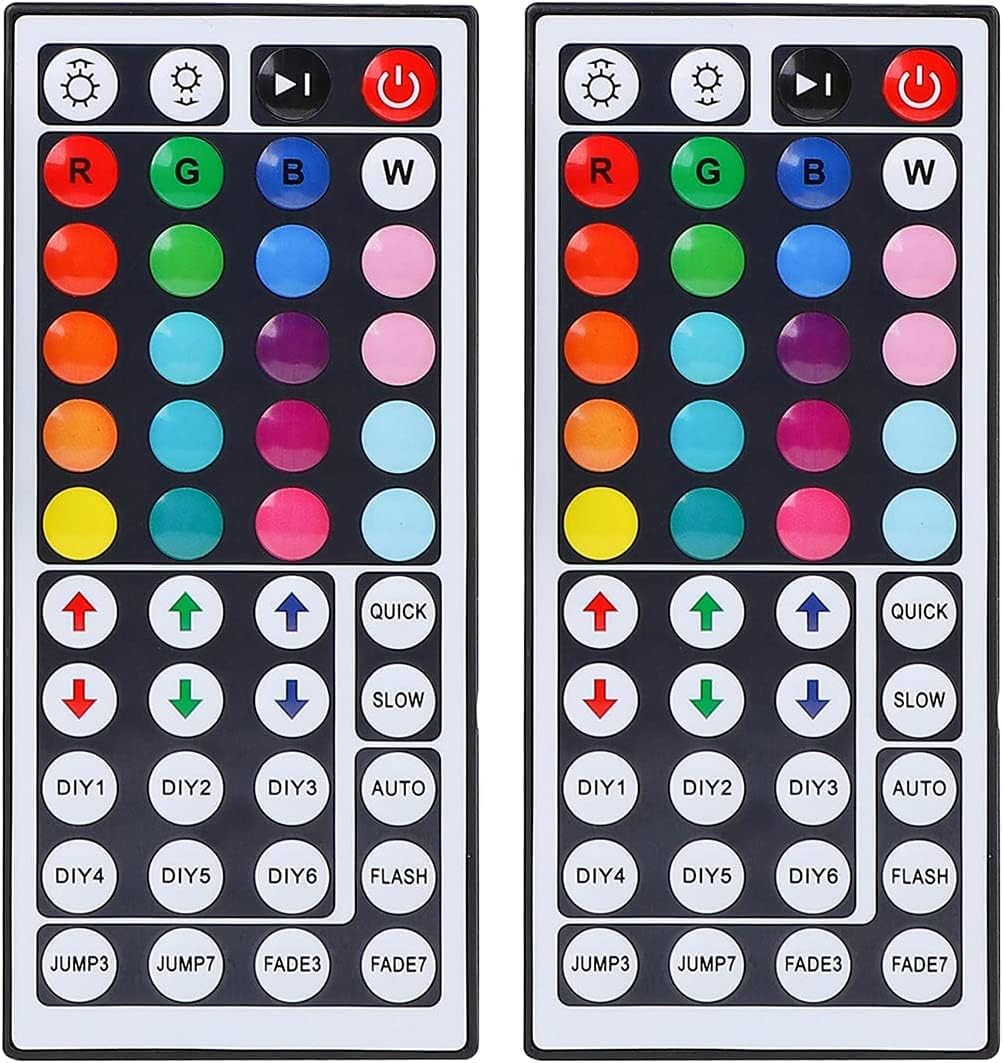
Image 1.1: Two SUPERNIGHT 44-Key IR Remote Controllers. These remotes offer extensive control over RGB LED strip lights.
2. Setup Instructions
Battery Activation:
Before first use, locate the battery compartment on the back of the remote control. Remove the clear plastic insulation tab to activate the pre-installed battery. This ensures proper power supply to the remote.

Image 2.1: Remove the plastic tab from the remote's battery compartment before use.
Connecting the IR Receiver:
Ensure your RGB LED strip light is compatible with 4-pin connectors. Connect the IR receiver box (included with the remote) to your LED strip. The power source for the LED strip is not included with this remote controller package.

Image 2.2: The IR receiver box connects to the 4-pin connector of your LED strip.
Positioning the IR Receiver:
For optimal performance, ensure the IR receiver is positioned where it has a clear line of sight to the remote control. Infrared remotes require direct aiming at the receiver for commands to be registered effectively. The effective range is approximately 30 feet.
3. Operating Instructions
The 44-key remote offers a variety of functions to customize your LED lighting experience.

Image 3.1: Layout of the 44-Key IR Remote Controller and its functions.
- ON/OFF: Power button to turn the LED strip lights on or off.
- Brightness Adjustment (V+/V-): Increase or decrease the brightness of the lights.
- Static Colors: Select from 20 preset static colors by pressing the corresponding color button.
- DIY Color Setting (DIY1-DIY6):
- Press a "DIY" button (e.g., DIY1).
- Long press the Red, Green, or Blue arrow keys (up/down) to adjust the intensity of each primary color.
- The adjusted color will be saved to the selected DIY button. You can save up to 6 custom colors.
- Speed Adjustment (QUICK/SLOW): Adjust the speed of dynamic lighting modes.
- Dynamic Modes:
- AUTO: Automatically cycles through 5 dynamic modes (JUMP3, JUMP7, FADE3, FADE7, FLASH).
- JUMP3: Three colors change in a jump pattern.
- JUMP7: Seven colors change in a jump pattern.
- FADE3: Three colors change in a fade pattern.
- FADE7: Seven colors change in a fade pattern.
- FLASH: Lights flash rapidly.

Image 3.2: The remote control allows for easy adjustment of LED strip light settings.
Video 3.1: Demonstration of the 44-Key remote control's functions, including color selection, brightness adjustment, and dynamic modes for RGB LED strip lights. This video also illustrates the DIY color setting process.
4. Maintenance
To ensure the longevity and proper functioning of your remote control:
- Keep the remote control clean and dry. Avoid exposure to moisture or extreme temperatures.
- If the remote's performance degrades, replace the battery. The remote uses a CR2025 coin cell battery.
- Avoid dropping the remote or subjecting it to strong impacts.
5. Troubleshooting
- Remote Control Not Responding:
- Ensure the transparent plastic insulation tab has been removed from the battery compartment.
- Verify that the remote control is aimed directly at the IR receiver on the LED strip controller. Obstructions can block the signal.
- Check the battery. If the remote is still unresponsive, replace the CR2025 coin cell battery.
- Incorrect Color Output:
- If the buttons do not control the correct colors (e.g., pressing Red shows Green), perform a color calibration:
- Press the OFF button on the remote to turn off the light strip.
- Press the FADE7 button (located at the bottom right of the dynamic modes section). The light strip should flash.
- Press the ON button to turn the light strip back on. The buttons should now control the correct colors.
- If the issue persists, repeat the calibration steps.
- If the buttons do not control the correct colors (e.g., pressing Red shows Green), perform a color calibration:
6. Specifications
| Brand | SUPERNIGHT |
| Model Number | IR1317 |
| Item Weight | 1.76 ounces |
| Package Dimensions | 7.52 x 3.98 x 0.67 inches |
| Color | Multicolor (Remote buttons) |
| Battery Type | CR2025 Coin Cell (pre-installed) |
| Power Source | Battery (Remote), Wired Electric (LED Strip) |
| Special Feature | Ergonomic design |
| Compatible Devices | SMD 5050, 3528, 2835 RGB LED Strip Lights (4-pin connector) |
| Max Supported Devices | 1 (per remote/receiver pair) |
| IR Range | Approximately 30 feet (line of sight) |
7. Support
For further assistance, technical support, or if you encounter issues not covered in this manual, please contact SUPERNIGHT customer service. If your remote control is not functioning correctly after following the troubleshooting steps, a replacement may be available.
Please refer to your purchase documentation or the SUPERNIGHT website for specific contact information.