
1. Introduction
This manual provides instructions for the proper installation and use of the IMC Audio Radio Wiring Harness, Model 70-1003. This harness is designed to simplify the installation of an aftermarket car stereo by providing a direct plug-and-play connection to your vehicle's factory wiring. It ensures proper electrical power and speaker connections without cutting or splicing the original vehicle wiring.
Compatibility: This wiring harness is compatible with the following Kia models:
- 2001-2002 Kia Rio, Rio Cinco
- 1995-2001 Kia Sephia
- 2000-2002 Kia Spectra
- 1995-2003 Kia Sportage
2. Safety Information
Always disconnect the vehicle's negative battery terminal before performing any electrical work to prevent short circuits and electrical damage. Ensure all connections are secure and properly insulated to avoid electrical hazards. If you are unsure about any step, consult a professional car audio installer.
3. Installation Guide
Follow these steps to install your IMC Audio Radio Wiring Harness:
- Prepare the Vehicle: Disconnect the negative terminal of your vehicle's battery. Remove the factory radio from the dashboard, following your vehicle's specific instructions.
- Identify the Harness: The IMC Audio wiring harness has two main sections: one designed to plug into the vehicle's factory radio connectors and another with color-coded wires to connect to your aftermarket radio's harness.
- Connect to Aftermarket Radio Harness: Match the color-coded wires of the IMC Audio harness to the corresponding wires on the aftermarket radio's wiring harness. Typically, aftermarket radio harnesses come with a wiring diagram. Ensure each wire is securely connected (e.g., by soldering and heat-shrinking, or using crimp connectors).
- Wire Color Code Reference:
Standard Wiring Color Codes (Consult your aftermarket radio manual for exact details) Wire Color Function Yellow Constant 12V (Battery) Red Switched 12V (Accessory) Black Ground Blue Power Antenna / Amplifier Remote Turn-On Orange Illumination / Dimmer White / White-Black Front Left Speaker (+ / -) Gray / Gray-Black Front Right Speaker (+ / -) Green / Green-Black Rear Left Speaker (+ / -) Purple / Purple-Black Rear Right Speaker (+ / -) - Connect to Vehicle: Once the IMC Audio harness is securely connected to your aftermarket radio's harness, plug the vehicle-side connector of the IMC Audio harness into the corresponding factory radio connectors in your dashboard.
- Test the System: Reconnect the vehicle's negative battery terminal. Turn on the vehicle and test the aftermarket radio's functionality, including power, sound from all speakers, and any other features.
- Secure the Radio: If everything functions correctly, carefully mount the aftermarket radio back into the dashboard.

Figure 1: Side view of the IMC Audio Radio Wiring Harness, illustrating the vehicle-side connector and the color-coded wires for connection to an aftermarket radio.

Figure 2: Top view of the IMC Audio Radio Wiring Harness, highlighting the arrangement of the color-coded wires extending from the connector.
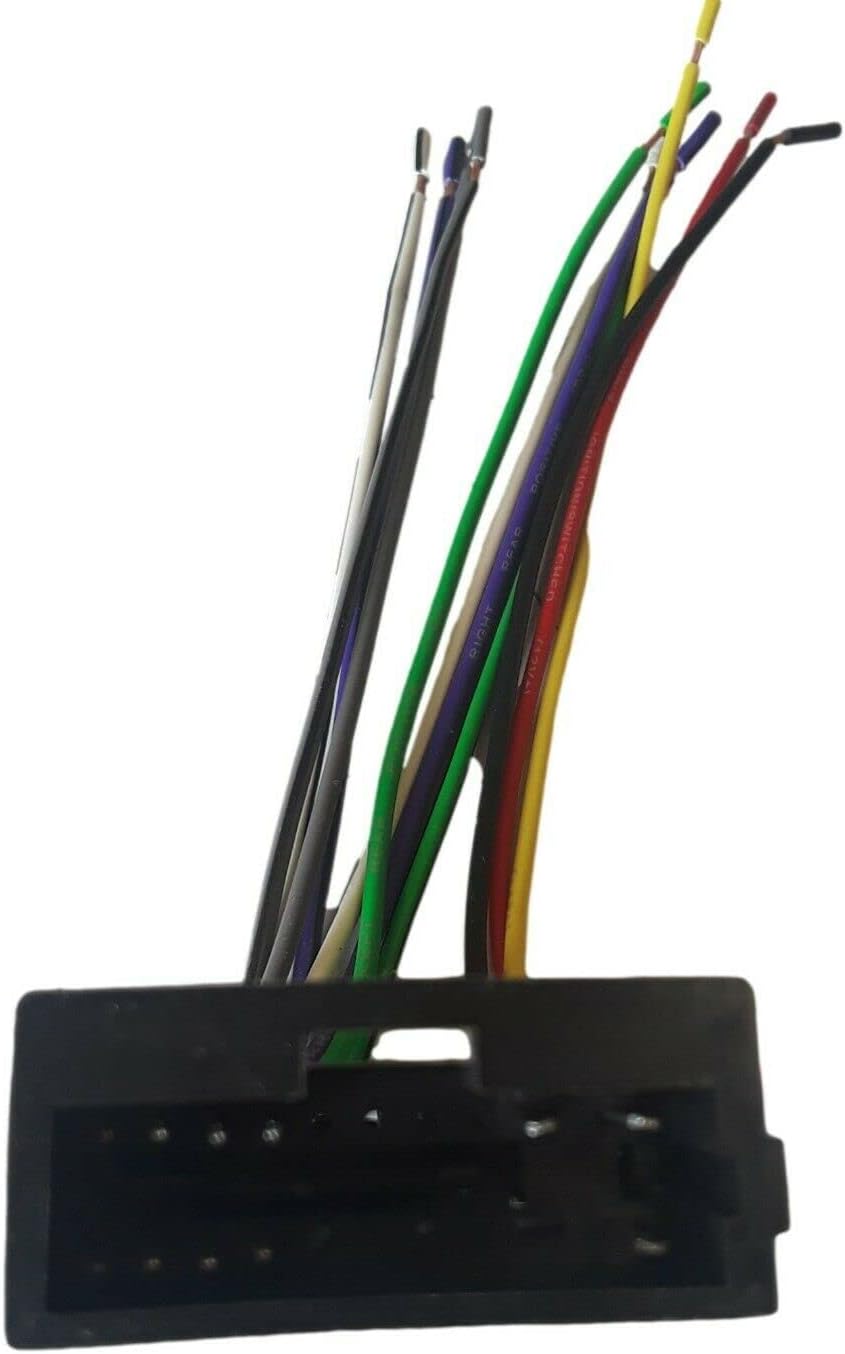
Figure 3: Front view of the IMC Audio Radio Wiring Harness, showing the pins within the vehicle connector and the individual wires.
4. Operation
The IMC Audio Radio Wiring Harness is a passive component designed to facilitate the electrical connection between your vehicle and an aftermarket radio. Once correctly installed, it enables the normal operation of your aftermarket car stereo, providing power and audio signals to the speakers.
5. Maintenance
This wiring harness requires no routine maintenance. Ensure all connections remain secure and free from moisture or excessive vibration. There are no user-serviceable parts within the harness itself.
6. Troubleshooting
If you encounter issues after installation, consider the following:
- No Power to Radio:
- Check vehicle's battery connection.
- Verify the yellow (constant 12V) and red (switched 12V) wires are correctly connected and receiving power.
- Inspect vehicle's fuses related to the radio.
- No Sound from Speakers:
- Ensure all speaker wires (white, gray, green, purple, and their black-striped counterparts) are correctly matched and securely connected.
- Check the aftermarket radio's fader and balance settings.
- Confirm the amplifier remote turn-on wire (if applicable, usually blue) is connected.
- Intermittent Operation:
- Re-check all wire connections for looseness or poor contact.
- Ensure the ground wire (black) has a solid connection.
If problems persist, consult a professional car audio technician.
7. Specifications
| Feature | Detail |
|---|---|
| Brand | IMC Audio |
| Model Number | 70-1003 |
| UPC | 741754770954 |
| Cable Type | Automotive Wiring Harness |
| Compatibility | 2001-2002 Kia Rio, Rio Cinco; 1995-2001 Kia Sephia; 2000-2002 Kia Spectra; 1995-2003 Kia Sportage |
8. Warranty and Support
Warranty Information
For specific warranty details, please refer to the documentation provided with your purchase or contact IMC Audio directly. General warranty terms typically cover manufacturing defects for a limited period from the date of purchase.
Customer Support
If you require assistance with installation, troubleshooting, or have questions about your IMC Audio Radio Wiring Harness, please contact IMC Audio customer support through their official website or the retailer from whom you purchased the product.