
MD-3009II
Underground Metal Detector User Manual
Model: MD-3009II | Brand: Generic
1. Introduction
This manual provides comprehensive instructions for the safe and effective operation of your new Underground Metal Detector. Designed for enthusiasts and professionals alike, this device allows you to locate various metal objects, including coins, relics, jewelry, gold, and silver, hidden beneath the surface. Please read this manual thoroughly before using the detector to ensure optimal performance and longevity.

Figure 1: The MD-3009II Metal Detector, showcasing its main components including the search coil, adjustable stem, and control unit.
2. Safety Information
- Always operate the metal detector in well-lit areas or with adequate lighting.
- Avoid using the detector near live electrical wires or in areas with known underground utilities.
- Do not immerse the control unit in water. Only the search coil is waterproof.
- Use caution when digging to avoid injury or damage to property. Always obtain permission before searching on private land.
- Keep batteries out of reach of children. Dispose of batteries properly according to local regulations.
- If the detector is not functioning correctly, refer to the troubleshooting section or contact support. Do not attempt to disassemble the main control unit.
3. Package Contents
Upon unpacking, please verify that all the following components are present:
- Metal Detector Main Unit (Control Unit, Stem, Armrest)
- Search Coil Assembly
- Stem Lock Nut
- User Manual (this document)
- (Batteries are typically not included and must be purchased separately)

Figure 2: Exploded view showing the main components: Armrest & Stem, Controller Unit, Anti-slip & comfortable soft handle, Stem Lock Nut, Stretchable Pole, and Search Coil Assembly.
4. Setup and Assembly
Follow these steps to assemble your metal detector:
- Attach the Search Coil: Connect the search coil assembly to the lower end of the stretchable pole using the provided non-metallic bolt and nut. Ensure it is securely fastened but do not overtighten.
- Connect the Pole Sections: Insert the lower pole (with search coil) into the middle pole, and then insert the middle pole into the upper pole (which has the control unit and armrest).
- Secure with Lock Nuts: Tighten the stem lock nuts to secure the pole sections together.
- Adjust Length: Adjust the length of the detector by extending or retracting the stretchable pole to a comfortable height. The ideal length allows you to swing the search coil parallel to the ground without bending over.
- Wrap Cable: Carefully wrap the search coil cable around the stem, ensuring it is not too tight or loose, and plug the connector into the corresponding port on the control unit.
- Install Batteries: Open the battery compartment on the control unit and insert the required batteries (typically 9V batteries, refer to specifications for exact type) observing the correct polarity. Close the compartment securely.
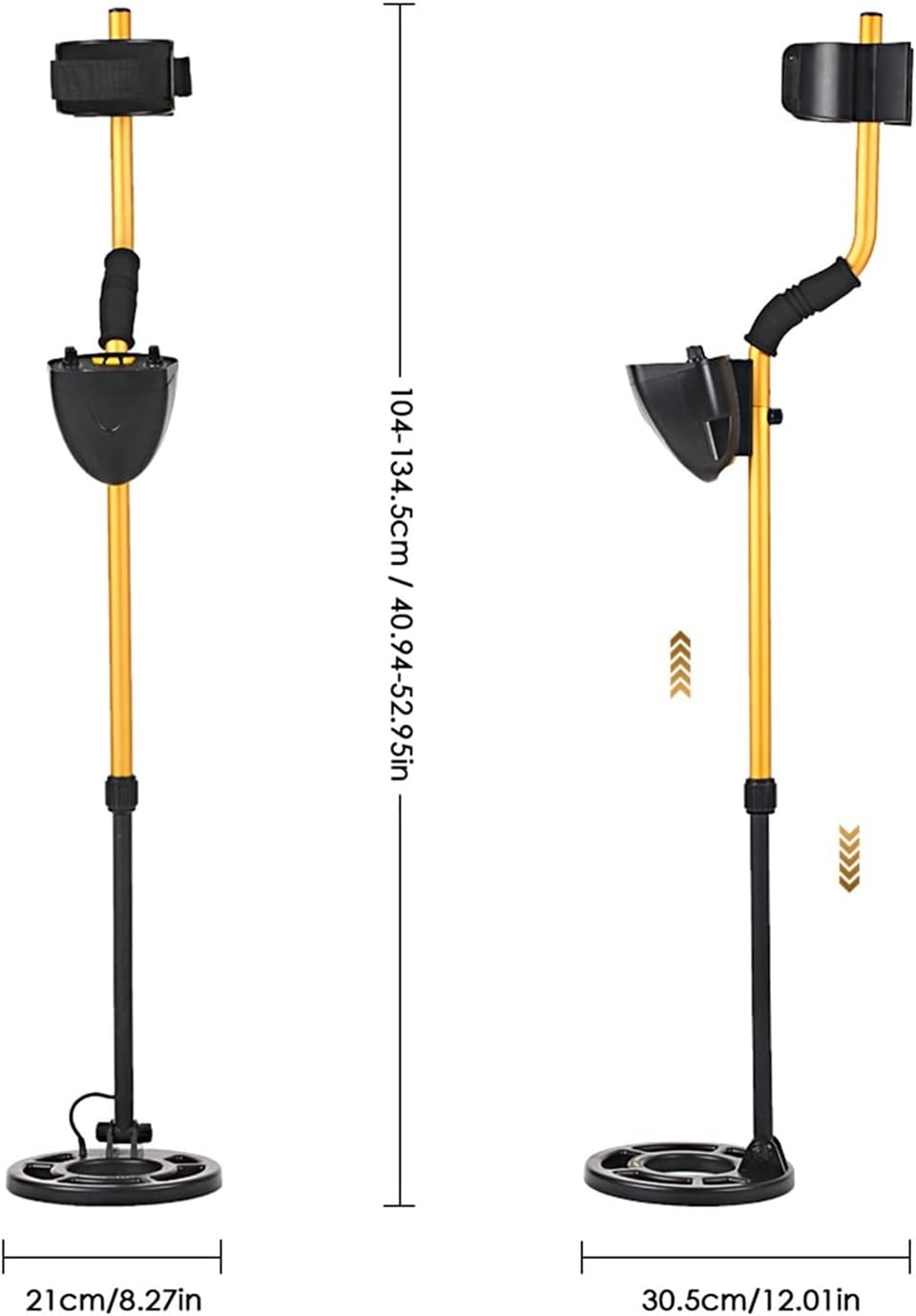
Figure 3: The adjustable length of the detector, ranging from approximately 104-134.5 cm (40.94-52.95 inches), with a search coil diameter of 21 cm (8.27 inches).
5. Operating Instructions
5.1 Powering On and Basic Controls
- Power On/Off: Rotate the "DISC" knob clockwise from the "OFF" position to turn on the detector. Rotate counter-clockwise to turn off.
- Sensitivity (SENS): Adjust the "SENS" knob to control the detector's sensitivity. Higher sensitivity increases detection depth but may also increase false signals from ground mineralization or electrical interference. Start with a medium setting and adjust as needed.
- Discrimination (DISC): The "DISC" knob allows you to eliminate unwanted metals from detection. As you increase the DISC setting, the detector will ignore more types of ferrous metals (like iron nails) and small trash items, focusing on more valuable targets.
- Detection Indication: When a metal object is detected, the mechanical pointer on the view meter will swing to the right, and an audio alert will sound. The tone may vary depending on the type of metal detected.

Figure 4: The view meter and pointer, which indicate metal detection by swinging to the right. The image also shows examples of gold nuggets, earrings, and coins, representing potential finds.
5.2 Detection Modes
- ALL METAL Mode: This mode detects all types of metal objects. It offers the greatest detection depth and is ideal for general searching or when you are unsure of the target type.
- DISCRIMINATION Mode: In this mode, you can set the detector to ignore certain types of metals. This is useful for filtering out junk metal and focusing on specific targets like coins or jewelry. Adjust the "DISC" knob to fine-tune the discrimination level.
5.3 Sweeping the Search Coil
Hold the detector with the search coil parallel to the ground, about 1-2 inches above the surface. Swing the coil slowly from side to side in overlapping sweeps. Maintain a consistent height and speed for best results. When a target is detected, narrow down the search area by making smaller, slower sweeps over the signal source.

Figure 5: The metal detector being used on a beach, demonstrating its application in various environments for finding treasures like coins.
6. Maintenance
- Cleaning: After each use, wipe down the detector with a damp cloth to remove dirt, dust, or sand. Do not use abrasive cleaners or solvents.
- Storage: Store the detector in a cool, dry place when not in use. If storing for an extended period, remove the batteries to prevent leakage.
- Battery Care: Replace batteries when the low battery indicator illuminates or when performance degrades. Always use fresh, high-quality batteries.
- Search Coil: The search coil is waterproof and can be rinsed with fresh water. Ensure the cable connection to the control unit remains dry.
7. Troubleshooting
| Problem | Possible Cause | Solution |
|---|---|---|
| No power | Dead or incorrectly installed batteries | Check battery polarity; replace with fresh batteries. |
| Constant false signals / Chatter | High sensitivity setting, electrical interference, highly mineralized ground | Reduce sensitivity; move away from power lines/electronics; try adjusting ground balance (if available) or discrimination. |
| Poor detection depth | Low sensitivity, small target, deep target, incorrect sweep technique | Increase sensitivity; ensure proper sweep technique; check battery level. |
| Detector beeps at everything | Discrimination set too low (ALL METAL mode) | Adjust the "DISC" knob to a higher setting to filter out unwanted metals. |
8. Specifications
- Brand: Generic
- Model: MD-3009II
- Material: ABS plastic + aluminum + copper
- Detection Depth: 10-50cm / 3.94-19.69 inches (depending on target size and ground conditions)
- Detect Objects: Metal (Iron nail, iron covering, aluminum ring, small aluminum product, coins, gold, bronze, silver)
- Detection Mode: All Metal, Discrimination
- Operating Frequency: 5KHz
- Operating Current: Standby 30mA, Max. 80mA
- Operating Voltage Range: 7.2-9.6V
- Detection Indication: Mechanical pointer mode, audio mode
- Indicator Light: Power, low battery indication
- Search Coil Diameter: 210mm / 8.27 inches
- Adjustable Height: 104-134.5cm / 40.94-52.95 inches
- Power Source: Battery Powered (Batteries Required: Yes, specific type not detailed in source, typically 9V)
- Item Weight: Approximately 500 Grams / 1.1 pounds
9. Warranty and Support
Specific warranty information for this product is not provided in the available documentation. For any product-related inquiries, technical support, or warranty claims, please contact the retailer or manufacturer directly through their official support channels. Keep your purchase receipt as proof of purchase.
Ask a question about this manual
Ask about setup, troubleshooting, compatibility, parts, safety, or missing instructions. Manuals+ will review the question and use this page’s manual context to help answer it.