
1. Introduction
This manual provides instructions for the setup, operation, maintenance, and troubleshooting of your Muddy Manifest 2.0 Cellular Trail Camera. The Manifest 2.0 is designed to capture images and videos of wildlife, transmitting them via cellular networks. It features a 16MP image sensor, 0.8-second trigger speed, and compatibility with AT&T and Verizon networks.

Figure 1: Front view of the Muddy Manifest 2.0 Cellular Trail Camera with its antenna.
Key Features:
- 16MP Image Capture with selectable resolutions (16MP/8MP/4MP).
- Fast 0.8-second trigger speed.
- Compatible with AT&T and Verizon cellular networks.
- 80-foot detection and infrared (IR) flash range.
- 1-3 photo burst modes.
- Utilizes powerful LED emitters for clear night images.
- Quick Scan QR Code setup via the Stealth Cam Command App.
- Images stamped with time, date, moon phase, and camera name.
- Compact design for easy transport and discreet placement.
2. Setup
2.1 Unboxing and Components
Verify that all components are present:
- Muddy Manifest 2.0 Camera
- Tree Strap
- Memory Card (up to 32GB, included)
2.2 Battery Installation
- Open the camera housing.
- Insert 8 AA batteries into the designated battery compartment, ensuring correct polarity.
- Close the battery compartment securely.
Note: For optimal performance, use high-quality alkaline or lithium batteries. An external power jack is available for an optional solar battery pack (not included).
2.3 Memory Card Insertion
- Locate the memory card slot.
- Insert the provided SD card (up to 32GB) into the slot until it clicks into place.
2.4 Network Activation and App Setup
The Muddy Manifest 2.0 operates on AT&T and Verizon networks. To activate cellular functions and manage your camera, download the Stealth Cam Command App.
- Download the "Stealth Cam Command" app from your device's app store.
- Create an account or log in.
- Use the Quick Scan QR Code feature within the app to register your camera. The QR code is typically located inside the camera housing or on the packaging.
- Follow the in-app instructions to select a data plan and complete the activation process.
2.5 Mounting the Camera

Figure 2: The Muddy Manifest 2.0 camera securely mounted to a tree using the provided strap.
Use the included tree strap to secure the camera to a tree or post. Ensure the camera is stable and pointed towards the desired detection area. The camera also features an integrated Python lock latch for added security (lock sold separately).
3. Operation
3.1 Powering On/Off
Locate the power switch inside the camera housing. Toggle it to the "ON" position to power on the camera. Toggle to "OFF" to power off.
3.2 Camera Modes and Settings
All camera settings, including image resolution, burst mode, and upload resolution, are managed through the Stealth Cam Command App. Refer to the app's interface for detailed options.
- Image Resolution: Select from 16MP, 8MP, or 4MP. Higher resolution images consume more storage and data.
- Burst Mode: Configure the camera to take 1 to 3 images per triggering event.
- Upload Resolution: Choose between Low and High upload resolutions for cellular transmission. Low resolution saves data, while High resolution provides more detail.
- Detection Range: The camera has an 80-foot detection range. Position the camera to optimize this range for your monitoring area.
- Infrared Flash: The 80-foot infrared flash range ensures clear images in low-light conditions without startling wildlife.
3.3 Image and Video Capture
When motion is detected within the 80-foot range, the camera will trigger and capture images or videos according to your configured settings. The trigger speed is approximately 0.8 seconds.
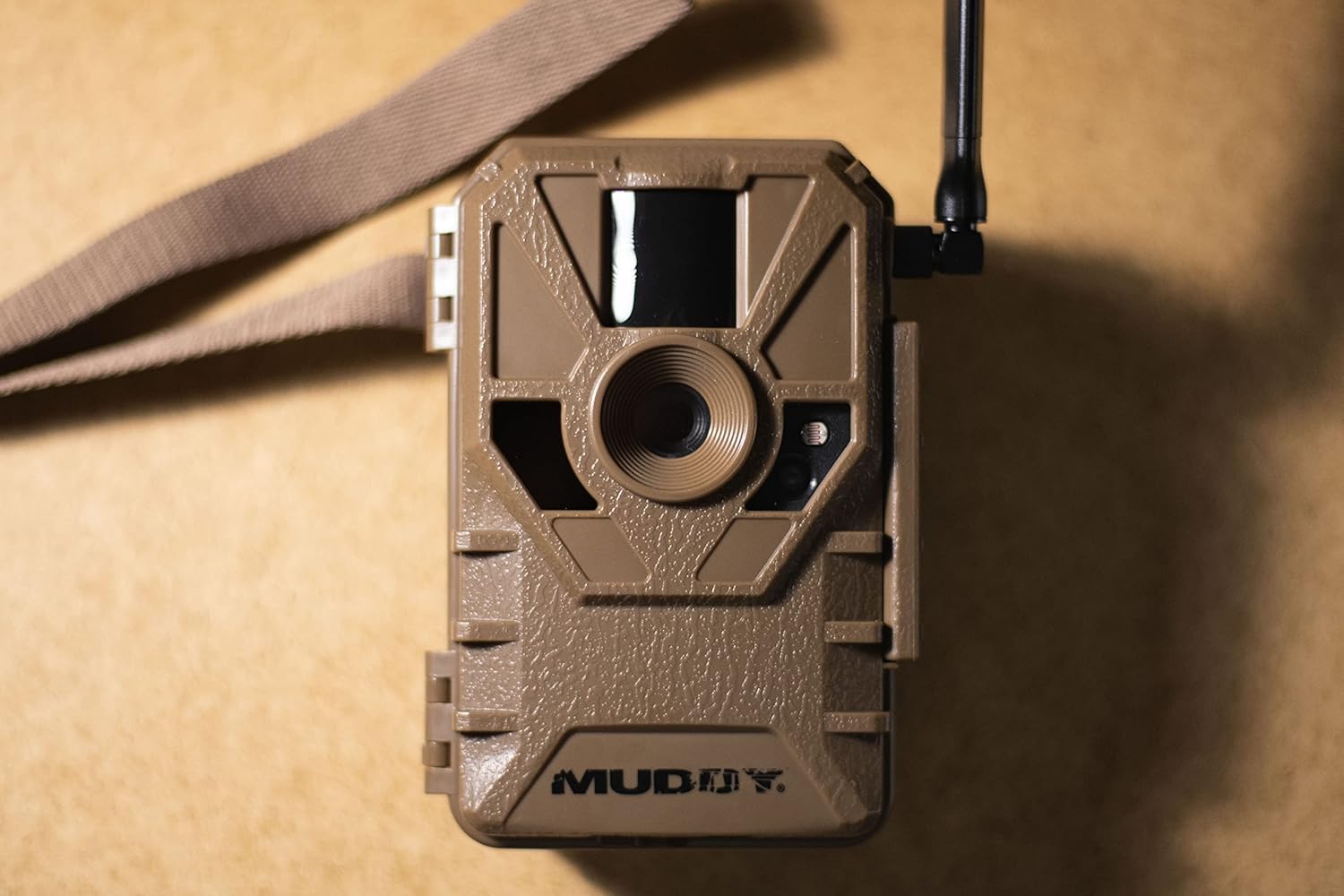
Figure 3: Detailed view of the camera's front, highlighting the lens, PIR sensor, and LED emitters.
3.4 Data Transmission
Captured images and videos are transmitted to your Stealth Cam Command App account via the cellular network. Ensure your camera has sufficient signal strength and an active data plan for reliable transmission.
4. Maintenance
4.1 Battery Replacement
Regularly check battery levels via the Stealth Cam Command App. Replace all 8 AA batteries when they are low to ensure continuous operation. Always use fresh batteries of the same type.
4.2 Memory Card Management
While images are transmitted, the camera also stores them on the SD card. Periodically check the memory card capacity. Format the card or replace it if it becomes full or if you experience performance issues. Always back up important images before formatting.
4.3 Cleaning
Keep the camera lens, PIR sensor, and LED emitters clean and free from dirt, dust, and debris. Use a soft, dry cloth for cleaning. Avoid abrasive materials or harsh chemicals that could damage the camera's components.
4.4 Firmware Updates
Check the Stealth Cam Command App periodically for any available firmware updates. Keeping your camera's firmware up-to-date ensures optimal performance and access to new features.
5. Troubleshooting
| Problem | Possible Cause | Solution |
|---|---|---|
| Camera not sending pictures to app. |
|
|
| Poor image quality. |
|
|
| Camera not triggering. |
|
|
6. Specifications
| Feature | Detail |
|---|---|
| Model Name | Manifest 2.0 Cellular Trail Camera |
| Item Model Number | MUD-VRZT |
| Image Resolution | 16MP / 8MP / 4MP |
| Trigger Speed | 0.8 seconds |
| Detection Range | 80 feet |
| IR Flash Range | 80 feet |
| Cellular Connectivity | AT&T and Verizon Networks |
| Power Source | 8 AA Batteries (external power jack for solar battery pack) |
| Memory Card Support | Up to 32GB (SD card included) |
| Product Dimensions | 5.51 x 3.03 x 7.48 inches |
| Weight | 1.06 Pounds |
| Manufacturer | GSM Outdoors |
7. Warranty and Support
7.1 Warranty Information
The Muddy Manifest 2.0 Cellular Trail Camera is manufactured by GSM Outdoors. For detailed warranty information, including terms, conditions, and duration, please refer to the official GSM Outdoors website or the warranty card included with your product. Keep your proof of purchase for warranty claims.
7.2 Customer Support
If you encounter issues not covered in the troubleshooting section or require further assistance, please contact GSM Outdoors customer support. Contact information can typically be found on their official website or within the Stealth Cam Command App.
For app-related inquiries, refer to the help section within the Stealth Cam Command App.


