
1. Introduction
Thank you for purchasing the RUMBERGER W689-1 COB LED Rechargeable Headlamp. This manual provides detailed instructions for the safe and efficient use, setup, operation, and maintenance of your headlamp. Please read this manual thoroughly before use and retain it for future reference.
2. Product Overview
The RUMBERGER W689-1 is a versatile COB LED headlamp featuring multiple lighting modes, motion sensor functionality, and USB-C recharging. It is designed for various activities requiring hands-free illumination.
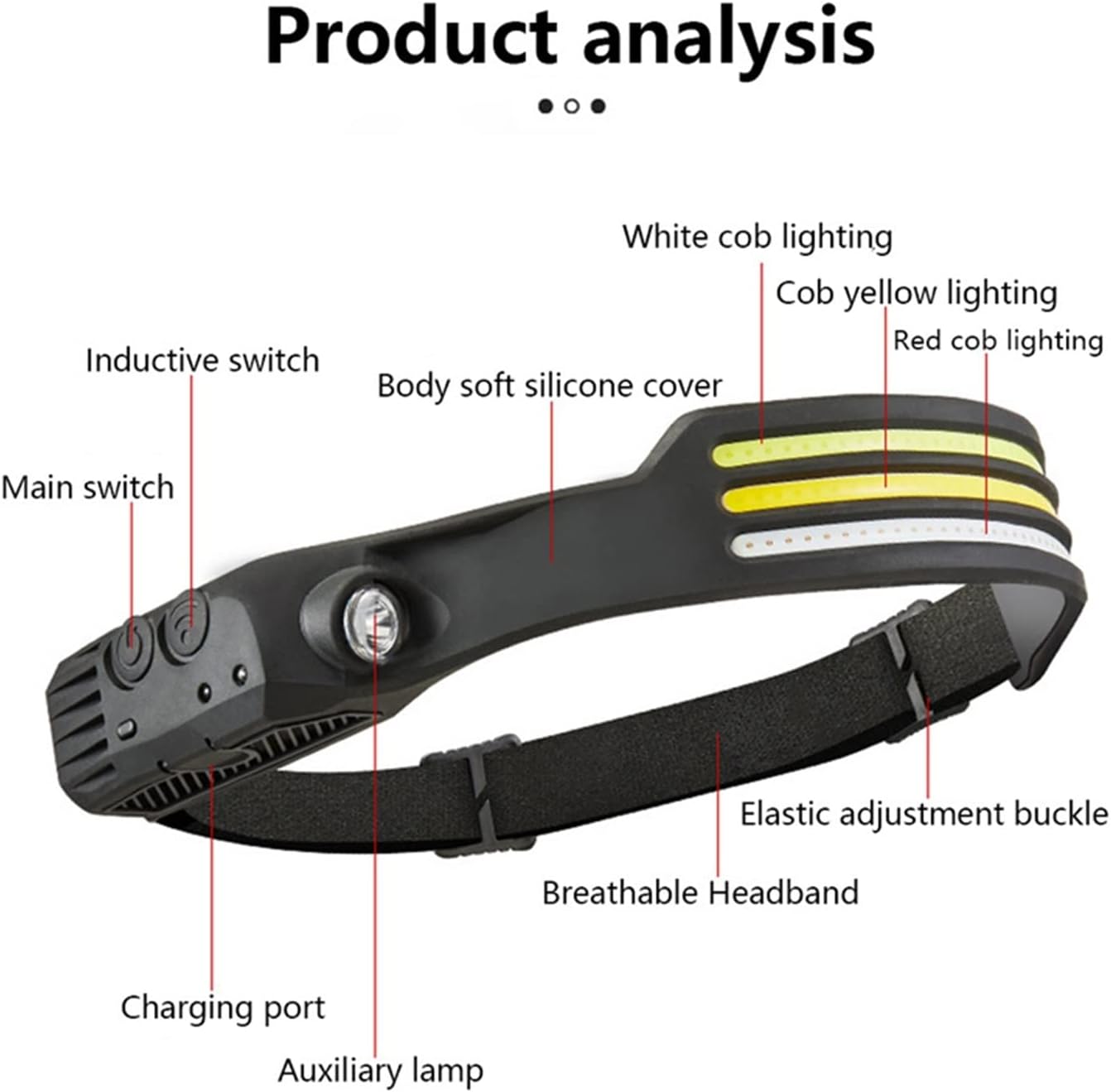
Figure 2.1: Headlamp Components. This image displays the RUMBERGER W689-1 headlamp with key components labeled, including the main switch, inductive switch, charging port, auxiliary lamp, white COB lighting, yellow COB lighting, red COB lighting, soft silicone cover, elastic adjustment buckle, and breathable headband.
Package Contents:
- 1 x RUMBERGER W689-1 COB LED Rechargeable Headlamp with Motion Sensor
- 1 x USB Charging Cable (Type-C)
3. Setup
3.1 Wearing the Headlamp
- Place the headlamp on your head with the light panel facing forward.
- Adjust the elastic headband using the buckle until it fits snugly and comfortably around your head. Ensure the headlamp is stable and does not obstruct your vision.

Figure 3.1: Headlamp in Use. This image shows the RUMBERGER W689-1 headlamp being worn, demonstrating its comfortable fit and wide illumination area.
4. Charging the Headlamp
The headlamp features a built-in 1200mAh rechargeable battery and uses a Type-C USB charging interface.
- Locate the Type-C charging port on the side of the headlamp (refer to Figure 2.1).
- Connect the provided USB charging cable to the headlamp's Type-C port.
- Connect the other end of the USB cable to a standard USB power source (e.g., wall adapter, computer USB port, power bank).
- During charging, a red indicator light will illuminate.
- Once fully charged, the indicator light will turn green.
- Disconnect the charging cable after the battery is fully charged.

Figure 4.1: USB-C Charging. This image illustrates the Type-C charging port and the red/green indicator lights for charging status.
5. Operating Instructions
The headlamp features a main switch for normal operation and a separate inductive switch for motion sensor mode.

Figure 5.1: Control Buttons. This image details the functions of the Normal Mode Button and the Sensor Mode Button, including how to switch modes and activate the flashing mode.
5.1 Normal Mode Operation (Main Switch)
Press the Main Switch (refer to Figure 2.1) to cycle through the available lighting modes:
- First Press: Activates White COB light.
- Second Press: Activates White COB light + White COB light (if applicable to your model variant).
- Third Press: Activates White COB light + White COB light + White COB light (if applicable to your model variant).
- Fourth Press: Activates White COB light + Red light (if applicable to your model variant).
- Fifth Press: Activates White COB light + Yellow light (if applicable to your model variant).
- Sixth Press: Activates White COB light + Yellow light + Red light (if applicable to your model variant).
- Long Press (3 seconds): Activates flashing mode from any active normal mode.
- Subsequent Presses: Turns off the headlamp or cycles back to the first mode.
Note: The specific light combinations available depend on your headlamp variant. The W689-1 variant, as described in the product details, primarily features White COB light and Red light options.
5.2 Motion Sensor Mode (Inductive Switch)
The motion sensor allows you to turn the light on or off with a hand wave, providing convenience when your hands are occupied or dirty.
- Ensure the headlamp is turned on using the Main Switch and is in your desired lighting mode.
- Press the Inductive Switch (refer to Figure 2.1). A small indicator light will typically illuminate to confirm sensor mode activation.
- Once activated, wave your hand within approximately 10-15 cm (4-6 inches) in front of the sensor to turn the light ON or OFF. The response time is approximately 0.1 seconds.
- To exit motion sensor mode, press the Inductive Switch again. The headlamp will revert to normal button control.
6. Maintenance
- Cleaning: Wipe the headlamp with a soft, damp cloth. Do not use abrasive cleaners or solvents.
- Storage: Store the headlamp in a cool, dry place away from direct sunlight when not in use.
- Battery Care: To prolong battery life, charge the headlamp fully before long-term storage and recharge it every 3-6 months, even if not used.
- Water Resistance: The headlamp is designed for general outdoor use but is not submersible. Avoid exposing it to heavy rain or submerging it in water.
7. Troubleshooting
| Problem | Possible Cause | Solution |
|---|---|---|
| Headlamp does not turn on. | Battery is depleted. | Charge the headlamp using the provided USB-C cable. |
| Motion sensor not responding. | Sensor mode not activated, or obstruction. | Ensure the Inductive Switch is pressed to activate sensor mode. Check for obstructions in front of the sensor. Wave hand within the effective range (10-15 cm). |
| Light output is dim. | Low battery level. | Recharge the headlamp fully. |
| Headlamp not charging. | Faulty cable or power source. | Try a different USB-C cable or a different USB power adapter. Ensure the cable is securely connected. |
8. Specifications
| Model | W689-1 |
| Light Source | COB LED (White, Red) |
| Main Light Output | 1000 Lumens |
| Auxiliary Light Output | 500 Lumens |
| Battery | 1200mAh (Built-in) |
| Charging Interface | Type-C USB |
| Material | TPU + ABS + PC |
| Dimensions | 310mm x 32mm x 31mm |
| Special Features | Motion Sensor, Rechargeable |
9. Safety Information
- Do not look directly into the LED light when it is on, as it may cause temporary vision impairment.
- Keep out of reach of children.
- Do not disassemble or modify the headlamp. This may cause damage and void the warranty.
- Use only the provided or a certified USB-C cable for charging.
- Avoid extreme temperatures and direct sunlight during charging and storage.
- Dispose of the product and battery responsibly according to local regulations.
10. Warranty and Support
For warranty information and customer support, please refer to the documentation provided at the time of purchase or contact your retailer. Keep your proof of purchase for any warranty claims.
Manufacturer: RUMBERGER