
MATIHUNO AIL
MATIHUNO Portable Neck Fan Instruction Manual
Model: AIL
1. Product Overview
The MATIHUNO Portable Neck Fan is designed to provide personal cooling with its innovative bladeless design and quad-core ice-sensing engine. It features four independent fans, a 6000mAh battery for extended operation, and multiple speed settings for customized comfort. Its ergonomic design ensures comfortable wear for various activities.

Image 1.1: The MATIHUNO Portable Neck Fan in white and green, showcasing its sleek, wearable design.
Key Features:
- Quad-Core Ice-Sensing Engine: Provides front and rear cooling for comprehensive comfort.
- Four Independent Fans: Equipped with powerful aviation turbine blades for strong airflow.
- 6000mAh Battery: Offers up to 24 hours of continuous operation on a single charge.
- Dual Noise Reduction Technology: Utilizes brushless DC motors for quiet operation.
- 3-Speed Adjustment: Allows selection of natural, cool, or icy wind modes.
- Independent Air Ducts: Front and rear fans can be controlled separately.
- Ergonomic Design: Lightweight and adjustable to fit various neck sizes comfortably.
- Type-C Fast Charging: Enables quick and efficient recharging.

Image 1.2: Diagram illustrating the four key upgrades: muffler motor, 24-hour battery life, quad-core power, and 360-degree surround adjustable airflow.

Image 1.3: Visual representation of the fan's dual noise reduction technology and the front and rear 4 air duct design, providing 360-degree surrounding icy wind.

Image 1.4: Close-up of the aviation fan blades for powerful hurricane-like wind and the control buttons for independent front and rear wind zone control.
2. Safety Instructions
To ensure safe operation and prolong the life of your MATIHUNO Portable Neck Fan, please adhere to the following safety guidelines:
- Do not attempt to disassemble, repair, or modify the device. Unauthorized modifications can lead to malfunction or injury.
- Keep the device away from excessive heat sources, direct sunlight, and open flames.
- Avoid exposing the device to water or other liquids, especially the charging port, to prevent electrical shock or damage. While the battery is designed to be sweatproof, the device is not fully waterproof.
- Use only the provided USB charging cable and a compatible 5V DC power adapter.
- Do not insert fingers or foreign objects into the fan vents.
- Store the fan in a cool, dry place when not in use.
- Keep out of reach of small children and pets.
3. Setup
3.1 Unboxing
Carefully remove the neck fan and all accessories from the packaging. Verify that all components are present: the neck fan unit and the USB Type-C charging cable.
3.2 Initial Charging
Before first use, fully charge the neck fan. Connect the Type-C end of the charging cable to the fan's charging port and the USB-A end to a compatible USB power source (e.g., wall adapter, computer USB port). The charging indicator light will provide feedback on the charging status. A full charge typically takes approximately 1.5 hours.

Image 3.1: Details of the fan's features including the independent switch for rear fan control, ergonomic design, waterproof and sweatproof battery, and the Type-C fast charging cable.
3.3 Wearing the Fan
Gently open the neck fan and place it around your neck. The flexible design allows for a comfortable fit. Ensure the fan vents are not obstructed by clothing or hair for optimal airflow.
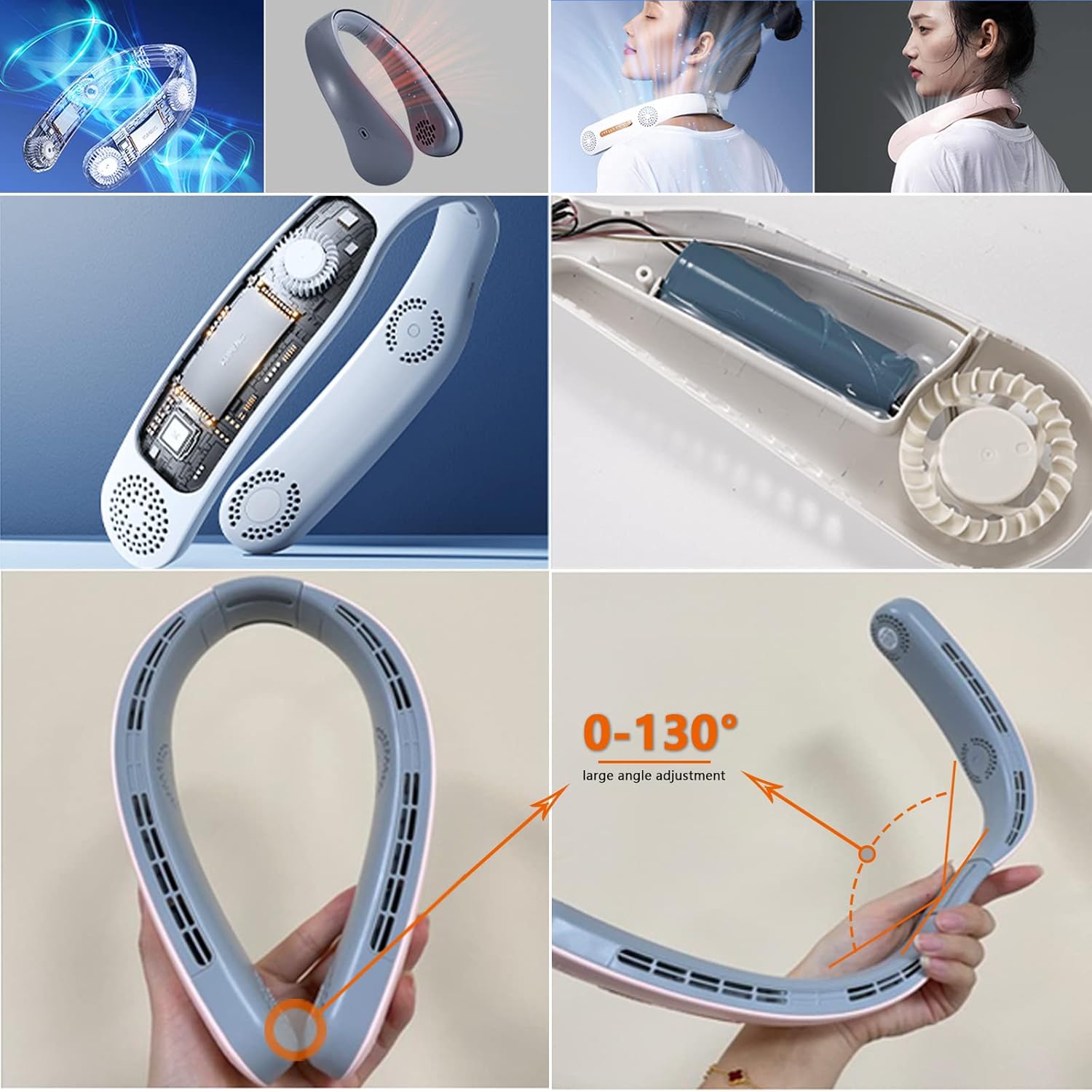
Image 3.2: The neck fan's adjustable design, allowing for a 0-130 degree large angle adjustment for a personalized fit, along with a view of its internal structure.
4. Operating Instructions
The MATIHUNO Neck Fan features intuitive controls for easy operation.
4.1 Power On/Off
- To power on the fan, press and hold the main power button (usually located on one side of the fan).
- To power off, press and hold the main power button again.
4.2 Adjusting Fan Speed
The fan offers three adjustable speed settings:
- 1st Speed (Natural Wind): Press the power button once after turning on.
- 2nd Speed (Cool Wind): Press the power button a second time.
- 3rd Speed (Icy Wind): Press the power button a third time.
- Pressing the button a fourth time will cycle back to the 1st speed.

Image 4.1: Illustration of the three-speed wind settings: Natural Wind, Cool Wind, and Icy Wind, providing a new cooling experience.
4.3 Independent Fan Control
The neck fan features two switches to control the front and rear fans independently. This allows you to customize airflow to specific areas of your neck and face.
- Locate the two control buttons on the fan. One controls the front fans, and the other controls the rear fans.
- Press each button to activate or deactivate the respective fan sections.
Video 4.1: This video demonstrates the fan's quiet operation, strong wind, and long battery life, showing its use in various settings like outdoors and indoors for work or relaxation.
5. Maintenance
Proper maintenance ensures the longevity and optimal performance of your neck fan.
5.1 Cleaning
- Ensure the fan is powered off and unplugged before cleaning.
- Wipe the exterior of the fan with a soft, dry, or slightly damp cloth.
- Do not use abrasive cleaners, solvents, or harsh chemicals, as these may damage the surface.
- Use a soft brush or compressed air to gently clear any dust or debris from the air intake and exhaust vents.
5.2 Storage
When not in use for extended periods, store the neck fan in a cool, dry place, away from direct sunlight and extreme temperatures. It is recommended to charge the battery to about 50% before storing to maintain battery health.
6. Troubleshooting
If you encounter issues with your MATIHUNO Portable Neck Fan, refer to the following common problems and solutions:
| Problem | Possible Cause | Solution |
|---|---|---|
| Fan does not turn on. | Battery is depleted. | Charge the fan fully using the provided Type-C cable and a compatible power source. Ensure the charging indicator activates. |
| Fan only works when plugged in. | Battery issue or not holding charge. | Ensure the fan has been charged for at least 1.5 hours. If the issue persists, the battery may require service. |
| Weak airflow. | Low battery; vents obstructed; fan speed setting too low. | Recharge the fan. Clear any obstructions from the air intake/exhaust vents. Increase the fan speed setting. |
| Unusual noise during operation. | Debris in fan; internal malfunction. | Power off and gently clean the fan vents. If noise persists, discontinue use and contact customer support. |
| Charging not working. | Faulty cable/adapter; charging port issue. | Try a different USB Type-C cable and power adapter. Ensure the charging port is clean and free of debris. |
If the problem persists after attempting these solutions, please contact MATIHUNO customer support for further assistance.
7. Specifications
| Feature | Detail |
|---|---|
| Brand | MATIHUNO |
| Model Name | AIL (electricfan-A2) |
| Color | White and Green |
| Electric Fan Design | Wearable Fan |
| Power Source | Battery Powered (6000mAh Lithium Ion, included) |
| Voltage | 5 Volts (DC) |
| Number of Power Levels | 3 |
| Control Method | Touch / Push Button |
| Blade Material | Plastic (Bladeless design) |
| Item Weight | 1 Pounds |
| Product Dimensions | 5.51 x 1.85 x 8.58 inches |
| Indoor/Outdoor Usage | Outdoor |
| Noise Level | 50 dB |
8. Warranty and Support
Specific warranty information for the MATIHUNO Portable Neck Fan is not provided in the product details. For warranty claims, technical support, or any product-related inquiries, please refer to the contact information provided with your purchase or visit the official MATIHUNO website.
Ask a question about this manual
Ask about setup, troubleshooting, compatibility, parts, safety, or missing instructions. Manuals+ will review the question and use this page’s manual context to help answer it.