
1. Introduction
The PREXISO Dual Laser Measure is a versatile and accurate laser distance meter designed for fast and precise measurements. This device features dual laser technology, a backlit TFT color display, and multiple measurement functions including distance, area, volume, and Pythagorean calculations. It is rechargeable and built with a durable, shockproof design, making it suitable for various professional and DIY applications.

Figure 1: PREXISO Dual Laser Measure with included charging cables and a demonstration of the device held in hand.
2. Safety Information
Please read and understand all safety instructions before using the device. Failure to follow these instructions may result in laser radiation exposure, electric shock, fire, or serious injury.
- Laser Radiation: This device emits Class 2 laser radiation. Do not stare directly into the laser beam or direct it at other people.
- Eye Protection: Do not intentionally look into the laser beam. Avoid direct eye exposure.
- Children: Keep the device out of reach of children.
- Operating Environment: Do not operate the device in explosive atmospheres, such as in the presence of flammable liquids, gases, or dust.
- Maintenance: Do not attempt to modify or disassemble the device. Repairs should only be performed by authorized service personnel.
- Battery Safety: Use only the specified charging method. Do not expose the device to extreme temperatures or dispose of it in fire.
3. Product Overview
The PREXISO Dual Laser Measure is designed for ease of use and durability. Key features include:
- Dual Laser Technology: Allows for measurements from both ends of the device simultaneously, providing total length and individual segment lengths.
- Measurement Range: Up to 230 feet (70 meters).
- Accuracy: ±1/8 inch (±3mm).
- Display: Backlit TFT Color Display for clear readability in various lighting conditions.
- Functions: Supports single distance, continuous measurement, area, volume, Pythagoras 2-point, and Pythagoras 3-point calculations.
- Units: Switchable between meters (M), feet (Ft), inches (Inch), and feet+inches (Ft+Inch).
- Rechargeable: Built-in Lithium-Ion battery, rechargeable via USB.
- Durability: Shockproof design with TPE and rubber material, and an IP54 International Protection Rating for water resistance.
- Compact Design: Small and portable, fitting easily into a pocket or tool belt.
- Automatic Shutdown: Device automatically turns off after 120 seconds of inactivity to conserve battery.
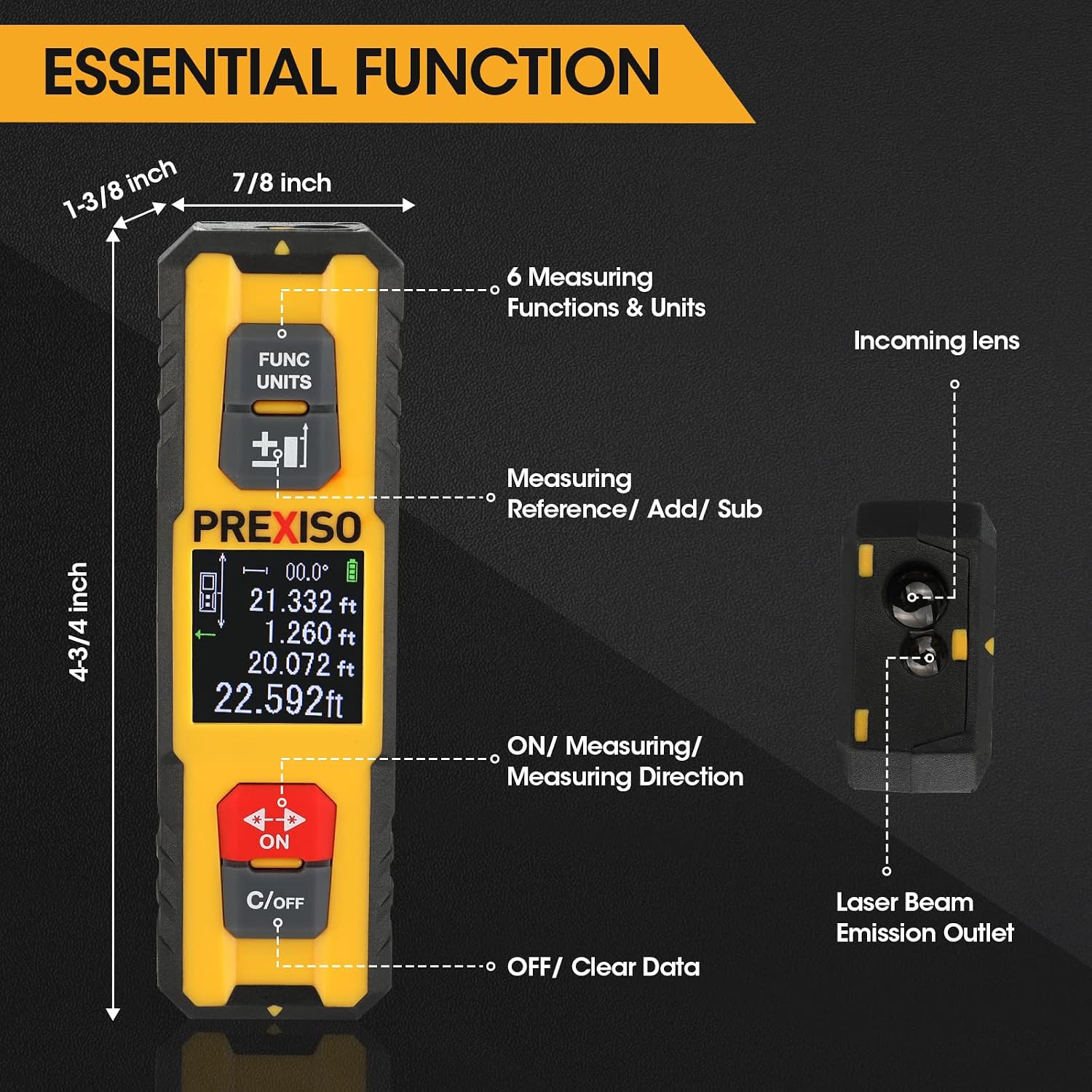
Figure 2: Overview of the device's essential functions and physical dimensions.

Figure 3: Key features of the PREXISO Dual Laser Measure, including its ASIC chip, rechargeable battery, shockproof build, compact design, digital display, and automatic shutdown.
4. Setup
4.1 Charging the Device
The PREXISO Dual Laser Measure comes with a built-in rechargeable Lithium-Ion battery. Before first use, or when the battery indicator on the display shows low power, charge the device using the provided USB cable.
- Locate the USB charging port on the side of the device.
- Open the protective cover of the USB port.
- Connect the smaller end of the USB cable to the device's charging port.
- Connect the larger end of the USB cable to a standard USB power adapter (not included) or a computer's USB port.
- The battery indicator on the display will show charging status. Once fully charged, disconnect the cable and close the protective cover.

Figure 4: The device being charged via its USB port.
5. Operating Instructions
5.1 Turning On/Off
- To Turn On: Press the ON button. The display will light up.
- To Turn Off: Press and hold the C/OFF button for a few seconds. The device will also automatically shut down after 120 seconds of inactivity.
5.2 Changing Units
To cycle through measurement units (Meters, Feet, Inches, Feet+Inches), press and hold the FUNC/UNITS button for 3 seconds.

Figure 5: Instructions for switching between measurement functions and units.
5.3 Changing Measurement Reference
The device can measure from different reference points: bottom, top, or simultaneously from both ends (center). To change the measurement reference, long press the ON button (with the double arrow icon).
- Default: Measures from the bottom of the device to the target.
- Top: Measures from the top of the device to the target.
- Center (Dual Laser): Measures in two directions simultaneously, providing individual lengths from the center to each target and the total length.

Figure 6: Visual guide to changing the measurement reference point.
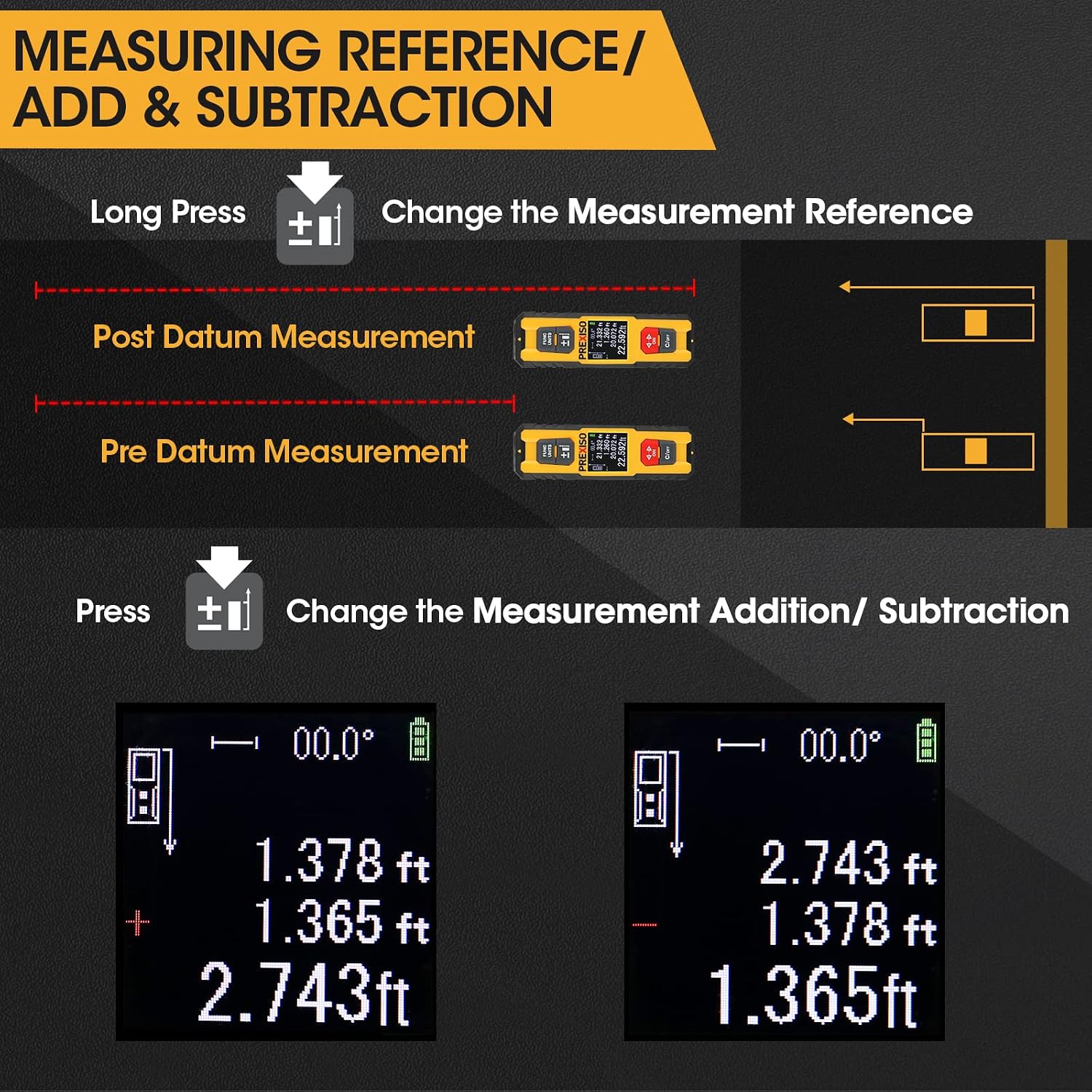
Figure 7: Detailed view of measurement reference options (Post Datum, Pre Datum) and addition/subtraction functions.
5.4 Measurement Functions
Press the FUNC/UNITS button (short press) to cycle through the 6 available measurement functions:
- Single Distance Measurement:
Press the ON button once to activate the laser, then press again to take a single measurement. The result will be displayed on the screen.
- Continuous Measurement (Tracking):
Select this mode. The device will continuously measure the distance as you move it, displaying real-time minimum, maximum, and current values. Press ON to stop.
- Area Measurement:
Select this mode. Measure the length, then the width. The device will automatically calculate and display the area.
- Volume Measurement:
Select this mode. Measure length, width, then height. The device will automatically calculate and display the volume.
- Pythagoras 2-Point Measurement:
Used to calculate an indirect height or length. Measure the hypotenuse (diagonal distance) and one leg (horizontal or vertical distance). The device calculates the unknown side.
- Pythagoras 3-Point Measurement:
Used for more complex indirect height measurements, often when an obstacle prevents direct measurement. Follow the on-screen prompts to take three measurements (e.g., hypotenuse to top, horizontal distance, hypotenuse to bottom).

Figure 8: Illustration of the six primary measurement functions.
5.5 Addition and Subtraction
After taking a measurement, press the +/- button to enter addition or subtraction mode. Take another measurement, and the device will add or subtract it from the previous value.
5.6 Angle Measurement
The device can display the angle when laid at a certain inclination. The angle value will be shown on the display. This feature is useful for checking slopes or leveling.

Figure 9: Demonstration of the digital angle measurement feature.
5.7 Dual Laser Measurement (4 Values in 1)
When using the dual laser mode (center reference), the device provides four values simultaneously:
- User Right Length
- User Left Length
- Right & Left Difference Length
- Total Length

Figure 10: Understanding the four values provided by dual laser measurement.
5.8 Official Product Video
Video 1: An official product video demonstrating the features and usage of the PREXISO Dual Laser Measure. This video highlights the bi-directional laser, measurement range, soft grip, backlit display, various functions, and rechargeable nature of the device.
6. Maintenance
- Cleaning: Use a soft, damp cloth to clean the device. Do not use abrasive cleaners or solvents. Ensure the laser lens is clean for accurate measurements.
- Storage: Store the device in a cool, dry place away from direct sunlight and extreme temperatures.
- Battery: For long-term storage, charge the battery to approximately 50% every few months to maintain battery health.
7. Troubleshooting
| Problem | Possible Cause | Solution |
|---|---|---|
| Device does not turn on. | Low battery. | Charge the device using the provided USB cable. |
| Inaccurate measurements. | Laser lens is dirty; target surface is too reflective or too dark; device is not stable. | Clean the laser lens. Measure to a non-reflective, solid surface. Ensure the device is stable during measurement. |
| Display is dim or unreadable. | Low battery; extreme temperature. | Charge the device. Operate within specified temperature range. |
| Cannot change units or functions. | Incorrect button press duration. | Refer to section 5.2 for unit changes (long press) and 5.4 for function changes (short press). |
8. Specifications
| Feature | Detail |
|---|---|
| Brand | Prexiso |
| Model | P70DLI Dual Laser Measure |
| Measuring Range | 230 feet (70 meters) |
| Accuracy | ±1/8 inch (±3mm) |
| Color | Black |
| Material | TPE, Rubber |
| Item Weight | 0.09 Kilograms |
| Product Dimensions (LxWxH) | 4.75"L x 1.38"W x 0.88"H |
| Battery Type | Lithium-Ion (Rechargeable) |
| Water Resistance Level | IP54 (Waterproof) |
9. Warranty and Support
For warranty information or technical support, please contact PREXISO customer service. Details can typically be found on the product packaging or the official PREXISO website.
For further assistance, you may visit the Prexiso Store on Amazon.

