
HABOTEST HT107D
HABOTEST HT107D Socket Tester User Manual
Model: HT107D
Introduction
The HABOTEST HT107D is a professional socket tester designed to quickly and accurately verify the wiring status of electrical outlets. It helps identify common wiring faults such as correct wiring, open neutral, open ground, live/ground reverse, live/neutral reverse, and live/ground reverse with missing ground. This manual provides detailed instructions for safe and effective use of your HT107D socket tester.
Safety Information
Please read and understand all safety warnings and operating instructions before using this instrument. Failure to do so may result in electric shock, fire, or serious injury.
- Do not use the tester if it appears damaged or is not operating properly.
- Do not use the tester in wet environments or with wet hands.
- Ensure the voltage of the circuit being tested does not exceed the tester's maximum rated voltage (300V CAT II).
- Always disconnect power before performing any wiring changes based on the tester's readings.
- This device is intended for professional use or by individuals with adequate knowledge of electrical systems.
- The RCD (Residual Current Device) test function should only be performed by qualified personnel.
Product Overview
The HABOTEST HT107D Socket Tester features a clear display and intuitive LED indicators to provide immediate feedback on socket wiring conditions.
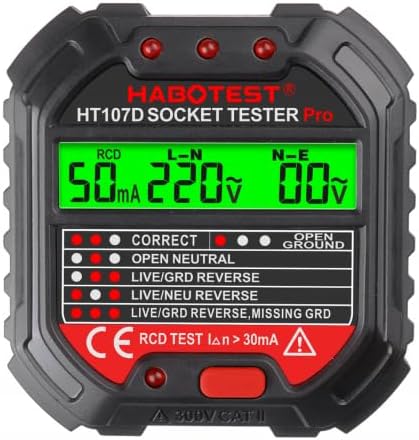
Figure 1: Front view of the Habotest HT107D Socket Tester, showing the digital display and LED indicator panel. The display shows RCD current, L-N voltage, and N-E voltage. The indicator panel lists various wiring statuses like 'CORRECT', 'OPEN NEUTRAL', and 'LIVE/GRD REVERSE', each with corresponding LED lights.
Key Components:
- Digital Display: Shows real-time measurements such as RCD trip current, Line-Neutral (L-N) voltage, and Neutral-Earth (N-E) voltage.
- LED Indicators: A panel of six LEDs that illuminate in specific patterns to indicate the detected wiring status.
- RCD Test Button: Used to initiate the RCD trip test.
- Plug Prongs: Standard electrical plug for insertion into a socket.
LED Indicator Meanings:
| Indicator Pattern | Wiring Status | Description |
|---|---|---|
| ● ● ○ (Correct) | Correct Wiring | Live, Neutral, and Earth wires are connected correctly. |
| ○ ● ○ (Open Neutral) | Open Neutral | The neutral wire is disconnected or open. |
| ● ○ ○ (Live/Grd Reverse) | Live/Ground Reverse | The live and ground wires are swapped. |
| ○ ○ ● (Live/Neu Reverse) | Live/Neutral Reverse | The live and neutral wires are swapped. |
| ● ○ ● (Live/Grd Reverse, Missing Grd) | Live/Ground Reverse, Missing Ground | The live and ground wires are swapped, and the ground connection is also missing. |
| ○ ○ ○ (Open Ground) | Open Ground | The ground wire is disconnected or open. |
Note: ● indicates an illuminated LED, ○ indicates an unlit LED. The specific pattern of the three main indicator lights (left, middle, right) corresponds to the wiring status.
Setup
The HT107D is battery-powered and ready for use out of the box. No complex setup is required.
- Ensure the tester is clean and free from any visible damage.
- Verify that the battery compartment (if accessible) is securely closed. The device is powered by internal batteries.
Operating Instructions
1. Basic Socket Wiring Test:
- Insert the HT107D socket tester firmly into the electrical outlet you wish to test.
- Observe the LED indicators on the front panel. The pattern of illuminated LEDs will immediately indicate the wiring status of the socket. Refer to the "LED Indicator Meanings" table in the Product Overview section for interpretation.
- Read the digital display for voltage readings:
- L-N: Displays the voltage between the Live and Neutral wires.
- N-E: Displays the voltage between the Neutral and Earth wires. Ideally, this should be close to 0V.
- Once the reading is taken, carefully remove the tester from the socket.
2. RCD (Residual Current Device) Test:
WARNING: The RCD test will trip the RCD/GFCI circuit breaker, cutting power to the circuit. Ensure all sensitive equipment is disconnected or powered off before performing this test. This test should only be performed by qualified personnel.
- Insert the HT107D socket tester into the electrical outlet protected by an RCD/GFCI.
- Ensure the socket wiring is indicated as "CORRECT" by the LED indicators before proceeding with the RCD test.
- Press the RCD test button (marked "RCD TEST IΔn > 30mA") on the front of the tester.
- The RCD should trip, cutting power to the socket. The digital display will show the RCD trip current (e.g., "50mA").
- If the RCD does not trip, it indicates a potential fault with the RCD or the wiring. Do not use the socket and consult a qualified electrician.
- Reset the RCD/GFCI breaker after the test.
Maintenance
- Cleaning: Wipe the tester with a dry, clean cloth. Do not use abrasive cleaners or solvents.
- Storage: Store the tester in a cool, dry place, away from direct sunlight and extreme temperatures.
- Battery Replacement: The HT107D is designed with internal batteries. If the display becomes dim or the tester does not function, it may indicate low battery. Consult the manufacturer or a qualified service center for battery replacement. Do not attempt to open the device.
Troubleshooting
| Problem | Possible Cause | Solution |
|---|---|---|
| No display or LEDs light up. | No power to the socket, or low/dead internal battery. | Check the circuit breaker for the socket. If other devices work, the internal battery may need replacement by a service center. |
| RCD test does not trip the breaker. | Faulty RCD/GFCI, or incorrect wiring preventing the test. | Ensure the socket shows "CORRECT" wiring before RCD test. If it still doesn't trip, consult a qualified electrician immediately. Do not use the socket. |
| Inconsistent readings. | Loose connection, or unstable power supply. | Ensure the tester is fully inserted into the socket. Test another known good socket to compare. If issues persist, consult an electrician. |
Specifications
- Model: HT107D
- Brand: HABOTEST
- Power Source: Battery Powered (Internal)
- Measurement Type: Multimeter (for voltage readings)
- Color: Black
- Safety Rating: 300V CAT II
- RCD Test Current: > 30mA
Warranty and Support
For warranty information or technical support, please contact your HABOTEST product retailer or visit the official HABOTEST website. Keep your purchase receipt as proof of purchase for any warranty claims.
Related Documents - HT107D
 |
Habotest Electrical Socket Tester User Manual Comprehensive user manual for the Habotest Electrical Socket Tester, detailing operation, safety guidelines, technical specifications, and troubleshooting for socket and RCD/GFCI testing. |
 |
HABOTEST HT107 Pro Socket Tester User Manual User manual for the HABOTEST HT107 Pro Socket Tester, detailing its functions for detecting socket wiring, measuring phase and leakage voltage, and testing RCD/GFCI trip functionality. |
 |
Habotest HT107D Digitální Zkoušečka Zásuvek - Uživatelská Příručka Komplexní uživatelská příručka pro digitální zkoušečku zásuvek Habotest HT107D. Pokrývá funkce, bezpečnostní pokyny, technické specifikace, provoz a tabulku chyb. |
 |
HABOTEST HT106 Socket Tester Pro: Safe and Reliable Electrical Outlet Testing Discover the HABOTEST HT106 Socket Tester Pro, a plug-and-play device for quick and accurate detection of electrical outlet wiring faults, RCD testing, and safety checks. Ideal for home, office, and industrial use. |
 |
Habotest HT 106D: Návod k obsluze a specifikace elektrické zásuvky Kompletní návod k použití testeru elektrických zásuvek Habotest HT 106D. Zjistěte informace o bezpečnosti, parametrech, funkcích a správné likvidaci. |
 |
Habotest HT5910 Loop and RCD Tester User Manual Comprehensive user manual for the Habotest HT5910, a versatile loop and RCD tester. Learn about its features, safety instructions, operation, technical specifications, and maintenance. |
Ask a question about this manual
Ask about setup, troubleshooting, compatibility, parts, safety, or missing instructions. Manuals+ will review the question and use this page’s manual context to help answer it.