
Introduction
This manual provides instructions for the GoTags Engraved Airtag Dog Collar Holder, Small size. This silicone holder is designed to securely attach an Apple AirTag to your pet's collar, offering both GPS tracking capabilities and personalized identification. The holder is made from durable, comfortable silicone and features deep engraving for long-lasting readability. Please read these instructions carefully before use to ensure proper installation and function.
Product Features
- Secure AirTag Integration: Designed to hold an Apple AirTag securely within the silicone case, preventing it from falling out during your pet's activities. (Note: AirTag is not included with this product.)
- Personalized Identification: Features deep engraving for up to 4 lines of custom text, providing essential contact information for your pet's safe return, even if the AirTag battery fails.
- Comfortable & Durable Material: Constructed from soft, flexible silicone that prevents irritation often associated with metal tags. The material is waterproof and easy to clean.
- Collar Compatibility: The Small size holder is designed to fit pet collars that are 5/8 inch wide.
- Low Profile Design: Slides onto the collar for a snug fit that lies flat, reducing dangling and potential snagging.
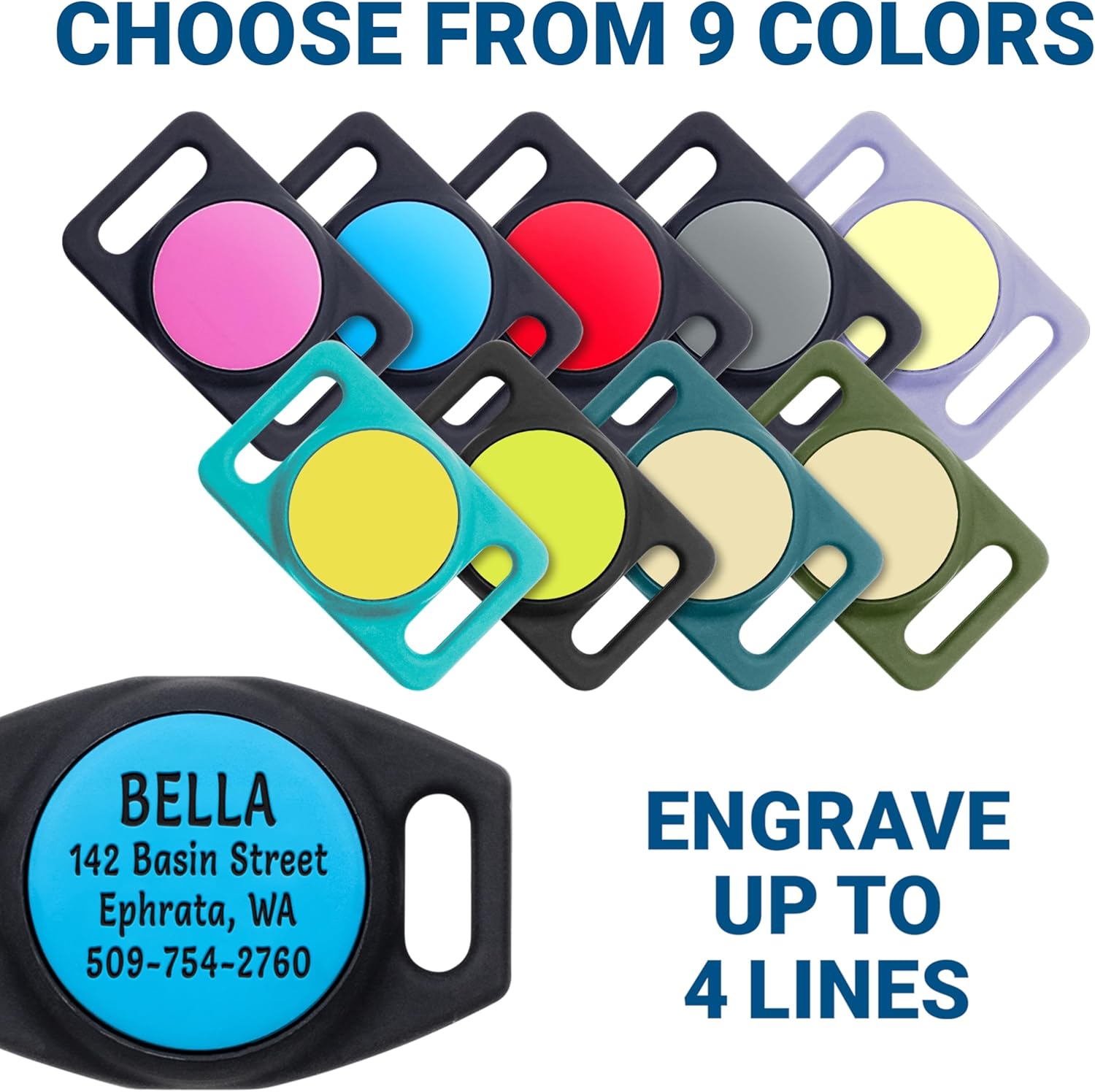
Image: GoTags Airtag Dog Collar Holder showcasing multiple color options and an example of personalized engraving.

Image: A close-up view of the GoTags Airtag Dog Collar Holder, highlighting its secure design that provides extensive coverage for the AirTag.

Image: A yellow Labrador Retriever wearing a collar with the GoTags Airtag Dog Collar Holder, demonstrating a comfortable and snug fit.

Image: A close-up view of the GoTags Airtag Dog Collar Holder, showcasing the permanent deep engraving of pet information.
Setup Instructions
- Insert AirTag: Gently push your Apple AirTag into the designated circular opening on the silicone holder. Ensure the AirTag is fully seated and secure within the holder.
- Attach to Collar: Slide your pet's collar through the two rectangular openings on either side of the AirTag holder. The holder should sit flat against the collar.
- Verify Fit: Ensure the collar is properly threaded through both loops and that the holder is snug against the collar, preventing excessive movement.

Image: Visual guide demonstrating the two-step process of inserting an AirTag into the holder and then sliding the holder onto a pet collar.
Operating Instructions
Once your Apple AirTag is securely installed in the GoTags holder and attached to your pet's collar, it will function as intended by Apple. You can use the Find My app on your iPhone to track your pet's location, receive alerts, and utilize proximity finding features. The personalized engraving on the holder provides an additional layer of safety, ensuring your contact information is visible even if the AirTag is not actively tracked or its battery is depleted.
For detailed instructions on using your Apple AirTag, please refer to the official Apple user manual or support documentation.
Maintenance
The silicone material of the GoTags Airtag Dog Collar Holder is designed for easy care. To clean, simply remove the holder from the collar and wash it with mild soap and water. Rinse thoroughly and allow it to air dry completely before reattaching it to the collar and inserting the AirTag. Regular cleaning helps maintain hygiene and the appearance of the holder.
Troubleshooting
- AirTag Not Staying Secure: Ensure the AirTag is fully pushed into the silicone holder. The flexible material should create a tight seal around the AirTag. If the issue persists, verify that you have the correct size holder for your AirTag.
- Holder Sliding on Collar: Confirm that your pet's collar width matches the specified compatibility for the Small size holder (5/8 inch wide). If the collar is too narrow, the holder may slide.
- Engraving Fading: The engraving is designed to be deep and permanent. If you notice any issues with the engraving, please contact GoTags customer support.
- AirTag Tracking Issues: If you experience problems with AirTag tracking, refer to Apple's official support resources for troubleshooting your AirTag device. This holder does not interfere with AirTag functionality.
Specifications
| Model | GoTags Engraved Airtag Dog Collar Holder |
| Size | Small (fits 5/8 inch wide collars) |
| Material | Silicone |
| Engraving | Up to 4 lines of custom text |
| Compatible Devices | Apple AirTag (not included) |

Image: A diagram illustrating the dimensions of both Small and Large GoTags Airtag Dog Collar Holders, along with their respective collar width compatibility.
Warranty and Support
For any questions, concerns, or support regarding your GoTags Engraved Airtag Dog Collar Holder, please contact GoTags LLC directly. Refer to your purchase documentation or the GoTags official website for specific warranty details and customer service contact information.