
AstroAI ACAC36OR-DE
AstroAI 20 PSI Electric SUP Air Pump
Model: ACAC36OR-DE
Introduction
The AstroAI 20 PSI Electric SUP Air Pump is designed for efficient and convenient inflation of various inflatables, including Stand-Up Paddleboards (SUPs), inflatable boats, yoga balls, and air mattresses. Featuring a durable metal cylinder and smart two-stage inflation, this pump ensures quick and reliable performance. Its large 7.5-inch LED screen provides real-time pressure monitoring, and the automatic shut-off function prevents over-inflation, making it safe and easy to use.
Safety Information
- Read all instructions carefully before operating the pump.
- This pump is designed for 12V DC power sources only (car cigarette lighter). Do not attempt to connect to other power sources.
- Do not operate the pump continuously for more than 20 minutes. Allow it to rest for at least 2 minutes after every 20 minutes of use to prevent overheating and prolong its lifespan.
- Keep both the air inlet and air outlet open during use to ensure proper ventilation.
- Do not block the air inlet or outlet during operation.
- Keep out of reach of children.
- Do not expose the pump to rain or wet conditions.
- Ensure the correct pressure setting for your inflatable to avoid damage.
Package Contents

Image: The AstroAI Electric SUP Air Pump shown with all included accessories, such as the pump unit, power cables, air hose, storage bag, and a selection of different inflation nozzles.
- AstroAI Electric SUP Air Pump
- 12V DC Car Power Cable
- Battery Terminal Clamps
- Air Hose
- Storage Bag
- 6 x Nozzles (various types for different inflatables)
- Spare Fuse
- User Manual
Product Overview

Image: A detailed view of the AstroAI Electric SUP Air Pump, highlighting its digital display, control panel, and the array of included nozzles.
- 7.5" LED Display: Shows preset and real-time pressure values.
- Control Buttons: For setting pressure, changing units, and starting/stopping inflation.
- Inflation Port: Where the air hose connects for inflation.
- Deflation Port: Where the air hose connects for deflation.
- Power Input: For connecting the 12V DC power cable.
- Integrated Handle: For easy portability.
- Metal Cylinder: Enhances durability and allows for continuous operation.
Setup
- Connect Power: Plug the 12V DC car power cable into your vehicle's cigarette lighter socket. Alternatively, use the battery terminal clamps to connect directly to a 12V battery.
- Attach Air Hose: Connect one end of the air hose to the inflation port on the pump. Ensure it is securely twisted into place.
- Select Nozzle: Choose the appropriate nozzle for your inflatable and attach it to the other end of the air hose.
- Connect to Inflatable: Securely connect the nozzle to the valve of your inflatable item.
Operating Instructions
Inflation

Image: The AstroAI pump in action, automatically inflating a SUP board in an outdoor setting, showcasing its hands-free operation.
- Ensure the pump is powered and the hose with the correct nozzle is connected to your inflatable.
- Turn on the pump. The 7.5" LED display will illuminate.
- Use the SET button to select your desired pressure unit (PSI or BAR).
- Use the + and - buttons to set the target pressure. The preset value will be displayed.
- Press the START/STOP button to begin inflation.
- The pump will operate in two stages:
- Low Pressure Mode (360 L/min): Rapidly inflates the item to a lower pressure.
- High Pressure Mode (80 L/min): Automatically switches to high pressure for precise inflation to the target PSI.
- The pump will automatically shut off once the preset pressure is reached.
- Disconnect the hose from the inflatable and the pump.
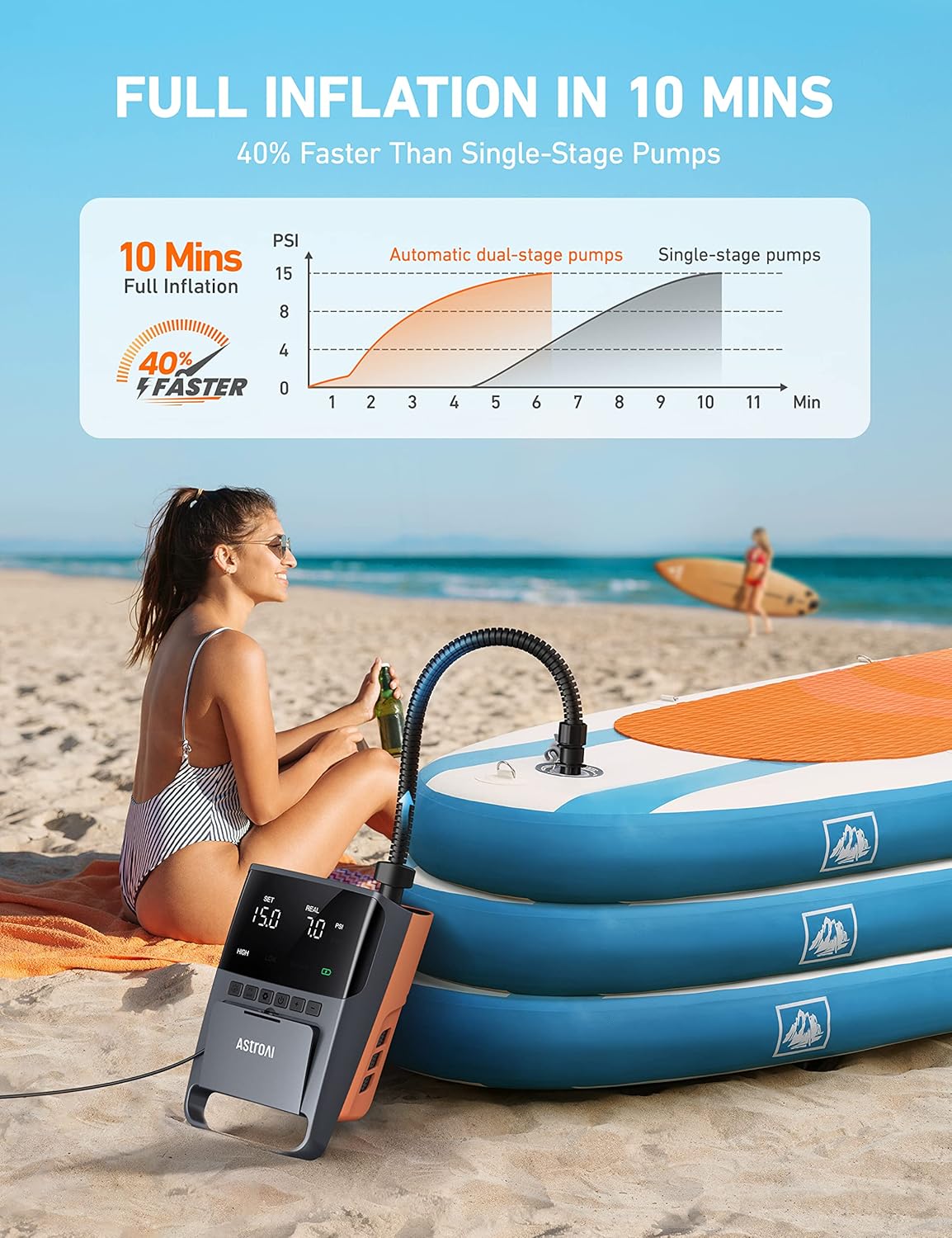
Image: A comparative graph illustrating how dual-stage pumps, like the AstroAI, achieve full inflation 40% faster than single-stage pumps.
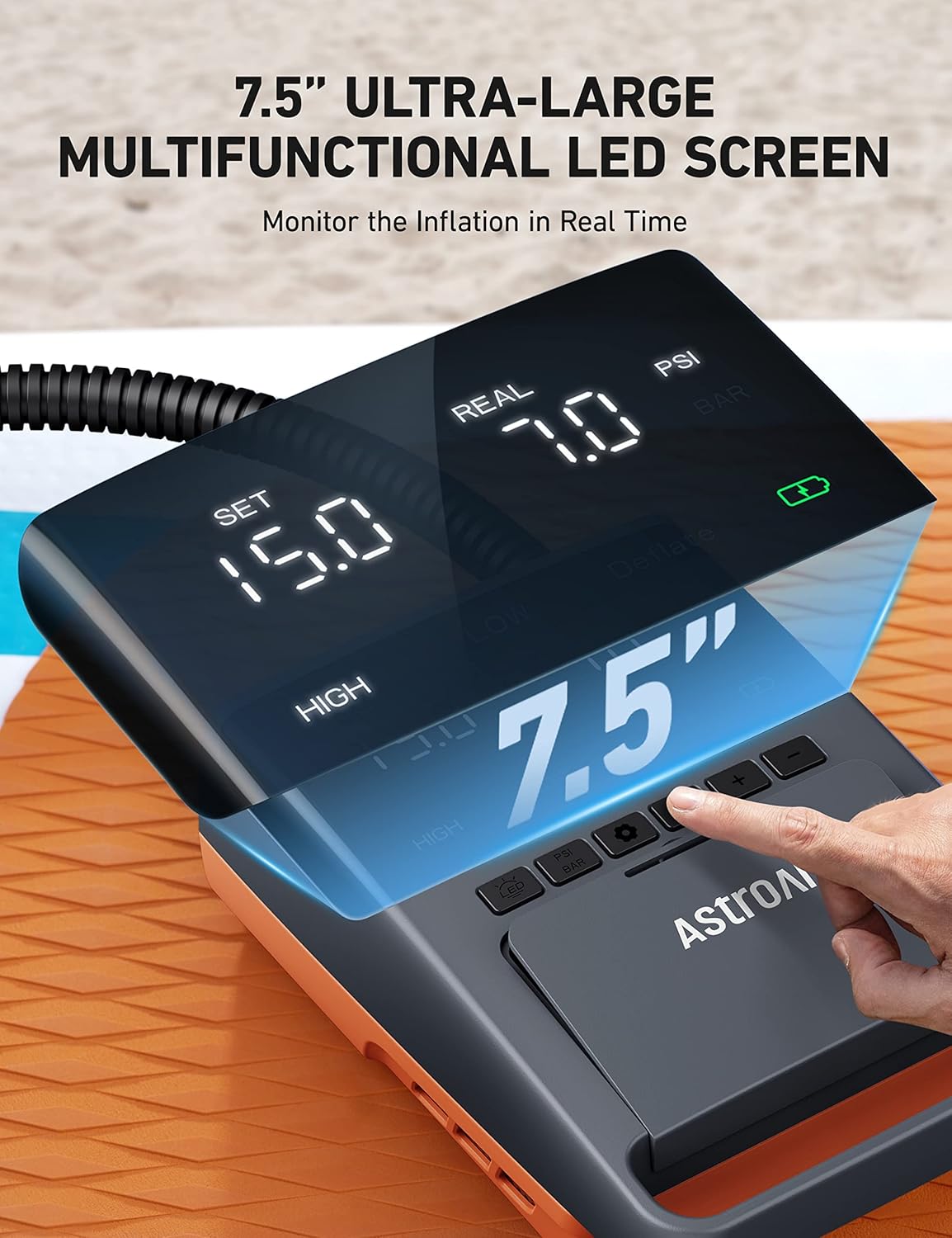
Image: A detailed view of the pump's large 7.5-inch LED screen, clearly showing the preset pressure and the current real-time pressure during operation.
Deflation
The pump also features a deflation function to quickly remove air from your inflatables for easier packing and storage.
- Connect one end of the air hose to the deflation port on the pump.
- Attach the appropriate nozzle to the other end of the hose and connect it to your inflatable's valve.
- Press the DEFLATE button to start the deflation process.
- The pump will draw air out of the inflatable.
- Once deflated, press the START/STOP button to stop the pump and disconnect the hose.
Versatile Nozzles

Image: An illustration of the pump's wide compatibility, showing it can inflate various items like SUPs, yoga balls, and air mattresses using the provided nozzles.
The AstroAI pump comes with a comprehensive set of 6 nozzles to accommodate a wide range of inflatable items. Always select the nozzle that provides the best fit for the valve of your inflatable to ensure efficient and secure inflation/deflation.
Maintenance
- Cleaning: Wipe the pump exterior with a soft, dry cloth. Do not use harsh chemicals or abrasive cleaners.
- Storage: Store the pump and its accessories in the provided storage bag in a cool, dry place, away from direct sunlight and extreme temperatures.
- Hose Care: Ensure the air hose is not kinked or bent sharply during storage to prevent damage.
- Fuse Replacement: If the pump stops working, check the fuse in the 12V DC power plug. Replace it with the provided spare fuse if necessary.
- Ventilation: Ensure the air inlet and outlet are free from dust and debris.

Image: An exploded view of the pump's internal components, highlighting the robust metal cylinder and efficient cooling system designed for extended use.
Troubleshooting
| Problem | Possible Cause | Solution |
|---|---|---|
| Pump does not turn on. | No power connection; Blown fuse in 12V plug; Vehicle's cigarette lighter socket is faulty. | Ensure power cable is securely connected. Check and replace fuse if necessary. Test the 12V socket with another device. |
| Pump inflates slowly or not to desired pressure. | Incorrect nozzle used; Air leak from hose/nozzle connection; Air inlet/outlet blocked. | Ensure correct nozzle is used and securely attached. Check all connections for leaks. Clear any obstructions from air inlet/outlet. |
| Pump overheats and shuts off. | Continuous operation for too long. | Allow the pump to cool down for at least 2 minutes after 20 minutes of continuous use. Ensure proper ventilation. |
| Display shows error or incorrect reading. | Sensor issue; Extreme temperature. | Turn off the pump, wait a few moments, and restart. Ensure operation within recommended temperature range. |
Specifications
| Feature | Detail |
|---|---|
| Model Number | ACAC36OR-DE |
| Brand | AstroAI |
| Power Source | 12V DC (Car Cigarette Lighter) |
| Max Pressure | 20 PSI |
| Low Pressure Flow Rate | 360 L/min |
| High Pressure Flow Rate | 80 L/min |
| Display | 7.5" LED Digital Screen |
| Operating Mode | Automatic Two-Stage Inflation |
| Product Dimensions (L x W x H) | 19.05 x 10.16 x 27.94 cm (approx. 7.5 x 4 x 11 inches) |
| Product Weight | 1.87 kg (approx. 4.12 lbs) |
| Color | Orange |
Warranty and Support
AstroAI products come with a 1-year warranty from the date of purchase. For any questions, technical support, or warranty claims, please contact AstroAI customer service through their official website or the retailer where the product was purchased. Please have your model number (ACAC36OR-DE) and proof of purchase ready when contacting support.
For more information, visit: www.astroai.com
Ask a question about this manual
Ask about setup, troubleshooting, compatibility, parts, safety, or missing instructions. Manuals+ will review the question and use this page’s manual context to help answer it.