
HAODEE HAODEE Protective Case for iPad Pro 11 (2020)
HAODEE Protective Case for iPad Pro 11 (2020) User Manual
Model: A2228/A2068/A2230/A2231 Compatible
1. Introduction
Thank you for choosing the HAODEE Protective Case for your iPad Pro 11 (2020). This manual provides essential information for the proper installation, operation, and maintenance of your new protective case. This case is designed to offer robust protection and enhanced functionality for your device.
Note: This product includes one silicone case and one soft film. The iPad and Apple Pencil are not included.

Image 1.1: The HAODEE Protective Case in black, shown with an iPad inserted, highlighting its sleek design and protective coverage. The case features a tri-fold front cover.
2. Package Contents
Please verify that all items are present in the package:
- 1 x HAODEE Silicone Protective Case (Black)
- 1 x Soft Screen Film
3. Setup and Installation
Follow these steps to properly install your iPad Pro 11 (2020) into the HAODEE Protective Case:
- Prepare your iPad: Ensure your iPad Pro 11 (2020) is clean and free of dust or debris.
- Install Soft Screen Film (Optional): Carefully apply the included soft screen film to your iPad's screen, following the instructions provided with the film, if you choose to use it.
- Insert iPad into Case: Gently align your iPad with the case, ensuring all corners and edges fit snugly into the protective shell. Start by inserting one side, then carefully press the other side into place until the iPad is fully seated.
- Secure the Pencil (if applicable): If you use an Apple Pencil, place it into the dedicated pencil holder slot on the side of the case.

Image 3.1: Illustration of the integrated pencil holder, designed to securely store your Apple Pencil and prevent loss or damage. It includes a groove for the pencil cap.
4. Operating Instructions
The HAODEE Protective Case enhances your iPad's usability with several key features:
- Automatic Sleep/Wake Function: The magnetic smart cover automatically puts your iPad to sleep when closed and wakes it up when opened. This feature helps conserve battery life.
- Multi-Angle Viewing Stand: The tri-fold front cover can be folded into two distinct standing positions, providing versatile viewing and typing angles.
- Precise Cutouts: The case features precise cutouts for all ports, buttons, speakers, and the camera, ensuring full access to all iPad functions without needing to remove the case.

Image 4.1: Visual representation of the automatic sleep/wake feature. Opening the cover wakes the iPad, and closing it puts the iPad to sleep, optimizing battery usage.
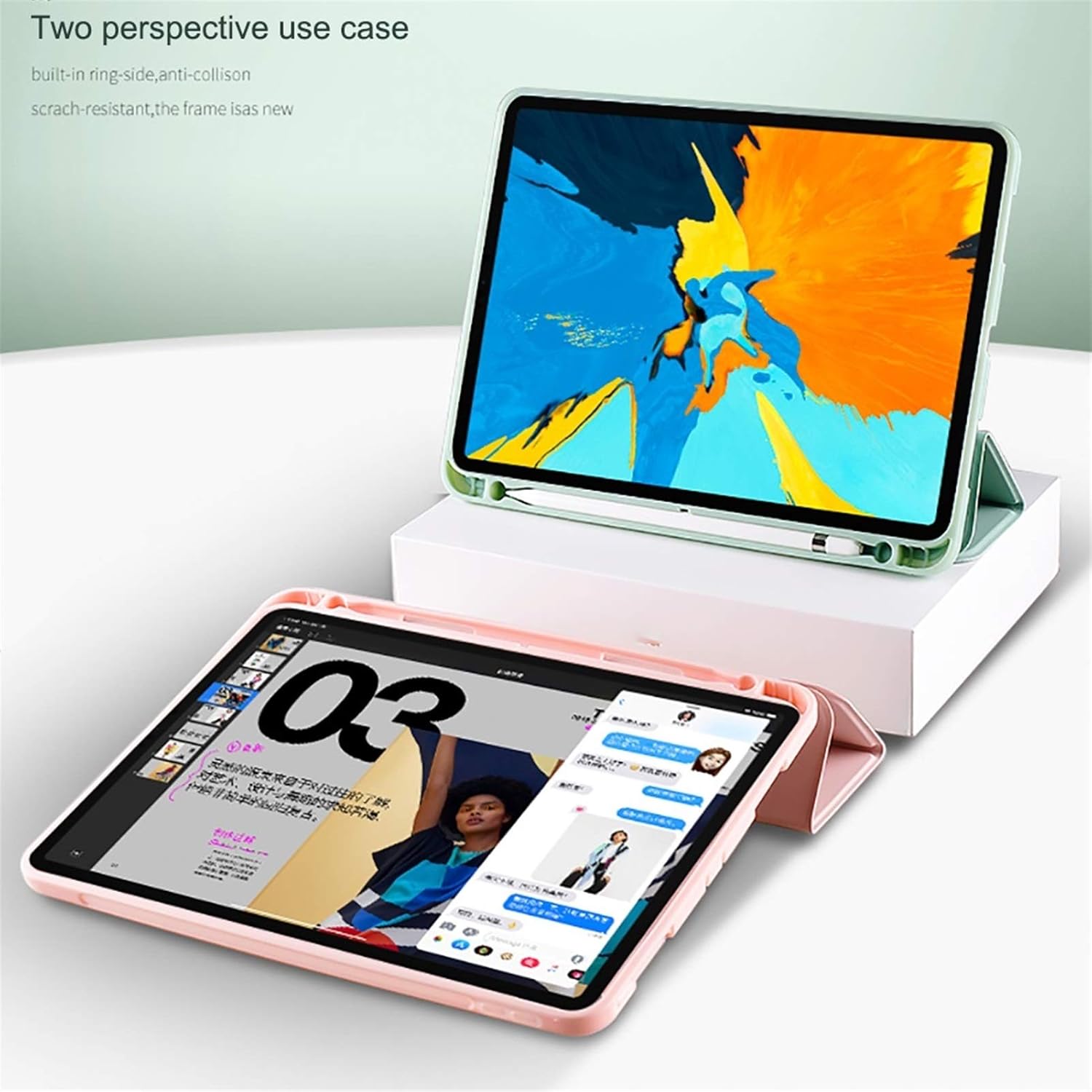
Image 4.2: The case supports two viewing angles: an upright position ideal for watching videos or video calls, and a lower angle suitable for typing or drawing.

Image 4.3: Detail of the case's design, highlighting accurate cutouts for the camera and volume buttons, ensuring unhindered access and functionality.
5. Maintenance and Care
To ensure the longevity and appearance of your HAODEE Protective Case, follow these care guidelines:
- Cleaning: Wipe the case regularly with a soft, damp cloth. For stubborn stains, a mild soap solution can be used, followed by wiping with a clean, damp cloth and air drying.
- Avoid Harsh Chemicals: Do not use strong detergents, abrasive cleaners, or solvents, as these can damage the case material.
- Storage: When not in use, store the case in a cool, dry place away from direct sunlight and extreme temperatures.
- Pencil Holder Care: Ensure the pencil holder remains free of debris to allow for smooth insertion and removal of your Apple Pencil.
6. Troubleshooting
If you encounter any issues with your HAODEE Protective Case, please refer to the following common solutions:
- Issue: iPad does not sleep/wake automatically.
Solution: Ensure the iPad is correctly seated in the case and the magnetic cover is fully closed. Check your iPad settings to confirm "Lock/Unlock" (or "Cover Lock/Unlock") is enabled under Display & Brightness.
- Issue: Case feels loose or iPad is not secure.
Solution: Remove the iPad from the case and re-insert it, ensuring all four corners snap firmly into place. Verify that your iPad model is compatible with the case (iPad Pro 11 2020 models A2228, A2068, A2230, A2231).
- Issue: Buttons or ports are obstructed.
Solution: Confirm the iPad is correctly aligned within the case. The precise cutouts should perfectly match your iPad's ports and buttons. If not, gently adjust the iPad's position.
7. Specifications
| Feature | Detail |
|---|---|
| Product Name | HAODEE Protective Case for iPad Pro 11 (2020) |
| Compatible Models | iPad Pro 11 (2020) Models: A2228, A2068, A2230, A2231 |
| Material | Quality Magnetic PU Front Cover, Sturdy Hard Frame, Soft Outer TPU Skin |
| Color | Black (as per current product) |
| Features | Automatic Sleep/Wake, Tri-fold Stand, Built-in Pencil Holder, Precise Cutouts, Anti-fingerprint, Scratch-proof, Dust-resistant |
| Item Weight | Approximately 1.1 pounds (0.5 kg) |
| Dimensions | Designed to fit iPad Pro 11 (2020) precisely |
8. Warranty and Support
HAODEE is committed to providing high-quality products. For any questions, concerns, or support needs regarding your protective case, please contact our customer service team through the retailer's platform where you purchased the product.
Please retain your proof of purchase for any warranty claims. Specific warranty terms and conditions may vary by region and retailer.