
Keurig K-Slim
Keurig K-Slim Single Serve K-Cup Pod Coffee Maker User Manual
Model: K-Slim (062151516731) | Brand: Keurig
Product Overview
The Keurig K-Slim single serve coffee maker offers convenience and great taste in a compact design. Its slim profile, less than 12 cm wide, allows it to fit neatly on any countertop, making it ideal for spaces where simplicity and efficiency are key. Equipped with MultiStream Technology, it ensures full flavor and aroma extraction from every brew.
The K-Slim features a removable 1.36 L (46 oz) water reservoir, capable of brewing up to 4 cups before needing a refill. Users can select from hundreds of K-Cup pod varieties, including coffee, tea, and cocoa, and enjoy a fast, fresh-brewed cup in 237 ml (8 oz), 296 ml (10 oz), or 355 ml (12 oz) sizes with simple push-button controls.
Key Features
- Space-Saving Design: Less than 12 cm wide, ideal for compact spaces.
- MultiStream Technology: Saturates coffee grounds more evenly for enhanced flavor and aroma.
- Multiple Cup Water Reservoir: Removable 1.36 L (46 oz) reservoir brews up to 4 cups.
- Three Brew Sizes: Offers 237 ml (8 oz), 296 ml (10 oz), and 355 ml (12 oz) options.
- Fast & Fresh Brewed: Delivers delicious coffee in minutes.
Initial Setup
Unboxing
Carefully remove all packaging materials from the coffee maker. Ensure all components, including the brewer, water reservoir, and user guide, are present. Place the brewer on a clean, stable, and level surface.
First Use & Cleaning
- Rinse the Water Reservoir: Remove the water reservoir and rinse it thoroughly with fresh water.
- Fill the Reservoir: Fill the reservoir with fresh water up to the MAX fill line.
- Power On: Plug the brewer into a grounded outlet. The power button will illuminate.
- Perform a Cleansing Brew: Lift and lower the handle to close the K-Cup pod holder. Place a large mug (at least 12 oz) on the drip tray. Select any brew size button to start a cleansing brew. Do not insert a K-Cup pod for this step.
- Discard Water: Once the brew is complete, discard the hot water from the mug. The brewer is now ready for use.

Image: The Keurig K-Slim coffee maker in white, actively brewing coffee into a peach-colored mug. This illustrates the primary function of the device.

Image: A top-down view of the Keurig K-Slim, highlighting its removable 1.36 L (46 oz) water reservoir and its slim, space-saving design (less than 13 cm wide). Two K-Cup pods are visible in the foreground.
Operating Instructions
Brewing Coffee
- Add Water: Ensure the water reservoir is filled with fresh water. The 'ADD WATER' light will illuminate if the water level is low.
- Place Mug: Place a mug on the drip tray. If using a travel mug, remove the drip tray for extra clearance. The K-Slim is travel mug friendly, accommodating mugs up to 17.78 cm (7 inches) tall.
- Insert K-Cup Pod: Lift the brewer handle and place a K-Cup pod into the K-Cup pod holder. Lower the handle completely to close the lid.
- Select Brew Size: The three brew size buttons (8 oz, 10 oz, 12 oz) will blink. Select your desired brew size.
- Brew: The brewing process will begin automatically. The brew size button will remain illuminated during brewing.
- Enjoy: Once brewing is complete, the button will turn off. Carefully remove the mug. Lift the handle, remove the used K-Cup pod, and discard it.

Image: A close-up of the Keurig K-Slim's control panel, showing the power button, 'ADD WATER' indicator, 'DESCALE' indicator, and the three brew size buttons (8 oz, 10 oz, 12 oz).
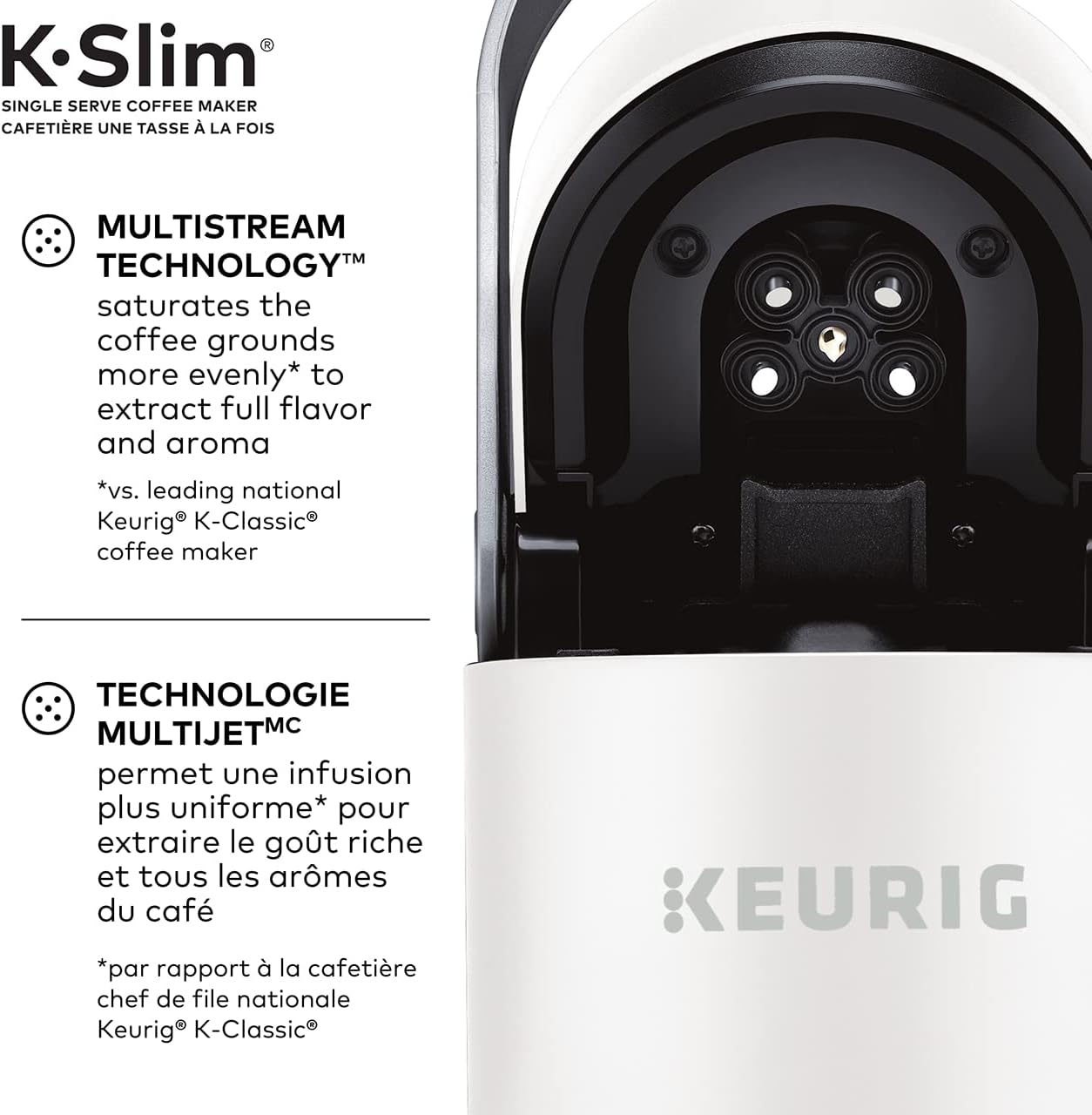
Image: A detailed view of the Keurig K-Slim's MultiStream Technology, illustrating how water saturates the coffee grounds more evenly for optimal flavor extraction.

Image: The Keurig K-Slim demonstrating its travel mug friendly design, with the drip tray removed to accommodate a 17.78 cm (7 inch) travel mug.
Care and Maintenance
Regular Cleaning
- Drip Tray: The drip tray can accumulate spills and should be removed and rinsed regularly. It is top-rack dishwasher safe.
- Water Reservoir: The water reservoir should be cleaned periodically. It is recommended to hand wash it with mild soap and rinse thoroughly.
- Exterior: Wipe the exterior of the brewer with a damp, non-abrasive cloth.
Descaling
Over time, calcium deposits (scale) can build up in your brewer, affecting performance and flavor. The 'DESCALE' indicator light will illuminate when descaling is recommended.
Descaling Process:
- Prepare Solution: Turn off the brewer. Empty the water reservoir and remove any water filter. Pour an entire bottle of Keurig Descaling Solution into the reservoir, then fill the empty bottle with water and pour it into the reservoir.
- First Descale Brew: Place a large mug on the drip tray. Lift and lower the handle. Press the power button to turn on the brewer. When the brew size buttons illuminate, press the 12 oz button. Discard the hot liquid.
- Repeat & Soak: Repeat the brew process without a K-Cup pod until the 'ADD WATER' light illuminates. Let the brewer stand for at least 30 minutes while still on.
- Rinse Cycle: After 30 minutes, empty and rinse the water reservoir thoroughly. Fill it with fresh water up to the MAX fill line.
- Fresh Water Brews: Place a large mug on the drip tray. Lift and lower the handle. Press the 12 oz button. Repeat this fresh water brew process at least 12 times, refilling the reservoir as needed, until the 'DESCALE' light turns off.
Troubleshooting
| Issue | Possible Cause | Solution |
|---|---|---|
| Brewer does not turn on. | No power or power button not pressed. | Ensure the brewer is securely plugged into a grounded outlet. Press the power button. Check the circuit breaker. |
| 'ADD WATER' light is on. | Water reservoir is low or empty. | Fill the water reservoir with fresh water up to the MAX fill line. Ensure the reservoir is seated correctly. |
| Coffee is not brewing. | K-Cup pod not properly seated, air in lines, or brewer needs descaling. | Lift and lower the handle to ensure the K-Cup pod is punctured. Perform a cleansing brew. If the 'DESCALE' light is on, perform a descaling cycle. |
| Coffee tastes weak or not hot enough. | Brewer needs descaling, or incorrect brew size selected. | Perform a descaling cycle. Select a smaller brew size for a stronger, hotter cup. Ensure the water reservoir is filled with fresh, room-temperature water. |
| Brewer turns off unexpectedly. | Safety feature activated due to low water or internal issue. | Ensure adequate water in the reservoir. If the issue persists, unplug the brewer for 30 seconds and plug it back in. Contact customer support if problem continues. |
Product Specifications
| Feature | Detail |
|---|---|
| Brand | Keurig |
| Model Name | K-Slim |
| Item Model Number | 062151516731 |
| Color | White |
| Product Dimensions (D x W x H) | 18.63"D x 7"W x 14.88"H (approx. 47.3 cm D x 17.8 cm W x 37.8 cm H) |
| Water Reservoir Capacity | 1.36 L (46 oz) |
| Brew Sizes | 237 ml (8 oz), 296 ml (10 oz), 355 ml (12 oz) |
| Coffee Input Type | K-Cup Pod |
| Operation Mode | Manual (Push Button Controls) |
| Special Feature | Removable Tank, MultiStream Technology |
| Included Components | Brewer, Reservoir, User guide |
| Item Weight | 7.17 pounds (approx. 3.25 kg) |

Image: A diagram illustrating the precise dimensions of the Keurig K-Slim coffee maker, including height, width, and depth, both closed and with the lid open.

Image: The Keurig K-Slim coffee maker positioned on a kitchen countertop, demonstrating its compact size and aesthetic integration into a home environment, alongside two mugs and a K-Cup pod.
Warranty and Support
Keurig products are manufactured to the highest standards. For detailed warranty information, please refer to the warranty card included with your product or visit the official Keurig website. Keep your purchase receipt as proof of purchase for any warranty claims.
For technical assistance, troubleshooting beyond this manual, or to order replacement parts, please contact Keurig Customer Service. Contact information can typically be found in your product's user guide or on the Keurig website.
Online Resources: For additional support, FAQs, and product registration, visit the official Keurig Store on Amazon.