
Introduction
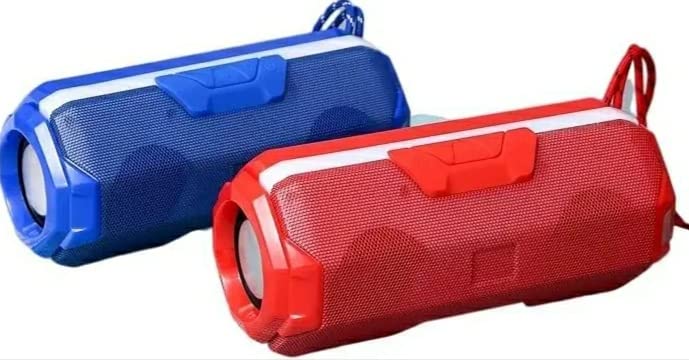
This manual provides instructions for the safe and efficient operation of your Jagdamba Mobile Point JGX02 Bluetooth Speaker. This portable wireless speaker offers multiple connectivity options and a robust design for various environments.
What's in the Box
- JGX02 Bluetooth Speaker
- Charging Cable (not explicitly listed but implied for battery-powered device)
- Auxiliary Cable (not explicitly listed but implied for AUX connectivity)
Setup
Initial Charging
- Before first use, fully charge the speaker. Connect the charging cable to the speaker's charging port and a suitable power source.
- A full charge takes approximately 8 hours. The LED indicator will change to show charging status and completion.
Bluetooth Pairing
- Power on the speaker by pressing and holding the power button. The speaker will enter Bluetooth pairing mode, indicated by a flashing LED.
- On your smartphone or tablet, navigate to the Bluetooth settings and enable Bluetooth.
- Search for available devices and select "JGX02" (or similar name) from the list.
- Once connected, the speaker will provide an audible confirmation, and the LED indicator will stop flashing. The speaker can maintain a connection up to 10 meters.
Operating
Connectivity Options
The JGX02 speaker supports multiple audio input methods:
- Bluetooth (BT): Wireless connection to compatible devices.
- USB: Play audio files directly from a USB flash drive.
- Micro SD: Play audio files directly from a Micro SD card.
- AUX: Connect external audio devices using a 3.5mm auxiliary cable.
Controls
The speaker features button and touch controls for various functions:
- Power Button: Press and hold to turn on/off.
- Volume Controls: Use dedicated buttons or touch areas to adjust volume up or down.
- Mode Button: Press to switch between Bluetooth, USB, Micro SD, and AUX modes.
- Play/Pause Button: Press to play or pause audio.
- Track Skip Buttons: Press to skip to the next or previous track.
Maintenance
Cleaning
- Wipe the speaker with a soft, dry cloth. Do not use abrasive cleaners or solvents.
- Ensure all ports are dry before connecting cables.
Water and Dust Resistance
The JGX02 speaker is IPX7 certified, providing protection against dust and water splashes. This means it can withstand immersion in water up to 1 meter for 30 minutes. While it is designed for outdoor use and can be used in environments like showers, hiking, or camping, avoid prolonged submersion or exposure to high-pressure water jets.
Battery Care
- To prolong battery life, avoid fully discharging the speaker frequently.
- Store the speaker in a cool, dry place when not in use for extended periods.
Troubleshooting
- No Power: Ensure the speaker is fully charged. Connect to a power source and try turning it on again.
- Cannot Connect Bluetooth:
- Ensure the speaker is in pairing mode (flashing LED).
- Check that Bluetooth is enabled on your device and it is within 10 meters of the speaker.
- Forget the device from your phone's Bluetooth list and try pairing again.
- Poor Sound Quality:
- Ensure the speaker and your device are within range and there are no obstructions.
- Check the audio source for quality issues.
- Adjust the volume on both the speaker and the connected device.
- USB/Micro SD Not Playing: Ensure the audio files are in a compatible format and the storage device is properly inserted.
Specifications
| Model Number | JGX02 |
| Brand | Generic |
| Connectivity Technology | Auxiliary, Bluetooth, USB, Wireless |
| Bluetooth Version | 5.0 |
| Wireless Range | Up to 10 meters |
| Battery Capacity | 2000mAh |
| Playback Time | Up to 18 hours 10 minutes (at 70% volume) |
| Full Charge Time | Approximately 8 hours |
| Waterproof Rating | IPX7 (Dust & Water Splash Proof) |
| Speaker Type | Outdoor |
| Controller Type | Button, Touch |
| Compatible Devices | Smartphone, Tablet |
| Power Source | Battery Powered |
Warranty and Support
Warranty Information
Please note that there is no warranty available for this product.
Customer Support
For any questions or assistance regarding your JGX02 Bluetooth Speaker, please refer to the retailer where the product was purchased.