1. Introduction
Thank you for choosing the GeowFiiTech M45 Pro Night Vision Goggles. This manual provides detailed instructions for the proper setup, operation, and maintenance of your device. Please read this manual thoroughly before using the product to ensure optimal performance and longevity. Keep this manual for future reference.
2. Product Overview
2.1 Package Contents
Upon unpacking, please verify that all the following items are included:
- GeowFiiTech M45 Pro Night Vision Goggles
- 32GB Memory Card
- Neck Strap
- Protective Case
- USB Data Transfer/Charging Cable (Type-C)
- Cleaning Cloth
- Multi-language Manual (this document)

Image 2.1: The GeowFiiTech M45 Pro Night Vision Goggles shown with its protective case, 32GB memory card, and charging cable.
2.2 Device Components
Familiarize yourself with the main components of your night vision goggles:
- Objective Lenses: Front lenses for capturing light.
- Focus Rings: Adjustable rings around the objective lenses for sharpening the image.
- Infrared (IR) Illuminator: Emits infrared light for enhanced vision in darkness.
- Display Screen: 4.5-inch IPS FHD screen for viewing images and videos.
- Control Buttons: Various buttons for power, mode selection, zoom, IR level adjustment, and menu navigation.
- Battery Compartment: Houses the rechargeable lithium-ion battery.
- Memory Card Slot: For inserting the 32GB memory card.
- USB-C Port: For charging and data transfer.
- Tripod Mount: Standard thread for attaching to a tripod.

Image 2.2: Side view of the device, highlighting the control buttons for various functions.
Image 2.3: Top view of the night vision goggles, illustrating the arrangement of the control buttons.

Image 2.4: Front view of the device, displaying the objective lenses and their adjustable focus rings labeled 'FAR' and 'NEAR'.

Image 2.5: Rear view of the night vision goggles, featuring the large 4.5-inch display screen.
3. Setup
3.1 Charging the Battery
The M45 Pro is equipped with a 4000mAh rechargeable lithium-ion battery. Before first use, fully charge the device.
- Connect the provided Type-C USB cable to the device's USB-C port.
- Connect the other end of the USB cable to a compatible USB power source (e.g., wall adapter, power bank, computer USB port).
- The charging indicator will illuminate. Once fully charged, the indicator may change color or turn off, depending on the device's design.
- A full charge provides approximately 20 hours of operation with IR off, and 7 hours with IR on.
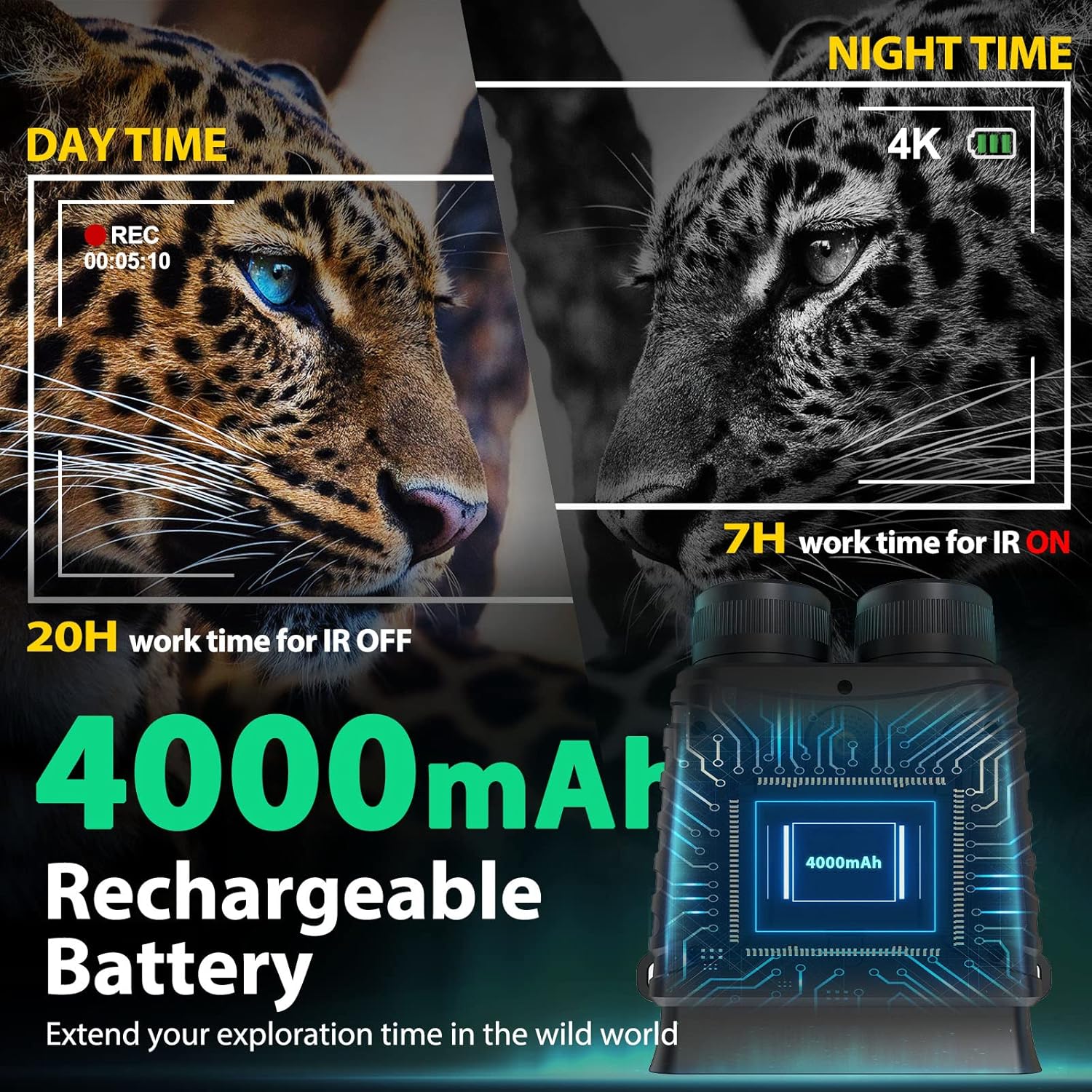
Image 3.1: Visual representation of the 4000mAh rechargeable battery's operational duration, showing 20 hours without IR and 7 hours with IR activated.
3.2 Inserting the Memory Card
A 32GB memory card is included for storing photos and videos.
- Locate the memory card slot on the device.
- Insert the 32GB memory card into the slot with the correct orientation until it clicks into place.
- To remove, gently press the card inward until it springs out.
3.3 Powering On/Off
- To Power On: Press and hold the Power button until the display screen illuminates.
- To Power Off: Press and hold the Power button until the display screen turns off.
4. Operating Instructions
4.1 Mode Selection
The M45 Pro features three primary modes: Photo, Video, and Playback. Use the Mode button to cycle through these options.
- Photo Mode: For capturing still images.
- Video Mode: For recording video footage.
- Playback Mode: For reviewing captured photos and videos.

Image 4.1: Depiction of the device's capability to capture 4K resolution video and 40-megapixel still images.
4.2 Adjusting Infrared (IR) Levels
The integrated 850nm IR illuminator has 7 adjustable levels to optimize visibility in varying low-light conditions, including complete darkness.
- In Photo or Video mode, press the IR button to activate the infrared illuminator.
- Continue pressing the IR button to cycle through the 7 intensity levels. Higher levels provide greater visibility in darker environments but consume more battery power.
- Observe the display to select the appropriate IR level for your viewing conditions.

Image 4.2: This image illustrates the 7 adjustable infrared (IR) levels and the device's objective lens, demonstrating how IR intensity can be varied for different viewing conditions.
4.3 Digital Zoom
The device features an 8X digital zoom to bring distant objects closer.
- While in Photo or Video mode, use the Zoom In/Out buttons (often marked with '+' and '-') to adjust the magnification.
- Increasing digital zoom may reduce image clarity.

Image 4.3: This image visually represents the 8X digital zoom function, showing how the device can magnify distant subjects.
4.4 Focusing the Image
To achieve a clear image, adjust the focus rings on the objective lenses.
- Rotate the focus rings (labeled 'FAR' and 'NEAR') on the objective lenses until the image on the display screen appears sharp.
- Adjusting focus is crucial for both day and night viewing, especially after changing viewing distance or zoom level.
4.5 Day and Night Use
The M45 Pro is designed for both daytime and nighttime observation.
- Daytime: The device captures full-color images and videos. IR illumination is not required and should be turned off to conserve battery.
- Nighttime: The device automatically switches to black and white imaging. Activate and adjust the IR illuminator for clear vision in low light or complete darkness.
4.6 Capturing Photos and Videos
- To take a Photo: Select Photo Mode. Frame your subject on the display. Press the Shutter/OK button to capture the image.
- To record a Video: Select Video Mode. Press the Shutter/OK button once to start recording. Press it again to stop recording. A recording indicator will typically appear on the screen.
4.7 Playback
To review your captured media:
- Enter Playback Mode using the Mode button.
- Use the navigation buttons (e.g., Up/Down or Left/Right) to browse through your photos and videos.
- Press the Shutter/OK button to view a selected item (e.g., play a video).
- Use the Menu button to access options like deleting files.

Image 4.4: The 4.5-inch IPS FHD display screen, providing a clear interface for viewing and navigating captured media.
5. Maintenance
5.1 Cleaning
- Use the provided cleaning cloth to gently wipe the lenses and display screen. Avoid using abrasive materials or harsh chemicals.
- For stubborn dirt, a lens cleaning solution specifically designed for optics can be used with the cleaning cloth.
- Wipe the body of the device with a soft, dry cloth.
5.2 Storage
- Store the device in its protective case when not in use to prevent dust and scratches.
- Keep the device in a cool, dry place, away from direct sunlight and extreme temperatures.
- If storing for an extended period, ensure the battery is partially charged (around 50%) and recharge it every few months to maintain battery health.
6. Troubleshooting
If you encounter issues with your GeowFiiTech M45 Pro, refer to the following common problems and solutions:
- Device does not power on: Ensure the battery is fully charged. If the issue persists, try connecting to a power source to see if it powers on while charging.
- Blurry image: Adjust the focus rings on the objective lenses. Ensure the lenses are clean.
- No image in darkness: Ensure the IR illuminator is activated and set to an appropriate level. Check battery charge.
- Memory card error: Ensure the memory card is inserted correctly. Try reformatting the card (this will erase all data) or using a different compatible memory card.
- Buttons unresponsive: Try restarting the device. If the problem continues, ensure the battery is adequately charged.
For issues not covered here, please contact GeowFiiTech customer support.
7. Specifications
| Feature | Specification |
|---|---|
| Model Number | M45PRO |
| Brand | GeowFiiTech |
| Night Vision | Yes |
| Objective Lens Diameter | 25 Millimeters |
| Minimum Magnification | 8 x (Digital Zoom) |
| IR Illuminator | 850nm, 7 adjustable levels |
| Viewing Range | Up to 984ft (300m) in 100% darkness |
| Display Screen | 4.5-inch IPS FHD |
| Video Resolution | 4K |
| Image Resolution | Up to 40MP |
| Battery | 1 Lithium Ion (4000mAh, included) |
| Battery Life | Approx. 20H (IR off), 7H (IR on) |
| Memory Card | 32GB (included) |
| Material | Aluminum |
| Mounting Type | Tripod Mount |
| Compatible Devices | Rifle, bow (as per product listing, for mounting purposes) |
| Package Dimensions | 24.2 x 19.1 x 9.2 cm |
| Item Weight | 1.05 kg |
8. Warranty and Support
For warranty information, technical support, or service inquiries, please refer to the contact details provided with your purchase documentation or visit the official GeowFiiTech website. Keep your proof of purchase for warranty claims.