
1. Introduction
This manual provides essential instructions for the safe and efficient operation, installation, and maintenance of the Flastec H106 Industrial Crane Remote Control Transmitter. Please read this manual thoroughly before using the product to ensure proper function and to prevent damage or injury. Keep this manual for future reference.
2. Safety Information
WARNING: Failure to follow these safety instructions may result in serious injury or death.
- Ensure all personnel operating this device are properly trained and understand its functions.
- Always inspect the transmitter for any damage before use. Do not operate if damaged.
- Do not modify the transmitter in any way. Unauthorized modifications can void certifications and create hazards.
- Keep the transmitter dry and away from extreme temperatures.
- This product is CE and FCC Certified, indicating compliance with relevant safety and electromagnetic compatibility standards.
3. Product Overview
The Flastec H106 is an industrial-grade remote control transmitter designed for crane operations. It features a durable, reinforced nylon plastic housing and operates on a 36V power supply.
Key Features:
- Current: 5A
- Frequency: 433MHz
- Buttons: 6 single-speed control buttons
- Antenna: Internal
- IP Rating: IP65 (Dust tight and protected against water jets)
- Operating Temperature: -35℃ to +70℃
- Housing Material: Reinforced nylon plastic
- Operating Distance: ≥ 100 meters (up to 500 meters with customization)
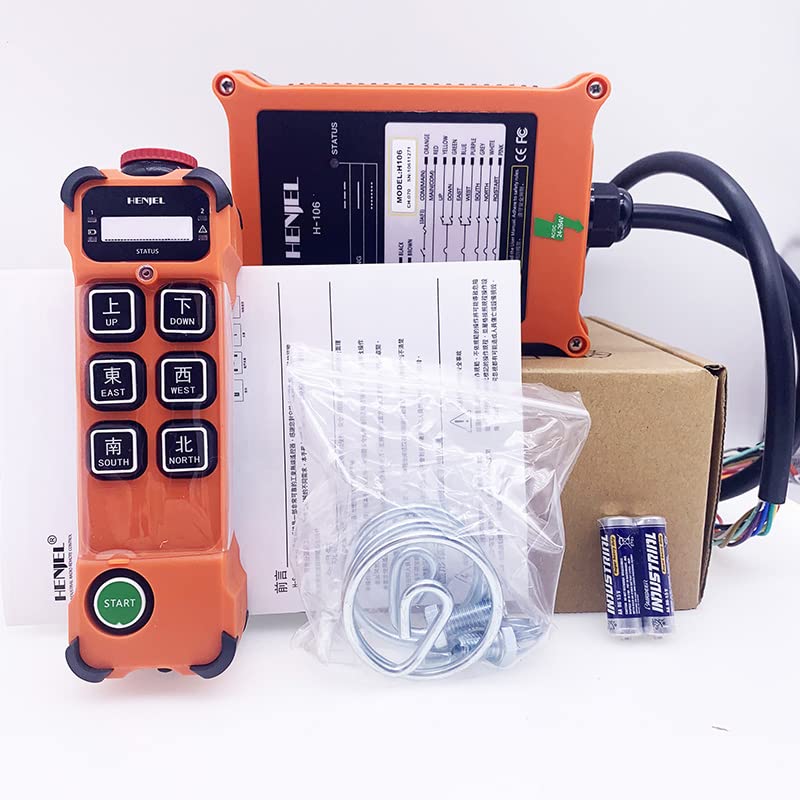
Image 1: Flastec H106 Industrial Crane Remote Control Transmitter. This image shows the orange-colored transmitter unit with its control buttons.
4. Setup
4.1 Powering the Transmitter
The H106 transmitter operates on 36V. Ensure the correct battery or power source is installed and connected according to the markings on the device. Refer to the battery compartment for specific battery type and installation instructions.
4.2 Pairing with Receiver
To establish communication with the crane's receiver unit, follow the pairing procedure outlined in the receiver's instruction manual. Typically, this involves:
- Ensure both the transmitter and receiver are powered off.
- Power on the receiver unit.
- Initiate pairing mode on the receiver (refer to receiver manual).
- Power on the transmitter and follow any specific button sequences to complete the pairing process.
- Verify successful pairing by testing basic crane functions in a safe environment.
5. Operating Instructions
Before operating, ensure the crane area is clear and all safety protocols are observed. The H106 transmitter features 6 single-speed buttons for controlling various crane movements.
5.1 Button Functions
Each button on the transmitter corresponds to a specific crane function (e.g., Up, Down, Left, Right, Forward, Backward, Stop). The exact mapping of buttons to functions may vary depending on the crane system and receiver configuration. Always refer to the crane's operational manual for specific button assignments.
- Press and Hold: For continuous movement, press and hold the desired function button.
- Release: Releasing the button will stop the corresponding movement.
- Emergency Stop: Locate and familiarize yourself with the emergency stop button on both the transmitter and the crane system. Use it immediately in case of an emergency.
5.2 Operational Range
Maintain a clear line of sight between the transmitter and receiver whenever possible. The effective operating distance is typically up to 100 meters, but environmental factors and obstacles can reduce this range. Do not operate the crane if signal integrity is compromised.
6. Maintenance
6.1 Cleaning
Clean the transmitter's exterior with a soft, damp cloth. Do not use abrasive cleaners or solvents, as these can damage the plastic housing. Ensure no moisture enters the device.
6.2 Battery Replacement
If the transmitter uses replaceable batteries, refer to the battery compartment for instructions on how to safely replace them. Always use the specified battery type and dispose of old batteries responsibly. Ensure the device is powered off before replacing batteries.
6.3 Storage
When not in use, store the transmitter in a dry, cool place, away from direct sunlight and extreme temperatures. If storing for extended periods, remove batteries to prevent leakage.
7. Troubleshooting
| Problem | Possible Cause | Solution |
|---|---|---|
| Transmitter not responding | Low or dead battery; Not paired with receiver; Out of range; Interference. | Check/replace batteries; Re-pair transmitter and receiver; Move closer to receiver; Check for sources of interference. |
| Intermittent control | Weak signal; Obstructions; Interference. | Move closer to receiver; Clear line of sight; Identify and remove sources of interference. |
| Buttons not functioning correctly | Damaged button; Internal fault. | Inspect buttons for physical damage. If no visible damage, contact support. |
If the problem persists after attempting these solutions, contact Flastec customer support or a qualified technician.
8. Specifications
| Model | H106 Transmitter |
| Part Number | Fla3-AL87-SW8-1054 |
| Brand | Flastec |
| Voltage | 36V |
| Current | 5A |
| Frequency | 433MHz |
| Control Buttons | 6 single-speed |
| Antenna Type | Internal |
| IP Class | IP65 |
| Operating Temperature | -35℃ to +70℃ |
| Housing Material | Reinforced nylon plastic |
| Operating Distance | ≥ 100 meters |
| Certifications | CE, FCC |
9. Warranty and Support
9.1 Warranty Information
Specific warranty details for the Flastec H106 Industrial Crane Remote Control Transmitter are not provided in this document. Please refer to your purchase documentation or contact the retailer/manufacturer for warranty terms and conditions.
9.2 Customer Support
For technical assistance, troubleshooting beyond this guide, or inquiries regarding parts and service, please contact Flastec customer support through their official website or the contact information provided with your purchase.