
1. Introduction
This manual provides detailed instructions for the installation, operation, and maintenance of the MokerLink 5 Port Industrial DIN-Rail Network Switch. This device is designed for reliable network connectivity in demanding industrial environments, offering 10/100Mbps Fast Ethernet capabilities and robust protection features.
2. Safety Information
Please read and understand all safety precautions before installing or operating the device. Failure to do so may result in injury or damage to the equipment.
- Ensure the power supply voltage matches the device's requirements (DC 12-52V).
- Do not expose the device to water or excessive humidity.
- Avoid placing the device in areas with extreme temperatures outside its specified operating range (-40°C to 85°C).
- Ensure proper grounding to prevent electrical hazards.
- Do not open the device casing; refer servicing to qualified personnel.
3. Product Overview
The MokerLink 5 Port Industrial DIN-Rail Network Switch is a robust and compact solution for industrial networking. It features 5 Fast Ethernet ports, including 4 standard Ethernet ports and 1 uplink port, all supporting 10/100Mbps adaptive speeds.

Figure 3.1: MokerLink 5 Port Industrial DIN-Rail Network Switch and included power adapter.
Key features include:
- 5 Fast Ethernet Ports: 4 downlink ports and 1 uplink port, supporting 10/100Mbps.
- Industrial Grade Design: IP40 rated aluminum alloy casing for durability and efficient heat dissipation.
- Wide Operating Temperature: Functions reliably from -40°C to 85°C (-40°F to 185°F).
- Redundant Dual Power Supply: Supports dual power inputs (DC 12-52V) with automatic fault switching and anti-reverse connection protection.
- Lightning and Static Protection: Enhanced protection against electrical surges and static discharge.
- DIN-Rail Mountable: Integrated kit for easy installation and removal on standard 35mm DIN-rails.
- Plug and Play: No configuration required for basic operation.
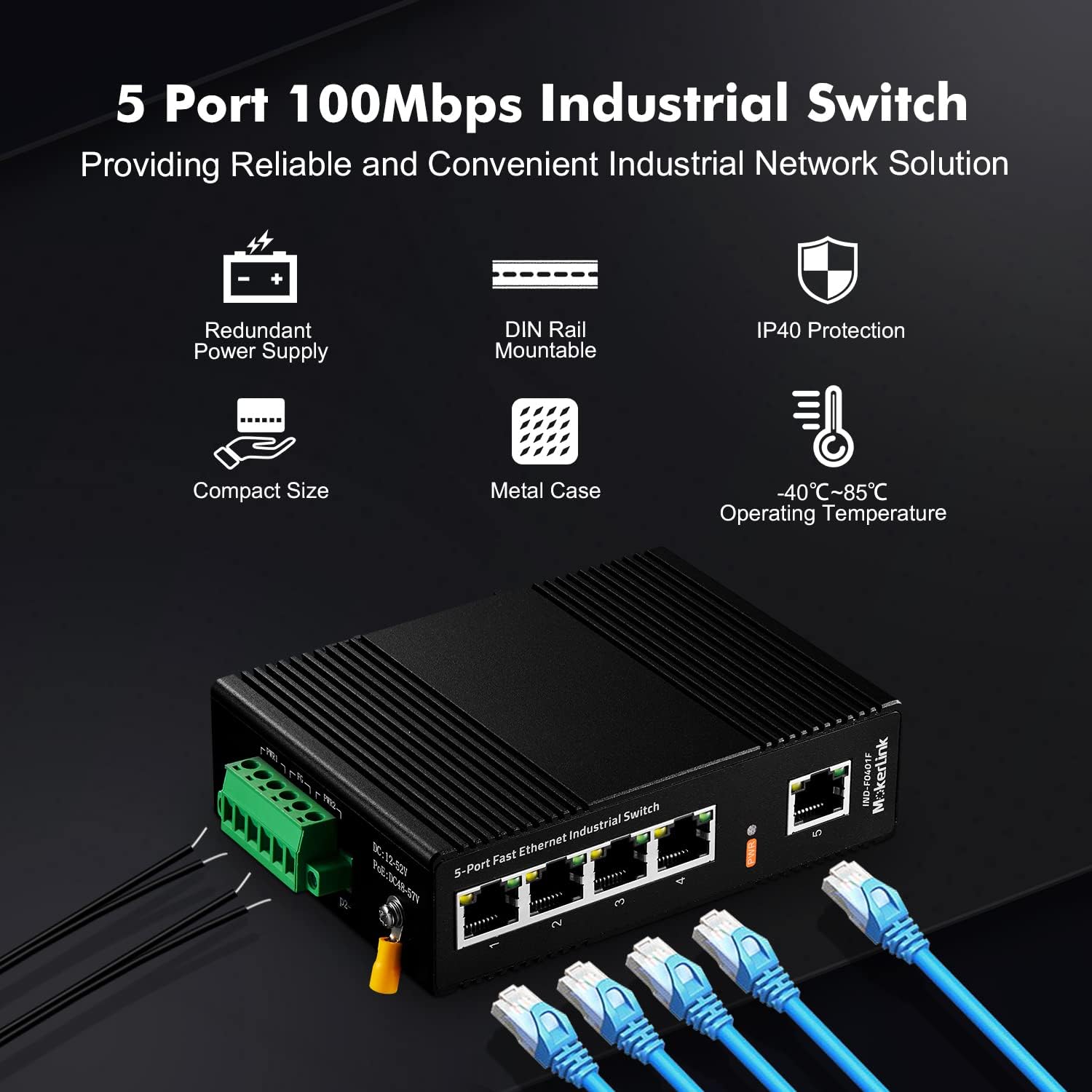
Figure 3.2: Overview of the MokerLink Industrial Switch's main features.
4. Setup and Installation
Follow these steps to set up your MokerLink Industrial Network Switch.
4.1 Package Contents
Verify that your package contains the following items:
- MokerLink 5 Port Industrial DIN-Rail Network Switch
- UL-certified Power Adapter (1x 24W AC Adapter)
- User Manual (this document)

Figure 4.1: Typical package contents.
4.2 Mounting the Switch
The switch is designed for DIN-rail mounting. It comes with an integrated DIN-rail mount kit.
- Locate a standard 35mm DIN-rail in your desired installation area.
- Align the switch's integrated DIN-rail clip with the rail.
- Push the switch firmly onto the DIN-rail until it clicks securely into place.
- To remove, pull the bottom of the clip outwards and lift the switch off the rail.
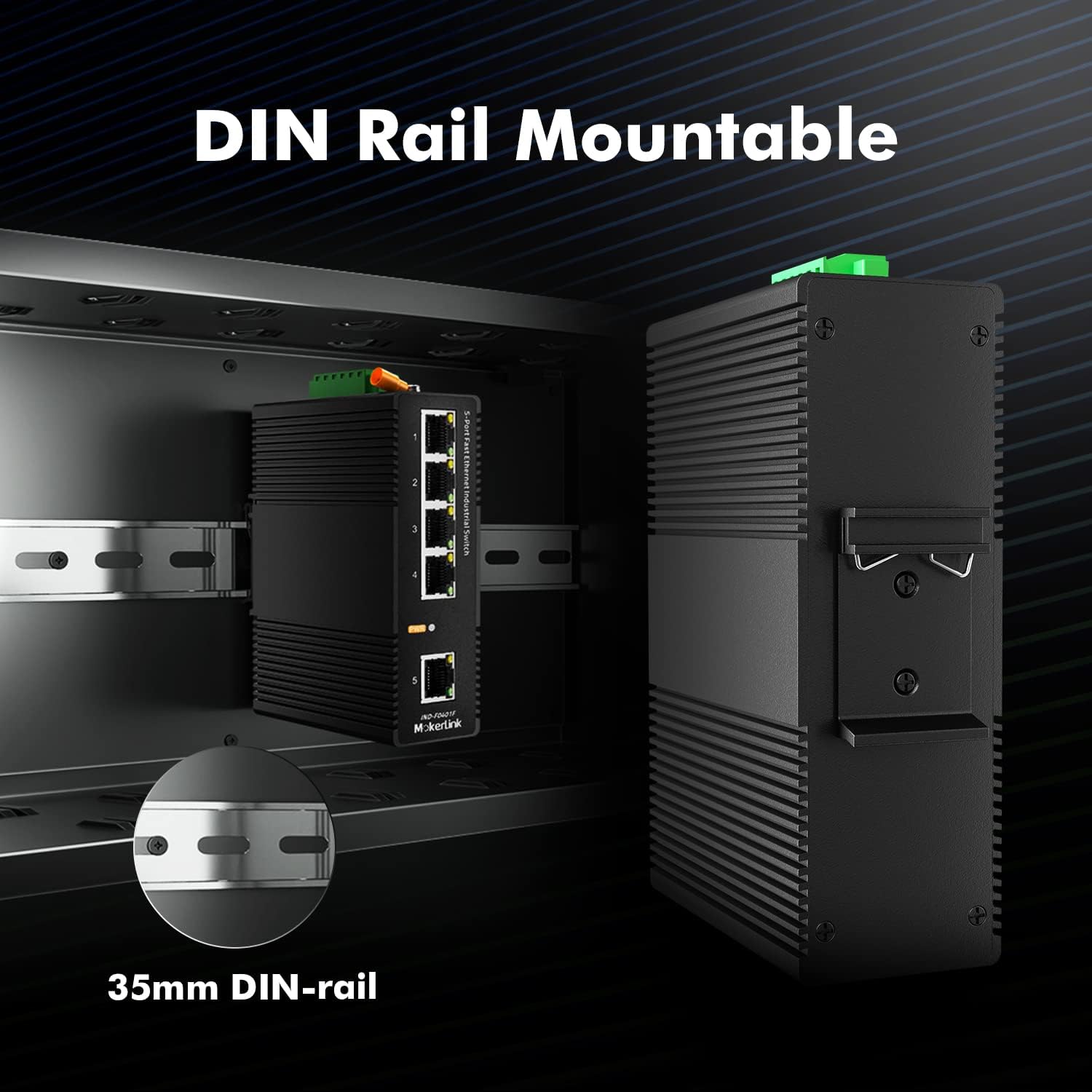
Figure 4.2: DIN-rail mounting illustration.
Alternatively, the switch can be wall-mounted using the provided wall-mount bracket (if included) and screws.

Figure 4.3: Wall mount option.
4.3 Power Connection
The switch supports dual redundant power inputs (PWR1 and PWR2) via a terminal block. Connect the included UL-certified power adapter to one of the power inputs.
- Ensure the power source is off before connecting.
- Connect the positive (+) and negative (-) wires from your power adapter to the corresponding terminals on the green terminal block (e.g., PWR1+ and PWR1-).
- For redundant power, connect a second power source to PWR2+ and PWR2-.
- Connect the FG (Frame Ground) terminal to a reliable ground source for optimal protection.
- Once connections are secure, turn on the power source. The PWR LED on the front panel should illuminate.

Figure 4.4: Power supply connection details.
4.4 Network Connection
Connect your network devices to the RJ45 Ethernet ports on the front panel.
- Connect your network devices (e.g., computers, IP cameras, PLCs) to ports 1-4 using standard Ethernet cables.
- Connect your uplink device (e.g., router, main switch) to port 5.
- The switch supports auto-negotiation, so it will automatically detect the speed and duplex mode of connected devices.
- The Link/Act LEDs next to each port will illuminate when a valid connection is established and blink during data activity.

Figure 4.5: Ethernet port connections.
5. Operating Instructions
The MokerLink 5 Port Industrial DIN-Rail Network Switch is a plug-and-play unmanaged switch, requiring no software configuration for basic operation.
- Power On: Once connected to a power source, the switch will automatically power on. The PWR LED will indicate power status.
- Network Connectivity: Connect your Ethernet devices to any of the 5 ports. The switch will automatically establish connections and facilitate data transfer between connected devices.
- LED Indicators:
- PWR LED: Solid green when the device is powered on.
- Link/Act LEDs (per port): Solid green when a valid network link is established; blinking green indicates data activity.
The fanless design ensures quiet operation, making it suitable for various environments.

Figure 5.1: Fanless design for efficient heat dissipation.
6. Maintenance
The MokerLink Industrial Network Switch is designed for minimal maintenance. However, regular checks can ensure optimal performance and longevity.
- Cleaning: Periodically clean the exterior of the device with a soft, dry cloth. Do not use liquid or aerosol cleaners.
- Cable Management: Ensure all Ethernet and power cables are securely connected and free from kinks or damage.
- Environmental Check: Verify that the operating environment remains within the specified temperature and humidity ranges.
- Firmware: As an unmanaged switch, firmware updates are generally not required.
7. Troubleshooting
This section addresses common issues you might encounter with your network switch.
| Problem | Possible Cause | Solution |
|---|---|---|
| No Power (PWR LED off) | Power adapter not connected or faulty; power outlet issue. |
|
| No Link (Link/Act LED off) | Ethernet cable faulty or disconnected; connected device is off or faulty. |
|
| Network Connectivity Issues | IP address conflicts; network configuration issues on connected devices. |
|
8. Specifications
Technical specifications for the MokerLink 5 Port Industrial DIN-Rail Network Switch (Model: 5 Port 100M).
| Feature | Description |
|---|---|
| Model Number | 5 Port 100M |
| Number of Ports | 5 (4 x 10/100Mbps Ethernet, 1 x 10/100Mbps Uplink) |
| Data Transfer Rate | 100 Megabits Per Second |
| Interface Type | RJ45 |
| Power Input | DC 12-52V (Dual Redundant Input) |
| Operating Temperature | -40°C to 85°C (-40°F to 185°F) |
| Storage Temperature | -40°C to 85°C (-40°F to 185°F) |
| Humidity | 5% to 95% (non-condensing) |
| IP Rating | IP40 |
| Case Material | Industrial-grade Aluminum Alloy |
| Mounting | 35mm DIN-Rail, Wall-Mountable |
| Dimensions (L x W x H) | Approx. 4.64 x 3.38 x 1.53 inches (11.78 x 8.59 x 3.89 cm) |
| Item Weight | 1.54 pounds (0.7 kg) |
| Included Components | Industrial Switch, UL Power Adapter |

Figure 8.1: Designed for harsh industrial environments.
9. Warranty and Support
MokerLink products are designed for reliability and performance. For warranty information and technical support, please refer to the official MokerLink website or contact their customer service directly. Keep your purchase receipt for warranty claims.
For further assistance, you may visit the MokerLink Store on Amazon.