
1. Introduction
This manual provides essential information for the installation and use of the Limentea Button PCB Controller Board. This product is designed as a replacement or component for custom projects involving the Game Boy Zero, original Game Boy (DMG-01), and Raspberry Pi GBZ systems. Due to the specialized nature of this product, users are expected to possess technical knowledge regarding electronics assembly and soldering. No technical support is provided with this product.
2. Product Overview
The Limentea Button PCB Controller Board is a common ground circuit board designed to register button inputs for compatible devices. It features dedicated pads for directional controls (UP, DOWN, LEFT, RIGHT), action buttons (A, B, X, Y), and system functions (START, SELECT, L, R), along with a common ground (GND) connection point. Its compact design allows for integration into various custom handheld gaming projects.
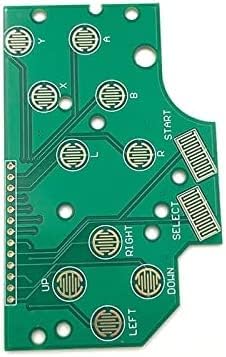
Front view of the Limentea Button PCB Controller Board, showing the button contact pads and connection points for various inputs like UP, DOWN, LEFT, RIGHT, START, SELECT, A, B, X, Y, L, R, and GND.
3. Setup and Installation
Installation of the Button PCB Controller Board requires soldering and integration into your specific project. This board is designed with a common ground configuration, simplifying wiring for multiple inputs.
3.1 Package Contents
- 1 x Limentea Button PCB Controller Board
3.2 Installation Steps (General Guidance)
- Preparation: Ensure your project enclosure and other components are ready for PCB integration.
- Placement: Position the Button PCB Controller Board within your device, ensuring proper alignment with physical buttons or contact points.
- Wiring: Solder wires from your device's microcontroller or input interface to the corresponding pads on the PCB (UP, DOWN, LEFT, RIGHT, START, SELECT, A, B, X, Y, L, R, and GND). Ensure all ground connections are tied to the common ground point on the PCB.
- Testing: Before final assembly, test all button inputs to confirm correct functionality and signal registration.

Rear view of the Limentea Button PCB Controller Board, illustrating the circuit traces and solder points for integration into a Game Boy Zero or similar project.
Important: This product requires advanced technical skills for proper installation. If you are unsure about any step, seek assistance from an experienced electronics hobbyist or professional.
4. Operating Instructions
Once correctly installed and integrated into your Game Boy Zero, GB DMG-01, or Raspberry Pi GBZ project, the Button PCB Controller Board functions as an input interface. Pressing the physical buttons connected to the board will send corresponding electrical signals to your device's main controller, allowing for gameplay and system navigation.
5. Maintenance
The Button PCB Controller Board is a durable electronic component. To ensure its longevity and reliable performance:
- Keep Dry: Avoid exposure to moisture or liquids, which can cause short circuits and damage.
- Handle with Care: Avoid bending or applying excessive force to the board to prevent damage to traces or components.
- Cleaning: If necessary, gently clean the board with a dry, soft brush or a lint-free cloth. Do not use harsh chemicals.
- Static Discharge: Always handle the PCB in an anti-static environment to prevent damage from electrostatic discharge.
6. Troubleshooting
If you encounter issues after installing the Button PCB Controller Board, consider the following:
- No Button Response: Check all soldered connections for continuity and ensure there are no cold solder joints or bridges. Verify that the common ground is properly connected.
- Intermittent Input: Inspect for loose wires or poor contact between physical buttons and the PCB pads.
- Short Circuits: Visually inspect the board for any accidental solder bridges or foreign objects that might be causing unintended connections.
- Device Compatibility: Confirm that your device's firmware or software is configured to recognize inputs from the connected PCB.
Note: As stated previously, no technical support is provided for this product. Troubleshooting requires a good understanding of electronics and circuit testing.
7. Specifications
| Feature | Detail |
|---|---|
| Brand | Limentea |
| Compatible Devices | Game Boy Zero GB DMG-01, Raspberry Pi GBZ |
| Input Type | Button Inputs (Common Ground) |
| Package Contents | 1 x Button Board |
| ASIN | B0B5ZZWRRG |
8. Warranty and Support
This product is intended for users with existing technical knowledge and experience in electronics modification and assembly. As such, Limentea does not provide technical support for the installation or troubleshooting of this Button PCB Controller Board. Users are advised to ensure they possess the necessary skills before purchase and installation.